Black and White

Danzaroonie

Suspended / Banned
Messages
441
Name
Dan
Edit My Images
Yes
Hi All,

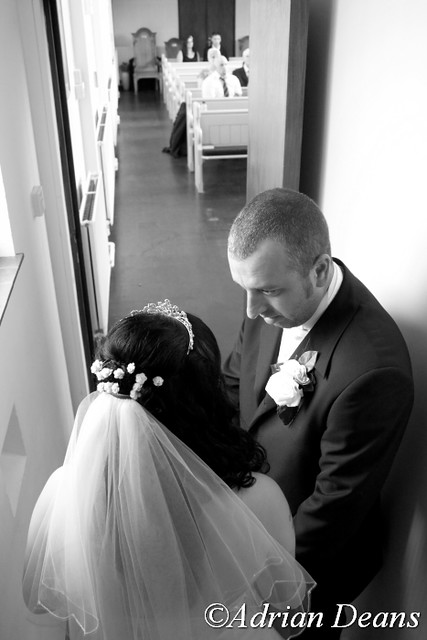
Been looking through a few wedding photos on here and other sites, I just wonder what kind of settings/presets people apply to get that amazing Black & White look to the photo. What do you normally look at to make sure you get the right feel/mood to the photo...

cheers

Dan.
 
Contrast mainly. A good tonal range is desirable of course with BW
 
What I really hate is greys rather than black and whites, as said above a good range is vital... A levels tweak generally ensures a more pleasing range
 
Adey, thank you for an example this the kind of black and white processing i like but can't seem to achieve. Did you just convert to b&w but with a high green tone? and did you dodge or burn any areas?

Here's one I have...

2011-07-29_at_20-07-06.jpg
 
Last edited:
Thats a gorgeous photo Dan. Different to mine, but then the lighting is completely different, so thats always gonna be a huge factor in how the picture looks. For the picture i posted, it was first edited from a raw file, in ACR i would of tweaked it to get a 'nice' colour version first, but when converting to B&W i didnt do much more than use the 'green filter' preset. I might of tweaked the contrast a bit, but not much really. Your photo is very extreme in its dynamic range (lots of shadow and highlights, not much mids, but thats the lighting that was there so, its fine as it is to me. My photo has an even amount of all the tones, so thats why it has a crisp, clean look to it. Your photo is more intimate and moody, the B&W looks spot on to me:thumbs:

I would say the crop/composition makes her look as though she's about to fall into the dark abyss though, but i cant do tilted shots, so i wouldn't listen to me:lol:
 
I think thats a great B&W conversion Danzaroonie. I also use the green filter but also use other filers but mask them out over the people so I can change the background if the green filter doesn't give the effect I want on the whole image. I also dodge the highlighted areas and burn the dark areas so this gives the image more punch.
 
There are some great plugins for photoshop like nik softwares silver effex pro, that really produce some stunning fully customizable results with realtively little effort. I use this alot as it can take me an age to achieve the same effect manually in photoshop.

There are also some great actions out there too!
 
My personal favorite is Silver effx pro, I have a preset in there I made that most of the time gives me a good effect.
Another of my favorite methods (lightroom/ACR) is to take the seperate saturation sliders to zero (not the global sat) and then ajust the individual luminance sliders to alter the tonal values, I usually finish that with a curves to push up the contrast a bit.
 
Back
Top