Bit of a problem

joel222

Suspended / Banned
Messages
703
Name
Lee
Edit My Images
No
I recieved my new softbox yesterday and was quite keen to give it a blast, so set it up and took a few shots. I didn't have a lot of time so I thought I'd have a better play today. Yesterday I used only the softbox, but today I used a shoot through brolly for a bit of fill along with the softbox as the main. The settings on camera were both set exactly the same but todays shots seem to have a bit of noise and are not as sharp. What could be the reason for this?
 
Well I've had another go at it tonight and the problem is still there. The only difference with the conditions was that the first pic was shot in daytime when there was plenty of ambient light. Both pics below are straight out of the camera with a 1:1 crop in LR, and taken on a 550d with 15-85 lens. I hope someone can help as It's giving me a head ache:bonk:

1/90, f5.6, iso 400, 85mm
joe-5.jpg


1/60, f6.7, iso 100, 50mm
joe-7.jpg
 
I'm struggling to see the noise
 
The 2nd picture doesn't appear to have a light from the soft box at all, there's no catchlight from the soft box, and the exposures are very different.

What are you using to meter, what lights are they and what are you firing them with?
 
I'm struggling to see the noise

I agree :shrug:

I'm wondering if it's a constant light source, hence the slow shutter speed etc.
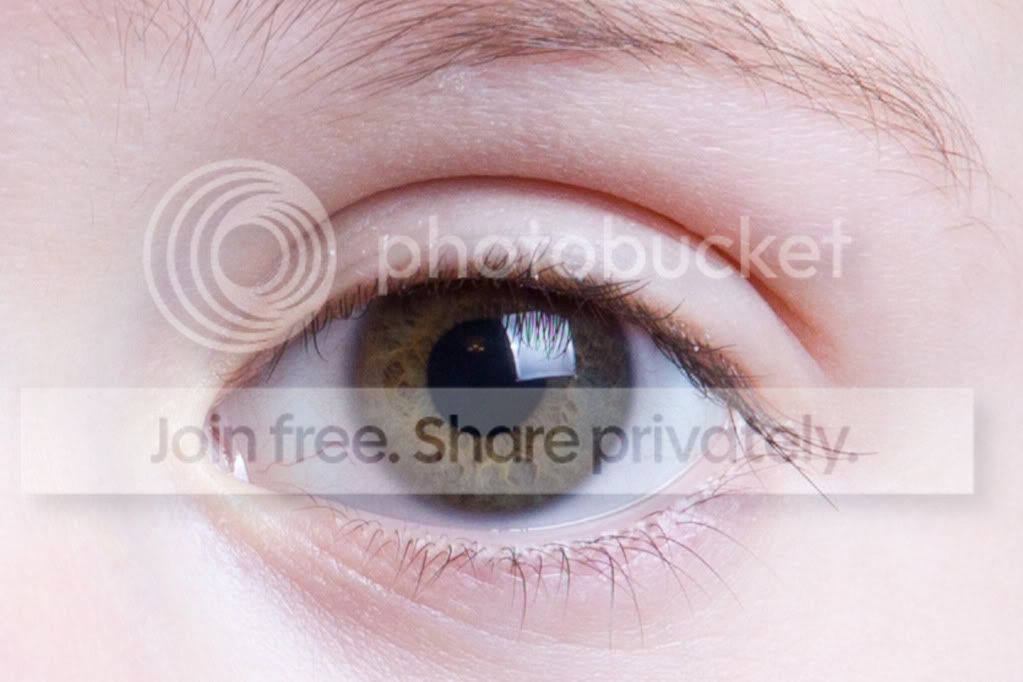
If you look closely at the first image, whcih the OP mentions was taken in daylight, there's a softbox reflected in the eye, but the power looks very down, as you can make out a lot of detail in it. It also looks as if it was taken on auto white balance, as it's rather cool looking.
 
I suppose I used the word noise in error. As you can see the second pic is of a lot less quality, or softer. Pic 2 was taken using a yongnuo 560 fired through a brolly, and pic 1 was taken using a yongnuo with a soft box. I'm using trial and error to metor, mainly error.
 
Last edited:
In which case I would say the second image is soft due to camera / subject movement.
I would also suggest your lightsource in the second image is too far away from your subject.
My reason for for coming to this conclusion is the fact the highlight in her eyes is tiny, whereas the reflection of a shoot through brolly should be enormous. The distance will also dramatically cut down the effectiveness of the speedlight too, so it looks under exposed. I think the ambient light is paying a far greater role in this image than your speedlight, hence the blurring.
 
Thanks for the explanation. I think you are right about the ambient, but when I had the flash turned up with a faster shutter speed the image was looking too white, even when wb was set to flash. I will have another play in the morning.
 
The best thing is probably to give it a break, and read something like the strobist blog In particular, look down the right hand side, where you will find the "Strobist 101 Archive". Read that, as it's basically a teach yourself course, and very good it is too.
 
As above - very good advice.

It's obvious to everyone reading this that something very basic has gone wrong, the modifiers aren't producing the expected results and that you're doing something wrong.

Problem is, it's difficult to work out from your descriptions exactly what the problem is. So, although Strobist is a very good suggestion it might be even better if you can replicate this setup with someone more experienced - someone who will probably spot exactly what the problem is immediately.

Whereabouts are you in the North East? There is probably someone who can help, very close to you.
 
Firstly - set your shutter speed at 1/125 and leave it there, it's adding a complication you don't need. Shutter speeds are only a consideration when you're balancing with ambient.

2ndly - go back to the setup you used for the softbox and try it again. to make sure your benchmark is still a safe bet. (ISO 400 - 5.6)

Then Swap the softbox for the umbrella and make no other changes until you've seen a direct comparison, the difference should be quite small.

Then you can start experimenting - changing one thing at a time. (not the shutter speed)
 
As above - very good advice.

It's obvious to everyone reading this that something very basic has gone wrong, the modifiers aren't producing the expected results and that you're doing something wrong.

Problem is, it's difficult to work out from your descriptions exactly what the problem is. So, although Strobist is a very good suggestion it might be even better if you can replicate this setup with someone more experienced - someone who will probably spot exactly what the problem is immediately.

Whereabouts are you in the North East? There is probably someone who can help, very close to you.

I'm near Bishop Auckland, I agree that it must be something basic, but with my very basic (or even less) knowledge it's got me stumped.
 
Firstly - set your shutter speed at 1/125 and leave it there, it's adding a complication you don't need. Shutter speeds are only a consideration when you're balancing with ambient.

2ndly - go back to the setup you used for the softbox and try it again. to make sure your benchmark is still a safe bet. (ISO 400 - 5.6)

Then Swap the softbox for the umbrella and make no other changes until you've seen a direct comparison, the difference should be quite small.

Then you can start experimenting - changing one thing at a time. (not the shutter speed)

Thanks for that I'll give it a try. I've been reading through strobist recently and it says set the camera a couple of stops down from the correct exposure then use the flash to bring it back to the correct exposure, and thats why I reduced the shutter speed as I read somewhere that the shutter speed is what controls the ambient part of the exposure and with the faster shutter speed the shadows were too dark., even with the living room lights on full. Now I might have a better chance as it's daylight and the is a lot more ambient light coming through the french doors. Does this sound like a load of crap or am i on the right page?:bonk:
 
Thanks to everone who has commented on this thread and given me advise. I set the soft box back up and took a shot then swapped it for the umbrella using exactly the same camera and flash settings. The soft box seems to be giving off a whiter light. Is it too bright? The camera blinkies show no blown out areas. Again, each image has had a 1:1 crop in LR.

Soft box
joe-8.jpg


Umbrella
joe-9.jpg
 
Thanks for that I'll give it a try. I've been reading through strobist recently and it says set the camera a couple of stops down from the correct exposure then use the flash to bring it back to the correct exposure, and thats why I reduced the shutter speed as I read somewhere that the shutter speed is what controls the ambient part of the exposure and with the faster shutter speed the shadows were too dark., even with the living room lights on full. Now I might have a better chance as it's daylight and the is a lot more ambient light coming through the french doors. Does this sound like a load of crap or am i on the right page?:bonk:

It's good advice - for if you're mixing flash with ambient, but lets get the 'studio' environment sorted (again - one thing at a time).

You are just lighting with flash, so you want the ambient to be completely overpowered, you can do this in a home environment by shooting at max flash sync speeds and fairly low ISO's (though if you live in a white house with wall to wall floor to ceiling windows it's worth just checking).

So flash sync speed and 200 or 400 ISO should kill any interference from ambient light indoors.

When you understand what your flash is doing and how you control it, you can mix it with ambient - but then you have to consider light temperature too.
 
Back
Top