
and please use their services
You are using an out of date browser. It may not display this or other websites correctly.
You should upgrade or use an alternative browser.
You should upgrade or use an alternative browser.
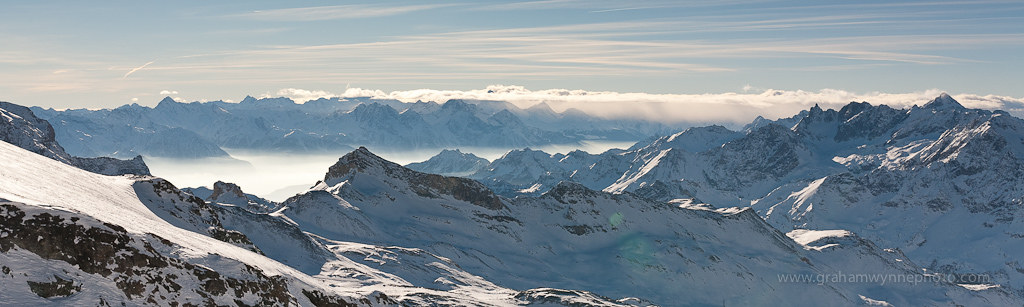
Best way to get rid of this flare?
- Thread starter grum
- Start date


BandyQuill
Suspended / Banned
- Messages
- 1,839
- Name
- Chris
- Edit My Images
- Yes
you might be able to use the spot removal tool in light room 3, it will allow you to lower the green tones in the area selected, might work!

swanseamale47
Suspended / Banned
- Messages
- 10,876
- Name
- wayne clarke
- Edit My Images
- Yes
I think I'd use the hue/sat on the selected area.
This is always a tricky one, compared to how easy it looks...
The technically "correct" way to get rid of the tint is:
1) Convert the image to LAB space
2) Duplicate the BG in photoshop, and get rid of most of the image leaving the green bits a about 50 px around each.
3) add a mask to the new layer
4) try to mask off anything that isn't green, and also the green bits depending on their colour density (of green) i.e the greenest bits are still 100%, and the least green bits are almost masked completely. This is pretty hard, since however you do it it's hard to see what your doing.
5) use the eye-dropper to find out the LAB values for bit of green flare over a BG colour and a bit of non-flared BG of the same colour (snow in your image)
6)subtract the A values for each and the B values for to find out the shift in the green flare
7) Add a layer, complete with the mask you made earlier, and fill it with a colour that has the opposite A and B values. Set the blend mode to "colour"
8) adjust the mask and the opacity of your colour layer to get the best effect.
But then you'll need to go at it with clone stamp to get rid of inconsistencies, so if it's a small area that's often a lot easier!
The technically "correct" way to get rid of the tint is:
1) Convert the image to LAB space
2) Duplicate the BG in photoshop, and get rid of most of the image leaving the green bits a about 50 px around each.
3) add a mask to the new layer
4) try to mask off anything that isn't green, and also the green bits depending on their colour density (of green) i.e the greenest bits are still 100%, and the least green bits are almost masked completely. This is pretty hard, since however you do it it's hard to see what your doing.
5) use the eye-dropper to find out the LAB values for bit of green flare over a BG colour and a bit of non-flared BG of the same colour (snow in your image)
6)subtract the A values for each and the B values for to find out the shift in the green flare
7) Add a layer, complete with the mask you made earlier, and fill it with a colour that has the opposite A and B values. Set the blend mode to "colour"
8) adjust the mask and the opacity of your colour layer to get the best effect.
But then you'll need to go at it with clone stamp to get rid of inconsistencies, so if it's a small area that's often a lot easier!