best media 'route' to a B&W landscape..?

the most useful jpeg image for B&W

  • 1. .Digital colour - then converted

  • 2.. Digital camera set to 'mono

  • 3.. colour film - scanned to CD

  • 4.. B&W film scanned to CD


Results are only viewable after voting.

Yardbent

Suspended / Banned
Messages
7,761
Name
John
Edit My Images
Yes
I have seen a few B&W landscapes threads recently - very nice

what 'route' will end up with the most useful jpeg image

1. .Digital colour - then converted to B&W with Photoshop Elements
2.. Digital camera set to 'mono' mode
3.. colour film - scanned to CD then converted to B&W with Photoshop Elements
4.. B&W film scanned to CD


i do realize 'colour' will give me 2 end-results, .....but just interested

thanks for your thoughts......:)

I dont shoot RAW
 
Of the choices given, in my opinion the best result will be from 4. But, also in my opinion, you've started off by crippling the result given that you want jpg. That gives you (at least potentially, depending on how you convert) a too limited tonal range to allow for any contrast/ curves type adjustments afterwards and still get the best possible print.
 
thanks

#4 is good - I have a range of film cameras - a delight to use any of them

RAW - my attempts to date at PP have been very haphazard....:(
 
Of the choices given, in my opinion the best result will be from 4. But, also in my opinion, you've started off by crippling the result given that you want jpg. That gives you (at least potentially, depending on how you convert) a too limited tonal range to allow for any contrast/ curves type adjustments afterwards and still get the best possible print.

Mmm, interesting. Do you mean that saving as say a TIFF file will give more tonal range to mess with or shooting in RAW?
 
I've had equally good results from 4 and 1. I prefer 4 because I enjoy using film cameras more, and the film captures the entire range including the highlights, but digital raw files converted to b&w in PP are very capable as well. I'd stay clear of 2 as that's just the camera doing what it "thinks" is best for your photo, and it doesn't do anything you can't do in PP afterwards.
 
The crucial point is that jpgs are 8 bit files, and I'm assuming that if you have results scanned to CD that jpg is what you'll get. If it's a simple greyscale conversion that's been done, you'll have 255 different tonal values to start from. Every levels, curves or contrast adjustment will expand/compress parts of this range and result in the total number of different tones being reduced - you'll get gaps in the histogram. Our eyes can distinguish about 250 different shades of grey (depending on the lighting conditions you may get the highlights or shadows clumped together visually, but you will differentiate tones in them if you change the lighting). Putting the two together, whether you're aware of it or not (without having a better print laid side by side) starting from a jpg is also guaranteed to rule out the best possible print.

Edit: last two posts made while I was typing. Does this answer your question Andy? Otherwise, I feel a need to post an extract from my book with diagrams....
 
Last edited:
Actually, I'll expand a bit. If you convert to mono but preserve colour channels you'll have more headroom. I scan and save a tiff file to work on (in fact, I never convert to jpg even for printing and only do so if I want something to post on the web). Tiff files are usually 16 bits (there is an 8 bit variant, but 16 is more usual) so I start out with 65,535 different tonal values. If you start with digital and raw, you'll have 12 or 14 bits; and if you save in tiff format you should preserve much more than you would in jpg. And that's not even considering jpg as a lossy format.

Edit to make another addition. I favour black and white film over colour film as a starting point because, having only one (rather than three) emulsion layers, it's capable of greater resolution. On the other side of the coin, using techniques like channel mixer (other methods are available :)) in Photoshop lets you do effective filtering on selected parts of the image - a red filter applied only to the sky, a green one on the foliage etc. It's far more precise than using a filter in black and white with infinite scope for adjustment and no filter factor.
 
Last edited:
Here's a colour photo (with red, green and blue elements) and various black and white conversions using channel mixer showing what you can do. I'll add roses in another post.

E1.jpg
E2.jpg
 

Attachments

  • E3.jpg
    E3.jpg
    97.3 KB · Views: 11
  • E4.jpg
    E4.jpg
    102.6 KB · Views: 10
Last edited:
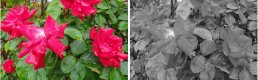
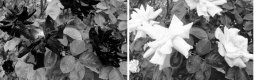
And the roses - a classic example of black and white removing colour contrasts...

RedRoseColourGreyScale.jpg

RedRoseGreen100Red100.jpg
 
They're all illustrations from my book. If anyone can bear ploughing through to the relevant bits, send me a PM and I'll supply a link to the pdf (so far as it's got).
 
Thanks Stephen, a really interesting series of posts there, I've definitely learnt a lot in a very short time.

Andy
 
One good thing about shooting in colour and playing around with the colour channels is that it really helps when you come to select your filter when shooting b&w. You still need to do some test as not all films respond to all colours the same but its a head start.
 
It seems to me that a black and white landscape should be the result of a conscious decision beforehand (@TheBigYin refers to it as a conscious artistic decision, but I'm not that grand), rather than post hoc. On that basis, route 4 seems most appropriate. You are forced to evaluate the scene and the available compositional options knowing that you have a black and white film with certain characteristics, and a limited set of ways to control the light (shutter speed, aperture, filters, lens, position, direction). No going back once the shutter is pressed.

The trouble with starting from colour is just that: the tendency to be looking at the scene before you as a colour scene (the easy option). I just feel this is the wrong frame of mind for a good black and white image.

The disadvantage of route 4, for me, is that it's really hard to learn; the disconnect between viewing the positive image some days or at best hours later, and the scene before my eyes when I pressed the shutter, is great. The advantage of route 2 (digicam set in mono mode) is that it's a useful aid in training the eye. You can make those evaluations seconds after pressing the shutter, while the scene is still there before you. But for me, the right option is black and white film.
 
What do you mean by most useful? In Digital a colour RAW will be most useful and in film then something like a B&W Pan film or a Wide Lattitude Colour negative film will be most useful, as you can do more with them. You'll have to do some considerable work on them though.

I've taken many approaches to shooting B&W, film and digital using colour filters, Infra Red, Converted colour film, cross processed colour film, It all works.
 
l
It seems to me that a black and white landscape should be the result of a conscious decision beforehand
. But for me, the right option is black and white film.

thanks - I'm slowly edging that way

as I said in the OP -- I dont use RAW. If it does/can give superior results - so be it - just not for me
 
Depends on who is doing the scanning. Personally, these days I would shoot a digital colour original then play in PSE (like the OP, I save in camera as JPEG) but if I wanted to convert a neg or slide, I would scan it myself and save it as a TIFF before working on a copy of that file in PSE.
 
Given that I don't "do" sports, wildlife etc., I'd go with any photograph (and not just a black and white landscape) should be the result of a conscious decision; first to decide to actually make a photograph, and secondly to determine how best to arrange the elements. The third part is ensuring that you'll have the best starting point for the final image - and the final step in the chain would be getting from that starting point to the end.

I don't believe that in most cases you can ever make a print without having to make some adjustments. I know that people using slide film have limited choice post exposure, but slides have the advantage of a greater tonal range as projected over a print, albeit at the expense of having a lower subject brightness range that they can record compared to negative film.

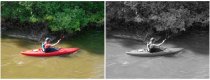
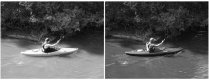
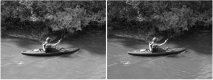
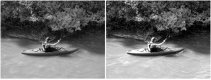
With that out of the way, it seems to me that it comes down to determining how to get the best starting point. As far as colour negative versus black and white negative film goes, whichever you have in the camera the viewfinder will still be in colour, and it makes no difference at the taking stage which it is. You still have the mental adjustment to make. Colour does have the advantage, as I said above, that you can selectively filter areas. If you look at the canoe photo I posted above, you should be able to see that the "filtration" which was applied globally has effects on the shadow areas - a red filter will always absorb more light in the shadows when the sky is blue, since the shadows are blue. If you are likely to have problems with blocked shadows and don't want to increase the exposure to compensate, starting with a colour image could be best.

Given that it makes no difference at the taking stage whether the film is colour or black and white, I can't readily see why it should make a difference in digital. But then, when I use a digital camera, I don't use the screen on the back to check the result, and treat it as a film camera.

There are black and white viewing filters made (dark brown, and very expensive) which work by temporarily forcing us to see in monochrome, although we soon readjust. You can get the same effect using a strong red filter, although that will affect the tonal balances.

I personally find it easier post exposure to have a black and white image as my starting point. Possibly it's just force of habit, but I haven't any problem in looking at a scene and seeing the final black and white image; but once change "scene" to "screen" and put me in front of a colour image I have problems.

Finally - one I got wrong. I should have foreseen it and used a filter. If it had been a colour image I could have rescued it.
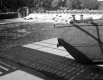
NaburnLocksBoat.jpg

The rusted boat (at Naburn Locks, York) was clearly differentiated from the water behind. But, like the red roses and green leaves, the difference was lost in (unfiltered) black and white.

 
I think there are a variety of things to take account of here, not least being the final use of the photo. I was starting to quite like Tesco developing and scanning Ilford XP2 a few years ago until they stopped it, but the files weren't very big. Scanning to a higher resolution can start to get expensive, so possibly treat the original dev & scan as a proof and then get individual negs rescanned at a higher resolution for enlarging? The problem then is that you can't manipulate the end result as it will be down to the scanner and the printer software deciding what looks "best".

I think digital b&w is a whole different beast and once you start on programs like Silver Efex then the end result can be absolutely anything, but not really like something that came from a film camera.
 
...............The rusted boat (at Naburn Locks, York) was clearly differentiated from the water behind.
But, like the red roses and green leaves, the difference was lost in (unfiltered) black and white.


once again - thanks for your comments and insights - I have a lot to learn...:)
 
I voted for black and white film scanned, but it would be infinitely better printed optically to proper black and white paper.


Steve.

Would it invariably be better? My experience contradicts this, in that my print quality improved almost infinitely when I moved over to digital printing. I can accept that one reason is that I wasn't a good darkroom printer; and there's certainly a subjective element to my assessment in that I don't have to throw away so many bad prints.

Theoretically, it should be possible to make much more precise tonal adjustments to very precise areas; to have a local control over contrast that even variable contrast papers can't give you so exactly in the darkroom; to have less print spotting to do as the only place that dust can settle is on the paper before the ink hits it. I've seen it written in "Beyond Monochrome" that densities can be separated in shadows and highlights more precisely than in wet printing.

As far as I can see, there are only two visual downsides. The first is DMax - can you get the same dense blacks with inkjet prints? Some of the quoted figures in paper tests suggest that there's not much in it. The other is longevity, which I'm counting as visual since a faded print doesn't look so good. It's usually said that conventional prints have lasted for well over 100 years (and we're not far off photography's 200th birthday now) whereas inkjet prints are an unknown quantity; even with "archival" papers and inks, the lifespan is only educated guesswork from accelerated aging tests. On the other hand, we aren't using the same print materials that were in use 100 years ago. There have been issues with modern papers caused by the novelties that have been introduced to "improve" them. Possibly because it's so easy to reprint inkjet prints, I haven't seen faded prints in exhibitions. But I have seen conventional prints on resin coated paper that are visibly laminating on show in one exhibition I went to.

It is possible to have a digital file optically printed, either by using a digital enlarger or by making a digital negative and contact printing it. That preserves the output method whilst giving most of the advantages of Photoshop retouching/dodging/burning etc. You still have to get the exposure right though (and worry about archival washing, freshness of fixer etc.)... But looking this far ahead is probably beyond the scope of the original question. Certainly the printer, ink and paper used will affect the final print. I've used inkjet printers that were hopeless for black and white although both Canon and Epson now both make excellent printers for this purpose. Different papers - even with the same or nominally identical surfaces - can give different prints, as I've shown to my satisfaction with a pair of prints on papers that look pretty much the same unprinted but give noticeably different renderings of midtone contrast with my sample photo.

For me, it's a matter of personal laziness, in that printing is easier digitally. I still have my darkroom set up, and the printer is on the bench along with two enlargers. It's marginally faster to print conventionally too - or it was when I had my Nova tank set up, and I'd often pop in for a few minutes to make a single print, since there was zero set up time. But it is far, far easier for me to get a good print digitally than conventionally. So, I do have a vested interest in arguing for digital over conventional printing, if only to salve my conscience. But I can't actually see that prints produced digitally look worse than those printed conventionally. I vividly recall on a workshop that my prints were taken for conventionally produced ones, so I can fool others as well as myself over this.

Is it just a matter of DMax, or am I missing something else that's important?
 
Is it the journey or the destination that's important? I think you have to answer that before answering the OP's question, or answering Stephen's last question above. Is the print something that stands alone, or is it the product of everything that's gone into it?

I imagine F&C has a higher proportion of "journey" people than the rest of the forums.
 
Good point about the journey. I start with the print in mind - if I don't think I'll like the print, I don't make the exposure. For me, the journey is like a commute from Brighton to London - good when it's over, unpleasant while in process (to judge from the papers - I haven't commuted for 25 years).

Edit to add: And on reflection, I suspect that that's what I'm missing that is important (to many anyway) - the journey, the way it's done. Preserving the old craft skills.
 
Last edited:
Where else on this forum would a fairly simple question on printing get such a wonderfully helpful and informative series of posts and also have a friendly and interesting discussion on the philosophical elements of the dilemma as well. Bl**dy marvellous, keep it up. :)
 
Good point about the journey. I start with the print in mind - if I don't think I'll like the print, I don't make the exposure. For me, the journey is like a commute from Brighton to London - good when it's over, unpleasant while in process (to judge from the papers - I haven't commuted for 25 years).

Edit to add: And on reflection, I suspect that that's what I'm missing that is important (to many anyway) - the journey, the way it's done. Preserving the old craft skills.

If only I could do this. If I printed all my negs I'd need a bigger man cave. If I printed only the best I could sell my printer..
 
I don't actually print all my negs :). Some are indeed failures - when I look in detail, I find I either missed something or the final result wouldn't be up to it. And some are duplicates. Processing faults are happily rare, but I do get some - mainly uneven development - and so if I particular want to be certain I'll make an exact duplicate exposure just in case. And I've got a backlog...

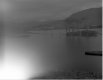
So here are some that didn't make it.

cpic032x.jpg cpic037x.jpg cpic047x.jpg
 
Do I get a prize for identifying Loch Assynt as the first one? (y)
 
IMO given the constraints of the OP - must be .jpg because processing raw is too difficult - then I'd have said to shoot colour .jpg files with as much HDR compensation as the camera can manage to broaded dynamic range, then convert to mono.

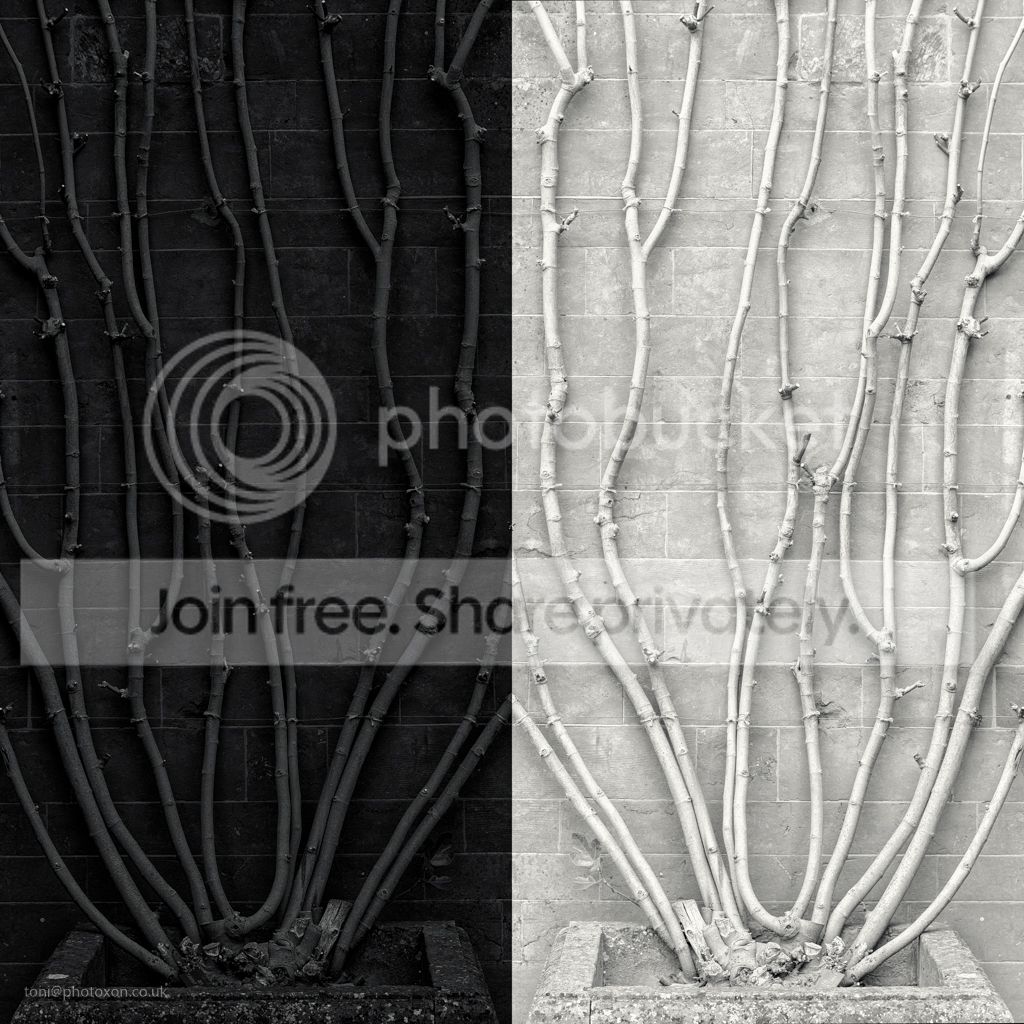
Mono convertion is enormously powerful to control tone:

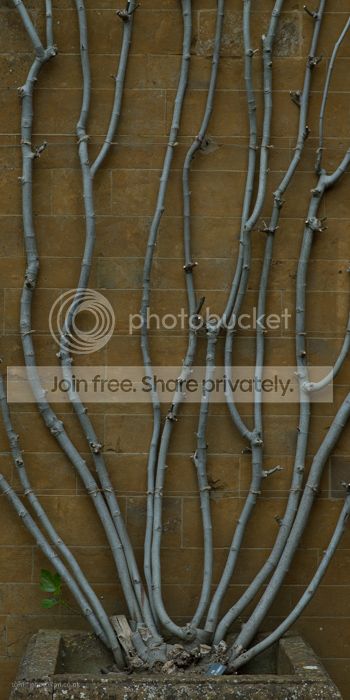
Base image (un-adjusted from RAW apart from a crop).
vine%20base%20image-2567_zpsl8zuqthv.jpg


Converted using sliders to adjust tonal density for each colour plus normal tne controls.
Black%20and%20white%20vine-_zpswzbeyv7q.jpg


Both these were produced using Nik silver FX (free) and took a couple of mins juggling sliders to get 90% of the way there.
 
@ancient_mariner

thanks for the post

''..Both these were produced using Nik silver FX (free)..''

i'll be giving this a serious look.....:thumbs:
 
It sounds to me like you need to decide if you want to shoot digital or film. They are two very different beasts but if you want to experiment more with digital then it's worth persevering with RAW. Processing it should be very similar to processing JPGs except you get more control and data to play with.

If I know up front I want the end result to be in B&W I'll shoot in RAW but switch to Mono in camera. This helps me get closer to the end result and helps visualise any strong shapes or contrasts when capturing the shot. The output RAW will be in full colour, but I can just convert it from there and, of course, change my mind about shooting in B&W after the fact if I want to.
 
I'm just revisiting this thread with an addendum. I write a page (they are very small pages!) for a local magazine and because I've found it difficult to cram everything I want to say into 400 words plus one photo (and 100 words less for every extra photo) I decided to create a Wordpress web site to carry the article plus extra comment.

The point is that the July issue had an article (submitted back in May!) which contains the illustrations and examples I gave above plus a few more and extra material. It's all from my book, but if anyone wants to read a bite sized chunk you can find it here. It's my "real" name that appears there; "M" is my middle initial, although it doesn't stand for "Middle" :D
 
Back
Top