Best Backup software for windows thats easy to use

antc

Suspended / Banned
Messages
4,355
Name
Anthony
Edit My Images
Yes
Hi All,

I recently upgraded my parents pc to windows 10, all working very well indeed. However I need to organise a backup regime for the machine to backup things such as photos etc from their holidays and trips out.

I currently use a Mac and I use time machine and another bit of software called Chronosync where I create backup documents to automate the backup of photos, music, docs etc. This does a full backup initially and then only backs up changes I believe from the last full backup.

However, I am planning to move back to windows in the next couple of months as my Mac is ageing and I would like to be able to build a custom machine for my needs hence coming back to windows.

Can anyone help me out with whats best to use? I have been away from using a windows machine now for about 5 years.

Thanks in advance.
 
I use the built in Windows backup program (free). File history it's confusingly called.

When you activate it and point to your backup disc it copies all data. Thereafter backs up changes every user set time interval.
You can see and access all your files on the backup dive using windows explorer.

Anyway it works - mine restored all my data to a new computer after a disc crash.
 
Last edited:
Had to look up File History, found out was in W8 and now W10 only.
 
I use the built in Windows backup program (free).

When you activate it and point to your backup disc it copies all data. Thereafter backs up changes every user set time interval.....

do you know if it deletes the old files on the external backup HDD as it adds the new ones......?

I'm using ''KARENS REPLICATOR' which does; BUT i have to run each main folder (Docs, Pictures, and Music) manually - no scheduled task facility

do you leave your external HDD permanently connnected for the schedule. I read best to disconnect from PC to prevent any virus infection which may hit the PC

thanks
 
It keeps old file versions - hence the name I guess. I've always seen this as a feature so never tried to change it.
If you have a huge file constantly being changed could give you a space problem but you can manually delete the old versions.

I keep the backup drive on all the time but until recently had a further manual copy on an old PC.
.
 
....It keeps old file versions - .
If you have a huge file constantly being changed could give you a space problem but you can manually delete the old versions........

that why i like KARENS - it does all the sorting/deleting
i have 4 external HDDs and run a backup in turn every 2 weeks

I'll have a look at W10 though - thanks
 
Hi
do you know if it deletes the old files on the external backup HDD as it adds the new ones......?

I'm using ''KARENS REPLICATOR' which does; BUT i have to run each main folder (Docs, Pictures, and Music) manually - no scheduled task facility

do you leave your external HDD permanently connnected for the schedule. I read best to disconnect from PC to prevent any virus infection which may hit the PC

thanks

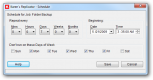
Replicator does have a schedule facility. It's the bottom panel in settings.
C__Data_Users_DefApps_AppData_INTERNETEXPLORER_Temp_Saved Images_schedule.png
 
Last edited:
I keep the backup drive on all the time
I back up to bare drives using a USB 3.0 SATA dock. The hard drives are removed from the dock in between backups. This eliminates drive failures occurring in between backups.
 
Last edited:
Acronis True Image for me was the best, but for example Cloud services are very good.
 
Unfortunately there is just nothing as good, or anything that comes even close to Apple's Timemachine. Both backup and restore are just very very good.

After trialling a few, I settled on Paragon. But it is still very old skool in how it feels. More complex than it should be.
 
Unfortunately there is just nothing as good, or anything that comes even close to Apple's Timemachine. Both backup and restore are just very very good.

After trialling a few, I settled on Paragon. But it is still very old skool in how it feels. More complex than it should be.

I'm new to Mac and haven't set up time machine. I have my photos on two external hard drives, mirror copies, can I use time machine to back up photos from one drive to another external hard drive? I'm thinking instead of manually backing up from one to another, i could buy a 5tb drive, use only one of my existing drives and back that up via time machine to,the 5tb one...does that make sense?
 
I've always used Acronis but when one of my pc's failed last month and i tried to recover it the backup was corrupt lol.

Anyway after reading reviews, i'm now using Easeus todo backup, the free version, so far so good.
 
I'm new to Mac and haven't set up time machine. I have my photos on two external hard drives, mirror copies, can I use time machine to back up photos from one drive to another external hard drive? I'm thinking instead of manually backing up from one to another, i could buy a 5tb drive, use only one of my existing drives and back that up via time machine to,the 5tb one...does that make sense?
Yes. Simply mark one of the drives as a time machine drive and have it excluded from a backup. Then include the other drive in a back. And voika it will do everything automatically.
 
Quite like synctoy as it can preview the changes, don't think it automates though
 
Yes. Simply mark one of the drives as a time machine drive and have it excluded from a backup. Then include the other drive in a back. And voika it will do everything automatically.

Oh great! Many thanks "Sir"
 
My Operating System + applications are on a separate SSD to my data so for backing up I do not image I simply clone the SSD to a backup drive. If my OS\Apps SSD dies it will take less than 10 minutes to swap drives and get me back up and running again.
 
Another for Synctoy, works a treat and is very very easy to use.
 
I've used Duplicati - shareware - that worked well (I could find and recover specific files easily) and has a built-in scheduler.
 
I use the built in Windows backup program (free). File history it's confusingly called.

When you activate it and point to your backup disc it copies all data. Thereafter backs up changes every user set time interval.
You can see and access all your files on the backup dive using windows explorer.

Anyway it works - mine restored all my data to a new computer after a disc crash.
I totally forgot about that one, and lol i've got it activated as well. It has been going to my NAS all that time :) It is so unintrusive it is actually like Timemachine, just tried to restore an old file through the integration in the Explorer and that is actually really good. Doesn't look as pretty but on Windows 10 this should be a no brainer.
 
Back
Top