Before and After

adamjt7

Suspended / Banned
Messages
308
Name
adam turner
Edit My Images
Yes
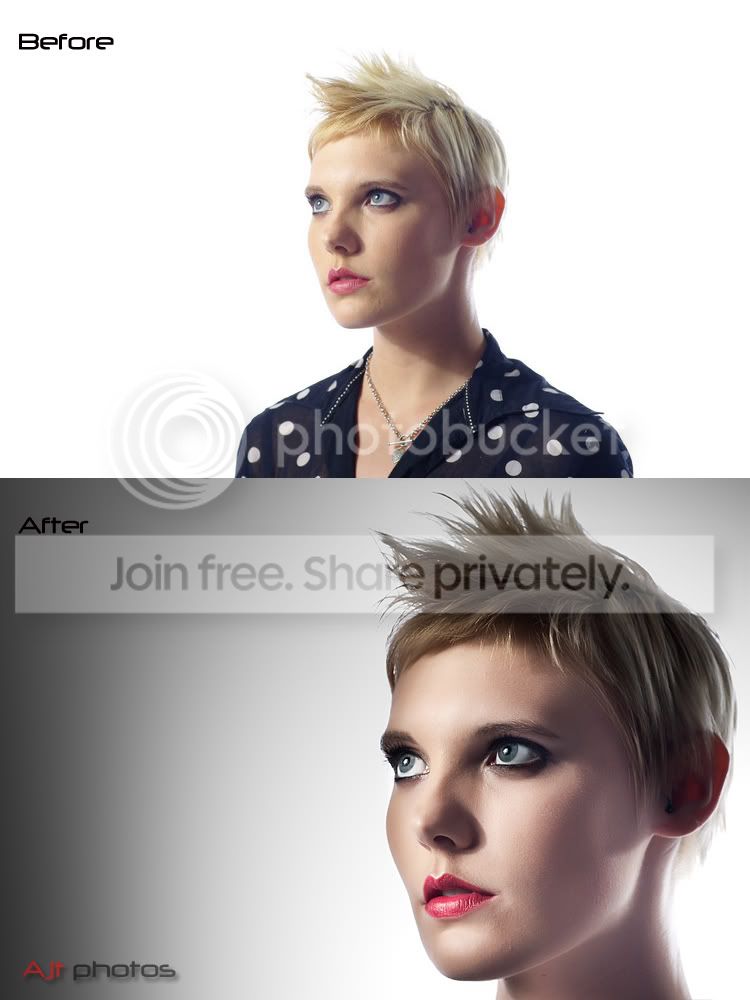
Playing around with an image which was a little boring using the new raw adjustment brush in cs4 i managed this outcome only work done in photoshop was skin smoothing.It such a good raw tool the adjustment and gradiant brush...

beforeafter.jpg
 
It's almost ( but not yet) that Photoshop is not necessary anymore. I'm spending less and less time with images in Photoshop, as I am able to do most of what I need in Lightroom.

I can't see a day though when Photoshop won't be needed, as there are still things that need to be done at the pixel level. Maybe one day we'll get a version of Photoshop that's designed soley for photographers without the graphics tools. May be cheaper as well ( well I can dream !).

Like the effect though.
 
She looks almost rendered in #2 but I really like it.
 
I'd say she looked like computer generated in the 2nd one. Did anyone see Final Fantasy: Spririts Within? I don't mean that as a bad thing as you're obviously going for a heavily processed look. It's very well done.
 
Super piece of PP work. Don't let the detractors get you down.
 
Thanks for the comments it was only an experiment to see how much i could get out of cs4 raw converter eg new background eyes lips etc and just thought to over process the skin in photoshop to see how it would look....
 
I like the colours but she looks like a manequin
 
Well Done! I think it's more a model portfolio image I'd expect to see and/or glamour. Just downloading Camera Raw 5.3 for my mac now!!!! Will have to consider shooting some RAW images nows so I can play!

Carl.
 
Really lovely in every respect. Love the final effect. Very well done. (Read that as far better than I could hope to achieve.!):clap:
 
It looks false, and over processed.


But... I REALLY like it! I've no idea in what context you'd use it, or what the Hell for, but it's brilliant. Well done, and don't let the detractors stop you.

cheers
 
Its not being used for anything like i said in an earlyier post i was just havin a play with the tools in cs4 raw converter to see what u can achieve and and just thought when opened in photoshop it looked quite striking with the strong processing on the skin.Also i do quite a few model portfolios and they all tend to want the processed look on close up face pics...but not to this extent....And to quote an above post are we gonna see some of your skills chaz......A quick pic below for the anti airbrush people is this better...hehe


ffff.jpg
 
Not keen at all on the 2nd, way over processed for my tastes, but that last shot is a really crackin shot, nice lighting and processing.
 
Christ what have u done to her.....No offence to your edit but it just dosent look right eyes way to bright neck all red etc etc
 
Christ what have u done to her.....No offence to your edit but it just dosent look right eyes way to bright neck all red etc etc

Red? is your screen calidrated even checking with the eye droper it has no more red that other parts of her face
 
Just looks like she has a rash around her neck......
 
adamjt7 ~ Your first and second picture are really rather good. The first is good in its own right, but the second edited version is wicked! Yes she looks like a mannequin, but a very beautifully photographed one! I really like it :D


I think good editing skill are when you can not tell it wss done, This to me has been over done.
IMHO

Then you go and do this...

I have done a few on here and how about this quick on of your last pic Only had screen grab and no time
3621216949_a510a27591_o.jpg

Are you serious? :lol: Now that is waaaay over done!

Red? is your screen calidrated even checking with the eye droper it has no more red that other parts of her face

It really is rather red on her neck, and most certainly is not the same colour/tone as the rest of her skin/plastic.
 
I think you have achieved impressive results with you portraits, but the last girl does have a red neck I am afraid.
 
Back
Top