
Beginner BBF Problem

Choc Fan

Suspended / Banned
Messages
16
Edit My Images
Yes
Camera: Canon 5D MK IV

When a train comes toward me I press the back auto focus button on the front of the train and keep hold of it as the train comes closer to where I want to take the original photo.

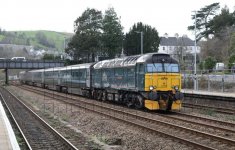
I thought doing this would keep the front of the train in focus while it is moving. But look at my photo, it didn’t do that.

What did I do wrong?
Capture.JPG
 
Are you using single focus point? As I think this locks focus to that point and tracking won't shift across, you need to use AF zones, still new to this myself so not 100% but think that's how it works
 
You need to use fewer focus points. The camera doesn't know it's looking for the front of a train, it just knows it has achieved focus so keeps those points active. Use a single AF point, or a small 3x3 group and place those over the front of the train, then keep the button held down.
 
AF Zones and make sure all points activated...shouldnt matter if you use one point or expanded
 
The squares are focus points. You have too many focus points active for this type of shot. Your camera is trying it's best to average all of those focus points to make the image.

If you want just the engine/front of the train to be in focus you will need to select a focus point array with just a few focus point squares and position them where you want the front of the train to be in your final shot. Once you have done this, you can prepare to take a shot of the train again. This time, keep the front of the engine positioned where your focus points are and keep your finger on the Back Button Focus until you have the train in the position desired for the shot. This time, the front of the engine will be in perfect focus, and the rest of the train will be out of focus in varying amounts, depending on it's distance from the engine. In reading your post, this sounds like what you are trying to accomplish.

Charley
 
As I see the issue.....

IMO
You should select a single AF point
But for your composition make the selected single point off centre i.e. perhaps at least 3 positions to the right of the one showing in red on your image above.
Lastly, as the train is coming towards you at an oblique angle you need to keep the AF point on the chosen part of the train e.g. the GWR on the front and pan/follow with the movement to maintain the AF point on the GWR

The above should give you what you seek!
 
Back
Top