BB router PC interface ?

Cobra

In Memoriam. TPer Emeritus
Admin
Messages
114,434
Name
The real Chris
Edit My Images
No
On several occasions I have had issues with BT, FTTC broad band,
The rest of the copper wire, approx 200yd run, is over 50 years old, and is usually found to be broken or disintegrating according to
the techy that turns up.

The scenario's are always the same.
Not staying connected for more than a few mins, over a 24 hour period.
When it finally returns this time (and others)
My speeds are down from 35mbs to single figures,
up, 0.5 mbs from a normal 7.5 mbs

Over the last several months the cabling from the road side box into my house, and to the hard wired PC has all been replaced.
Inc. a new router, which incidentally sorted the problem for a few months.

This time the live chat monkey said there is no problem, and yet the text "help" tells me there is, and they will sort it, for the 4th time in
less than 24 hours.
Now before the CEO get's the full extent of my displeasure ( he, well his lackey has already acknowledge the first contact email)
and before I jump ship to the recently installed city fiber line that runs across the bottom of my drive,
my question is, is it possible that the PC is producing these faults rather than any external wiring?
 
Last edited:
Depending on the router there is likely a user accessible log of events especially the TR69 sub set log. That will show the router connection log events.

Next, if there are regular issues with the connection your ISP should be able to access their logs and tell if the actual connection has been triggering, what I would call (though wrong expression), a fallback connection speed to preserve any connection.

Lastly, who are you with and what router are you using???

PS if they are repairing/replacing the copper 'last leg' in a piecemeal manner.....they clearly have not found & replaced the primary cause!!!!
 
Do you find it's worse after rain?

We had a BT engineer out, he said water is getting into the copper wire 'link', he replaced it but we still not getting decent speed
 
Lastly, who are you with and what router are you using???
As above BT, its their router.
PS if they are repairing/replacing the copper 'last leg' in a piecemeal manner.....they clearly have not found & replaced the primary cause!!!!
They just seem to be repairing as and when, not replacing.

if there are regular issues with the connection your ISP should be able to access their logs and tell if the actual connection has been triggering, what I would call (though wrong expression), a fallback connection speed to preserve any connection.
I know, sometimes they tell me there is no issue. Sometimes they tell me there is,
depending who I complain to.

My question as above though, could it be the PC causing the issue rather than their tech?
 
Do you find it's worse after rain?
Heavy rain can trigger it, but so can long hot spells :rolleyes:
It has rained the last couple of days, but not what I would call heavy
 
As above BT, its their router.

They just seem to be repairing as and when, not replacing.


I know, sometimes they tell me there is no issue. Sometimes they tell me there is,
depending who I complain to.

My question as above though, could it be the PC causing the issue rather than their tech?
This is why I mention the TR69 log. Other than user interventions i.e. you are disconnecting & reconnecting manually the log will show the events that are triggering the loss of connection.

This is my current page showing the 'chat' that happens in the TR69 process, it goes on all the time (this does not show a discon & connection event)

08:22:45, 24 May.
ppp1:Request for a new authenticated connection
08:22:45, 24 May.
ppp1:TR69 ConnectionRequest: processing request from ACS
06:23:51, 24 May.
ppp1:Request for a new authenticated connection
06:23:51, 24 May.
ppp1:TR69 ConnectionRequest: processing request from ACS
05:08:44, 24 May.
ppp1:Request for a new authenticated connection
05:08:44, 24 May.
ppp1:TR69 ConnectionRequest: processing request from ACS
04:46:52, 24 May.
ppp1:Request for a new authenticated connection
04:46:52, 24 May.
ppp1:TR69 ConnectionRequest: processing request from ACS
01:42:32, 24 May.
ppp1:Request for a new authenticated connection
01:42:32, 24 May.
ppp1:TR69 ConnectionRequest: processing request from ACS
18:26:19, 23 May.
ppp1:Request for a new authenticated connection
18:26:19, 23 May.
ppp1:TR69 ConnectionRequest: processing request from ACS
17:46:01, 23 May.
ppp1:TR69 connectivity to (pbthdm.bt.mo) has been closed
17:46:00, 23 May.
ppp1:TR69 sending GetParameterValuesResponse message
17:46:00, 23 May.
ppp1:TR69 receiving GetParameterValues message
17:46:00, 23 May.
ppp1:TR69 sending GetParameterValuesResponse message
17:46:00, 23 May.
ppp1:TR69 receiving GetParameterValues message
17:46:00, 23 May.
ppp1:TR69 connectivity to (pbthdm.bt.mo) has been initiated
17:46:00, 23 May.
ppp1:TR69 receiving InformResponse message
17:45:59, 23 May.
ppp1:TR69 event found : 4 VALUE CHANGE
17:45:59, 23 May.
ppp1:TR69 event found : 2 PERIODIC
17:45:58, 23 May.
ppp1:TR69 sending Inform message
17:45:58, 23 May.
ppp1:TR69 event found : 4 VALUE CHANGE
17:45:58, 23 May.
ppp1:TR69 event found : 2 PERIODIC
17:45:57, 23 May.
ppp1:TR69 sending Inform message


Of note I use a BT Business Hub and it auto soft boots approx every 11 days. But does that mostly in the wee small hours.
 
Last edited:
This is why I mention the TR69 log.
Thanks for the reply, but that means absolutely nothing to me.
As I've mentioned before I am an absolute dinosaur where all this is concerned.
So in words of one syllable could it be the PC causing the issues and not the kit?
 
Just one idea before I duck out, could it be the cable to the PC, could you try linking via wifi and see if the speed is still low in case the flexable cable is damaged?
 
It's very unlikely to be the PC especially if you have replaced the cable between the PC and router. Even then a simple test would be to jiggle the cable at either end and see if it has any impact on connection and speed.
 
Thanks for the reply, but that means absolutely nothing to me.
As I've mentioned before I am an absolute dinosaur where all this is concerned.
So in words of one syllable could it be the PC causing the issues and not the kit?
IMO no as the Router connection is the problem you are talking about.
Just one idea before I duck out, could it be the cable to the PC, could you try linking via wifi and see if the speed is still low in case the flexable cable is damaged?
Having said the above to @Cobra to eliminate the ethernet connection and trying a WiFi adaptor will eliminate the extremely remote possibility of the PC triggering it????


PS Sorry if I missed it but have to tried another cable from the router to the BT/Openreach socket.

PPS have you tried the "Quiet Line Test" how to mentioned here https://community.bt.com/t5/Archive-Staging/How-quiet-should-the-Quiet-Line-Test-be/td-p/1666911
 
Last edited:
Just go full fibre. All this flaky century old copper nonsense fades instantly.
 
Having said the above to @Cobra to eliminate the ethernet connection and trying a WiFi adaptor will eliminate the extremely remote possibility of the PC triggering it???
It may do, a wifi dongle will bypass the pc's built in connection. I'm no expert, I'm just thinking aload and probably shouldn't :exit:

@Cobra do you have a mobile or tablet you could run a line test on with the PC turned off?

I feel your pain with BT :(
 
It's very unlikely to be the PC especially if you have replaced the cable between the PC and router. Even then a simple test would be to jiggle the cable at either end and see if it has any impact on connection and speed.
Thanks Chris I just needed to be sure before I really let rip (y)
(and yes I've tried the above and more.)

IMO no as the Router connection is the problem you are talking about.

Having said the above to @Cobra to eliminate the ethernet connection and trying a WiFi adaptor will eliminate the extremely remote possibility of the PC triggering it????


PS Sorry if I missed it but have to tried another cable from the router to the BT/Openreach socket.

PPS have you tried the "Quiet Line Test" how to mentioned here https://community.bt.com/t5/Archive-Staging/How-quiet-should-the-Quiet-Line-Test-be/td-p/1666911
As above I've tried all that. But thanks.
I con't do the quite line test, its BB only no phone line.
 
@Cobra do you have a mobile or tablet you could run a line test on with the PC turned off?
I'll go fire up the Lap top in a mo, (y)
 
@Cobra do you have a mobile or tablet you could run a line test on with the PC turned off?
Lap top wifi, was recording exactly the same speeds when next to the router in another room 1mbs!
So to recap the laptop wifi was 5 Mbs when next to the router,
the lap top when hard wired to the router was exactly the same 5Mbs.
So I'm guessing a router problem, although its only 6 months old.

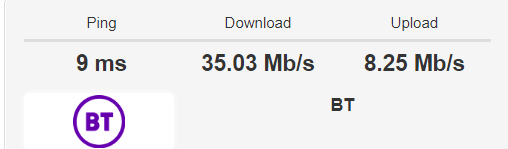
Another speed test once I put everything back together again.
( including the spare cables)

Back to normal ( for now :thinking: )

Opera Snapshot_2022-05-24_145524_www.broadbandspeedchecker.co.uk.png
 
Last edited:
Can I ask (the obvious?) you have password protected access to the router i.e. not left it at default settings?

And also created a new password for WiFi devices to keep our miscreants from sharing your access!

I ask because I wonder if someone else has accessed it and is downloading HD streaming files for example and stealing your bandwidth?
 
Can I ask (the obvious?) you have password protected access to the router i.e. not left it at default settings?
Good point, I'm sure I did years ago, but I'll double check :)
 
Good point about wifi being 'borrowed'

Spare cables? Do you mean you swapped for new or have extras running elsewhere? Internet TV?

Did you switch off router at any point during the PC/laptop switch over? That may have reset any glitch on it?
 
Do you mean you swapped for new
I had spares. But they made no difference.
Did you switch off router at any point during the PC/laptop switch over? That may have reset any glitch on it?
No, but I tried that several times yesterday and that made no difference either.
 
Good point, I'm sure I did years ago, but I'll double check :)
FWIW it may be worth changing the passwords (Router access & the WiFi password) as a precautionary measure.

NB though often spoken of as limited security I also MAC Address filter as well and only allow 'our' devices access ;)
 
Not wanting to point out the obvious as I'm sure BT have already had you do this, but have you removed the faceplate on the wall and plugged the router directly into the test socket?

This will rule out any issues with any internal extensions and the filter in the faceplate.

Also plugging a PC or laptop directly into the wall socket and setting up a PPPOE connection will rule out any issues with the router/wifi
 
Last edited:
I had spares. But they made no difference.

No, but I tried that several times yesterday and that made no difference either.
AFAIK repeated switching on & off is not recommended with FTTC or ADSL connections as the line monitoring sees it as a problem and drops the connection speeds to compensate :(
 
I'm out of ideas, I think it's 'our local' BT service, hope they get back to you
 
Not wanting to point out the obvious as I'm sure BT have already had you do this, but have you removed the faceplate on the wall and plugged the router directly into the test socket?

This will rule out any issues with any internal extensions and the filter in the faceplate.
@Cobra said above he only has the BB on the line so no phones or other devices......unless he says now otherwise ;)

But plugging into the test socket will bypass the filter in the Openreach socket box, so perhaps worth trying in case the Openreach faceplate is at fault???
 
Last edited:
@Cobra said above he only has the BB on the line so no phones or other devices......unless he says now otherwise ;)

But plugging into the test socket will bypass the filter in the Openreach socket box, so perhaps worth trying in case the Openreach faceplate is at fault???

Sorry I never picked up on that, however just because he has no phones plugged in doesn't mean to say that he doesn't have some old extensions still connected up with dodgy wiring.

I learned in my years of troubleshooting IT issues never to take anything for granted :)
 
@Cobra said above he only has the BB on the line so no phones or other devices......unless he says now otherwise ;)
As I said originally. nothing other than the router

just because he has no phones plugged in doesn't mean to say that he doesn't have some old extensions still connected up with dodgy wiring.
As above all the internal wiring was replace, not so long ago. No extensions, straight from the road side junction, straight to the hard wired router.
 
AFAIK repeated switching on & off is not recommended with FTTC or ADSL connections as the line monitoring sees it as a problem and drops the connection speeds to compensate :(
The speeds were already dropped to around 5mbs before I tried the reboots ( BT recommends that as a first resort anyway)
 
I'm out of ideas, I think it's 'our local' BT service, hope they get back to you
As above, back to normal for now, I'll now wait to see what happens when I get a reply from customer service.
Oh and BTW the live chat monkey did say "she" was going to open a compliant of my behalf, and gave the the reference number.
There is nothing on my dashboard showing a compliant.
Lying little toad!
 
FWIW it may be worth changing the passwords (Router access & the WiFi password)
Router is hard wired so no one can get at that, WiFi range is quite limited, barely extends to the bottom of the garden,
they would need to be sat out front in a car to leech it, but changed it anyway, thanks for the tip :)
 
Telephone cable can sometimes suffer from water ingress. This manifests itself as "impulse noise" which many of us will remember as the random scratchy sounds that we used to get on older lines. It can be very difficult to get your provider to fix it as the problem comes and goes with the level of moisture.

If there is still dial tone on the line, then you could plug in an old handset and see if you can hear it.
 
If there is still dial tone on the line, then you could plug in an old handset and see if you can hear it.
As above no land line.

Anyhow it seems it was a fault their end despite being told repeatedly by the live chat minion that it wasn't ...
I've just received an email from them.

Thanks for getting in touch with us recently. We're pleased we could help.

We've now closed your complaint. Your reference number is VOL013-xxxxxxxx


Contacting the CEO usually works, no matter what or who is the problem.
 
Back
Top