


Ally
Suspended / Banned
- Messages
- 2,599
- Name
- Alistair Vannet
- Edit My Images
- Yes
Anyone who had been reading my post's lately will know that I'm really pushing to try and improve my PP skills at the moment. I've got a half day of digital imaging at college at the moment where I've learned alot. I'm wanting to share with everyone what I've learned and how it can really help your photographs. I've taken some photographs that I shot from last year at around this time and I just wanted to edit and share what I had done to them to hope it will help.
Before I got involed in studying photography at college I had no idea how big an impact PP can have on photographs. I still hold the view that photographers should be photographers not digital artists and that most of your work (If not all) should be done in camera. I've learn somethings that I feel have if used peoperly have the ablity to take not just my photography but alot of peoples to the next level. My first thing is WB. IMO white balance is what sperates the pro from the amiture. If you have a well composed shot that is fine, but if the colours aren't right it distroys the image. I've really been pushing myself to improve my WB. Not just in camera but the small adjustments you can make computer wise.
Heres an Example :-
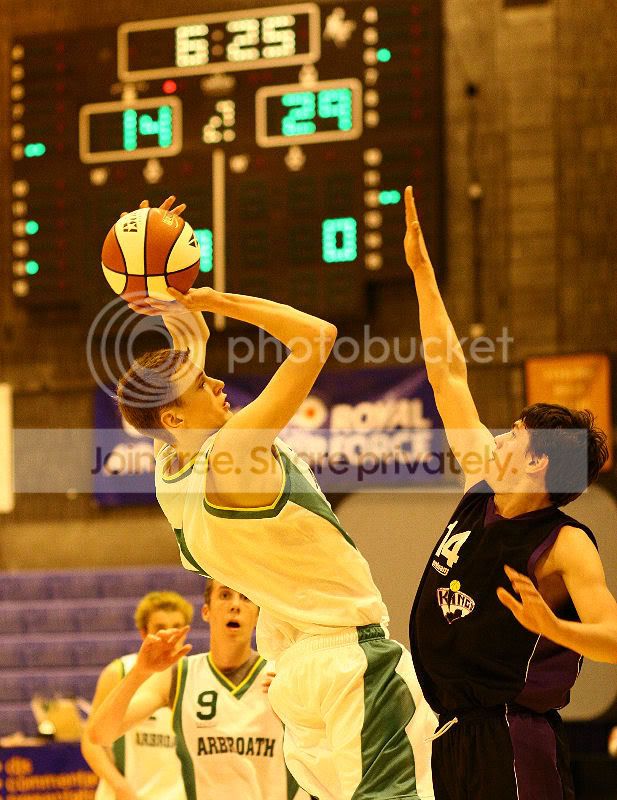
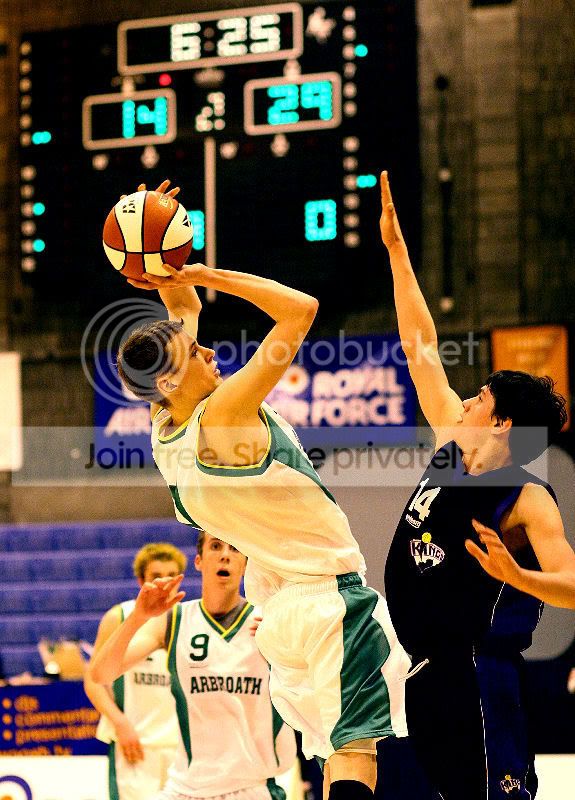
The first shot has a yellow cast to it. The shot is well aviradge and sharp. The second shot has had the white balance changed using the colour balance tool in Paint Shop Pro 9. I use this tool because you can adjust the 3 primery and secondery colours (Red, Green, Blue - Yellow, Magenta, Cyan) in the highlights, midtones and shadows so it gives me full control over the colour. As you can see the shot still has a yellow tint closer to the floor because of the refection onto of the yellow floor onto the white strip, But IMO that WB change has taken the image to the next level?
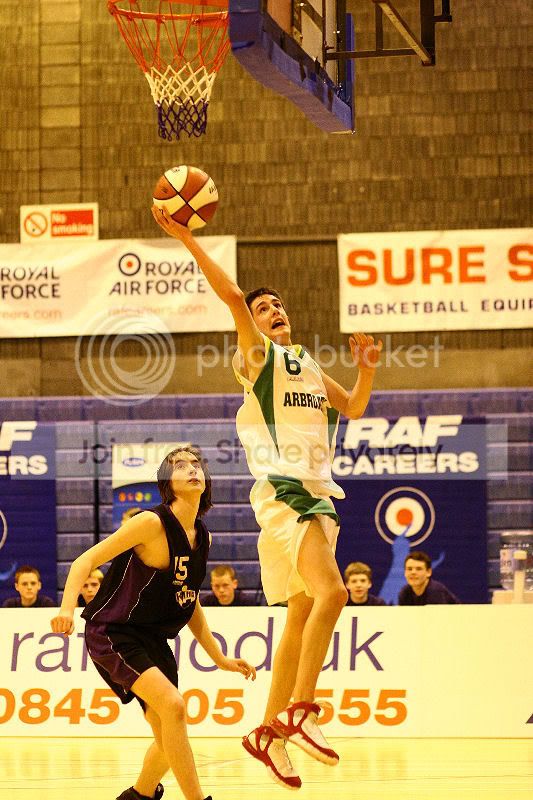

The same in this Image the first shot has a horrible yellow cast again the shot is sharp and not to badly framed. The scond shot has had the yellow cast taken away, Its not the best ever but someone with more practice could make it better. But my point again, It adds another level to the image having the realism of colours with a proper WB.
I'm not a master at this I'm not even that good to perfictly honest but these are things that I've learned and that I fell if I can apply them properly they can take my images to the next level, I hope that they can help more people like myself who don't really have a great knowlege of PP but its something simple that really can improve their shots.
All the best
Ally

Before I got involed in studying photography at college I had no idea how big an impact PP can have on photographs. I still hold the view that photographers should be photographers not digital artists and that most of your work (If not all) should be done in camera. I've learn somethings that I feel have if used peoperly have the ablity to take not just my photography but alot of peoples to the next level. My first thing is WB. IMO white balance is what sperates the pro from the amiture. If you have a well composed shot that is fine, but if the colours aren't right it distroys the image. I've really been pushing myself to improve my WB. Not just in camera but the small adjustments you can make computer wise.
Heres an Example :-
The first shot has a yellow cast to it. The shot is well aviradge and sharp. The second shot has had the white balance changed using the colour balance tool in Paint Shop Pro 9. I use this tool because you can adjust the 3 primery and secondery colours (Red, Green, Blue - Yellow, Magenta, Cyan) in the highlights, midtones and shadows so it gives me full control over the colour. As you can see the shot still has a yellow tint closer to the floor because of the refection onto of the yellow floor onto the white strip, But IMO that WB change has taken the image to the next level?
The same in this Image the first shot has a horrible yellow cast again the shot is sharp and not to badly framed. The scond shot has had the yellow cast taken away, Its not the best ever but someone with more practice could make it better. But my point again, It adds another level to the image having the realism of colours with a proper WB.
I'm not a master at this I'm not even that good to perfictly honest but these are things that I've learned and that I fell if I can apply them properly they can take my images to the next level, I hope that they can help more people like myself who don't really have a great knowlege of PP but its something simple that really can improve their shots.
All the best
Ally


