

You are using an out of date browser. It may not display this or other websites correctly.
You should upgrade or use an alternative browser.
You should upgrade or use an alternative browser.
away with the clouds
- Thread starter Mr Bing
- Start date

Not knowing, but until somebody with more knowledge answers.
I would guess you have two ways, either in manual mode purposely under expose what the camera is suggesting
or (and i guess this woudl be easiest) use a little bit of exposure compensation, take a few pics, with varying degrees of exposure comp and see where you like it.
I am guessing it will be different every time though.
I would guess you have two ways, either in manual mode purposely under expose what the camera is suggesting
or (and i guess this woudl be easiest) use a little bit of exposure compensation, take a few pics, with varying degrees of exposure comp and see where you like it.
I am guessing it will be different every time though.

also you find that your camera has a bracketing mode, which will take 3 or 5 (or soemtimes 7 ) versions of the same shot at differnet exposure, which again shoudl do exactly what you are asking.
Also, If you dont have a camera that will do the above, try focusing on a lighter area of the sky, so that the camera sets the exposure for that, and there for the darker clouds should be a little under exposed and just what (i think) you are after.
my god im rambling
/slowly slinks away
Also, If you dont have a camera that will do the above, try focusing on a lighter area of the sky, so that the camera sets the exposure for that, and there for the darker clouds should be a little under exposed and just what (i think) you are after.
my god im rambling
/slowly slinks away

Jo
Suspended / Banned
- Messages
- 3,667
- Name
- Jo Fisher
- Edit My Images
- Yes
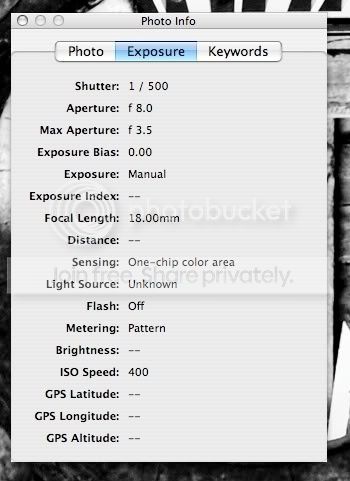
Do you have an example you can post with some exif? My guess would be your exposure needs adjusting.
Are you just shooting clouds or is there some landscape in the shot too? If you expose for the land on a sunny day 9 times out of ten you will get over exposure in the sky if there are clouds. If you expose for the clouds on such a day then you will probably find your land is under exposed. There are a few options to solve this. You could use the HDR technique using Photomatix or a new on I have found called Picturenaut which basically blends your bracketed shots to make the exposures blend nicely. It does not give the same look as Photomatix though, it's more of a natural look.
One of the other options is to take two exposures, one for the sky and one for the land and then use them both in one image simply by deleting the underexposed land in one shot and the overexposed sky in the other. Then merge whats left of the two to make 1 image. I hope that makes sense, and that it helps.
Jo
xx
Edit: in the time it took me to type all that you got a bucket load of replies so some of it sounds repetitive.
Are you just shooting clouds or is there some landscape in the shot too? If you expose for the land on a sunny day 9 times out of ten you will get over exposure in the sky if there are clouds. If you expose for the clouds on such a day then you will probably find your land is under exposed. There are a few options to solve this. You could use the HDR technique using Photomatix or a new on I have found called Picturenaut which basically blends your bracketed shots to make the exposures blend nicely. It does not give the same look as Photomatix though, it's more of a natural look.
One of the other options is to take two exposures, one for the sky and one for the land and then use them both in one image simply by deleting the underexposed land in one shot and the overexposed sky in the other. Then merge whats left of the two to make 1 image.
I hope that makes sense, and that it helps.Jo
xx
Edit: in the time it took me to type all that you got a bucket load of replies
so some of it sounds repetitive.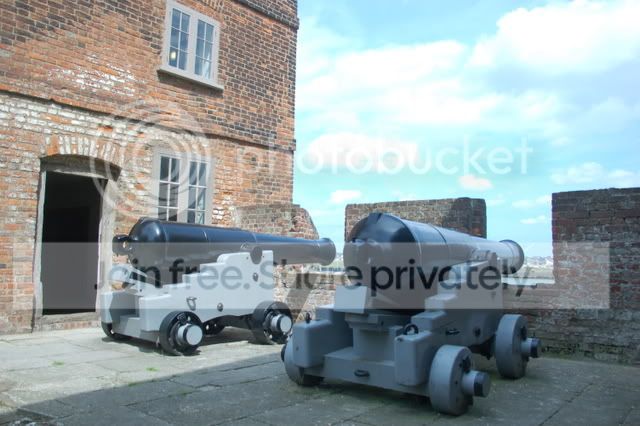


AndyB
Suspended / Banned
- Messages
- 1,527
- Name
- Andy
- Edit My Images
- Yes
I think the metering seems to be the biggest problem. The exif shows you used pattern metering which if I am right, takes an average reading. To get more control you need to set the camera to spot metering. With this picture you could have then taken a reading from the canons. You would then end up with a very light sky but thats just the way it works. HDR or grads are the only way round that and grads would have been difficult in this one.
D
DollyBuster
Guest
Bracket, and blend in PP.