Auto setting in Lightroom

I think a lot of the time, I don't want my photos to look 'auto' or 'normal'
I'm not sure that this is ever the purpose of auto. it's just to get some sort of standard starting point for manual processing or to help cull imported fles. As an end point, I've never seen it give acceptable results.
Quite often I shoot to intentionally over expose for a brighter and more pastel look for example. Other times it might be the opposite and I shoot for a darker moodier final image.
This mirrors the point I made earlier and why auto doesn’t work at all for me, even as a starting point, because it almost always destroys the tonal characteristics I have carefully, and deliberately exposed for.
I also use a non standard 'profile' 95% of the time. The other 4% is another non standard profile. And the remaining 1% is 'camera light' which I like for my night sky images.
Again this mirrors the same point I made earlier. I have a home made import preset (style in my case because I use C1), based on a linear curve import profile, but also using a tweaked tone curve, and tweaked Contrast, saturation and brightness sliders. The auto setting in C1 is customisable and I've found that by using only the auto levels, with this import style, I get a flat but full tonal and colour range starting point, This is normally a good reflection of what I had in my mind at the time of taking the picture, and is near enough to help me with the initial cull.

I still normally need a small tweak in the levels control to adjust contrast and exposure before making a final decision, Occasionally I need to manually switch from the import Linear profile to the standard profile if my image is much flatter than I want. it to be.

And, in my case I also convert to Black and White on import, (But can switch between colour and B/W with the "\" key.). I normally photograph with B/W in mind, but some pictures are taken because of the colours and the same import settings for B/W give me rather soft pastel ones colour images, which is easy to assess at the culling stage Often, when I get it wrong, and a picture isn't working as a B/W, it will work in colour, so being able to quickly switch between the two is useful.

Auto can be good to learn from I guess. Much like Auto when someone buys their first decent camera. But it's good to press forward and learn new, unique things.
As I suggested in another post, I'm not sure how much you can learn from Auto, but I feel you can learn a lot from using presets/styles through learning which combinations of settings give particular effects, and learning how you can recreate these effects for your own use.
 
Quite often I shoot to intentionally over expose for a brighter and more pastel look for example. Other times it might be the opposite and I shoot for a darker moodier final image.
Interesting. I never expose for a 'look'. I try to expose for the fullest range of tones possible, hinged on highlight protection. 'Look' comes later, in processing.
 
Interesting. I never expose for a 'look'. I try to expose for the fullest range of tones possible, hinged on highlight protection. 'Look' comes later, in processing.
While I tend to think of the "taking" stage in terms of "data capture" where I try to choose an exposure to optimise the tonal range (a technical exercise), I also have in mind what tones I think are going to be the most important in the "look" of the final picture (a creative decision), This might push the exposure, up or down from a technically optimal compromise.

Although the histogram isn't all "that" useful, I still tend to look at the highlight end first to see what happens as I adjust exposure and then check what is happening in the shadows, Making a final exposure decision based on the "look" I am visualising. If everything easily fits within the histogram (soft pastel subjects ) it's easy to just go for an optimal exposure, but that isn't always the case with contrasty subjects (ie woodlands and backlit scenes)
 
that isn't always the case with contrasty subjects (ie woodlands and backlit scenes)
For me that's a prime case where highlight protection is the key, especially if the end result will be in colour - with modern sensors the shadows can be pulled up later with little detriment.
 
For me that's a prime case where highlight protection is the key, especially if the end result will be in colour - with modern sensors the shadows can be pulled up later with little detriment.
I think you might be right, Shadow detail is certainly much better than it used to be, but I still think you need to make a decision about what highlights need protected.

Maybe I should be less pernickity about my exposure.
 
It seems that some of you spend a lot more time processing an image than I do. For those that use linear profiles approx how long do you take to edit a non complex image eg no need for the removal tool or equivalent. Probably a how long is a piece of string question.
 
It seems that some of you spend a lot more time processing an image than I do. For those that use linear profiles approx how long do you take to edit a non complex image eg no need for the removal tool or equivalent. Probably a how long is a piece of string question.

*** by Lee, on Flickr

My 'Landscape' profile. +0.20 exposure, -25 highlights for the sliders. No tone curve, no HSL, no colour grading, no anything except the profile sharpening & the just a foreground radial mask for some slight darkening & warmth. Oh, and a 4:3 ratio crop.

So maybe a minute or two.
 
*** by Lee, on Flickr

My 'Landscape' profile. +0.20 exposure, -25 highlights for the sliders. No tone curve, no HSL, no colour grading, no anything except the profile sharpening & the just a foreground radial mask for some slight darkening & warmth. Oh, and a 4:3 ratio crop.

So maybe a minute or two.

*** by Lee, on Flickr

Pretty much the same as above for this one too. One click 'landscape' profile, exposure tweak and a 4:3 crop. Not even any masks. Even the WB on both is 'as shot' :)
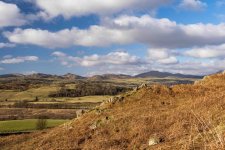
But this is on 'Auto' before I have done anything else. And a lunchtime shot as well. Not actually bad in any way?
DSC08963.jpg
 
I still think you need to make a decision about what highlights need protected.
Yes of course, that goes with the game. Forget about streetlights or specular points. But bark and foliage can be surprisingly reflective, for instance, as can be wet tarmac, et al. It's so often about control the shot or lose it. There's always guesswork involved, & I love to wing it.

It's only technical. Creative success is something else.
It seems that some of you spend a lot more time processing an image than I do. For those that use linear profiles approx how long do you take to edit a non complex image eg no need for the removal tool or equivalent. Probably a how long is a piece of string question.
Hmmm - 3 minutes as a middle measure? I dunno. It's kind of irrelevant - it's the result that counts.
 
But this is on 'Auto' before I have done anything else. And a lunchtime shot as well. Not actually bad in any way?
Very colourful, and rather fuzzy. Tonal range is fine, in particular no blown highlights, but the subject is undemanding enough in terms of tonal range. In terms of meaning, it seems a bit too bright and jolly, & I'd have thought about saturation & mid-tones, maybe? I only said maybe.

The task of the photograph is not to represent reality in a literal fashion, as many seem to think. But I'm getting off track.
 
Very colourful, and rather fuzzy. Tonal range is fine, in particular no blown highlights, but the subject is undemanding enough in terms of tonal range. In terms of meaning, it seems a bit too bright and jolly, & I'd have thought about saturation & mid-tones, maybe? I only said maybe.

The task of the photograph is not to represent reality in a literal fashion, as many seem to think. But I'm getting off track.
The fuzziness is probably me taking the photo and attempting to get hyperfocal rather than Lightroom!! The point was that the auto setting has done much of the work - I can now adjust things like saturation (or vibrance on the foreground probably) from there - rather than having to do the earlier changes that auto does for you.
 
Yes of course, that goes with the game. Forget about streetlights or specular points. But bark and foliage can be surprisingly reflective, for instance, as can be wet tarmac, et al. It's so often about control the shot or lose it. There's always guesswork involved, & I love to wing it.

It's only technical. Creative success is something else.
I suspect we are actually doing something very similar, just looking at it slightly differently. As I said, I primarily see exposure as a technical data capture exercise but at the extremes feel the need to make a creative decision. ie can I get away with calling this particular highlight specular or is it important to try and get a bit of detail into it.
Hmmm - 3 minutes as a middle measure? I dunno. It's kind of irrelevant - it's the result that counts.
 
It seems that some of you spend a lot more time processing an image than I do. For those that use linear profiles approx how long do you take to edit a non complex image eg no need for the removal tool or equivalent. Probably a how long is a piece of string question.
It all depends on the image.
There are some images where I don't use the linear profile but the ones that I do use it on can take a while - perhaps around the 10 minute mark.
However, I often revisit it as there's often something I'm not happy with when I view it again.
TBH, I love the processing every bit as much as I love taking the images in the first place.
I love listening to music while I'm editing - I find it really therapeutic.
 
Last edited:
It seems that some of you spend a lot more time processing an image than I do. For those that use linear profiles approx how long do you take to edit a non complex image eg no need for the removal tool or equivalent. Probably a how long is a piece of string question.
Time per pictures varies a lot and it depends on the subject matter and its purpose. A picture I took yesterday (for my wife) of a china doll with hand made clothing where I had chosen an appropriate window for lighting (plus a single reflector), in front of a suspended background, took about 5 to 10 minutes to go from importing into the computer to handing her a 10x8 print.

Most of my photographs I spend far longer on, but it's nothing to do with using a linear profile. As I said in an earlier post, the reason I use a linear profile is because I find it faster than not using one. The longer time is spent on refining things in ways which I suspect I'm the only one that appreciates, but it's part of the photographic process for me.

But, as I detailed a few posts ago I have a customised import preset that gets me to a good starting point., which for "easy" subjects (as above) might only mean a quick tweak of exposure and saturation before it's "fit for purpose".

For more complex subjects the linear starting point, because it's flatter gives a better representation of the full range of tones available in the raw and for me gives me. better indication of what is available for processing than you get with non-linear profiles..

But I think you are conflating "linear profile" with "auto". I find the biggest problem for me are the available LRc profiles, not necessarily the "auto adjustment". Using a linear profile plus auto can also give a pretty good starting point for non-challenging subjects.
 
Last edited:
Incidentally, rather than use AUTO, has anyone tried the new ADAPTIVE COLOUR profile in the latest Lightroom update?
I've only glanced a video about them. Like everything AI, they look a useful tool, but also seem to open the door for even more photographs to just look the same as everyone else's.

I already do something "similar" in that I sometimes create masks for sky, foreground and main subject so I can give them each a custom colour balance, and some other separates adjustments. So, if I actually used LR, this in theory could be a useful tool, but I also feel that I want to be "in control", and might waste more time "fixing" the Adobe AI decisions than it might save me.

There is an interesting parallel with AI masking, where anecdotally, it seems the quality of masking has declined, because people aren't learning how to create masks (ie scrutinise the quality of the mask, and adjust the feathering and sensitivity settings) and just uncritically accepting what the AI masking gives them.
 
But this is on 'Auto' before I have done anything else. And a lunchtime shot as well. Not actually bad in any way?
View attachment 445585

I was replying to editing time per image with recent examples, not the actual finished result. But me clicking my profile is pretty much the same as you clicking 'auto', but better :)

Yours is a little HDR and over saturated for my tastes tbh and certainly needs more time consuming tweaks regarding the blues in the sky. Again, imo.
 
I've only glanced a video about them. Like everything AI, they look a useful tool, but also seem to open the door for even more photographs to just look the same as everyone else's.

I already do something "similar" in that I sometimes create masks for sky, foreground and main subject so I can give them each a custom colour balance, and some other separates adjustments. So, if I actually used LR, this in theory could be a useful tool, but I also feel that I want to be "in control", and might waste more time "fixing" the Adobe AI decisions than it might save me.

There is an interesting parallel with AI masking, where anecdotally, it seems the quality of masking has declined, because people aren't learning how to create masks (ie scrutinise the quality of the mask, and adjust the feathering and sensitivity settings) and just uncritically accepting what the AI masking gives them.
Agreed ;)
I use the TK9 panels for creating masks
I find Dave Kelly's TK Friday on YouTube a great source of information on how and when to use the masks etc. (The Joy Of Editing)
 
Last edited:
But this is on 'Auto' before I have done anything else. And a lunchtime shot as well. Not actually bad in any way?
View attachment 445585
The use of a linear profile is about getting a better starting point, And different people prefer different starting points.

For me, your picture here is maybe locally a bit contrasty and saturated but globally a bit flat.

With my linear profile and import style, I start with an image that is locally flatter and less saturated (showing subtle tonal and colour gradations) but with a little lift to the global contrast from the import style that adds a small lift in the midtones. I find it quicker and easier to add contrast and saturation, than to take it away.
 
I was replying to editing time per image with recent examples, not the actual finished result. But me clicking my profile is pretty much the same as you clicking 'auto', but better :)

Yours is a little HDR and over saturated for my tastes tbh and certainly needs more time consuming tweaks regarding the blues in the sky. Again, imo.

The use of a linear profile is about getting a better starting point, And different people prefer different starting points.

For me, your picture here is maybe locally a bit contrasty and saturated but globally a bit flat.

With my linear profile and import style, I start with an image that is locally flatter and less saturated (showing subtle tonal and colour gradations) but with a little lift to the global contrast from the import style that adds a small lift in the midtones. I find it quicker and easier to add contrast and saturation, than to take it away.
I shall try some different profiles. When I first started using processing (elements I think it was) - I used the linear curve quite a lot as standard, but I don't seem to now. Maybe it's something I should get to grips with again!
 
But this is on 'Auto' before I have done anything else. And a lunchtime shot as well. Not actually bad in any way?
View attachment 445585

Looks fine to me.

I consider that the Auto setting improved a couple of years ago. It is now part of my input settings. If I need an image to print, send to someone, post etc I will tweak or even start from fresh but often Auto is fine. I’m probably less fussy than some, don’t like spending too much time processing and possibly cannot tell if the adjustments are slightly off.

There is no right method.
 
I shall try some different profiles. When I first started using processing (elements I think it was) - I used the linear curve quite a lot as standard, but I don't seem to now. Maybe it's something I should get to grips with again!
A "lot" of people (including very good photographers) only use a linear profile on special occasion ie when they are having problems with highlights being clipped by the standard profiles. Others (people who know what they are talking about**) are adamant that Linear profiles are a waste of time

Personally, I think starting with linear profile just gives better tonal and colour gradation across "all" the tones so it's not just about the highlights. And, I do the opposite to the above and switch to standard profiles when the image is very flat.

It's also worth trying some of the non-linear alternatives provided by Adobe, to see if they give you a better starting point than the default profile. A different profile plus auto might give you something useful. It's well worth experimenting.


** I'm thinking of people like Jeff Schewe, who is a well respected expert , but maybe a little biased as he was the one that built the Adobe profiles. But Andrew Rodney (Digital Dog), another well respected expert holds similar views


This is just a portfolio site


This is Andrew Rodney's site and he has lots of technical content. I'm not sure if there is anything about linear profiles, but I've read posts from both of them on forums writing about linear profiles as being a fad, that just force you to waste time getting to the same place that a "proper" profile would have got you to with a single click.

As an alternative view here is a video from Andy Astbury on the benefits of starting with a linear profile (his PVSwap profile). It's rather long (48.5 mins), and he has a style of presentation you need to get used to, but there is a lot of useful info. in his videos.

View: https://www.youtube.com/watch?v=iZ_eaAwb23M
 
But I think you are conflating "linear profile" with "auto". I find the biggest problem for me are the available LRc profiles, not necessarily the "auto adjustment". Using a linear profile plus auto can also give a pretty good starting point for non-challenging subjects.

I don’t think I was conflating (good word!) the two. I have downloaded some linear profiles but have not really used them. Some of the guidance suggests start with a linear profile and then use Auto. I had a quick play yesterday evening and I could see that linear profile + Auto was different to Adobe colour + Auto.

I’ll continue to experiment.
 
I have just watched a video on YouTube about cinematography: Movies and his comments about HDR and modern filming resonated with me regarding alterations in Lightroom. He talks about retaining the contrast in images and not bringing up the shadows, even though it can be done with modern digital cameras. He says in the video 'just because you can, doen't mean you should'. I shall go back over soe of my photographs and see what happens to the picture when I let a shadow be a shadow.
 
I don’t think I was conflating (good word!) the two. I have downloaded some linear profiles but have not really used them. Some of the guidance suggests start with a linear profile and then use Auto. I had a quick play yesterday evening and I could see that linear profile + Auto was different to Adobe colour + Auto.

I’ll continue to experiment.
Maybe not. The thread has taken two different directions using auto adjustments and using linear profiles.

It could well have been me doing the conflating by linking the "time spent" question to the potential time saved by using auto (with a standard adobe profile) vs not using auto and a linear profile.

As an aside, using auto with a linear profile was something I suggested in an earlier post, as for me, this gives a fairly good starting point for many pictures compared to adobe c Colour

A lot of this is just experimenting and finding something that works.
 
I have just watched a video on YouTube about cinematography: Movies and his comments about HDR and modern filming resonated with me regarding alterations in Lightroom. He talks about retaining the contrast in images and not bringing up the shadows, even though it can be done with modern digital cameras. He says in the video 'just because you can, doen't mean you should'. I shall go back over soe of my photographs and see what happens to the picture when I let a shadow be a shadow.
There is a lot to learn from the world of cinematography.
 
Yes it's possible to bring shadows up too much - but too much for what? Some of us seem to have an idea of super realism - of revealing as much clinical detail as their equipment affords us. But oddly, this approach may lead to a more emotionally sterile image. It's also possible to think in terms of verity, where a picture is held to be 'what I saw', and have some kind of accuracy. Which can be a bit deluded, since a lens and camera are mechanisms quite different to the human eyes and brain.

Shadows indeed can be very engaging and certainly have a part to play in the totality of a picture. I think that a clue to why shadows can be so compelling is that they conceal, and provide mystery - as it may be said blur does too. Which can give an image more visual and emotional depth.

“Were it not for shadows, there would be no beauty.”
(Jun'ichirō Tanizaki, "In Praise of Shadows")
 
Last edited:
Back
Top