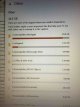
Apple folder on PC!

Phil1974

Suspended / Banned
Messages
868
Name
Phil
Edit My Images
Yes
Hi all, need some tech advice. I am running very low on space on my ssd and need to free up some space. The largest folder on th drive is the ‘Apple’ folder but despite the properties showing 45k files and 30.8gb it says it’s empty!!
Any ideas? Screenshots below....
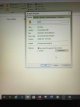
IMG_0114.JPGj

IMG_0114.JPG
 
Is your system set to hide system files?

Open explorer, select the view tab and either check the boxes top right for file name extensions & hidden items OR open the options menu and in the view tab select 'show hidden files, folders and drives'.

Clipboard01.jpg
 
Tried that. Every time I set the folder to show hidden items or go to the options and set the hidden files option it just resets itself!! Really weird ☹️
 
Do you have anything made by apple that might store stuff on your drive? If you can't see why it should be there then (if poss) back it up to an external drive (spare SD card?) & then delete.
 
Install treesize to see exactly what files are using the space, could be temps or backups, delete as required. Its more than likely a backup of your apple device, and likely encrypted.
 
Last edited:
... Your ssd is low on space with 30gb taking up the majority? That must be a very small ssd, could be time for a cheap upgrade.
 
... Your ssd is low on space with 30gb taking up the majority? That must be a very small ssd, could be time for a cheap upgrade.

I think it’s only 100gb. The Apple folder was the largest one on there. Might look for an upgrade though [emoji106]
 
I think it’s only 100gb. The Apple folder was the largest one on there. Might look for an upgrade though [emoji106]

Probably worthwhile if you're backing up your devices onto your main drive or if you only have 1 drive. Otherwise stick your backups onto your secondary drive if there's space and keep your OS / app drive as clean as possible .(y)
 
Probably worthwhile if you're backing up your devices onto your main drive or if you only have 1 drive. Otherwise stick your backups onto your secondary drive if there's space and keep your OS / app drive as clean as possible .(y)

That’s what I tried to do. All my music is another drive (laptop has ssd and another 1tb drive split into two) but Apple seems to default to the main drive with no option to change it [emoji53]. For now I’ve cut and pasted the folder to one of the other drives and all seems ok at the moment, fingers crossed
 
Last edited:
Back
Top