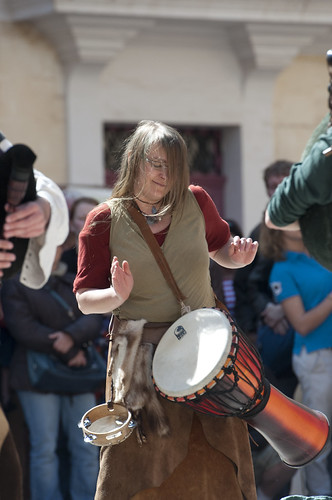
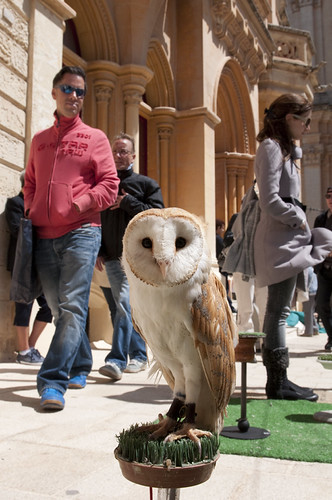
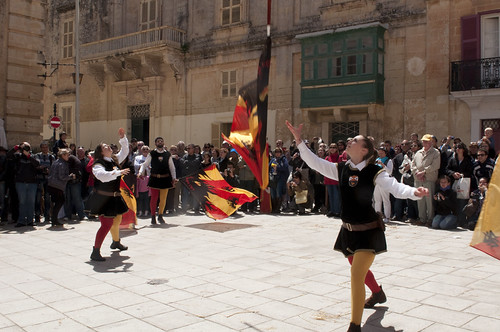
Appears I'm a bit soft

Trevor Quinn

Suspended / Banned
Messages
347
Name
Trev
Edit My Images
Yes
I'm back to basics on sharpness.

Seem to be having some trouble with quite a few photos which appear "perfect" on the rear of the camera but when I view them on the laptop they just scream SOFT at me! :cuckoo:

I'm rolling with a Nikon D90 & Nikon 24-70mm f2.8 + 70-200mm f2.8

Some landscape shots even on the tripod aren't as sharp as I'd like them to be either - wrong focal point or am I expecting too much from the camera? :shrug:
 
Examples!

100% crops with minimal processing would be ideal for us to help judge. Those lenses should certainly be able to deliver excellent image quality.


But FYI, a lot of photos will appear sharp on a 3inch LCD but they aren't viewed on a computer screen, that's not an issue as such. Viewing the image so small simply cannot be used to judge critical sharpness.
 
Last edited:
I hear your shout, never was as fussy about sharpness before but it has become something like an obsession now. Bumping up the ISO obviously invites more noise - which is hateful in a good shot :(
 
Is the softness apparent only when pixel peeping or at normal viewing sizes as well? How far are you stopping down for landscape stuff? If it's to f/22 and you are pixel peeping you'll see a problem caused by diffraction. With a crop body try stopping down no further than f/16, and even f/11 will often be enough unless you have close foreground detail to be included. With the tripod are you using mirror lockup and the self timer or a remote release? What are the conditions like - windy? How solid is your tripod? Do you have a grip fitted? Are you using any filters? Does the long lens have VR? What sort of subjects are you shooting? If you have VR are you using the right mode for panning, or not, as the subject requires? What sort of shutter speeds? Is the focus calibrated accurately?

There's a lot to consider, and from out here in web land we don't have the insight into your shooting techniques and situations that you do. Pictures and crops with EXIF might help, plus more details on the shooting conditions.

EDIT : Just seen you do have a grip. That might not be helping.
 
Softness plagues me too. I'm still a beginner but the photo never seems to be sharp at the point where I focused using the single point focus. I put it down to my equipment canon eos 400d and sigma 17-85. I know they aren't pro but still I would expect the sharpest point to be the point I focused on but it rarely is. Maybe time for an upgrade can a few of you explain to my mrs why I need to spend a couple of grand on a new camera please? :help:
 
I think you should try to determine the route cause of the problem before you start throwing money at the solution, which might or might not prove to be the answer.
 
^ That's without a doubt my top priority at the moment

Well I know I was going for good glass this year anyway (which I already have bought recently), maybe I'm expecting too much of an improvement over the 3rd party lens and "it's all in my head"

I'll throw up a few unedited pics on my flickr now, meantime thanks for the advice & options to consider.

I'm confused about why a grip would cause a problem though :thinking:
 
The grip adds another contact point - another joint - and another place for a bit of wobble to occur. It also raises the camera higher above the tripod head and increases the leverage forces on the head, which a bit of wind can affect. It may not be much, if anything, but it's just another potential area of concern.
 
Ahh get you
Loading 3 pics to flickr at the moment - 2 off the 24-70 with flash and 1 from the 70-200, VR on in normal & 5m-infinity mode
 
I had a quick peek on flickr, and they don't look too bad. You're using program mode for exposure which doesn't give you much control over the settings. For example, shot 3 was taken at 1/200th which with moving subjects can easily take the edge off the sharpness. If you'd maybe gone with 1/500th or even higher using shutter priority the movement would have been frozen a bit better.

Also, with the owl shot, you mention wanting
to improve the depth of field. Is that less dof to make thw owl stand out more or more to get the background more in focus? Either way, this time using aperture priority would have been beneficial. If you wanted less dof then remember that using a longer focal length will also reduce the dof at a given aperture, and using a wide lens means you may struggle to blur the background as much as you had hoped.

Hope that makes a bit of sense.
 
I looked at the largest size images on Flickr and they all look sharp to me. However, the real proof would be in the full size original files, as downsizing can tend to hide imperfections quite well. But, it's also the case that when downsizing image files you may need to add a little extra sharpening, after you've downsized, for the best presentation of the files.

I also note with these three examples that the subjects are pretty much backlit, with the exception of a small amount of side light hitting the owl. This means that the parts we see are in the shade and have very flat, even lighting which prevents the creation of shadows and highlights and helps to make details disappear. This can lead to the impression of softness when actually the focus/sharpness is perfectly OK. If you have side lighting striking across the front of your subject then you will get micro shadows cast within the texture of the fabrics, the feathers etc. and this will make details stand out and increase the perception of sharpness. Front lighting, as with on camera flash, can be almost as bad a backlight, again filling in shadows and robbing the subject of detail.

As far as I can tell there is no problem with equipment here. You just need a better understanding of the part played by the lighting and maybe to get a little more involved with the processing of your images.

p.s. I don't know to what degree, if any, Flickr screws around with your files. I know it strips EXIF out of the files and sticks it elsewhere. I wouldn't be at all surprised if it fiddles about further with the files. Just by making alternative file sizes it must be doing something. Personally I never use Flickr and I always do my own resizing and sharpening before uploading to my host site (Picasaweb) so that I remain in charge of the appearance of my images. I certainly don't want a website having its own ideas and re-processing my files for me.

p.p.s. To my eyes your pictures look "naturally" sharp, which I find infinitely preferable to the gaudy and ugly oversharpening and hideous sharpening halos that some people seem to favour.
 
Last edited:
I had a quick peek on flickr, and they don't look too bad. You're using program mode for exposure which doesn't give you much control over the settings. For example, shot 3 was taken at 1/200th which with moving subjects can easily take the edge off the sharpness. If you'd maybe gone with 1/500th or even higher using shutter priority the movement would have been frozen a bit better.

Also, with the owl shot, you mention wanting
to improve the depth of field. Is that less dof to make thw owl stand out more or more to get the background more in focus? Either way, this time using aperture priority would have been beneficial. If you wanted less dof then remember that using a longer focal length will also reduce the dof at a given aperture, and using a wide lens means you may struggle to blur the background as much as you had hoped.

Hope that makes a bit of sense.

Not strictly true. If framing of the subject is the same, ie you move back with a longer lens to maintain the size of the subject in the frame, DoF stays constant.
 
pooley said:
I had a quick peek on flickr, and they don't look too bad. You're using program mode for exposure which doesn't give you much control over the settings. For example, shot 3 was taken at 1/200th which with moving subjects can easily take the edge off the sharpness. If you'd maybe gone with 1/500th or even higher using shutter priority the movement would have been frozen a bit better.

Also, with the owl shot, you mention wanting
to improve the depth of field. Is that less dof to make thw owl stand out more or more to get the background more in focus? Either way, this time using aperture priority would have been beneficial. If you wanted less dof then remember that using a longer focal length will also reduce the dof at a given aperture, and using a wide lens means you may struggle to blur the background as much as you had hoped.

Hope that makes a bit of sense.

That's all in my language mate, normally I shoot in aperture mode but out here in the sun wide open was "blinding" the camera even whacking the exposure down.
 
p.s. I don't know to what degree, if any, Flickr screws around with your files. I know it strips EXIF out of the files and sticks it elsewhere. I wouldn't be at all surprised if it fiddles about further with the files. Just by making alternative file sizes it must be doing something. Personally I never use Flickr and I always do my own resizing and sharpening before uploading to my host site (Picasaweb) so that I remain in charge of the appearance of my images. I certainly don't want a website having its own ideas and re-processing my files for me.

As far as I know, flickr just does some sharpening when it downsizes to create the various different sizes. This actually works really well, unless you upload a properly processed image that's just a little bit larger than one of their set sizes, then it'll downsize just a little and the sharpening will look pretty nasty. This used to happen to me when I uploaded 1200px files and it downsized to 1024px. Now I upload at 1024px so the "large" image is untouched and the smaller ones look nicely sharp.
 
Hadn't even crossed my mind about how flickr can make the uploads seem sharper on the thumbnails, probably explains why I seemed content with most of my uploads until now.
I got into the habit of uploading the high quality file to flickr without resizing - normally only resized my images for printing!

Tim - the whole idea of being in control of how a website does any fiddling with you/my/anyone's images is lots of food for thought!

For loading onto the likes of facebook or my site (still working on it), I would usually I would take a processed JPEG, stick my name in the corner and reduce the quality.

I haven't got into the habit of resizing everything for online, and on reading above I probably should! - I probably take the most awkward method of doing so anyway haha.
 
i am very new to this, very. what do you mean when you say a photo looks soft? x
 
i am very new to this, very. what do you mean when you say a photo looks soft? x

A bit hard to explain without examples but basically things looks ever so slightly out of focus and poorly defined. Basically the opposite of sharp where edges are crisp and details leap out at you. Technical aren't I!?
 
Soft on the left, fairly sharp on the right, but could do with sharpening for a bit more "pop"....

20120417_182844_000.jpg


Here's the second image, cropped and sharpened....

20110828_151957_9741_LR.jpg
 
Last edited:
Back
Top