
Anyone any good with computers?

  • Thread starter Thread starter Jo
  • Start date Start date

Jo

Suspended / Banned
Messages
3,667
Name
Jo Fisher
Edit My Images
Yes
I have a problem... When I go to burn a disc it gets all the way through then comes up with an error message right at the end, ruins the disc and no files have been copied:
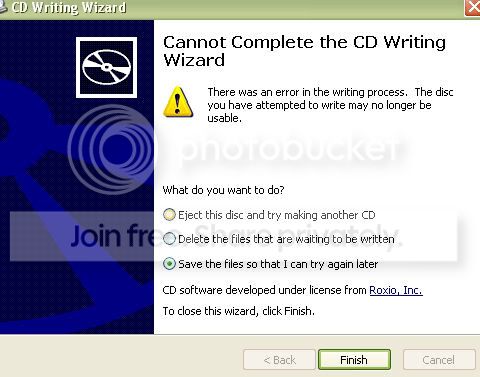
2225252.jpg


I have tried everything I can think of to fix it, but nothing seems to work, or I am doing it wrong. Quite frankly, I am so stressed with it now that I think if it weren't for all the important stuff I need to burn, I would throw the ****** think out the window.

I am also worried because I have tried to do a backup (onto floppies, as obviously burning discs is not an option)and that won't work either :eek: I thought if I could back up, then I could use the instillation disc to wipe the :C drive and start over :shrug:

:help: PLEASE!

EDIT :lol: someone has my kind of imagination when it comes to swear words! Nice work on the filter ;)
 
not a very technical answer but I have a batch of dvds that will fail every time if the machine is set to "fastest speed" for writting. If I do it at half the top speed, it works fine.

If you've not tried slowing down the write speed, it could be worth a go. :shrug:
 
Good advice - I never record on the fastest speed the CD/DVD is supposed to go at. I normally stay at about 24X for a CD and I only have an 8X DVD recorder so I stay at 4X speed for those. Also I tend not to do anything else with the PC while the disc is writing, not even web browsing, just in case the RAM suddenly gets taken off the recording process. I know the newer computers should be able to handle more tasks at once but I would still err on the side of caution.
 
No it's not the speed, I tried a few different speeds, from the fastest to the lowest, and still the exact same message. I even tried downloading some different CD burner software's, only one of them gave a different ending It appeared to have worked, but when I put the disc into another computer (hubby's work laptop) there was nothing on the disc. I thought it might have been the cheap Tesco's own brands disc's at first, so I splashed out on some Phillips ones at the weekend. But still the same problem :(
 
Try using Nero Burning Rom.... At the max selectable. Always works for me.
 
Jo

Its not an easy fix and may need some pretty low level digging.

Have a look at a couple of these links and see if anything there applies to you

http://SPAM/3cpewx

http://support.microsoft.com/kb/324129

http://SPAM/2ufa3q

It would help us if we knew what OS you're using (although I'm guessing XP by the screen shots) and which program you're using to burn cds. These issues are tricky to pin down and will often relate to the most unlikely causes - eg have you installed any new anti-virus software recently? Norton appears to be a culprit. So does having 2 or more cd burning progs on your pc, especially if Roxio is one of them.
 
i had this trouble earlier is your cd scratched??

i had to go buy a cd from the shop to use to put my pictures on

the error message means there is something wrong with the cd you are using
 
the error message means there is something wrong with the cd you are using

No it doesn't. It means stuff all. It gives no clues. That's Microsoft for you. The least likely culprit is the cds. The most likely problem is a driver conflict. The next likely is a dead cd drive. The cds are not an issue.
 
Jo

Its not an easy fix and may need some pretty low level digging.

Have a look at a couple of these links and see if anything there applies to you

http://SPAM/3cpewx

http://support.microsoft.com/kb/324129

http://SPAM/2ufa3q

It would help us if we knew what OS you're using (although I'm guessing XP by the screen shots) and which program you're using to burn cds. These issues are tricky to pin down and will often relate to the most unlikely causes - eg have you installed any new anti-virus software recently? Norton appears to be a culprit. So does having 2 or more cd burning progs on your pc, especially if Roxio is one of them.

I'm using windows XP SP2, I have used windows media player in the past to burn disc's, otherwise just the burner wizard. I did download some other burners a while ago though, but again that was because of this problem, so the problem was already there before I did that. I'm sure I had Roxio easy CD creator at one point, but I can't find it on my program files anywhere now :shrug: I wonder if that's the problem? But the roxio site offers no help with that... updates don't work cause it doesn't find the original on my computer.

Well I tried all of those links and nothing helps. The last one .. the guy seems to have the exact same problem as me (apart from the fact he has some of his burns succeed) everything else is almost identical.

I can see that I will have to go out and buy easy CD creator or something, and completely reinstall :( I'll try uninstalling every other burner first just in case.

Thanks for trying to help Mobilevirgin :)
 
The most likely problem is a driver conflict. The next likely is a dead cd drive. The cds are not an issue.

Totally agree. It'll be one of the above as you've already ruled out recording speed, burning software and medium. If its your main machine, burners are dirt cheap these days. If it's a laptop then a bit more pricey i'd guess !
 
It does sound like either a driver conflict or dead burner. Although in defence of THC, Windows will throw up that same message when the discs themselves are effed. Thats the problem, the message gives no indicators of actual cause.

Not much consolation JO, but my lappy is on its second knackered DVD burner....I wouldnt mind, but I rarely burn DVD's, or CD's or even use prewritten discs. These days I always have to do that either from his machine, or the old desktop. :bang:
 
you might take a peek at the cd drive
maybe a speck of dirt on the lens?
 
I'm with gwocni, try Nero, it's designed for the job, cheap to buy and has never once let me down.
 
Hi
I have had this problem before and apparently it was due to cache or something being full :thinking:

I now use nero or such like and never have a problem.
As you can guess I am not very PC technical either lol.

hope you sort it

Pat
 
No, none of that works :(

I guess I will have to buy another re writer then? Oh well.

Thanks so much everyone for trying to help though. I really do appreciate it :)
 
Just before you buy a new burner I would download a trial version of Nero from their site and try that. Failing that if you borrow another burner from a friend and literally hang it on the wires taken from your own (doesn't have to be mounted) you can rule out/in a dodgy burner.

David.
 
I tried Nero and it still doesn't work. I don't know anyone with a burner to borrow :shrug: I think I'll probably get someone to look at it before I do anything drastic.
 
Hi,

if you want a new CD/DVD burner it will only be about £23 all in so not too drastic if need to replace it. I had the same problem a while back with a Philips burner and in the end after all the hassle of re-installing software, drivers, wasting loads of time, I binned it and bought a new NEC one, worked right away, so the burner you have might well be dead and the easiest thing might be just to replace it, the Philips one I had was only months old and it still gave in.

Mike.
 
I had the exact same problem at the end of last year - it's so bloody infuriating :bang: After weeks of farting about trying different CD's, drivers, speeds, programmes etc, I bought a new CD re-writer and hey presto! everything works ok now :)

I think it was about £20 or so from PC World (I needed it in a hurry!), and I even fitted it myself (this is coming from someone who knows diddly squat about PC's but it was very easy and straightforward).
 
Oh that's good to know! Last time I bought one was about 6 years ago when they didn't come built in as standard (shock horror), that one cost me £149.99 and that was the cheapest one :lol: £20 aint bad at all. Thanks guys :)
 
Back
Top