We looked at those the other day (wife and I) can't remember which shop thoughJust bought an Asus zen book duo, has an extra half height screen to house frequently used editing tools, great for editing on the go but I’d still want to edit on a large screen for crucial stuff.
So far I’m really pleased.
The thing about a ‘perfect laptop’ is that it doesn’t exist. You need 2 screens and a lot of hdd storage for a photo PC, and those things will never be good enough on a laptop while maintaining portability, so you might as well accept the compromise and buy ‘good enough’.


You are using an out of date browser. It may not display this or other websites correctly.
You should upgrade or use an alternative browser.
You should upgrade or use an alternative browser.
Any thoughts on this laptop?
- Thread starter Adamcski
- Start date

Phil V
Suspended / Banned
- Messages
- 26,303
- Name
- Phil
- Edit My Images
- No
So far all I can say is that it’s interesting.We looked at those the other day (wife and I) can't remember which shop though
John Lewis that's where it was and the wife wondered why it had that extra screen bit. But even the 32gb model of that is £2999 at John Lewis, so the deal above isn't too bad overall. It does come with 3 yr warranty, 2 year collection, repair and return, 2 years parts and 3 years labour also...So far all I can say is that it’s interesting.
I can also plug it into the 34" monitor upstairs and run steam games on it lol
Last edited:
Phil V
Suspended / Banned
- Messages
- 26,303
- Name
- Phil
- Edit My Images
- No
I’ve just got a 16gb one for £630 from Amazon warehouseJohn Lewis that's where it was and the wife wondered why it had that extra screen bit. But even the 32gb model of that is £2999 at John Lewis, so the deal above isn't too bad overall. It does come with 3 yr warranty, 2 year collection, repair and return, 2 years parts and 3 years labour also...

And 16gb is fine unless you’re editing files from a 60mp camera.
Last edited:

Cagey75
Suspended / Banned
- Messages
- 17,146
- Name
- Keith
- Edit My Images
- No
Because we do, for quite a few reasons
I mean, that doesn't explain it!
 I could never get on with Apple, my daughter has an iphone and ipad but I'm all about Android and PC - different strokes ... but surely better specs just = better specs? for the monies
Which just shows that different people have different priorities - for me, a 16" laptop was the perfect option - it's only slightly larger than a 15" laptop (due to very narrow screen bezels), and was a comparable price (comparing models with similar CPU, Memory and 100% sRGB screens), at home it's usually docked to my dual monitors (to give a 3 monitor setup), but if I'm away from home the slightly larger screen makes the high resolution more practical.As mentioned above, 16" laptop screens aren't great for editing, nor are they particularly portable - and given how expensive they tend to be, you can get a smaller laptop and a decent monitor for the same price. FWIW I have a Philips 279P 27" monitor which works well with both Macs and PC with one cable connection for power/USB/video/network cable.
...

ancient_mariner
Moderator
- Messages
- 27,769
- Name
- Toni
- Edit My Images
- No
aren't curved monitors a no no in the photo editing world?
Sounds good - try editing on it (might be worth calibration first though).

Craikeybaby
Suspended / Banned
- Messages
- 7,590
- Name
- Lewis
- Edit My Images
- Yes
5 years ago I would have agreed with you (although I was happy to have the lower spec, with my preferred software), but the Apple ARM SoCs are way ahead in performance, and especially performance on battery power than anything available in a PC laptop.I mean, that doesn't explain it!
Cagey75
Suspended / Banned
- Messages
- 17,146
- Name
- Keith
- Edit My Images
- No
5 years ago I would have agreed with you (although I was happy to have the lower spec, with my preferred software), but the Apple ARM SoCs are way ahead in performance, and especially performance on battery power than anything available in a PC laptop.
If that's important to you I can get it, but battery life doesn't matter to me when it comes to my main 'hub' as it's just always plugged in - My Android phone will last a couple days between charges as I don't tend to use it for much outside of calls/random boredom browsing/ the odd photo and the odd sneaky game of Marvel snap at work
 I do pretty much everything beyond that on my PC. I have a decent enough set up for my needs, 27" curved 1440p capable monitor, Ryzen 2600x, 16GB RAM, GTX 1660, 1.5TB SSD cap - cost a LOT less than anything mentioned here and I play the odd high end game at high settings, edit using both LR and PS, often switching between both and it never stutters - If I need to up anything it'll be to extra RAM and at some point [when games become a lot more power hungry] a better gpu
Last edited:
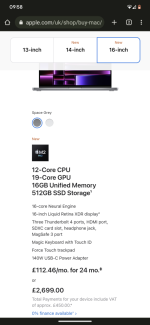
Well even the base model 16" MacBook Pro with 16gb ram and 512 GB HD is £2700 so a chunk over the costs of the above set up and would be a whole new system for me. £700 is a decent chunk of change to a monitor upgrade or another lens 

Nikon f1.8
Suspended / Banned
- Messages
- 1,724
- Name
- Paul
- Edit My Images
- Yes
got mine for less than that and it has the 1Tb ssd in it.Well even the base model 16" MacBook Pro with 16gb ram and 512 GB HD is £2700 so a chunk over the costs of the above set up and would be a whole new system for me. £700 is a decent chunk of change to a monitor upgrade or another lens

John Lewis one and that's the 2021 M1 sorry I was looking at the M2 version
So a 2021 MacBook Pro is still more than the laptop set up, more expensive and has older parts than the newer systems.
Why do they make them so expensive?
So a 2021 MacBook Pro is still more than the laptop set up, more expensive and has older parts than the newer systems.
Why do they make them so expensive?
Attachments
Last edited:
ancient_mariner
Moderator
- Messages
- 27,769
- Name
- Toni
- Edit My Images
- No
Why do they make them so expensive?
0wn design exclusive chipset that performs better than the equivalent PC chipset in many ways, high purchase price helps maintain the 'desirability' of the goods to make apple products aspirational, high profit margains to keep Apple as one of the wealthiest companies on the planet.
ancient_mariner
Moderator
- Messages
- 27,769
- Name
- Toni
- Edit My Images
- No
exclusive chipset that performs better than the equivalent PC chipset in many ways.
That's the only thing then lol.
I wouldn't call having anything Apple / Amazon / Google an aspiration of mine lol
I've owned Apple hardware and there are some good aspects to their design, though they've also made some very poor design choices indeed in the past. But having had higher-end PC hardware at the same cost as the Apple stuff I'd probably choose PC kit in future for the upgradeability of storage. The exception would be if I wanted a true ultra-book with long battery life - the Macbook air pretty much wins here.
I had the original Iphone and the Iphone 3G and then moved to Android and specifically Google afterwards.
I try not to start a debate on Apple vs Google, or Audi vs BMW or Rolex vs so and so, people tend to bang the drum about what they have and what they subscribe to and that is to be expected. What one likes and thinks is great, the other thinks is terrible. My brother is an Apple Ecosystem user but he recently purchased a gaming laptop to run a scanner for work (dentist). He loves how it all links together but admits "its expensive for what it is"
My household and family are google users, phones, photos, drive, calendar the lot so I am unlikely to switch over regardless of the Apple guy telling me that his watch unlocks his computer and it saves so much time...(I'd just get out of bed 10 seconds earlier).
My needs were pretty simple, a larger laptop screen than 13.5 inches and something more powerful than I have now. I do not need or want a full desktop although a separate screen may get some use, but again limited. I am not a pro, but a 40 year old hobby guy
So for my needs, I think a 16" laptop would be fine (I am typing the out on what was a £3k Microsoft Surface Book thingy that I had from work) so I can see the difference in 16" and 13.5".
Anyhow, back to work and searching for reviews.
I try not to start a debate on Apple vs Google, or Audi vs BMW or Rolex vs so and so, people tend to bang the drum about what they have and what they subscribe to and that is to be expected. What one likes and thinks is great, the other thinks is terrible. My brother is an Apple Ecosystem user but he recently purchased a gaming laptop to run a scanner for work (dentist). He loves how it all links together but admits "its expensive for what it is"
My household and family are google users, phones, photos, drive, calendar the lot so I am unlikely to switch over regardless of the Apple guy telling me that his watch unlocks his computer and it saves so much time...(I'd just get out of bed 10 seconds earlier).
My needs were pretty simple, a larger laptop screen than 13.5 inches and something more powerful than I have now. I do not need or want a full desktop although a separate screen may get some use, but again limited. I am not a pro, but a 40 year old hobby guy
So for my needs, I think a 16" laptop would be fine (I am typing the out on what was a £3k Microsoft Surface Book thingy that I had from work) so I can see the difference in 16" and 13.5".
Anyhow, back to work and searching for reviews.
So coming back to this.
I've looked at the Asus ProArt 24/27 inch monitors. How do these fair? I will still grab a laptop as I am into gaming with my son.
I'm having fun and games trying to link my Spectre x360 to my MSI gaming monitor (probably don't have the correct USB C cable). I attached a work laptop to my gaming monitor no problem but it was the HDMI as that laptop has hdmi ports.
I was thinking, grab a 24-27 Asus pro art monitor and establish which cable I need to link current laptop to it. Then later on when I get the gaming laptop I can just use HDMI anyway.
This was one of them:
I've looked at the Asus ProArt 24/27 inch monitors. How do these fair? I will still grab a laptop as I am into gaming with my son.
I'm having fun and games trying to link my Spectre x360 to my MSI gaming monitor (probably don't have the correct USB C cable). I attached a work laptop to my gaming monitor no problem but it was the HDMI as that laptop has hdmi ports.
I was thinking, grab a 24-27 Asus pro art monitor and establish which cable I need to link current laptop to it. Then later on when I get the gaming laptop I can just use HDMI anyway.
This was one of them:
ASUS PA247CV ProArt Full HD Monitor, 24”, Black/Silver
Buy ASUS PA247CV ProArt Full HD Monitor, 24”, Black/Silver from our Monitors range at John Lewis & Partners. Free Delivery on orders over £50.
www.johnlewis.com
Last edited:
ancient_mariner
Moderator
- Messages
- 27,769
- Name
- Toni
- Edit My Images
- No
I was thinking, grab a 24-27 Asus pro art monitor and establish which cable I need to link current laptop to it.
You need a USB C to displayport cable:
The 24" version you linked is only 1080P, which makes for a lumpy experience, but the 27" version in 4K. My preference is 1440P for 27" screen - neither too pixellated nor too small.
Thanks @ancient_mariner.
I do wonder how the world managed prior to 4k lol. I bet when 1080p came out it was the best thing ever. Now everyone wants 4k plus. I should have added that 24" was pretty much the maximum I would be looking for as I already have some normal monitors set up on the desk for work and space is a premium as a hobby guy.
I assume (possibly incorrectly) that a usb c to hdmi would give the same result?
I do wonder how the world managed prior to 4k lol. I bet when 1080p came out it was the best thing ever. Now everyone wants 4k plus. I should have added that 24" was pretty much the maximum I would be looking for as I already have some normal monitors set up on the desk for work and space is a premium as a hobby guy.
I assume (possibly incorrectly) that a usb c to hdmi would give the same result?
Last edited:
ancient_mariner
Moderator
- Messages
- 27,769
- Name
- Toni
- Edit My Images
- No
I do wonder how the world managed prior to 4k lol
My first decent monitor was a 17" Panasonic capable of 1024 X 768 in 1997 at a cost of around £460. The thing about CRT screens is that they looked clearer and smoother than LCD with its blocky pixels.
HDMI can't handle high resolution i.e. 4k like displayport IIRC.
Phil V
Suspended / Banned
- Messages
- 26,303
- Name
- Phil
- Edit My Images
- No
When 1080 came out we weren’t using 27” screens.Thanks @ancient_mariner.
I do wonder how the world managed prior to 4k lol. I bet when 1080p came out it was the best thing ever. Now everyone wants 4k plus. I should have added that 24" was pretty much the maximum I would be looking for as I already have some normal monitors set up on the desk for work and space is a premium as a hobby guy.
I assume (possibly incorrectly) that a usb c to hdmi would give the same result?
The more I consider these options the more I get confused and just think stick with my little 13.5 inch computer screen lol.
So before I forget the whole thing, I'm looking for a 24" 4k 100srgb screen that I use USB C to display out to connect to.
I thought HDMI would have been good as that what we generally use for TV connections.
This photograph thing can be complex. Might just buy my gaming laptop and game on it lol
So before I forget the whole thing, I'm looking for a 24" 4k 100srgb screen that I use USB C to display out to connect to.
I thought HDMI would have been good as that what we generally use for TV connections.
This photograph thing can be complex. Might just buy my gaming laptop and game on it lol
Last edited:
ancient_mariner
Moderator
- Messages
- 27,769
- Name
- Toni
- Edit My Images
- No
I thought HDMI would have been good as that what we generally use for TV connections
HDMI is an infotainment standard that carries encoded video and audio originally designed to stop people recording DVDs etc. The most recent versions are better, but aren't designed for high data throughput required for high resolution.
For editing *I find* the best screen size 27-28" and 1440p. My previous 24" screen was 1920*1200 (i.e. better than 1080p) and was a little cramped. I briefly had a 30" 4k screen and found it too big with details too small, though some love that kind of detail.
I edit on an iPad, Lightroom is super fast on it (admittedly the 40mp of the X-H2 while i had it to try were noticeably slow to load but that was a newest iPad Mini not an M1 variant which are much faster and have more RAM).
Only to say that a base Mac Mini with 16GB RAM and 1TB storage or a Macbook Air M1/M2 with same is perfect for editing and does not cost 2k...
I also edit on my MBP 14" which I have for software development which runs DBs/VM/RD sessions and have never heard the fan or noticed it slow down. My top spec Thinkpad at work on the other hand....
Also pixel density of 4k on 24" would be too high you'd have to scale otherwise you won't be able to see a thing, and Windows scaling is pretty pants (though same goes for OS X when the scaling is not linear and to achieve that there you need 5K res displays)
Only to say that a base Mac Mini with 16GB RAM and 1TB storage or a Macbook Air M1/M2 with same is perfect for editing and does not cost 2k...
I also edit on my MBP 14" which I have for software development which runs DBs/VM/RD sessions and have never heard the fan or noticed it slow down. My top spec Thinkpad at work on the other hand....
Also pixel density of 4k on 24" would be too high you'd have to scale otherwise you won't be able to see a thing, and Windows scaling is pretty pants (though same goes for OS X when the scaling is not linear and to achieve that there you need 5K res displays)
Last edited:
Nikon f1.8
Suspended / Banned
- Messages
- 1,724
- Name
- Paul
- Edit My Images
- Yes
^^^^For editing *I find* the best screen size 27-28" and 1440p.
This, I have two dell 27" 2560 x 1440 displays and they are great for editing, text is not too small and the colours are spot on. 4 and 5K screens make the text tiny. The icons are way too small in the apps.
ancient_mariner
Moderator
- Messages
- 27,769
- Name
- Toni
- Edit My Images
- No
The other thing worth mentioning is that very high res small screens make it harder to judge sharpness and fine detail, often flattering an image and giving a false sense of sharpness.
Well I've just spoken to a chap at WEX who was very helpful.
He explained a few things and suggested I use my existing monitor as he and a few there use curved screens without issue.
I believe the below is my existing monitor but will check the box as I've had it a year or two.
 www.msi.com
And it is: True colors – DCI-P3 90% & sRGB 122%
So I may just forget it and use this screen. Getting fed up with not knowing which way to turn lol.
Looking on the back it has:
2* HDMI.
1* USb c with some sign next to it.
2* square usb ports.
A blue port and finally what looks to be a display port for the cable @ancient_mariner kindly linked me to.
So I will order that cable and see what happens using the existing laptop.
Monitor settings allows me to alter between, professional, user, reader, cinema, designer and HDR. All of which alter the colour and screen. So designer looks like the laptop and HDR looks overkilled in Photoshop lol
He explained a few things and suggested I use my existing monitor as he and a few there use curved screens without issue.
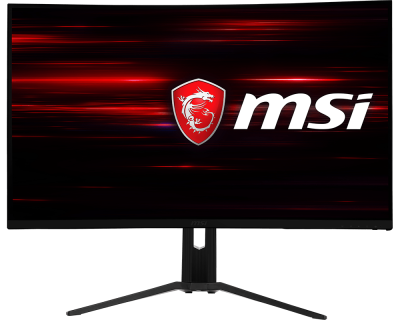
I believe the below is my existing monitor but will check the box as I've had it a year or two.
MSI Optix MAG321CQR | RGB LED WQHD Curved Gaming Monitor
We are honored to introduce our latest MAG series gaming Monitor - MAG321CQR. It features 144Hz refresh rate and 1ms response time to make the gameplay more smooth, a curved display, WQHD resolution and MSI Mystic Light to give you more game immersion.
www.msi.com
And it is: True colors – DCI-P3 90% & sRGB 122%
So I may just forget it and use this screen. Getting fed up with not knowing which way to turn lol.
Looking on the back it has:
2* HDMI.
1* USb c with some sign next to it.
2* square usb ports.
A blue port and finally what looks to be a display port for the cable @ancient_mariner kindly linked me to.
So I will order that cable and see what happens using the existing laptop.
Monitor settings allows me to alter between, professional, user, reader, cinema, designer and HDR. All of which alter the colour and screen. So designer looks like the laptop and HDR looks overkilled in Photoshop lol
Last edited:
ancient_mariner
Moderator
- Messages
- 27,769
- Name
- Toni
- Edit My Images
- No
And it is: True colors – DCI-P3 90% & sRGB 122%
Now that's a good spec. I'd probably try Professional or User modes, but I'd probably also buy a calibration device to set it up so that you'll have an idea of how things might look on other screens or as prints. Hope it works well for you.
Now that's a good spec. I'd probably try Professional or User modes, but I'd probably also buy a calibration device to set it up so that you'll have an idea of how things might look on other screens or as prints. Hope it works well for you.
Got a photography buddy who comes to my club who has a spider thingy and he will let me borrow it.
So, I will order that wire and see if the current laptop links up.
I'll buy the gaming laptop anyway and then have the best of both worlds.
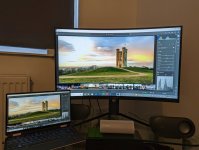
Interestingly, the chap I spoke to at WEX builds PCs and asked me about the spec I was considering and he laughed and said "going high end then, that will last you years for photography" so fingers crossed
ancient_mariner
Moderator
- Messages
- 27,769
- Name
- Toni
- Edit My Images
- No
Very good - Broadway tower is a nice place.
Yes it is.Very good - Broadway tower is a nice place.
I need to play around with the settings a little but it's a start
Got the settings to match the laptop screen yesterday - interestingly it was via the USER profile so it must match / mirror the laptop display.
Little laptop has no issues, no lag (currently) and I ran a few 5/6 image stacks on Lightroom and Affinity and all was good. So for now, I can use what I have and go from there.
Saved me a few quid anyway
Thanks for all the comments folks.
Little laptop has no issues, no lag (currently) and I ran a few 5/6 image stacks on Lightroom and Affinity and all was good. So for now, I can use what I have and go from there.
Saved me a few quid anyway
Thanks for all the comments folks.
Last edited: