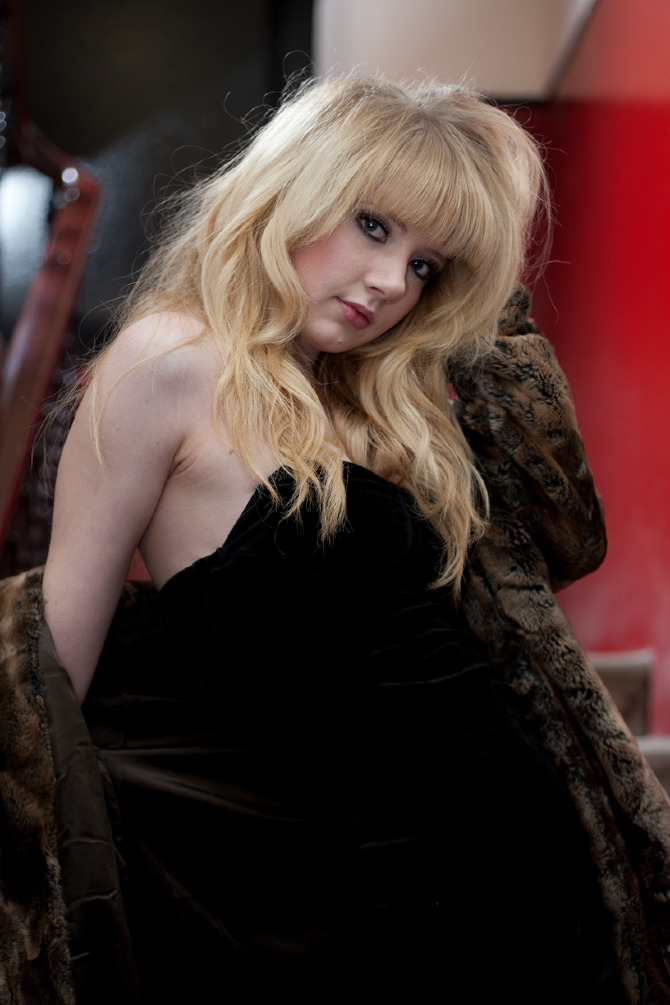
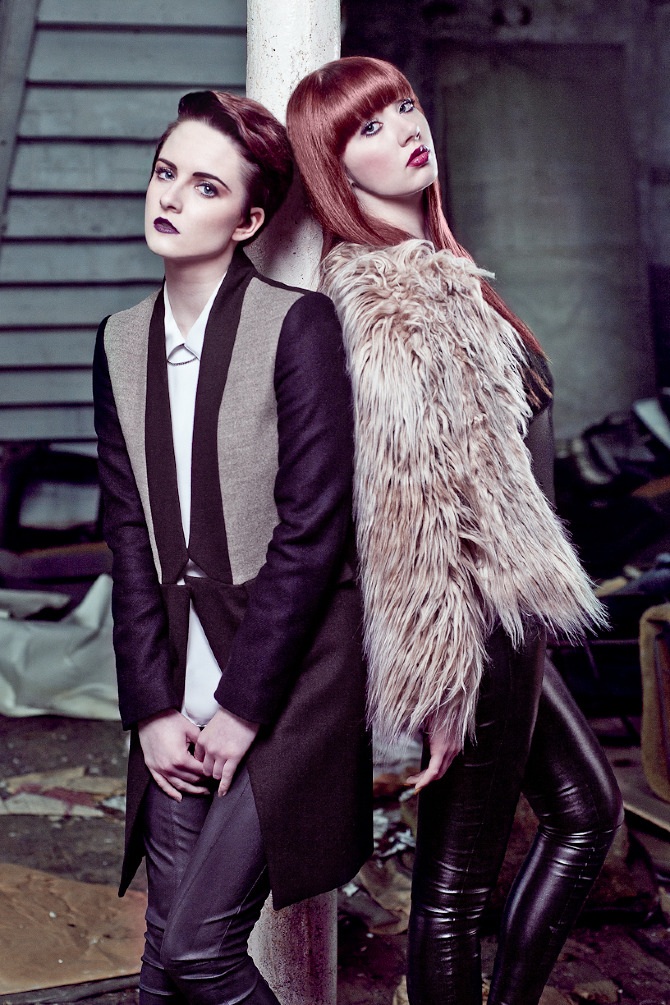
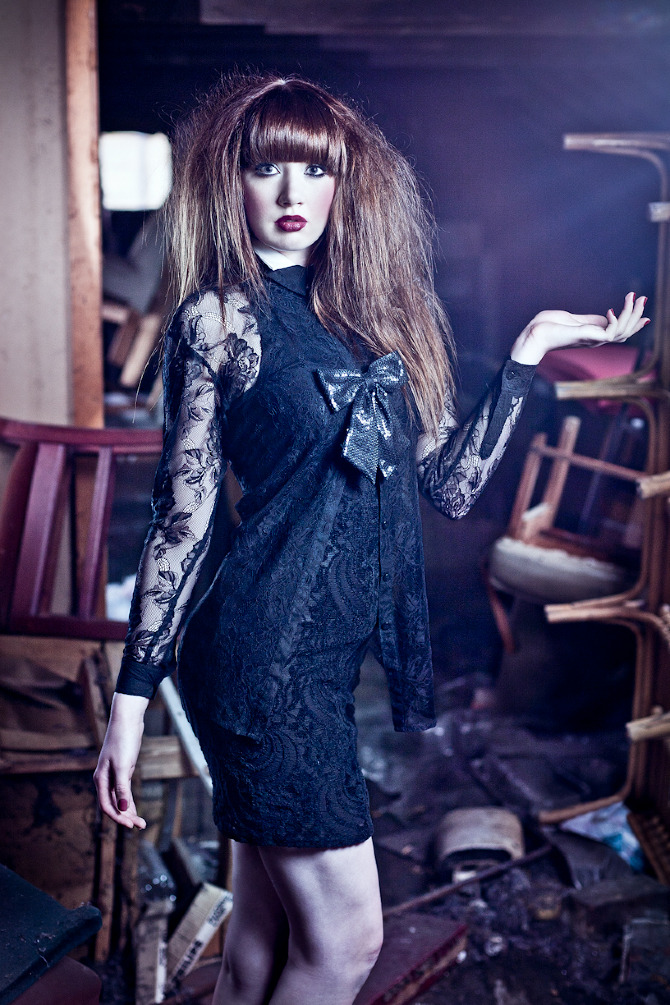
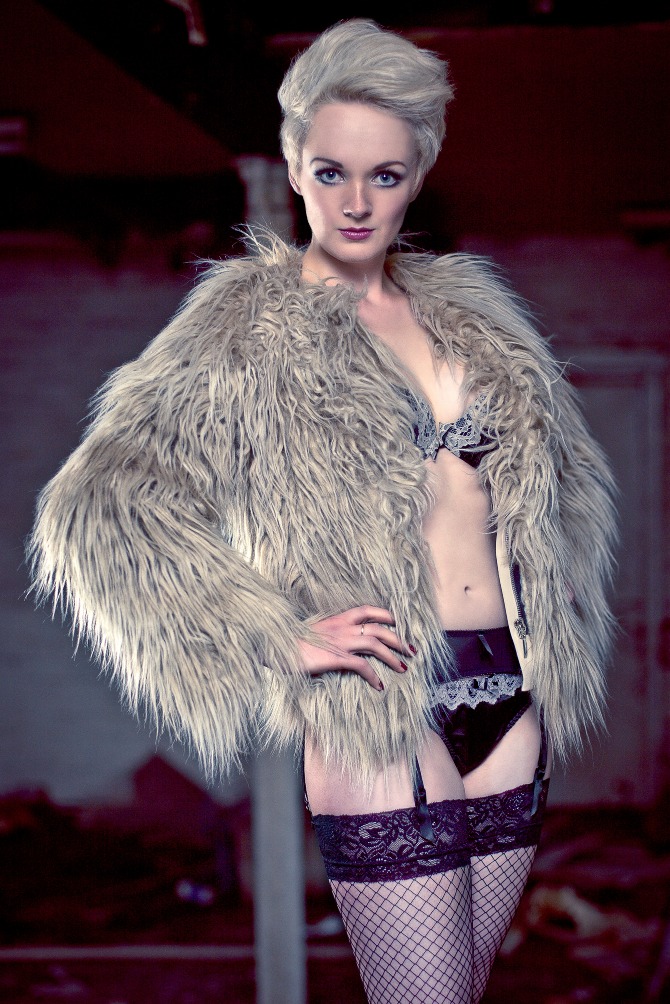
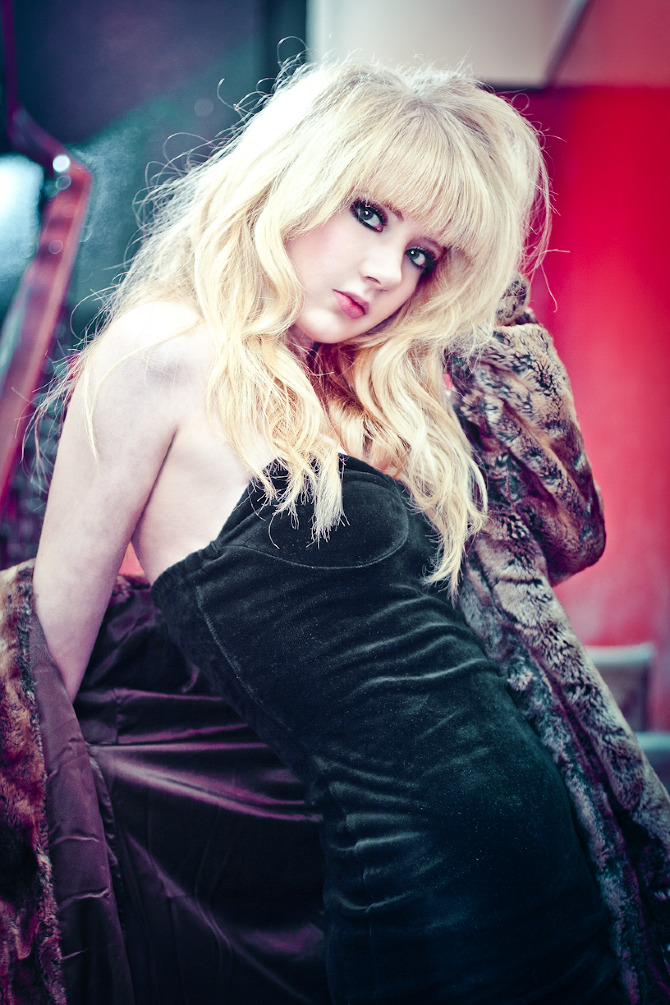
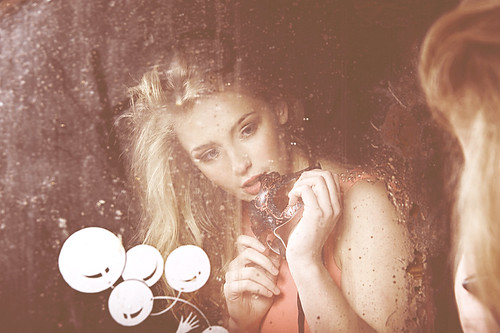
Any PP geniuses tell me this technique?

Not a clue although I agree it is a lovely process, pity the photographer wasn't credited we might have been able to email him/her to ask. What struck me though was what a completely and utterley pretentious load of old *******s the blog is, far too much time on her hands and more stolen photography than you can shake a stick at to boot.
Just Sayin :)
 
Looking at the 'Take a Bow' section (albeit on my phone) ........

Looks like a lot has gone into the lighting to begin with. There are some layers at work here and also some textures.
 
Not a clue although I agree it is a lovely process, pity the photographer wasn't credited we might have been able to email him/her to ask. What struck me though was what a completely and utterley pretentious load of old *******s the blog is, far too much time on her hands and more stolen photography than you can shake a stick at to boot.
Just Sayin :)

I think it's Neil Craver...the photographer that is, the images definitely aren't. Anyway that name's in the blog blurb...
 
How did you figure it out? Great photographer anyway

you can search google images for an image- you just upload the image and it searches for where ever the image is used

yep I just blew your mind...


as for the PP- it's not hard, but i'm not going to tell you, not for free anyway
 
How did you figure it out? Great photographer anyway
open two browsers, one with the image and one with google on, in the google browser click on images then go back to the image and click and hold then drag it on to the google page and over the search box where it says image, let go and it will find that image on the net, as for the pp its quite easy to find out how it's done but 90% of that image is good lighting.
 
you can search google images for an image- you just upload the image and it searches for where ever the image is used

yep I just blew your mind...


as for the PP- it's not hard, but i'm not going to tell you, not for free anyway

So you don't know then :)
 
Mr Sarcasm.Excellent way to help out your fellow pros. Ive been given some advice anyway.:nono:

i'm sure mcdonalds wouldn't give you their secret burger recipe, nor would coke, nor would anyone with a covetable secret


if you send me an image i'll retouch it for you in that style so you can see for yourself (but people are right, the lighting has to be a certain way to really sell the effect, also a grand location and a beautiful model helps a lot)


but i'm not going to just tell you how it's done- it took me many years of reading and experimenting to figure that out
 
Last edited by a moderator:
i'm sure mcdonalds wouldn't give you their secret burger recipe, nor would coke, nor would anyone with a covetable secret


if you send me an image i'll retouch it for you in that style so you can see for yourself (but people are right, the lighting has to be a certain way to really sell the effect, also a grand location and a beautiful model helps a lot)


but i'm not going to just tell you how it's done- it took me many years of reading and experimenting to figure that out

BIB-Well I had two out of three;)

I appreciate your last paragraph but not like it hurts to give pointers if not the full technique. Like a link to a tutorial or similar?
 
Last edited by a moderator:
As with any style of processing there will not be a single press of a button action or a tutorial that will tell you how it's done, that style is probably made
up of many different tutorials on the net, it's a case of practice practice practice.

I can see where Clark is coming from, the internet is far too easy to find things out or ask someone how something is done, I'm sure if you had your own
processing style that is different to others and honestly if you were asked if you could write up a tutorial would you, I mean this is your living,
would you really tell the world how you do it.
 
BIB-Well I had two out of three;)

I appreciate your last paragraph but not like it hurts to give pointers if not the full technique. Like a link to a tutorial or similar?

I guess my 'pointer' was that professional retouchers exist, and know how to emulate any 'look' you want, or can find the perfect look for your photos, for probably a lot cheaper than the cost you'd indure spending your time learning how to do this technique

if I want my suit taking in I go to the tailors and spend £20, I don't go out a a buy a sewing machine and learn how to use it (I admit that a suit is not a photo, and that a suit only gets altered once a year, but the analogy rings true)

a good retoucher is worth their weight in gold, and just the outsourcing of images can be a godsend to a busy studio- it's amazing that my best clients now didn't see the value of a retoucher until I literally said 'this is what I do and how it can help you, if you don't see the advantages to you then you are blind', and suddenly it clicked for them and now i'm indespencible

to paraphrase a quote
"good photos are usually made by a person who thinks that they alone are the best at everything, but the greatest photos are made by a team where everyone knows they are the best at something"


this will tickly your fancy
http://www.brunodayan.com/htm/index2.htm
go on fashion 2, and fashion 3 (NSFW unless you work for vogue or something)


if someone on this thread posts up an image but jpg is fine) in the style that will suit the processing techniques discussed in the thread- I will retouch it and write up a report on how I did it
 
Last edited by a moderator:
OMG! Fashion 3 tickles me immensely and depresses me when I look at my work ha.

good isn't it ;)


it seems impossibly good, but it is achievable

I went from shooting in my bedroom with a kit lens and a desk lamp to work like this
0J9W4678-2-2.jpg


and then finally on to work this good

0J9W4336-Edit.jpg

0J9W4364-Edit.jpg

0J9W4759-Edit.jpg


and the truth is that most of the work is in the retouching- there is only so much you can physically do in camera, even with the best model and an arrary of lights, some looks just have to be done with post production

I mean see for yourself, even some striking photos look very flat and plain (or overly contrasty, or just ugly) without post production- (ok I know I could have got the exposure better in camera but shooting models is all about flow, you have to just go with it and you can't keep stopping to adjust flash power, the model has to keep active and interested, but even with perfect exposure you wouldn't get that kick, or the colour without PP)


even the image I posted up as the 'ok' image was later retouched into something beautiful when I went back through my archive looking for shots to edit

0J9W4678-Edit-2-2.jpg
 
Last edited by a moderator:
Email addresses and links to retouching services removed from the above posts.

MrJames, if you'd like to promote your retouching services to fellow photographers then I'm sure that admin would be happy to discuss the possibility of an advertiser's account with you . . . just hit the "contact us" button at the bottom of the page.
 
Excellent work James extremely jealous :)
Wheres the "how to" pic you were going to do? Where did you learn?

I meant that one of you guys on the forum would post up a picture and i'd retouch it

and I learnt by trial and error, practice, tutorials, 4 years at art school, and some time working for an agency as their retoucher

Email addresses and links to retouching services removed from the above posts.

MrJames, if you'd like to promote your retouching services to fellow photographers then I'm sure that admin would be happy to discuss the possibility of an advertiser's account with you . . . just hit the "contact us" button at the bottom of the page.

oh, ok that could be interesting actually- i'll look into it, thanks
sorry if I broke any rules, I don't feel I was advertising directly as it was all relevent to what was being said in the thread
 
I meant that one of you guys on the forum would post up a picture and i'd retouch it

and I learnt by trial and error, practice, tutorials, 4 years at art school, and some time working for an agency as their retoucher


oh, ok that could be interesting actually- i'll look into it, thanks
sorry if I broke any rules, I don't feel I was advertising directly as it was all relevent to what was being said in the thread

I'll email you a pic.Bit harsh mods dont think James was touting for work really :)
 
you can search google images for an image- you just upload the image and it searches for where ever the image is used

yep I just blew your mind...


as for the PP- it's not hard, but i'm not going to tell you, not for free anyway

Thats cool to know, thanks.
 
good isn't it ;)


it seems impossibly good, but it is achievable

I went from shooting in my bedroom with a kit lens and a desk lamp to work like this
0J9W4678-2-2.jpg


and then finally on to work this good

0J9W4336-Edit.jpg

0J9W4364-Edit.jpg

0J9W4759-Edit.jpg


and the truth is that most of the work is in the retouching- there is only so much you can physically do in camera, even with the best model and an arrary of lights, some looks just have to be done with post production

I mean see for yourself, even some striking photos look very flat and plain (or overly contrasty, or just ugly) without post production- (ok I know I could have got the exposure better in camera but shooting models is all about flow, you have to just go with it and you can't keep stopping to adjust flash power, the model has to keep active and interested, but even with perfect exposure you wouldn't get that kick, or the colour without PP)


even the image I posted up as the 'ok' image was later retouched into something beautiful when I went back through my archive looking for shots to edit
0J9W4678-Edit-2-2.jpg
Excellent work! Really good stuff :)
 
Legend has it that Pablo Picasso was sketching in the park when a bold woman approached him.

“It’s you — Picasso, the great artist! Oh, you must sketch my portrait! I insist.”

So Picasso agreed to sketch her. After studying her for a moment, he used a single pencil stroke to create her portrait. He handed the women his work of art.

“It’s perfect!” she gushed. “You managed to capture my essence with one stroke, in one moment. Thank you! How much do I owe you?”

“Five thousand dollars,” the artist replied.

“B-b-but, what?” the woman sputtered. “How could you want so much money for this picture? It only took you a second to draw it!”

To which Picasso responded, “Madame, it took me my entire life.”
 
Looks like fairly straightforward split toning: purples in the shadows, and an orange or blue in the highlights, possibly both.

Easy enough added to with some layers for texture in photoshop and a screen blending mode or two with a little blue or green, stick a layer mask on with a gradient (or brush it for more accuracy) like in MrJames's shots.

Any skin work will enhance the pic as well as a decent location/model
 
Looks like fairly straightforward split toning: purples in the shadows, and an orange or blue in the highlights, possibly both.

Easy enough added to with some layers for texture in photoshop and a screen blending mode or two with a little blue or green, stick a layer mask on with a gradient (or brush it for more accuracy) like in MrJames's shots.

Any skin work will enhance the pic as well as a decent location/model

Come again? :thinking:
 
Come again? :thinking:

Lightroom has a split toning tool if you use that, otherwise it can be easily replicated in Photoshop - youtube split toning :)

Also, look up blending mode on youtube - try adding two layers with satin applied, pick two different colours that work well (such as yellow and purple in this case). Bring the opacity down on the layers so it's just a hint of colour.

Next, look up layer masks on youtube so that the colours you've applied from above only apply to the bits of the photo that you want them to apply to - by adding gradients or by brushing it yourself.

With a decently lit photo to start with and a nice location for context, you get replicate those shots easily enough. Check out some decent (read:subtle) skin toning techniques just to add that nice finish and you'd be done!
 
Lightroom has a split toning tool if you use that, otherwise it can be easily replicated in Photoshop - youtube split toning :)

Also, look up blending mode on youtube - try adding two layers with satin applied, pick two different colours that work well (such as yellow and purple in this case). Bring the opacity down on the layers so it's just a hint of colour.

Next, look up layer masks on youtube so that the colours you've applied from above only apply to the bits of the photo that you want them to apply to - by adding gradients or by brushing it yourself.

With a decently lit photo to start with and a nice location for context, you get replicate those shots easily enough. Check out some decent (read:subtle) skin toning techniques just to add that nice finish and you'd be done!

Thanks, I had a play around with an image in an attempt at duplicating your advice ;)


mirror2 by john_mather, on Flickr
 
Thanks, I had a play around with an image in an attempt at duplicating your advice ;)


mirror2 by john_mather, on Flickr

nice job
want to post up the original for comparison?

contrast is perhaps a little low, i'd maybe brush in a tiny bit of extra contrast in the face just pop it has a little 'pop'

and I will post up those images you sent me, I've just been busy with client work- although you should have sent me this image to work on, it's more suited to these techniques than the 2 you sent me
 
Are you aware that some of the images to be found via this link are also in the blog posted by the OP? Just asking in case they are your work and you wanted to get them taken down.

No I didn't do the retouching for those

and i'm sure Bruno Dayan and his retoucher would actually welcome the unauthorized sharing of his images, after all sharing is advertising right

Bruno Dayan is hot topic right now, shooting for Louis Vuitton- and his popularity came from several important people seeing his work on blogs and tumblr's, I don't know why people are so afraid of people 'stealing' their work, you get nowhere from sitting at home policing your own work and making sure that no one sees your images
in fact I could do with some extra publicity so feel free to share :)
 
In all honesty I think low contrast works here. I have a feeling the high contrast version would look a little run of the mill, although I'd be happy to be proven wrong!
 
Back
Top