


- Messages
- 7,312
- Name
- Jeff
- Edit My Images
- No
Would love to hear from any illustrator experts who can help with the below...
I've not used the package much but am trying to learn a bit more of it.
In simple terms the problem is thus:
I've created a blank document (white background) and used the pen tool to draw a few shapes (on layer 1) which create a logo, the logo has a central area through which the white background comes between.
I've created a new layer, below layer 1 and drawn a large rectangle to fill the page in another colour - great the logo sits on top and the new colour comes through the previous white bits on the logo.
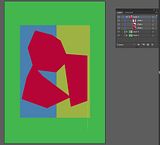
I now want to create another layer and fill with two coloured rectangles, but this one I want to sit below the logo layer, but above the background layer, BUT - I want to retain the background layer coming through the central part of the logo.
I've not used the package much but am trying to learn a bit more of it.
In simple terms the problem is thus:
I've created a blank document (white background) and used the pen tool to draw a few shapes (on layer 1) which create a logo, the logo has a central area through which the white background comes between.
I've created a new layer, below layer 1 and drawn a large rectangle to fill the page in another colour - great the logo sits on top and the new colour comes through the previous white bits on the logo.
I now want to create another layer and fill with two coloured rectangles, but this one I want to sit below the logo layer, but above the background layer, BUT - I want to retain the background layer coming through the central part of the logo.


