Beginner Another noob question

Carpy2001

Suspended / Banned
Messages
520
Name
Andrew
Edit My Images
Yes
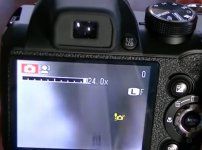
Hi all, I was out again today and have encountered an issue, when I zoom in more than 12X-15X no my bridge camera I get a little yellow camera appear on the screen, having looked in the manual it says it is an out of focus warning, the camera has 24X zoom so dont understand why this is happening. It happens in all the settings I use, ie full auto, apperture priority, shutter priority and maual mode, it also does not seem to matter how far away the object is that I am trying to focus on is, I tried it in my garden on objects from 10mtrs to a few houses away ayt aprox 30mtrs, and get the same out of focus displayed on screen. I know I am an idiot but, this seems a bit odd that it wont focus at what is stated as full zoom, any Ideas anyone please lol (apart from I need a new camera Pany fz1000 or fz 330).
Thanks Andy.
 
Thanks Dan never thought of that, I have just checked again and it was not in macro mode and is still doing it lol.
 
That is a stability or shake warning. When you use a longer focal length any camera shake is exaggerated and you have to shoot with a faster shutter speed to freeze that motion.
The camera is warning you of that you shutter speed is probably too slow.
 
Thanks everyone, sorry for the late reply my monitor died and I have had to borrow one for now. Dan that is the icon I get, I have been trying to play around to get rid of it again today, even if I put the camera in shutter priority mode and go up and down the shutter speeds it is still there lol, even tried in manual mode, and changing both the apetrure and shutter speed but it still wont go away lol, why does taking a picture involve so many different menus sometimes lmao, (apart from the obvious which is the user is a dumb ass that does not understand anything). Shooting at closer distances seems fine, just trying to shoot a distant object gets messy.
Thanks Steve some useful info on there.
 
Last edited:
Thanks everyone, sorry for the late reply my monitor died and I have had to borrow one for now. Dan that is the icon I get, I have been trying to play around to get rid of it again today, even if I put the camera in shutter priority mode and go up and down the shutter speeds it is still there lol, even tried in manual mode, and changing both the apetrure and shutter speed but it still wont go away lol, why does taking a picture involve so many different menus sometimes lmao, (apart from the obvious which is the user is a dumb ass that does not understand anything). Shooting at closer distances seems fine, just trying to shoot a distant object gets messy.
Thanks Steve some useful info on there.

The general rule of thumb for handheld photography is that the minimum shutter-speed should be equal to the reciprocal of the focal length. So if you were using a 500mm lens the minimum shutter-speed would be 1/500 of a second. You camera seems to have a zoom range of 24 -720mm, so I would suggest that at 720mm you use a shutter-speed of 1/800. I would also suggest that you turn off Digital Zoom if you have it activated.
 
The general rule of thumb for handheld photography is that the minimum shutter-speed should be equal to the reciprocal of the focal length. So if you were using a 500mm lens the minimum shutter-speed would be 1/500 of a second. You camera seems to have a zoom range of 24 -720mm, so I would suggest that at 720mm you use a shutter-speed of 1/800. I would also suggest that you turn off Digital Zoom if you have it activated.
Thanks, I will try to remeber that, I have the digital zoom turned off, I tried it once and the image was rubbish, all blured and out of focus, wont be using it again lol.
 
You’re missing some key points.

And this is why I always say that photography can’t be reduced to ‘settings’.

What you have is a very long zoom, so that’ll require a shutter speed of at least 1/1000 sec (probably 1/2000) and it’ll also have a fairly small max aperture, and relatively low max ISO. Those three facts mean that you’ll likely need a good amount of light to use the max zoom setting and not be warned about your shutter speed.

If you set max ISO and point your camera directly at the sky, that logo will disappear, it’ll also help guide you that whilst people bang on about the exposure triangle, they often miss out the salient part (for any given Exposure Value - ie amount of light)
 
Thanks everyone, sorry for the late reply my monitor died and I have had to borrow one for now. Dan that is the icon I get, I have been trying to play around to get rid of it again today, even if I put the camera in shutter priority mode and go up and down the shutter speeds it is still there lol, even tried in manual mode, and changing both the apetrure and shutter speed but it still wont go away lol, why does taking a picture involve so many different menus sometimes lmao, (apart from the obvious which is the user is a dumb ass that does not understand anything). Shooting at closer distances seems fine, just trying to shoot a distant object gets messy.
Thanks Steve some useful info on there.

The warning may never disappear at higher focal lengths. It's just warning you that there may be camera shake at the focal length you are at.
You can still take a photograph in whatever settings you have set,
 
So much to try and learn/remember, hope that I get there in the end lol, gets a bit confusing at times, having read a few things about this camera, it seem to be best used at low ISO (64-100) above ISO 200 they say the image starts to get really noisy. I have only been trying this photography game for a week, and already my brain hurts, to many types of cameras, to many leses, to many formats, to many options in menu's lol, as a newcomer to this world it is very confusing, I just know that I don't want to be carrying load of equipment around, I would like to for example, to take a picture of a flower, and then maybe see a bird in a tree and take a picture of that, but by the time I have seen the bird and changed the lenses the bird has gone lol. Sorry frustration creeping in, time for a coffe and relax for 10 minutes, then try again.
 
Last edited:
I agree with Phil about the exposure triangle. I did post my idea of an exposure circle or pie chart a while ago. It may, or may not, help :)

 
I just noticed I have had the camera on ISO 64 all the time, should I switch it to Auto 400 or auto 800???, I belive the numbers mean the camera will not go above that number.
 
I just noticed I have had the camera on ISO 64 all the time, should I switch it to Auto 400 or auto 800???, I belive the numbers mean the camera will not go above that number.
Put it on Auto 800. You’ll get an idea of what it’s capable of Aand then decide if it’s useful.
 
Thanks sphexx, I will do that and see how it goes, to be fair some of the pictures I get seem quite good, well to my eyes anyway lol.
 
I just noticed I have had the camera on ISO 64 all the time, should I switch it to Auto 400 or auto 800???, I belive the numbers mean the camera will not go above that number.

Personally, I wouldn’t use Auto ISO unless I was using Manual Exposure - shutter-speed and aperture being the critical settings.

At the end of the day it comes down to personal preference. You cannot tell by looking at a photograph what settings were used to take the image, so as long as you are getting the results that you are happy with then that is all that matters. How you got there is largely irrelevant. What settings work for one person don’t necessarily work for someone else.

Myself, I use Aperture Priority for most things - manually selecting both the aperture and ISO. For an image where I wanted to create motion blur I would use shutter priority - manually selecting both shutter-speed and ISO. I would NOT use Auto ISO when using one of the priority modes.
 
Thanks L320Rio, the problem for me is that to change ISO I have to go into the menu then select ISO and then select the speed, which as I am sure you can apreciate is a bit awkward, especialy if trying to photograph something like a squirrel on a tree branch that wont sit still for to long. Unfortunatley I also forget sometimes what I am doing and concentrate on the exposure meter on the screen, and use the aperure and shutter speed to make sure it is in the middle lol.
 
Personally, I wouldn’t use Auto ISO unless I was using Manual Exposure - shutter-speed and aperture being the critical settings.

At the end of the day it comes down to personal preference. You cannot tell by looking at a photograph what settings were used to take the image, so as long as you are getting the results that you are happy with then that is all that matters. How you got there is largely irrelevant. What settings work for one person don’t necessarily work for someone else.

Myself, I use Aperture Priority for most things - manually selecting both the aperture and ISO. For an image where I wanted to create motion blur I would use shutter priority - manually selecting both shutter-speed and ISO. I would NOT use Auto ISO when using one of the priority modes.

I don’t mean to be rude but it isn’t about what you would do but about what might be helpful to the OP. by his own account he finds it all confusing and may give up before he solves all the problems. It’s probably the case that he should set it on automatic and concentrate on composing his photos. He can study the EXIF at leisure and see what the camera has chosen and what worked and what didn’t but meanwhile enjoy taking pictures.
 
Personally, I wouldn’t use Auto ISO unless I was using Manual Exposure - shutter-speed and aperture being the critical settings.

At the end of the day it comes down to personal preference. You cannot tell by looking at a photograph what settings were used to take the image, so as long as you are getting the results that you are happy with then that is all that matters. How you got there is largely irrelevant. What settings work for one person don’t necessarily work for someone else.

Myself, I use Aperture Priority for most things - manually selecting both the aperture and ISO. For an image where I wanted to create motion blur I would use shutter priority - manually selecting both shutter-speed and ISO. I would NOT use Auto ISO when using one of the priority modes.
Personally I don’t call Manual with auto ISO ‘manual’. But that’s the crux of the difference of opinion.

If I’m choosing the aperture (the thing I care most about) all that really matters about my shutter speed is that I get a sharp shot! So I’m shooting myself in the foot by having to guess when the fixed ISO will make the SS be unworkable.

Likewise if I’m wanting a fixed SS (whether a long one or a very short one) if the aperture is unimportant why is the ISO important? It makes no sense.

Myself? I use Aperture priority most of the time - with no care what the camera decides is a reasonable balance of ISO and SS (decent minimum SS set). If I cared about those settings I’d shoot full manual and make all those judgements myself
 
Thanks L320Rio, the problem for me is that to change ISO I have to go into the menu then select ISO and then select the speed, which as I am sure you can apreciate is a bit awkward, especialy if trying to photograph something like a squirrel on a tree branch that wont sit still for to long. Unfortunatley I also forget sometimes what I am doing and concentrate on the exposure meter on the screen, and use the aperure and shutter speed to make sure it is in the middle lol.

Which is why you need to set the camera up in a way that works best for you.
 
Which is why you need to set the camera up in a way that works best for you.
I use my camera's customisation option to pop my ISO on a rear wheel easily accessible by my thumb. Works wonders!
 
Thanks everyone for your comments, some help and stick in my mind like the pie chart, some I am not sure about lol, but thats just me, slow old git, so all in all everything is as clear as mud. So out we go again and try something else lol, Oh and on the aperture priority, my camera says it has f3.1 at wide and f5.9 at tele, so why do I keep seeing a choice of f11 or f20 ???, like I said clear as mud, and the manual is no help either lmao.
 
Thanks everyone for your comments, some help and stick in my mind like the pie chart, some I am not sure about lol, but thats just me, slow old git, so all in all everything is as clear as mud. So out we go again and try something else lol, Oh and on the aperture priority, my camera says it has f3.1 at wide and f5.9 at tele, so why do I keep seeing a choice of f11 or f20 ???, like I said clear as mud, and the manual is no help either lmao.
The F3.1 is the widest aperture available at wide, and at tele it’s f5.9. That’s called a variable aperture zoom.

Photographers pay extra for a wider aperture (smaller number - shallower DoF) and more still for the wide aperture to be constant through the zoom range*.

Your smallest aperture (bigger number) aren’t often listed, but they’ll be available to you to use :)

* a Canon crop std zoom would be the 18-55 (f3.5-5.6), and an upgrade is the 17-55 2.8 (which has a fast 2.8 aperture throughout its zoom range. Both those lenses have the same f22 aperture when stopped down IIRC.
 
Lesson learned today lol, I was out in the local park trying to do what L320Rio mentioned about focal length and shutter speed being equal ie 500mm should be 1/500sec. When I got home and looked at my pictures, 95% of them were almost black lol. This has nothing to do with the advice given by L320Rio as it is correct. My zoom lens has 2 sets of numbers on it, on the left side it goes upto 500 but says Equiv. 135 in small letters, on the right it says focal length, I have been loooking at the left hand numbers, so when shootong at 300mm I was using a shutter speed of minimum 300, what I should have been doing is looking at the other side which would have said 53.8, no wonder my pictures were bad lol. But watching a video on youtube about this, it turns out L320Rio is correct, focal length and shutter speed being the same, but that is for a full size camera, apparently for a crop camera the shutter speed should be 2x the focal length, so shooting at 50mm should need a shutter speed of 100sec minimum lol.
 
Last edited:
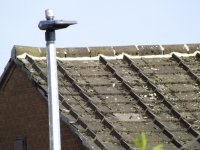
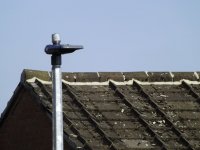
These 2 images were taken from the same place, using the same setting apart from shutter speed, both used, 96.1mm focal length (full zoom 24x), f/5.9 and ISO 100, the first was using 1/200sec, the second using 1/400sec.I was suprised at the difference.
 

Attachments

  • 1-200.JPG
    1-200.JPG
    143.3 KB · Views: 17
  • 1-400.JPG
    1-400.JPG
    101.1 KB · Views: 19
These 2 images were taken from the same place, using the same setting apart from shutter speed, both used, 96.1mm focal length (full zoom 24x), f/5.9 and ISO 100, the first was using 1/200sec, the second using 1/400sec.I was suprised at the difference.
When I was learning I found this a good way to pick up exposure knowledge. Leaving all the elements the same but one.

In your example, it may not seem like a lot in the scheme of things but you let twice as much light into the sensor at 1/200s as you did at 1/400s.

I promise, it all clicks eventually.
 
Thanks Adam-G, I have Adobe Photshop Express, the free version, I just clicked auto enhance on the pictures, and the change is huge, more colour and a slightly clearer image lol.
 
Thanks Adam-G, I have Adobe Photshop Express, the free version, I just clicked auto enhance on the pictures, and the change is huge, more colour and a slightly clearer image lol.
You'll notice that the closer you are to the correct exposure out of camera will mean the editing software will have to push less to get the correct results for you, usually resulting in better overall image quality.

Keep at it though, it can be overwhelming and frustrating at first but if you push through it you'll find your learning will accelerate.
 
Why on earth are you still missing photos by buggering about with ‘settings’.

Let the camera deal with the maths whilst you get on with making interesting pictures.

No camera invented can take interesting photos, no software can yet create interesting images. Use your human brain to do what no one or nothing else can possibly do. Creating images that show how you view the world.
 
These 2 images were taken from the same place, using the same setting apart from shutter speed, both used, 96.1mm focal length (full zoom 24x), f/5.9 and ISO 100, the first was using 1/200sec, the second using 1/400sec.I was suprised at the difference.
These two images also show one of the dilemmas that affect photographers.
If you look just at the front edge of the lamp-post, in the fist (lighter) shot, it's just plain white - with respect to that, the picture is too bright, and you've lost any detail, while in the second (darker) shot you can see the pattern in the metal - so much better you think at first.
Then look at the actual lap section - in the second (darker) shot, this is just a black blob, while in the first you can see some of the shape of it, a bit of reflection of the pole, etc.
You will often find situations like this , where there is no 'perfect' exposure - cameras have a limit on the range they can capture, and you have to decide what is important for your image.

Of course, as @Phil V said, the most important thing is making an interesting image - choosing what to shoot (and what to exclude).
As you are learning, initially just use Auto, then look at Aperture Priority and Shutter Priority once you are comfortable with framing a shot and selecting what is the primary point of focus.
 
Why on earth are you still missing photos by buggering about with ‘settings’.

Let the camera deal with the maths whilst you get on with making interesting pictures.

No camera invented can take interesting photos, no software can yet create interesting images. Use your human brain to do what no one or nothing else can possibly do. Creating images that show how you view the world.

Mainly because the camera would not focus at distance, not even on auto, hence the original post, I found out that the shutter speed was wrong for the focal length, like I said it was doing this even on auto, now I understand the equation between shutter and focal length for a crop camera I can go and try again lol. I know that I look stupid to seasoned photographers, but so do undergads compared to most professors lol. I have the camera on "M" this gives me some control over shutter and aperture, am I doing it wrong?? should I just be using full auto ??. I keep trying to get shot of the squirrels in the local park, but by the time I get the camera to focus and stop objecting to the distance, the bloody squirrel has gone lmao. One day I might understand all this, shoot doing my degree was less hassle.
 
Last edited:
Mainly because the camera would not focus at distance, not even on auto, hence the original post, I found out that the shutter speed was wrong for the focal length, like I said it was doing this even on auto, now I understand the equation between shutter and focal length for a crop camera I can go and try again lol. I know that I look stupid to seasoned photographers, but so do undergads compared to most professors lol. I have the camera on "M" this gives me some control over shutter and aperture, am I doing it wrong?? should I just be using full auto ??. I keep trying to get shot of the squirrels in the local park, but by the time I get the camera to focus and stop objecting to the distance, the bloody squirrel has gone lmao. One day I might understand all this, shoot doing my degree was less hassle.

It had nothing to do with focus and that was explained very early on in the thread.

The camera will focus at whatever focal length you are using as long as you are not too close to the subject (the lenses minimum focus distance). The warning that you were getting was just warning you that the camera shake was possible because your shutter speed may be too low for the focal length being used.

You have two choice here, either up the shutter speed (1 over the focal length is generally accepted but not gospel), which also entails adjusting other settings to compensate and keep the exposure the same (or you get black images) or you can put the camera on a tripod and shoot at the lower shutter speed.
 
Last edited:
Mainly because the camera would not focus at distance, not even on auto, hence the original post, I found out that the shutter speed was wrong for the focal length, like I said it was doing this even on auto, now I understand the equation between shutter and focal length for a crop camera I can go and try again lol. I know that I look stupid to seasoned photographers, but so do undergads compared to most professors lol.
An incorrect shutter speed will not affect the cameras ability to focus.

You got into problems because you took all the auto functions off and set far too low an iso (without understanding that you’d done it), which gave you underexposed and then blurry photos in turn.

I was about to type that you’re heading into wasting lots of time and learning nothing, but it seems you’re already quite far down that route.

At the risk of wasting my breath; set the camera on auto iso and one of the semi auto modes, let it do the maths and allow yourself concentrate on making pictures. It’s a much more rewarding use of your brain power.
 
Mainly because the camera would not focus at distance, not even on auto, hence the original post, I found out that the shutter speed was wrong for the focal length, like I said it was doing this even on auto, now I understand the equation between shutter and focal length for a crop camera I can go and try again lol. I know that I look stupid to seasoned photographers, but so do undergads compared to most professors lol. I have the camera on "M" this gives me some control over shutter and aperture, am I doing it wrong?? should I just be using full auto ??. I keep trying to get shot of the squirrels in the local park, but by the time I get the camera to focus and stop objecting to the distance, the bloody squirrel has gone lmao. One day I might understand all this, shoot doing my degree was less hassle.
The camera will have programmed in a set of rules on picking aperture, shutter speed and ISO to give a reasonable exposure - and it can make those calculations, and adjust the settings far faster than even the most seasoned professional on here.
What it cannot do is know how you want the image to appear.
The first part of that is choosing the focal length and your position to determine what is in the frame, and the perspective between objects in the frame - you cans shoot on auto while learning how this works.
The second part is determining that the MOST important setting is for this image - it will either be aperture (which determines how much of an image is in focus) or shutter speed (which determines how fast something can move and still be 'frozen'). Set the camera to Aperture Priority or Shutter Priority for this - and you can set the aperture or shutter to a typical value before you think about taking a given shot - making it quick and easy to take a shot. Leave ISO on auto at this stage, to give the camera as much option for adjusting things as possible.
Using "M" means you determine both Aperture and Shutter, leaving only ISO (if it's set to auto) for the camera to adjust to get a reasonable exposure - and if all you are doing is adjusting these until the exposure measures zero on the meter, then you are just mimicking what the camera can do, and it will do it much faster than you!
 
Think I may be done lol, dont need grief for not understanding what I am doing with something I have never done, 1 person says do this someone else says do that, stick it on auto and take pictures, great but how do you learn when a machine does it all for you. I want more than a point and shoot, but at the moment I only have this camera, I want to know why I get the results I get from the things I use, playing around with different things on the camera and getting bad results should teach you what not to do as well as what you should do. If we were all as clever as some of the comments on here, then their would be no use for things like mechanics as we should be able to fix your own vehicle, after all we all drive them (except me lol I dont drive). Learning starts at the bottom, which is exactly where I am.
 
Think I may be done lol, dont need grief for not understanding what I am doing with something I have never done, 1 person says do this someone else says do that, stick it on auto and take pictures, great but how do you learn when a machine does it all for you. I want more than a point and shoot, but at the moment I only have this camera, I want to know why I get the results I get from the things I use, playing around with different things on the camera and getting bad results should teach you what not to do as well as what you should do. If we were all as clever as some of the comments on here, then their would be no use for things like mechanics as we should be able to fix your own vehicle, after all we all drive them (except me lol I dont drive). Learning starts at the bottom, which is exactly where I am.

If you leave it on auto you won't learn but manual is the very deep end and the wrong place to learn to swim.

Read some books. Watch the Youtube channel I suggested to you in another thread (Mike Browne). You need to understand what each setting does and when and why to use them (Shutter speed, Aperture, ISO). You need to understand that adjusting one usually means you will need to adjust another to get the balance right (Exposure Triangle). Going into M mode and randomly changing settings isn't going to teach you anything and will likely just confuse you even more.

Once you have a bit of an understanding of each setting then switch to Av model. This is a Semi Automatic model where the camera will make settings based on the Aperture you choose but you need to understand why you are choosing that Aperture and why the camera is choosing it's settings based on that and why you may need to override the cameras decision sometimes. (Exposure Compensation)

Where you are comfortable with Av mode then try Tv mode. This is also semi automatic where you choose the shutter speed and the camera deals with the rest. Again, you need to understand why you are choosing a certain shutter speed. Do you want to freeze the action (faster shutter speed) or show movement (slower shutter speed).

Only once your really understand the above should you venture into Manual mode.
 
Last edited:
Back
Top