Am I being really silly?

Rosebud44

Suspended / Banned
Messages
96
Name
Karen
Edit My Images
Yes
Hi guys

I am new to Photography still trying to learn all there is to know about my camera. When I take photos on Auto some come out lovely and sharp not all but most of them.

I have tried to move off Auto and am now playing about with P, TV and AE but no matter what setting I have it on or how many times I change it the photos come out sooo dark, too dark.

I don't have loads of light so looking into buying lights but I can't understand what I am doing wrong.

I take photos of my little girl and wanted a blurry back ground and her face/eyes to be sharp but most of my photos come out very very soft.

any help would be wonderful

K xx
 
It would be good if you posted some examples so that those folks more technically minded than me can see the problem and also look at the EXIF data to see the exact settings.
 
some example shots would help
 
OK will do, I am at work right now so it wont let me load any photos will try and do that this evening thank you K x
 
Here is a photo I took of my little girl, I am using a canon 400d my lens is Canon 50mm and I took it on setting AE 1/250 ISO 400 f2.0

Her face is so soft I am really after taking pin sharp photos but I seem to be doing something wrong?

K XXX

4685144834_3bc3a142e5_m.jpg
 
even though its a small image, it looks quite good to me. and your settings sound pretty much exactly what i would have it on!

maybe post some bigger resolution examples of the ones youre not happy with.
 
I did try F4 as well but the higher F points I use the darker my photos get?? K xx
 
i just looked at a larger size on your flickr and to me it looks like there is a tiny bit of motion blur. dont forget to focus on the eyes! it would help if your subject was facing the light a bit more. youre doing everything right though as far as i can tell.
 
Hi Karen, are you shooting in raw or jpg and are you doing any sharpening in post production?
 
The motion blur do you mean that could have been me or my little girl? I need to work out a way to freeze the photo almost as kids move about so much. I have no lights either yet I have a flash gun but when I put it on and try and face it up I just get a dark shadow over the photo?

I think I really really need to think about lights.

Sorry for asking so many questions.

K XX
 
No I am defo on AV I have tried M but am a bit scared to use it yet LOL These are JPJ and no I have not done anything in PS not sure how to use it to be honest.

Thanks so much for your feedback guys, this problems as been driving me mad for weeks

K XX
 
I am just adding some more of my photos to Flickr would love some feedback on them. I am trying to start up a baby/children/family photography business I know it's going to take a long time but really want to make a go of this :-)
K X
 
Buy Understanding Exposure by Bryan Petersen. This will help you understand the relationship between shutter speed, aperture and ISO. All three add up to create an exposure.
 
I have actually just bought that book so will be reading that very soon. Glad I am sort of on the right path :-) K X
 
I did try F4 as well but the higher F points I use the darker my photos get?? K xx

If you narrow the Aperture to F4 from F2 in aperture priority mode. The camera WILL reduce the shutter speed to compensate for the smaller amount of light passing through the lens.

If the shutter speed did not reduce you are not in aperture priority mode.
 
Thanks Mark I just need to find a way to get more of my photo in focus but have a higher SP to freeze the photo.
K X
 
Thanks Mark I just need to find a way to get more of my photo in focus but have a higher SP to freeze the photo.
K X

Option 1 increase the iso

2 use a flashgun or studio lights

3 shoot near a window and buy a reflector to bounce back some of the window light onto the side that would be in shadow.

Option 3 somewhat dependent on the available light.
 
Thanks Mark, I have been thinking about looking into getting lights, I am just all very new to this and don't mind spending the money for the right lights just need to work out which ones would be best for babies and children.

I have a flashgun but I am not that happy with the results when using it K xx
 
Option 1 increase the iso

2 use a flashgun or studio lights

3 shoot near a window and buy a reflector to bounce back some of the window light onto the side that would be in shadow.

Option 3 somewhat dependent on the available light.

Option 4: shoot outside in daylight :)
 
:-) Yeah have done that a few time now which has been great but when it's raining and cold I can't, plus I still get that soft look in my photos. Think I am going to have to have a huge play with PS K XX
 
As already suggested there is a small amount of motion blur. You can see that by looking at the catchlight in the child's right eye, which at that distance should be near circular. The blur could have come from either yourself or the child - there's no way of knowing for sure.
To start with, you don't really need expensive reflectors, although they would be needed if and when you start working professionally. A newspaper or a blank piece of white paper put in the light from a window and placed facing the unlit side of the child's face will fill in the shadows. Despite the motion blur, which is by no means bad, it's a nicely presented photo that I'm sure any parent would be delighted with.
 
Sorry, but I'm not seeing any motion blur, the catchlight is as sharp edged as the pixels will allow.

The lens will probably be a little soft so close to its maximum aperture, but that's not terribly bad.

The 400D starts showing noise at ISO 400, so increasing the ISO will get you more light but also degrades the picture. I avoid 800 and up if possible, unless its at night, 400 only when desperate, and try to stick with 100 or 200 for general use.

by "AE" I think you meant "Av" which is Aperture Value (aperture priority). However decreasing the aperture (ie. increasing the aperture f value) should not make your shots darker, it should increase the shutter opening time. Sure you are not in another mode? The only one that makes it darker when aperture f value is increased is M (manual mode) as you can fix the shutter speed, that means you are pressing the Av button on the back of the camera while twiddling the wheel to change the aperture. . . is that what you are doing?

Now if you have not got a full grasp of the controls and are pressing the Av button on the back of the camera when in anything other than Manual mode then you will be adjusting the Exposure Compensation, which will make the photos lighter or darker because it tweaks the light sensor system (used to cope with bright backgrounds, subject in shadow, bright lights, etc etc).


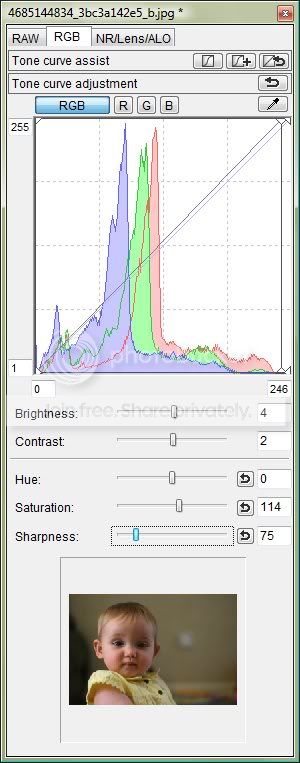
The photo you linked to on flickr needs a little bit of sharpen, but not much, If you've got Canon DPP loaded off the CD that came with the camera then try copying these settings and watch the results:

Rosebud44001.jpg


should turn out like this:

4685144834_3bc3a142e5_b-wookied.jpg
 
I am not a canon man, but it looks like you missed the focus slightly, also the depth of field at f2 on the 50mm is very small so any error is really obvious. Wookies edit is a great improvement, What I would say is try not to run before you walk. get the basics down to pact and then go from there.
 
are you selecting the focus points? you need to select one that's held over the closest fully lit eye. Eyelashes and eybrows are likely to bring the focus point towards you slightly, so if necessary focus on something the same distance away as the lens of the target eye, eg the outer corner of the eye. Beware stray hairs across the face, the focus system can pick up on them too.

I also find at this sort of distance and wide apertures (small f number, gives very very shallow depth of field) that the focus can slip out with the camera set in one-shot focus mode. Instead I use the right hand of the 3 focus modes "AI Servo", so it continually tracks the focussing and accounts for any body sway of me and subject.
 
Wow that photos looks tons better Lawrence thank you :-)

Sorry yes I meant AV, was having one of those days yesterday running around after my 10 month old while trying to type :-)

It's deffo on AV not M, I am not pressing the little AV button on the back of the camera I am just turning the wheel and that changes the F stops. If I go up to 22 say then the photos comes out dark though I have hardly any natural light in my front room. If I take the F point down to F 2 say the photos is lighter.

My focus points are all highlighted so using them all, I have tried to selected just the middle but am finding it hard staying on her face while she is moving so much and bot getting tons of blurry photos as a result.

K xx
 
try not to use high f numbers, lenses tend to be soft at both ends of their aperture range, but also at small apertures (big numbers) like f/22 you'll be hitting diffraction effects because the hole is so small, like a pinhole, which acts in some ways like inserting another type of lens and it basically causes a sort of scatter of the light through the glass elements . . . makes it fuzzy!

also as you reduce aperture (use higher f numbers) you'll be getting less light onto the sensor, so its increasing the shutter time. By f20 depending on light available and ISO selection you may well have maxxed out the shutter time, maximum on my 400D is 30 seconds. That's going to be very blurred, but for higher f numbers you are reducing the aperture so less light through the lens but it cannot compensate with longer shutter opening . . . hence dark photos.

if you are saving to jpegs in camera then you are processing the RAW data in the camera according to the settings in "picture styles" (various ones, select a default on menu page 2 - also allows detail settings to be modified, or select one by pressing the set button in middle of cursors while shooting), that will affect stuff like sharpening, contrast, brightness, white balance. Alternatively set camera to save as RAW and learn to adjust the settings after downloading to a PC, eg. using DPP which came on the cd with the camera.


some general rules of thumb:

- on the 400D: ISO 100 or 200 preferred, ISO 400 if desperate in poor light, ISO 800+ only at night

- most lenses give best results at around f8, and its a good general purpose depth of field compromise too.

- for portraits with out of focus background increase the aperture (smaller f number), but try not to use the maximum aperture (smallest f number) of the lens as it will likely be soft.

- ignore aperture numbers higher than f22

- for mobile kiddies try to keep shutter speed at 1/125 or faster (faster the subject faster the the shutter speed)

- general rule slowest shutter speed = 1/focal length of lens, or 1/(2xfocal length of lens) if you have shaky hands

- if there is not enough light to stick to the rules you need to add light. Does not need to be expensive, be creative, use white paper or a white bedsheet on the floor, or pinned on a wall to reflect sunlight, pick your locations for the light.

- experiment and ask questions :thumbs:
 
At f2.8 or below at the distance you are shooting the area of the image that is pin sharp is very small front to back. Practice, and know that even the best of us miss at large apertures like f2. Even when not chasing a baby about. Near a window give great light, and maybe invest in a reflector which can be had really cheap to bounce light back from the window (if you don't know what a reflector is, imagine a large piece of tinfoil to bounce light back at the side of the face not getting window light) this also helps avoid harsh shadows when shooting window light.

Try using one of the outer points to focus, choose the one nearest to how you want the image to be when you press the shutter, this may help. Remember though, it is digital, you can chuck the 100 you don't get, but the 10 you do will make all the shooting worth while.
 
Hi Karen,

I've had very similar problems photographing my eight month old niece. Shooting indoors can be really really tough with the lack of available light. I have had to whack the ISO up quite a way to allow me to increase my shutter speed and stop shake.

The difference when shooting outside is huge, you'll be able to be able to keep your ISO low and play around with the f/stops until your heart is content. I think the pics on your Flickr are really good efforts. They will be great when the rain stops and you can get outside.

Some great advice from the other posters on here as well should help you along. Good luck.
 
some general rules of thumb:

- on the 400D: ISO 100 or 200 preferred, ISO 400 if desperate in poor light, ISO 800+ only at night
Wookie, as you seem to know your sruf, what would this line be for a 20D?
 
Great thread - You're not being silly at all.

I was making the same mistake as you in choosing the lowest aperture to try to blur the background only to find focussing was difficult.

I've learnt a lot, folks - Thank you :thumbs:
 
Wow that photos looks tons better Lawrence thank you :-)

Sorry yes I meant AV, was having one of those days yesterday running around after my 10 month old while trying to type :-)

It's deffo on AV not M, I am not pressing the little AV button on the back of the camera I am just turning the wheel and that changes the F stops. If I go up to 22 say then the photos comes out dark though I have hardly any natural light in my front room. If I take the F point down to F 2 say the photos is lighter.

My focus points are all highlighted so using them all, I have tried to selected just the middle but am finding it hard staying on her face while she is moving so much and bot getting tons of blurry photos as a result.

K xx

Seriously, read the Understanding Exposure book. It's not exactly wordy (so you should be able to read it all pretty quickly) but it explains everything you need to know in a very clear manner.

Also, this should help, it illustrates the problem you're facing pretty well:

http://www.whatswrongphoto.com/2010/02/50mm-f1-8-lens-and-blurry-photos/
 
Thank you so much for all your wonderful feed back I have had a play about and have come out with a few shots of my little one that I am really proud of ;-) I have done some outside as well I really like.

I think I am going to look into getting some lights, I want to get some decent ones as I want to do this as a job so I may as well invest now while I am back to work full time. Can anybodt help me out on the lights? I know there are tons to look at and it's down to each person but I honestly lost. I see what looks like Flash guns but how do they go off when you take your photo? I have never used any lights before.

Thanks Andrew will be checking that link out now K X

K XX
 
Wookie, as you seem to know your sruf, what would this line be for a 20D?


I'm just good at getting it wrong :D

I've got no idea about ISO and quality on a 20D, but I've got a 400D same as Karen (Rosebud44) so I was basing my comments on my results with that model.
 
Back
Top