All things related to Apple phones & tablets

  • Thread starter Thread starter stupar
  • Start date Start date
I'm not going to like it. :oops: :$
Me too, I haven't upgraded to whatever the last one was called yet! With this new interface thingy and AI coming, I'd rather stick with something I know.
 
I have an iPad that I am now locked out of , Did not use it for several months , Any ideas how I can revive it
Forgotten the user name and password , DOH!
 
I have an iPad that I am now locked out of , Did not use it for several months , Any ideas how I can revive it
Forgotten the user name and password , DOH!
You used to be able to recover by plugging it into your computer and through iTunes but no idea if that is still an option. Presumably now through iCloud?
 
Yes if you have icloud it will be all linked , that’s only if you have another apple device though
 
Last Saturday I picked up two (pre-ordered) iPhone 17 Pro Max units, each with 1TB of memory from the Apple store in Regent Street. These are to replace my iPhone 15 Pro Max units which I have been using extensively for my POV work, one for stills and one for video.

I've not had a chance to fully set them up yet but I have been playing around with test shots from my roof garden in London. All I can say is I'm absolutely blown away with the quality of images that I've managed to get from these cell phones using Apple Pro Raw format, the files are obviously quite big but the quality is outstanding.

Stills wise these units have made my Sony RX100M6 virtually obsolete, and are not far off the quality I'm getting from my Fuji X-H1, which I have been using over recent times for my pic's on TP. I shall still continue to use my Fuji kit for a bit longer but will certainly be gradually moving back to the cell phone thread on TP for the pic's I post.
 
Since updating to iOS26 and macOS26, every time I leave home, i get a notification on my iphone that my macbook is no longer with me and was last seen at [my address].
How do I turn off this notification, please? Can't seem to find it...
 
Since updating to iOS26 and macOS26, every time I leave home, i get a notification on my iphone that my macbook is no longer with me and was last seen at [my address].
How do I turn off this notification, please? Can't seem to find it...

Try turning off notifications under General/Apps/Find My
 
Since updating to iOS26 and macOS26, every time I leave home, i get a notification on my iphone that my macbook is no longer with me and was last seen at [my address].
How do I turn off this notification, please? Can't seem to find it...
In FindMy app on the phone, goto the Devices tab. Click on the MacBook, Click on Notify when left behind. You should get a list of locations that you can make exceptions, or you can set a new location.
 
In FindMy app on the phone, goto the Devices tab. Click on the MacBook, Click on Notify when left behind. You should get a list of locations that you can make exceptions, or you can set a new location.
Thank you, Mr. Coin of the Realm. That's done the trick; I didn't think of clicking on the device in FindMy...thanks again.(y)
 
Just installed macOS 26 Tahoe. Any issues I should be aware of?
 
Apparently it can wreak havoc with Adobe Ransomware. Creative Cloud.

As I don't use CC I haven't noticed anything.
 
Mrs R has an iPhone 11, bought new a couple of years ago. When she gets a call from me, it announces "Chris" and then plays the ring tone. If I were to Facetime her, it would announce "Chris, Facetime video" etc. This is sometimes helpful, but very annoying if she's in a public place. Does anyone know how to turn this off? Thanks,
 
Mrs R has an iPhone 11, bought new a couple of years ago. When she gets a call from me, it announces "Chris" and then plays the ring tone. If I were to Facetime her, it would announce "Chris, Facetime video" etc. This is sometimes helpful, but very annoying if she's in a public place. Does anyone know how to turn this off? Thanks,

It’s under the Siri options in settings.
 
Really dont like the way the latest update looks and works on iphone
Our friend does night photography with her iPhone and is now struggling with aurora photography and anything that needs a slow shutter speed
apparently they have made the night mode more automated and it overides any slow shutter speed work, she is now trying Raw out and I have introduced her to Affinity photo as well as suggested using an App on the iPhone that will give her more control
 
I don’t think it has changed in function?

It was always 10s or 30s and these have just been renamed to Auto and Max for some reason.
 
"MERRY CHRISTMAS" to all Apple iPhone & Tablet users.
 
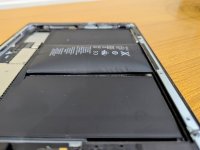
It was an iPad 4, so pretty old.

With the battery replaced it should be perfectly good again, providing the battery has not leaked.
 
With the battery replaced it should be perfectly good again, providing the battery has not leaked.
iPad 4 had pretty much had its time now anyway. Can’t get apps, very old OS.
 
iPad 4 had pretty much had its time now anyway. Can’t get apps, very old OS.

But it can still be used for many things to good effect.
 
It's been destined for the scrapheap. As other have said, virtually no apps would run on it.
Not going to be missed to be honest.
 
Steps to Download Older App Versions
  1. Use a Newer Device (Or Older iTunes):
    • Sign into your same Apple ID on a newer iPhone or iPad that can run recent iOS/iPadOS.
    • Download the app you want onto this newer device, even if it's the latest version.
    • (Alternative: Use an older iTunes version (like 12.6.5 or earlier) on a computer and download the app there).
  2. On Your Old iPad:
    • Open the App Store and tap your profile icon (top-right).
    • Tap Purchased, then My Purchases (or just look for the cloud icon).
    • Find the app you just "bought" on the newer device in your list.
    • Tap the cloud with the arrow icon.
    • When prompted, confirm you want to download the last compatible version for your old iPad's iOS.
 
Anyone else find the new ipad / iphone update frustrating, 26.2 on ipad
It just makes doing simple things more difficult the interface isn’t user friendly now
for example I have all my photos in folders in icloud and like to look at them on my ipad
You used to be able to just tap on an image and swipe each time to see the next
Now you have to go to another step in a menu
Also the borders for photos are white rather than black very distracting
Sorry for the rant :oops: :$
 
Last edited:
Anyone else find the new ipad / iphone update frustrating, 26.2 on ipad
It just makes doing simple things more difficult the interface isn’t user friendly now
for example I have all my photos in folders in icloud and like to look at them on my ipad
You used to be able to just tap on an image and swipe each time to see the next
Now you have to go to another step in a menu
Also the borders for photos are white rather than black very distracting
Sorry for the rant :oops: :$
I don’t have a problem with the latest version, I also do not the same issues with photos. Can you change the settings? Don’t ask me how.
 
I don’t have a problem with the latest version, I also do not the same issues with photos. Can you change the settings? Don’t ask me how.

Its not photos section on the ipad, its images that i have in folders in icloud drive can work around it with another menu step
Maybe I’m old fashioned but the whole update in my opinion isn’t an improvement but a step backwards
 
Mrs R has had her iPhone 13 auto-updated, presumably to IOS 26, and hates it. Neither of us are sophisticated users, is there any way to revert, presumably to 18?
 
Mrs R has had her iPhone 13 auto-updated, presumably to IOS 26, and hates it. Neither of us are sophisticated users, is there any way to revert, presumably to 18?

Yep same for us both on iphone and ipad , neither of us want to do anything complicated and hate the new update
 
Oh dear, but thanks. On my phone (SE 2022) this (or at least an) update has downloaded and it is nagging me to install it. I'm just a bit worried I'll accidentally install it when trying to do something else. Is there any way to disable the update completely?
 
I've only just updated my iPad to 26.2 and must admit I'm inclined to agree with you. I much preferred it before the update as like you say everything was straight forward. Now there seems to be several extra steps to take to do the same thing that could be done in one.
 
Oh dear, but thanks. On my phone (SE 2022) this (or at least an) update has downloaded and it is nagging me to install it. I'm just a bit worried I'll accidentally install it when trying to do something else. Is there any way to disable the update completely?
You should be able to delete the update before it is installed. Under settings/general/storage.

Turn off auto software updates in settings.
 
You should be able to delete the update before it is installed. Under settings/general/storage.

Turn off auto software updates in settings.
Thank you Steve! I don't know how it got downloaded, as I have auto updates turned off. I suspect I answer wrongly to one of those sneaky messages. (Earlier this evening I was trying to check the update out, and the only two options were update now or update tonight! I did manage to avoid both, thankfully.)

But thanks to your first point, I have now deleted it, so with luck I can avoid it arriving again. Mrs R is still grumbling about hers, without any prompting from me, along the lines of, why do they change something that works and now I can't do what I want to do (and used to be able to do?)
 
Back
Top