All things related to Apple phones & tablets

  • Thread starter Thread starter stupar
  • Start date Start date
Updates for older OSes:


I'm still struggling with the T2 chip inmy wife's (now replaced) 2019 15" Pro, which appears to be its own worst enemy.

We got a new one because this one became unstable and eventually wouldn't boot. I've tried all sorts of things and every time I do a reinstall (which is a palaver in itself) it works all right for a while and then decides to insist on an update, which inevitably crashes and burns the internal drive. I have a workaround, booting Catalina from an external SSD but it would be nice to find a permanent fix.

The local Genius Bar was rather worse than useless, telling us it was unrepairable, after which I got it up and running in a day! Now all I need is to figure out how to keep it stable using the internal drive. The internal drive passes all the tests I've run on it, which is why I think it's something to do with the T2.
 
Anyone had apple automation via homekit actually work properly? Set up one to change a radiator thermostat at given temperatures but it doesn't work. The actual automation does what it is supposed to when you run it manually but it doesn’t work automatically. Which rather negates the point of it being an automation.

Done the usual turning it off and on again and deleting it and setting it up via a different device. No change.

It's just two simple ones. When temperature is above one then turn off that radiator. When it drops below another value then turn the radiator back on to its normal setting. It should work as the two temperatures are a reasonable distance apart and one is an over and the other an under so there shouldn't be any range where both would apply.
 
When HomeKit came out and also got 'improved', I never got anything sensible out of it, so stuck with the propriety Apps I had been using, like Hue, etc.
 
Anyone had apple automation via homekit actually work properly? Set up one to change a radiator thermostat at given temperatures but it doesn't work. The actual automation does what it is supposed to when you run it manually but it doesn’t work automatically. Which rather negates the point of it being an automation.

Done the usual turning it off and on again and deleting it and setting it up via a different device. No change.

It's just two simple ones. When temperature is above one then turn off that radiator. When it drops below another value then turn the radiator back on to its normal setting. It should work as the two temperatures are a reasonable distance apart and one is an over and the other an under so there shouldn't be any range where both would apply.

I think it might be working. I wasn't sure whether looking in the app was what made it go and check or not but I think it's working without intervention at the moment. It doesn't leave any activity lists or anything so you can't keep an eye on it. It doesn't do notifications when it changes it either so it's invisible.
 
"Interested"

Yesterday I installed all the new updates etc with the exception of my MacBook Pro as I honestly can't remember the last time I did anything on it, much preferring my iPad Pro.

All installed OK but what I'd be interested to know is does anyone else's watch take ages to update? I have a Series 8 watch that took 1hr-55min to update, it was obviously on the charger etc with the battery fully charged and my Wi-Fi signal is pretty good.
 
"Interested"

Yesterday I installed all the new updates etc with the exception of my MacBook Pro as I honestly can't remember the last time I did anything on it, much preferring my iPad Pro.

All installed OK but what I'd be interested to know is does anyone else's watch take ages to update? I have a Series 8 watch that took 1hr-55min to update, it was obviously on the charger etc with the battery fully charged and my Wi-Fi signal is pretty good.

I have the series 8 and it took about the same time as normal. ‍♂️
 
Not sure, George, as I was doing something else while waiting for it. Maybe 20 minutes to half an hour.

Thanks for that Garry, that's still a shorter time than mine takes which is usually about an hour.
 
Last edited:
HELP NEEDED

I have an iPhone 6s

the screen has suddenly gone black --- I've tried a ''hard'' or ''forced'' start

and got this request to ''add charging cable''

the phone does not recognise the connection (I've tried 2 cables )

any thoughts..? thanks

tn_DSC_6623.JPG
 
Fluff in the connector?
 
If the rumours (from Mark Gurman) are to be believed, the next batch of OS updates will be numbered 26 for all devices (e.g. iOS 26).


It's not a version number jump, as some sources are saying, it's a change to a different system, using the year. It's a good idea, IMO, at least right up until 2099.
 
I'm thinking of replacing my Asus laptop that's attached to my monitor with a Mac mini. Will the basic spec M4 with say 16gb be sufficient for lightroom and Photoshop duties. I manly use affinity for stacking images and things like that. No video at the moment.

Sorry wrong place to post. My mistake
 
Last edited:
I use a Mac Mini M2 Pro with 16GB with several other programs running at the same time, eg Safari, Notes, Finder, and others, and it runs fine for my needs. But all I do is basic adjustments and masking, and no HDR merge or more advanced work, except for the occasional collage in PS.

I have a multiport hub plugged in, and a 4-port USB hub plugged in, and if I have too many USB drives and SSDs plugged in, Finder can drop one or more of them. Although it soon reconnects them, it could happen while writing to disk.

So I would suggest getting 32GB or being careful with peripherals and not running too many heavy apps. The M4 version should be better than my M2 Pro, though.
 
I just use chrome and YouTube music mainly. I don't have many tabs open. I do masking and adjustments but also focus stacking and HDR stacking. I have the M4 Pro 16" MacBook with the 24 and I have yet to see if use swap memory.

Just thinking a studio will be way more than I really need and once you spec the mini to 32 ram etc it isn't far off the studio
 
APPLE iPhone 6s

mine has died.
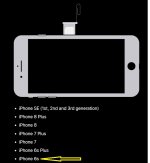
Where is the SIM card inserted ?

The online diagrams show the tray below the power button but mine doesn't have a 'release' hole

Nor a seam on any of the edges


SIM tray.jpg
 
APPLE iPhone 6s

mine has died.
Where is the SIM card inserted ?

The online diagrams show the tray below the power button but mine doesn't have a 'release' hole

Nor a seam on any of the edges


View attachment 454496

Take a photo and show us. Because i am thinking.

Option 1 - Check the other side?....the phone isn't exactly big....just check the other 2 sides (not the bottom, it's never at the bottom)

Option 2 - You have a super unique iPhone 6 that has e-sim which only sold in the US, which pre-dates the first e-sim ONLY iPhone by like 10 generations.

Option 3 - You have a case on the phone and you are looking at the case.

Option 4 - You have a completely different phone....again, just check the other sides, not like there are that many left

Option 5 - You have confused your left with your right and looking at the wrong side....but then not checked the opposite side.

I am going to say....Option 5.

Here is a photo...

IBWeU1c.jpg
 
Last edited:
@Raymond Lin

Thank you..Thank you..Thank you..

Option 3 - You have a case on the phone and you are looking at the case..........:banana:
 
I just use chrome and YouTube music mainly. I don't have many tabs open. I do masking and adjustments but also focus stacking and HDR stacking. I have the M4 Pro 16" MacBook with the 24 and I have yet to see if use swap memory.

Just thinking a studio will be way more than I really need and once you spec the mini to 32 ram etc it isn't far off the studio

So the Mini M4 with 16GB should work for you.
 
@Raymond Lin

Thanks for the tip about the case...- iPhone 6s was a brick''

so I ended up buying a 5* mint used iPhone 7 - with a new SIM card sent from My3

they even programmed my existing number into the new SIM.... :banana:

so just a case of ''insert'' and ''Go'
 
I have a 1st gen iPad Mini, which I have managed to update (to some extent) but every app I try to download says it's not compatible. Apple Maps doesn't work, and it won't retrieve my email, via the on boars mail app. Is it a throw away job now?
 
@Raymond Lin

Thanks for the tip about the case...- iPhone 6s was a brick''

so I ended up buying a 5* mint used iPhone 7 - with a new SIM card sent from My3

they even programmed my existing number into the new SIM.... :banana:

so just a case of ''insert'' and ''Go'

You went from a 6s to a 7?

Any reason why didn't go for the 2020 SE iPhone? Faster, still have touch ID, sim card slot too.

But that is the last iPhone with Touch ID...after that it is all Face ID.
 
@Raymond Lin

hi --- I was swamped by the amount and variety of iPhones on eBay; so being a non-tech luddite, I just chose by budget
 
@Raymond Lin

hi --- I was swamped by the amount and variety of iPhones on eBay; so being a non-tech luddite, I just chose by budget

Fair enough, so here is a tip. Next time before you buy an iPhone. Put this into google.

What phone support the current build of iOS?

You will get a link to Apple page, go into there, those are the phones you should be looking at. As they run the latest version of the software. I would not go any older than that, even so, the phone that supports it goes back to like 7-8 years so they should be cheap too.

This is what you get currently if you today.

 
hopefully this phone will outlast me..........;)

I'm using iOS 15.8.4

thanks for the link
however; even choosing a lower model such as iPhone 11, is still around £130+ on eBay
and is over my budget
 
Mrs R is always having problems with passwords. I've been finding it difficult to understand, since she uses an iPhone and an iPad; my experience with iPhone and Mac suggests that they are pretty good at keeping track of passwords, whether it's Keychain or Passwords or whatever. The only clue that I could find is that she doesn't really use the Contacts app, and in particular does not have a contact for herself, containing her own email address. Would that be sufficient to explain why she never gets prompted with a saved password?

She is very reluctant to let me fiddle with her gadgets, or to take advice, so I'd like to have a reasonably solid basis before suggesting anything!
 
@Raymond Lin

''hopefully this phone will outlast me.'' spoke too soon................. :headbang:
the iPhone 7 has developed a fault

it is over-heating badly - almost too hot to hold
the rear cover has a temperature of 40 deg C
the battery Health/Capacity is 89% but it wont charge above 67%
has a 12 month warranty so I've applied for an eBay Return & Refund.

I've taken your advice....ordered an iPhone 11 - from a different company ! ... damn the expense :)
 
in particular does not have a contact for herself, containing her own email address. Would that be sufficient to explain why she never gets prompted with a saved password?

Possibly in that it might imply using an iPhone without being signed into iCloud? As I think if you are signed in there's always an entry for you.
 
Possibly in that it might imply using an iPhone without being signed into iCloud? As I think if you are signed in there's always an entry for you.
Definitely signed in no entry in Contacts! Also, the relevant box is checked in iCloud to save passwords.


Back
Top