Advice required for potential Mac purchase

mstphoto

Suspended / Banned
Messages
5,755
Name
Mike
Edit My Images
Yes
Hi Guys,
My Windows PC is centuries old and is struggling with some programs and also my a7R4's 61mp images.
I'm seriously contemplating moving to Mac in the near future.
I know many photographers etc are using iMac so what do I look for?
Ideally, I would like a 27" monitor but 24" would do.
I've had a look at the M1 iMac which looks good but would it be powerful enough to do photo & video editing etc?
Looking to spend around £2k

TIA
Mike
 
I've not seen anyone complaining the M1 Macs are inadequate for photo or video! But IIRC memory is not upgradeable (though more efficient) so make sure you spec it with sufficient. Looks like the 24" iMac only goes up to 16 GB, and doesn't have a SD slot either (if that's an issue). Neither does the Mac Mini.

The Mac Studio starts at 32 GB, and has a SD slot, but it's £2K and you still haven't got screen, keyboard, mouse/trackpad!

I'm using a 16" MacBook Pro with 16GB, does have a SD slot, super for what I need (no video, large DAM but relatively few photos per import, being from film)!
 
I've had a look at the M1 iMac which looks good but would it be powerful enough to do photo & video editing etc?
You need to tell us how long your piece of string is for us to be able to give you sensible advice! :naughty:

Some basics...
  1. How many pictures do you already have and how many more will you add over, say, a year?
  2. What sort of applications do you intend to use and have you checked they're compatible with the M1?
  3. Will you be keeping your data in external storage, cloud storage, or trying to use the internal drive?
  4. What spec M1 iMac are you pricing?
I'm sure other people can add to this list but that's a start.
 
Mac Studio would probably see you right for at least 10 years, but any M1 with maximum built ion memory should too. I'm still doing ok on a 7 year old 27" iMac with 16Gb, not that fast but good enough
 
Unless you are doing 8k video editing, a current M1 Mac will be more than enough for photo and video.

Internal RAM on an M1 is better utilised than on older machines, so relatively, you need less. For a long time now external storage has been the best way of having more storage space on a Mac. Particularly photos and videos, which take up a lot of space.
 
Hi Guys,
My Windows PC is centuries old and is struggling with some programs and also my a7R4's 61mp images.
I'm seriously contemplating moving to Mac in the near future.
I know many photographers etc are using iMac so what do I look for?
Ideally, I would like a 27" monitor but 24" would do.
I've had a look at the M1 iMac which looks good but would it be powerful enough to do photo & video editing etc?
Looking to spend around £2k

TIA
Mike

As a long time mac user who has gone through 3 or 4 iMacs, a M1 Mac Mini and a M1 Studio, I have just gotten rid of my two iMacs and switched to the M1's

The issue with the iMacs is that you are stuck with their screens which are glossy and IMO not great for photo editing. It also means that every time you upgrade you are also paying to replace a monitor which may still be perfectly adequate for your needs.

I bought the M1 Mini with 16Gb ram and that handled Lightroom, Photoshop just fine. You can easily get the upgraded Mini and a very good screen for your budget and the next time you upgrade you just upgrade the computer.

The 2 iMacs were being used mainly for my business, were on 24 hours a day and were quite power hungry so I decided to move the M1 Mini to my business work and bought the Studio M1 Max with 32Gb RAM for my photo work. This machine is £2K and you will stiill need a screen, mouse and keyboard but is probably say over powered for photo editing use is likely to last you many many years before you would need to think about upgrading.
 
Last edited:
As already suggested, a separate pro screen (with next day replacement warranty!) and a good spec device is best. Studio is fine, but laptop may be more universal in case you need some portability here and there. Imacs are sort of ugliest devices they now make, and glossy coating renders it very hard to work with.

in any case if you are careful with them, reselling a few years later is always an option so you don't have to wait till it is snail slow again.
 
Have you used a Mac for extended periods of time?

Some people get on with them just fine and after an initial acclimitisation phase are very happy

Others either dislike OS X from the outset or just can't convert from years of Windows use to how Macs do things.

I'd be looking at Mac Mini / Mac Studio myself + my own monitor, unless a laptop is necessary, and then I'd go 16" and a plug in external monitor.
 
Last edited:
Lifelong Won user, I switched to Mac a couple of years ago and never looked back.
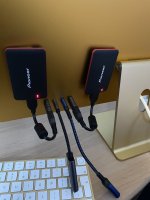
I now have a 24" M1 and it does all of the processing I need with ease - I have a couple of external nano-SSD's attached plus a USB (old) adapter and SD card reader adapter.

M1.jpg
 
I have the MBP 13" M1 with 16gb ram and 512 SSD. I bought it when there were only the M1 13" map and Mac mini available (no pro models etc).

It handles multi 4k video layers in premier pro form my canon R, and only hear the fans spin up when exporting occasionally.

It is my work tool, video, photos and design (photoshop, indesign, illustrator, premier, after effects and some 3d rendering). If it was struggling in any way I would upgrade, but really don't need to! Especially when at home and plugged into a 4k monitor.

I have heard the 8gb ram model can struggle.

T
 
I went from a Windows desktop machine to a 16 inch MacBook Pro laptop
The issue for me was the size of the R5 files the M1 is really really fast with DXO photolab and Affinity photo even with Deep prime raw conversion and large image focus stacks in Affinity
I went for 32 GB memory as it can’t be upgraded
 
You need to tell us how long your piece of string is for us to be able to give you sensible advice! :naughty:

Some basics...
  1. How many pictures do you already have and how many more will you add over, say, a year?
  2. What sort of applications do you intend to use and have you checked they're compatible with the M1?
  3. Will you be keeping your data in external storage, cloud storage, or trying to use the internal drive?
  4. What spec M1 iMac are you pricing?
I'm sure other people can add to this list but that's a start.
Hi Andrew
Here is my piece of string :D
1. Probably thousands and probably lots more to come in the coming year. I'm not one of those photographers that go out for a weekend and come back with thousands of images.
2. Mainly Adobe CC, Topaz Suite and a few other editing programs. Would be looking to get Final Cut Pro if I go down the Mac route.
3. At the moment, I have everything backed up to an external drive so would likely continue this way.
4. The higher specced model with 16gb RAM
 
To me, the obvious jump would be an M1 mini and decent screen, making updates in the future less expensive as you only change a part of the setup. But do have a play to make sure you're happy using that OS because it isn't the same as windows, not is it historically bug-free.

Taking point 4. 16gb isn't much now for working, and if you want to edit video then it's entry level.
 
Last edited:
To me, the obvious jump would be an M1 mini and decent screen, making updates in the future less expensive as you only change a part of the setup. But do have a play to make sure you're happy using that OS because it isn't the same as windows, not is it historically bug-free.

Taking point 4. 16gb isn't much now for working, and if you want to edit video then it's entry level.
This may be a daft question so apologies in advance.
Can the Mini be connected to the M1?
 
This may be a daft question so apologies in advance.
Can the Mini be connected to the M1?
Simply connect both to the same WiFi, then use CMD-K on one to open a drive on the other. If you don't use fixed IP addresses you'll need to check the address on the one you're connecting to, because that method requires you to enter the address of your target.
 
You can also use AirDrop to transfer files back and forth. It works quite well.
Indeed.

Unfortunately my mind has barely got out of OS9 mode... :naughty:
 
Funnily enough, I started on Macs with OSX Panther.. The other day I booted up my old Powerbook 12" from 2003, it runs (still!) Leopard.. Man is the UI nice, and it's fast too.. Kind of prefer it over today's versions...
The power of coincidence!

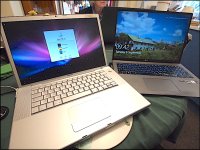
I had the 2006 15" MacBook Pro running yesterday. Battery's shot but otherwise OK. :naughty:

Macbook 2006 LG17 EPL-1 P9061529.JPG
 
Last edited:
My late 2008 MacBook is a doorstop now. It came with leopard, was upgraded to snow leper and rapidly reverted back. Eventually got to lion, which was actually quite decent. It seemed as though Apple were getting more windows-like up to that point, which was good for users. The machine always seemed snappy until asked to run lightroom 5, at which point it wasn't snappy any more.
 
Well, Apple has admitted to slowing down iPhones, so I would not be surprised if they did that with the MacOS machines as well.
Even the 2006 is pretty fast, if you stay below the Aqua level.

The trouble with almost all GUIs is that adding 1% functionality to them seems to double the load. I've only done one major GUI project myself so I'm hardly speaking from a position of strength here. However, it's seldom that any GUI upgrade doesn't slow down a given machine :(
 
To help the OP, as it feels like there is too much confusion being added to the thread.

The consumer Macs are:
iMac (M1 processor) - all in one desktop (including a 24" screen)
Mac Mini (M1 processor) - stand alone desktop (i.e. you supply your own keyboard/mouse/monitor)
MacBook Air (M2 processor) - Laptop

Configured with 16GB RAM, any of these will be capable of most photo/video workflows.

The next grade of Macs are:
Mac Studio (M1 Max/Ultra) - stand alone desktop (i.e. you supply your own keyboard/mouse/monitor)
MacBook Pro (M1 Pro/Max) - 14"or 16" laptop

These are more expensive, for most users they are probably overkill (I have a 14" MacBook Pro, it is great, but do not notice any performance difference to the (discontinued) M1 MacBook Air that I use for work.

For a fixed location set up I prefer an iMac, as the screens tend to be very good quality and you get the simplicity of everything being built in - you only need the power cable going to it, so do not need the masses of cables you get with an external monitor/webcam/speakers etc.
 
Last edited:
The next grade of Macs are:
Mac Studio (M1 Max/Ultra) - all in one desktop
MacBook Pro (M1 Pro/Max) - 14"or 16" laptop

A correction here. The Studio is not an all in one desktop. It's like the Mini (just bigger) and you have to supply a mouse, Keyboard and Monitor.

You may be confusing it with the Studio Display which is just a monitor.
 
Last edited:
A correction here. The Studio is not an all in one desktop. It's like the Mini (just bigger) and you have to supply a mouse, Keyboard and Monitor.
Thank you for picking that up, I have corrected my post.
 
Back
Top