

Advice on Scanning

Carl Hall

Suspended / Banned
Messages
3,817
Edit My Images
Yes
Over the last few months I've become dissatisfied with the scans I'm getting from my V550, so in an effort to find out whether it's a problem with me (i.e. unrealistic expectations) or the scanner, I set about trying to find if my scanners optimum scan height was higher/lower than the negative carrier holds the negative.

I spent some time this afternoon cutting out some spacers from a few pieces of thick card measuring 0.45mm thick per sheet. I cut the windows in the card spacers to be slightly larger than the 6x7 neg that I would be scanning, just to ensure that the negative was as flat as possible during scanning. To hold the negative flat and stop and curling or movement I also placed a 6x9 piece of glass on top (pinched from my enlarger).

I started off scanning the film directly against the glass of the scanner, with just the 6x9 piece of glass on top to hold it flat and in place. Next I put the negative on top of a card spacer so that the negative image was lined up with the window, and then placed the glass on top again. I carried on by stacking more spacers on top of each other to give me 0.45mm, 0.90mm, 1.35mm and 1.80mm scans from the glass. I also did a standard scan with the 1mm thick negative carrier that comes with the scanner.

I didn't change any of the scanner settings between scans, only for the first scan to set the image up. I scanned them all at 2400 dpi which is higher than I usually do, and then imported them all into Lightroom, and then Photoshop to crop them. I can tell you now that it's pretty hard to get the angles and crops of all the images the same!

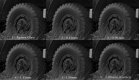
Anyway, I'm not sure what to make of the results. I guess that deep down I was hoping that one of the images would be noticeably sharper than the standard one from the carrier, and that it would solve my problem. However, to my eye they all look fairly similar. I think that the sharpest one is probably number 6, which is the one that was scanned using the standard Epson negative carrier!

Now this leaves me thinking, either I am actually expecting too much from a basic flatbed scanner, which is probably the most likely explanation I can think of, or something isn't quite right with my scanner (less likely).

Hoping to get some opinions as to whether these scans look like what you would personally expect to get from a 6x7 negative scanned on a V550?

(The film was FP4+ developed on Rodinal 1+50, taken on an RB67 back in July 2015, if it makes a difference)

I plan to redo this test again with a different film, and also with a C41 film too, but this is as far as I've got tonight and I'd like to get some input before potentially wasting any more time
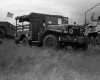
Low Ham Rally (Small).jpg

Scan-Test-(Small).jpg

The larger version of this is below if you want click to see closer, I don't want to attach a bigger image to the thread if it takes ages to load :)

https://flic.kr/p/FuJe2u
 
Last edited:
I honestly think it is what it is Carl. I've done a fair amount of experimenting and decided I'm best with the standard holders.

At the end of the day, it's a cheap consumer scanner and it's good enough for my purposes.

If you want maximum quality for very large prints, then sending away for drum scanning is the way to go.

I need to be convinced it would be very much better though.
 
I honestly think it is what it is Carl. I've done a fair amount of experimenting and decided I'm best with the standard holders.

At the end of the day, it's a cheap consumer scanner and it's good enough for my purposes.

If you want maximum quality for very large prints, then sending away for drum scanning is the way to go.

I need to be convinced it would be very much better though.

Thanks for the reply Simon :) I had a feeling that it's me and not the scanner. If this is what I can expect to get from the scanner than I'm happy with that, I just wanted to make sure that it's normal. Something in the back of my head's been telling me it's not quite right, but now I can just tell that voice to shut up :D The results I get from it are decent enough for web use, and any printing would be done on an enlarger (hopefully, need to find space to set it up again first) where the scanner's not in the equation anyway.

I would be interested to get a drum scan of one negative at some point, just to see how much better they really are. Trouble is I need to take a photo that's worth it first :lol:
 
Have you printed images scanned with your Epson? How did they look? How big do you print?

How much difference in sharpness must there be before the human eye can even detect it at your standard printing or viewing size? You could be stressing over something where there is little to gain depending on what you do with your photographs.

Remember, no one will be viewing your photographs at 100% magnification, so I'd be evaluating it based on normal viewing. I only ever view my scans at 100% to critique my own picture-taking technique at the time of exposure (e.g., handholding technique, sturdiness of tripod, etc.).

I don't ever bother worrying about sharpness when scanning with my Epson. It is what it is and sharpness isn't my ultimate goal anyway. My bigger concern with Epson scanners are noise in the highlights and colour.
 
Last edited:
Basically, what skysh4rk said. If you're getting scans that allow you to get good results at your end result (for the sake of argument, let's say A3+ prints since that's as large as is practicably home doable!), the scans are good enough.

Your experiments seem to show that there's very little difference between the scans so I would go for the easiest method - probably the supplied carrier.
 
Like the guys said I try not to worry about it, they're good enough up to A4 which is as large as I print any way.

More interesting is you've done the hard work for the 54 holders I've been meaning to make. I'm very dissatisfied with laying sheet film on the scanner and I've been considering making something to lift the neg up, now I can at least start with the default position and work from there.
 
Pop in to any well established commercial printers, they'll have a drum scanner gathering dust at the back of their studio and will happily scan slides / film to fill their quiet times.
 
Most importantly, what skysh4rk said.

I bought a Lomo Digitaliza recently, not to improve detail, but because I hate loading the flimsy Epson holders. I'm really impressed with how much easier it is to load and also how flat it manages to keep the film. The magnetic 'sandwich' holds it very flat as the sides clamp down and keep it taught for scanning. I haven't done any tests, but subjectively my scans do seem to pull out a little more detail. Maybe wishful thinking, who knows.

I'm also using a V550.
 
Over the last few months I've become dissatisfied with the scans I'm getting from my V550

Dissatisfied when looking at them on your computer monitor? Move your chair back two extra feet from the screen. Most of my dissatisfaction disappeared when I realised I was looking at them from too close. Sharpness is, after all, a function of viewing distance.
 
Last edited:
I bought a Lomo Digitaliza recently, not to improve detail, but because I hate loading the flimsy Epson holders. I'm really impressed with how much easier it is to load and also how flat it manages to keep the film. The magnetic 'sandwich' holds it very flat as the sides clamp down and keep it taught for scanning. I haven't done any tests, but subjectively my scans do seem to pull out a little more detail. Maybe wishful thinking, who knows.

I have a Lomo Digitaliza for 120 myself that I've been using for a couple of years now. Absolutely no idea if they have any effect on sharpness, but it's easy enough to use and the film is held pretty flat, I agree.
 
Dissatisfied when looking at them on your computer monitor? Move your chair back two extra feet from the screen. Most of my dissatisfaction disappeared when I realised I was looking at them from too close. Sharpness is, after all, a function of viewing distance.

Computer screens / pixels can be so misleading .......many times i print images off that on screen don't look good, yet on paper they are brill.
 
Computer screens / pixels can be so misleading .......many times i print images off that on screen don't look good, yet on paper they are brill.

Indeed. I have a photo on my wall that was taken with an XA2, on Vista, cross-processed with Rodinal. As a 6x4 from three feet, however, it may as well be an M6/Summicron/TMax. (At 30x20, however, I think I might need to be next door)
 
I agree about the obsession with monitor sharpness. I have two A4 prints on the wall in the loft. One taken with my XA3 and scanned on the V550, the other taken with my Rolleicord and scanned by UKFilmLab. They were both printed on the same Epson inkjet. By all accounts the XA3 photo should look rubbish, but unless you stand within 18 inches of it, which I never do, they look identical.
 
The camera on a tripod could make a difference for max sharpness, but the detail obtained from the neg with a V550 would always be less compared to a pro scanner.
 
All of the above, but surprisingly I could convince myself the one straight on the glass was better!
 
I think I'm reasonably confident, looking at the writing on the tyre, that the 1.8mm one is worst. Apart from that, they all look the same to me.
 
Have you printed images scanned with your Epson? How did they look? How big do you print?

How much difference in sharpness must there be before the human eye can even detect it at your standard printing or viewing size? You could be stressing over something where there is little to gain depending on what you do with your photographs.

Remember, no one will be viewing your photographs at 100% magnification, so I'd be evaluating it based on normal viewing. I only ever view my scans at 100% to critique my own picture-taking technique at the time of exposure (e.g., handholding technique, sturdiness of tripod, etc.).

I don't ever bother worrying about sharpness when scanning with my Epson. It is what it is and sharpness isn't my ultimate goal anyway. My bigger concern with Epson scanners are noise in the highlights and colour.

I've had one printed, but it was well over a year ago and I'm sure I was pleased with the scans back then! But then like you say, I think I'm looking at them too close. I stopped doing dust removal at 100% because it was taking too long, so now I just remove any dust that's visible when the image is fitted to the viewing window, and it's much better. I think I need to stop worrying about 100% views and pay more attention to the overall image at the end size that it's going to be exported.

Basically, what skysh4rk said. If you're getting scans that allow you to get good results at your end result (for the sake of argument, let's say A3+ prints since that's as large as is practicably home doable!), the scans are good enough.

Your experiments seem to show that there's very little difference between the scans so I would go for the easiest method - probably the supplied carrier.

Yep, that's pretty much exactly what my conclusion was! If there is a difference then I can't tell when zoomed in to 100%, so there's no way I'd be able to tell from a 1500px wide exported photo. The carrier is much, much easier to use than lying the neg flat on the glass so I think I'll carry on with it.

Like the guys said I try not to worry about it, they're good enough up to A4 which is as large as I print any way.

More interesting is you've done the hard work for the 54 holders I've been meaning to make. I'm very dissatisfied with laying sheet film on the scanner and I've been considering making something to lift the neg up, now I can at least start with the default position and work from there.

Hmm this is interesting, I was also thinking of making some sort of 5x4 holder for my scanner, just have to convince my friend with a 3D printer to help first! Why aren't you happy lying the sheets on the glass? I find lining it up can be a PITA a bit but at least they lie nice and flat and the negs so big that the scans look very detailed :D

Dissatisfied when looking at them on your computer monitor? Move your chair back two extra feet from the screen. Most of my dissatisfaction disappeared when I realised I was looking at them from too close. Sharpness is, after all, a function of viewing distance.

I'm not sure, I guess that from such big negatives I'm expecting to get a lot of detail, but when I try and look around the image I feel that a lot of the finer details in the photo just aren't there, such as the writing on the wall of the tyre.

I think I'm reasonably confident, looking at the writing on the tyre, that the 1.8mm one is worst. Apart from that, they all look the same to me.

Yeah the writing on the tyre is why I chose that crop to compare :) I also came to the conclusion that the 1.8 is the worst but the rest are all pretty much the same. Was wondering if there was something my eyes were missing but sounds like I came to the same conclusion as everyone else :)
 
Last edited:
I think that the outcome of my experiment is two main points; that I'm simply expecting too much from a consumer scanner, and that I should stop looking at the photos so closely, as 99% of the time they're only ever exported as 1500 pixel wide jpegs for web use, and the V550 is decent enough for that.

The main reason for me trying this out wasn't so much that I didn't think the scanner was good enough, but I was concerned that something was not working correctly with it. A few months ago I re-scanned an older negative and found that the scan wasn't as sharp and detailed as the previous scan a year or so earlier. I think that must have just been user error at the time, but since then I've had a gremlin in my head saying something isn't right, which I can now get rid of. The scanning is definitely the weak point in the chain, and it's pretty much the only thing that's stopping me from trying to make a home made C41 tank so I can do the whole process myself. If I can stop myself being too critical on 100% zoomed images and just look at them at an exported image sort of size, then I think I'll be happy enough. Time to start thinking of a way to make a heated tank then! (expect a "help!" thread on that soon :P )

Thanks everyone, very helpful as always :)
 
I think that the outcome of my experiment is two main points; that I'm simply expecting too much from a consumer scanner, and that I should stop looking at the photos so closely, as 99% of the time they're only ever exported as 1500 pixel wide jpegs for web use, and the V550 is decent enough for that.

The main reason for me trying this out wasn't so much that I didn't think the scanner was good enough, but I was concerned that something was not working correctly with it. A few months ago I re-scanned an older negative and found that the scan wasn't as sharp and detailed as the previous scan a year or so earlier. I think that must have just been user error at the time, but since then I've had a gremlin in my head saying something isn't right, which I can now get rid of. The scanning is definitely the weak point in the chain, and it's pretty much the only thing that's stopping me from trying to make a home made C41 tank so I can do the whole process myself. If I can stop myself being too critical on 100% zoomed images and just look at them at an exported image sort of size, then I think I'll be happy enough. Time to start thinking of a way to make a heated tank then! (expect a "help!" thread on that soon :p )

Thanks everyone, very helpful as always :)

C41 + RA4 = no scanner worries :)
 
I don't know if this is going to be of any help, but here are a couple of early scans of mine, from 6x7 negatives. I would have been using whatever was Epson's top end flatbed at the time; but I assume that they would not have been better than your V550.

cairngormtrees.tif scanned in 2004, size 13029x10503
crop010.tif scanned in 2003, size 8840x7258

The links point to OneDrive; you will need to download them. The Cairngorm Trees photo prints well at A3, and can reveal extra details when viewed with a magnifier.
 
Hmm this is interesting, I was also thinking of making some sort of 5x4 holder for my scanner, just have to convince my friend with a 3D printer to help first! Why aren't you happy lying the sheets on the glass? I find lining it up can be a PITA a bit but at least they lie nice and flat and the negs so big that the scans look very detailed :D

Is there not a holder already for the v550? (or is it only for the v700 and up scanners?)

I'm quite interested in finding out how well you 5x4s come out. I'm getting back in to film stuff and mainly will be shooting 5x4... So I need to get a decent scanner. :)
 
I don't know if this is going to be of any help, but here are a couple of early scans of mine, from 6x7 negatives. I would have been using whatever was Epson's top end flatbed at the time; but I assume that they would not have been better than your V550.

cairngormtrees.tif scanned in 2004, size 13029x10503
crop010.tif scanned in 2003, size 8840x7258

The links point to OneDrive; you will need to download them. The Cairngorm Trees photo prints well at A3, and can reveal extra details when viewed with a magnifier.

Thank you Steve, I'll have a look at them when I get on the Mac at home, the work PC won't let me view and my laptop is only a cheapy Chromebook and goes wobbly when I try :lol:

Thanks :)
 
Is there not a holder already for the v550? (or is it only for the v700 and up scanners?)

I'm quite interested in finding out how well you 5x4s come out. I'm getting back in to film stuff and mainly will be shooting 5x4... So I need to get a decent scanner. :)

I don't think there is a holder no, the V550 can't scan 5x4 sheets in one go, so you have to scan in two goes. Scan one side of the sheet and then move it over and scan the other side, then stitch the two halves together in Photoshop (it's actually much easier than it sounds).

I'm happy scanning 5x4 with the V550 though. Even though it's more of a long winded method, I usually shoot less than a handful at a time so it's not that much work compared to scanning a few rolls of 120 or 35mm.

Here's a few links to 5x4 scans I've done with the V550, the black and whites are Fomapan 100 and the colour is Fuji Pro 160NS. Hope that helps :)

https://www.flickr.com/photos/carlhallphotography/16605583552/in/dateposted-public/

https://www.flickr.com/photos/carlhallphotography/16969835250/in/dateposted-public/

https://www.flickr.com/photos/carlhallphotography/16757374618/in/dateposted-public/

https://www.flickr.com/photos/carlhallphotography/16665966492/in/dateposted-public/
 
You will have to download, I think. My computer won't let me view the cairngormtrees, so I expect it's a OneDrive limitation. Downloaded it views OK. The same I suspect applies to the other one.
 
Yeah sorry I meant that the work PC won't let me download as it's from OneDrive and all that sort of stuff is blocked. I'll try this evening from home :)
 
I don't think there is a holder no, the V550 can't scan 5x4 sheets in one go, so you have to scan in two goes. Scan one side of the sheet and then move it over and scan the other side, then stitch the two halves together in Photoshop (it's actually much easier than it sounds).

I'm happy scanning 5x4 with the V550 though. Even though it's more of a long winded method, I usually shoot less than a handful at a time so it's not that much work compared to scanning a few rolls of 120 or 35mm.

Here's a few links to 5x4 scans I've done with the V550, the black and whites are Fomapan 100 and the colour is Fuji Pro 160NS. Hope that helps :)

https://www.flickr.com/photos/carlhallphotography/16605583552/in/dateposted-public/

https://www.flickr.com/photos/carlhallphotography/16969835250/in/dateposted-public/

https://www.flickr.com/photos/carlhallphotography/16757374618/in/dateposted-public/

https://www.flickr.com/photos/carlhallphotography/16665966492/in/dateposted-public/

Cheers, you might have saved me a couple of hundred pounds :eek: :)
I was gonna save up for the 700 or later model.
 
I use an Epson 4890, which is an older model but is designed to scan 5x4 as well as all t'other sizes. It just saves faffing about joining 2 bits together.
 
Back
Top