
and help to keep the site free for all
You are using an out of date browser. It may not display this or other websites correctly.
You should upgrade or use an alternative browser.
You should upgrade or use an alternative browser.
advice on blown sky
- Thread starter mteam
- Start date


Jambo_84
Suspended / Banned
- Messages
- 408
- Name
- Rob
- Edit My Images
- Yes
Did you shoot in RAW? If so try doing two conversions, one for foreground & one for sky then drop the darker one onto the lighter one then change blending mode to hard light, opacity around 80%. That worked a min ago on one of my images, hope it helps with yours.
Rob.
Rob.

Pirate Neilsouth
Suspended / Banned
- Messages
- 4,379
- Edit My Images
- Yes
Hi
Wondering if anything could be done to save this ? or is too bad

All advice welcomed

Tough one , lowered the highlights still rather blown but not as intense


AndyB
Suspended / Banned
- Messages
- 1,527
- Name
- Andy
- Edit My Images
- Yes
I had a quick play. This is about as good as I can get without spending a lot of time fiddling with the trees.

Copy the pic to new layer. Play with colour levels to get a layer with a blue tint. Blend mode 'darken'. Layer mask on tinted layer and brush out the foreground to bring the bench back.
Saturation to lift the grass a little.
Curves to bring a bit more contrast in and then a little sharpen.
Copy the pic to new layer. Play with colour levels to get a layer with a blue tint. Blend mode 'darken'. Layer mask on tinted layer and brush out the foreground to bring the bench back.
Saturation to lift the grass a little.
Curves to bring a bit more contrast in and then a little sharpen.
Pirate Neilsouth
Suspended / Banned
- Messages
- 4,379
- Edit My Images
- Yes
Well done that man ^
- Messages
- 3,320
- Name
- Luke Woodford
- Edit My Images
- No
Simple answer- make it black and white.

ShawWellPete
Suspended / Banned
- Messages
- 3,699
- Name
- Pete
- Edit My Images
- Yes

Jambo_84
Suspended / Banned
- Messages
- 408
- Name
- Rob
- Edit My Images
- Yes
Simple answer- make it black and white.
I see where you are coming from but a mono conversion wouldn't bring back the lost detail in the sky

Jo
Suspended / Banned
- Messages
- 3,667
- Name
- Jo Fisher
- Edit My Images
- Yes
I don't think there is any hope of pulling back sky detail I'm afraid. But you do have a few options to play with, a couple being ...
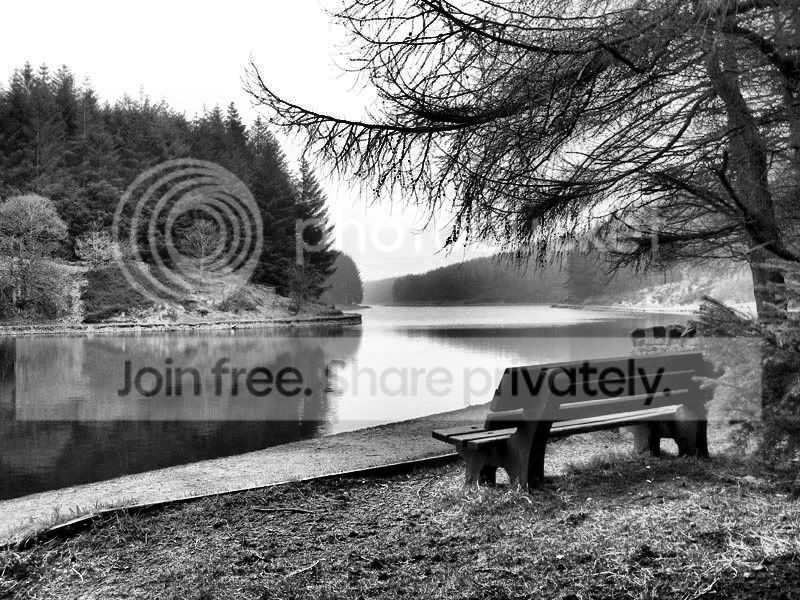
- You could go back another day and have another go. If it's a bright day, try using a tripod and taking two shots. One exposing for the sky, and one for the ground/water/trees. Maybe even do 3 exposures so you have one for the bench and immediate foreground to. Then when you come to processing, it's not too difficult to merge all three exposures, to give you a better 'all over' exposure.
- You could take Lukes advice and convert to B&W. I had a little dabble with converting to B&W and came up with the results below. Granted there is still no detail in the sky, but some of the detail that was not there in the original has been pulled back. To be honest though, I would probably still go and re shoot it, as I like cloud detail. But if going back is not an option, and you would still like a decent photographic memory of your visit, then B&W is an option.

JMPhotographic
Suspended / Banned
- Messages
- 87
- Name
- James
- Edit My Images
- No
That right there is an AWESOME black and white conversion. Definitely suits the subject. Nicely done 
Jo
Suspended / Banned
- Messages
- 3,667
- Name
- Jo Fisher
- Edit My Images
- Yes
I used my Corel Paintshop Pro Photo x2. Went into the 'effects' browser and selected B&W conversion from there, shifted the clarify slider up to about half way. Then I think, before saving I did a final levels adjustment, shifting the midtone slider to the right slightly.
Sorry I can't be more specific I did my usual trick of closing out of it before making a note of the actions.
Sorry I can't be more specific
I did my usual trick of closing out of it before making a note of the actions.- Messages
- 3,320
- Name
- Luke Woodford
- Edit My Images
- No
B&W may not of bought any detal back in the sky but thats a great conversion and suits it very well.


DLS_Creations
Suspended / Banned
- Messages
- 212
- Name
- Dean
- Edit My Images
- Yes
I didn't think it would make a very good B&W pic....how wrong I was though!!!
I think I will have a look through some old pics and see if I can find any to play about with and convert
I think I will have a look through some old pics and see if I can find any to play about with and convert
