Adobe sRGB issue

LeeRatters

Suspended / Banned
Messages
7,354
Name
Lee
Edit My Images
Yes
I'm not sure how this is coming about but I am getting image files with no "colour representation" attached.

I have RAW's in Lightroom, all selected & merge to panorama in Photoshop, edited, close PS & it returns to the LR catalogue as a Tiff, final tweaks & export to windows folder as a jPeg. I then find the jPeg & even the Tiff has no sRGB attached ** so it doesn't display properly on the 'net etc

Any ideas what's going wrong or what I've changed please?

PS - All my single images export as jPegs with no such issues.

** right click, properties, details.
 
There's either Adobe RGB or sRGB. Could the problem be trying to export in Adobe RGB?

*edit*

Just realised that wasn't what you were saying. My guess is that you've set either PS or LR to use a different colour space and that gets carried through, even though the exporting software says something different. I had this a while back where I was exporting pictures for editing in something other than sRGB, and when they came back into LR they continued to be in that colourspace, even when supposedly exported as sRGB. It became a problem when I got pictures printed and the colours were off - hard to solve because the info embedded in the pictures showed them as being sRGB, but the actual colourspace was something else.
 
Last edited:
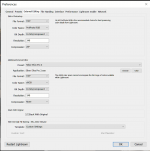
1653163591087.png

This is the default setting in my copy of LR6. If I re-import into lightroom an image previously exported in ProPhoto RGB, that colourspace remains with the image when I output it as a jpg file, regardless of what colourspace I tell LR to use for exporting the jpg.
 
(y)

Only thing different on mine is the 'preset & application'

In LR I've just clicked 'edit in Photoshop' done some edits, closed & saved changes, back in LR as a Tiff, exported as a jPeg and colour space info is attached.

So it must be something to do with the panorama stitching even though I follow the same basic procedure!
 
Maybe stitching requires a particular colour space? Can you export from PS (i.e. not simply re-import) with a specific colour space?
 
I did this on a Mac so I don’t know if it is relevant or not.

In Lr I selected three RAW files and then merged them together as a Panorama.
That created a DNG file.
I right-clicked on the DNG file and selected Open in Photoshop.
Edited the DNG file and then Saved it as a TIFF file.
The TIFF file is automatically put back into Lr.
In Lr I selected the TIFF file and then Exported as a JPEG.

The Colour Space for ALL the images was RGB

The Colour Profile for the RAW files was Display P3
The Colour Profile for the DNG file was Display P3
The Colour Profile for the TIFF file was ProPhoto RGB
The Colour Profile for the JPEG was sRGB
 
Back
Top