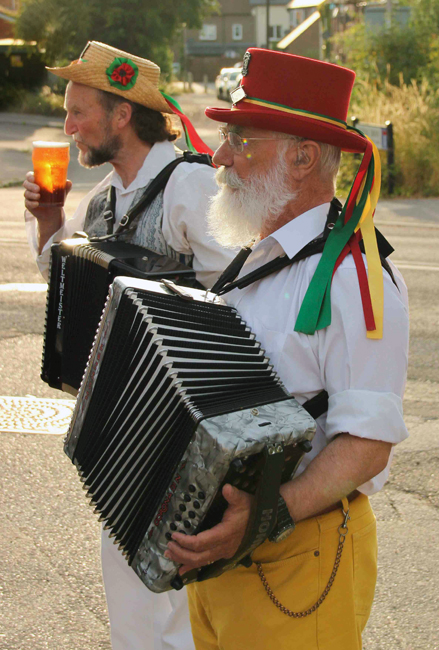
Adjusting overexsposed backgrounds in Lightroom..?

BertieTBE

Suspended / Banned
Messages
85
Edit My Images
No
Hello everyone,

Took this over the weekend and can't work out how to get rid of the very white background! Any ideas, I'd be very grateful! I'm using Lightroom 3 and only just getting used to it (although it's been amazing so far).

https://www.dropbox.com/s/so8nul3kjcojsso/morris -1.jpg

There's also a white circle on one side? How do I get rid of that?

Thank you very much.

BertieTBE
 
Last edited:
If this is a RAW image you may be able to improve it slightly but you will never make it perfect.

If it's a JPG, the data has probably been lost so you won't get much better.

Try the highlights slider by moving it to the left.
You could also try a graduated filter over the sky and drop the exposure down a bit.

You won't get it perfect, but it should take the glare off.
 
Personally I'd just crop the sky out and use the clone tool to fix the lens flare, I did do an edit but then noticed you have editing unticked so I won't post it.
Edit thats in photoshop, in lightroom you could still crop and use the ajustment brush to darken the flare.
 
Last edited:
use the clone tool to fix the lens flare, I did do an edit but then noticed you have editing unticked so I won't post it.
Edit thats in photoshop, in lightroom you could still crop and use the ajustment brush to darken the flare.

Thank you very much for your suggestion. Wasn't aware that there was an editing checkbox? I'll tick that. If you've already done it, by all means post.

Is that in Lightroom or Photoshop? I only have Lightroom at the moment. I've brushed over it - what's the best way to darken it without making it took artificial?

Thanks again.
 
Personally I'd just crop the sky out and use the clone tool to fix the lens flare, I did do an edit but then noticed you have editing unticked so I won't post it.
Edit thats in photoshop, in lightroom you could still crop and use the ajustment brush to darken the flare.

Thank you very much - yep - I think the sky will have to go.
 
In a scene like that there's nothing you can do. The contrast exceeds the dynamic range of the camera. If highlight recover in RAW doesn't work.. then that's it. As others have said though.. just clone out the green flare.

You could have exposed for the background and used fill flash though... that helps.
 
Thank you very much for your suggestion. Wasn't aware that there was an editing checkbox? I'll tick that. If you've already done it, by all means post.

Is that in Lightroom or Photoshop? I only have Lightroom at the moment. I've brushed over it - what's the best way to darken it without making it took artificial?

Thanks again.

Here you go, done quickly I'm afraid.

9415056564_a34709fa87_o.jpg
 
At work as we speak, though I would look to double process the RAW file and manually blend them in PS using luminosity masks.

Although you may not be able to get a lot of detail in the sky, you will be able to tone it down.

Will try to post an example when I get home.
 
Back
Top