A problem with in camera corrections.

woof woof

I like a nice Chianti
Suspended / Banned
Messages
43,206
Name
Alan
Edit My Images
No
Hello all.

I recently bought a Panasonic G100 and when testing it with an Olympus 17mm f1.8 I saw excessive barrel distortion which I've never seen before when using this lens on any of my other Panasonic cameras. I swapped the lens to a Panasonic 12-35mm f2.8 and saw the same thing, excessive distortion. It was as if the camera wasn't applying any in camera corrections and this was happening with both raw and Jpeg files.

Today I updated the camera firmware to the latest version and it's now applying corrections to jpegs but not to raws. With raws I have to convert them to DNG and then process them in CS5 so I'm now not sure if this could be a problem but I have no problems with my other cameras, Sony A7, Panasonic TZ100, Panasonic GM5, GX80, GX9 and this G100.

Does anyone have any idea what the likely cause could be or if anyone has a G100 could they send me a raw file which could potentially show barrel distortion. I could just send the G100 back but that leaves me with the worry that if I buy another new camera I might have the same or a similar problem.

Any help will be appreciated.

PS.
If anyone could send me a raw file from any new camera that could show distortion that could allow me to see if the DNG conversion process and CS5 can handle raws from newer cameras.
 
Last edited:
This happens with my R5 and 24-240. Joegs looks ok but raw look terrible - tons of shading in corners, vignetting and softness - and it’s due to the Raw not being processed..
 
This happens with my R5 and 24-240. Joegs looks ok but raw look terrible - tons of shading in corners, vignetting and softness - and it’s due to the Raw not being processed..

That's interesting.

I've downloaded some raws from DPR and they're ok so it looks like there's something strange and wrong with my camera. I'll return it for a refund.
 
Hmmm you'r emaking me think maybe I have something wrong with my lens too.. got it in the US so a bit of a pain, but I thought it was normal. I'll do some digging too!
 
Hmmm you'r emaking me think maybe I have something wrong with my lens too.. got it in the US so a bit of a pain, but I thought it was normal. I'll do some digging too!

Good luck with it. Maybe you can do as I did and Google your way to some raws you can download?

Hope you get it sorted.
 
Hmm you're making me think now as I've just had a quick look at Ken Rockwell's review, and his are all JPEGs straight out of camera with no editing and they look perfect.. but RAW are a different matter. Time for digging !
 
The idea with RAW is that it's that, RAW - you do the fixing.

I don't think that's the case as several manufacturers do bake in in camera corrections which are then recognised by your software. I've certainly not come across this issue before. I don't know if this is definitely the case with Canon.
 
I don't see why the lens correction should be applied to a RAW file.
Firstly, it wouldn't then be RAW would it.

Secondly whenever I load a RAW file, the software reads the lens and length (if a zoom) from the file, and applies the relevant profile for that lens.
 
I don't see why the lens correction should be applied to a RAW file.
Firstly, it wouldn't then be RAW would it.

Secondly whenever I load a RAW file, the software reads the lens and length (if a zoom) from the file, and applies the relevant profile for that lens.

I can't speak too much for Canon but back when I had Canon DSLR's it was well known that Canon baked in noise reduction that you couldn't turn off and I'd be amazed, if only mildly, if Canon didn't include lens correction in raws today.

Anyway, including correction detail in raw should be a doddle and in the case of MFT this has been a feature since day 1.
 
I can't speak too much for Canon but back when I had Canon DSLR's it was well known that Canon baked in noise reduction that you couldn't turn off and I'd be amazed, if only mildly, if Canon didn't include lens correction in raws today.

Anyway, including correction detail in raw should be a doddle and in the case of MFT this has been a feature since day 1.
"Anyway, including correction detail in raw should be a doddle and in the case of MFT this has been a feature since day 1."

Your original post was about the camera carrying out the lens correction, correction detail may be included in the RAW file, I don't know, but as far as I know, the software has profiles for lenses, which is why the software doesn't correct on new lenses until the profiles have been updated.
 
"Anyway, including correction detail in raw should be a doddle and in the case of MFT this has been a feature since day 1."

Your original post was about the camera carrying out the lens correction, correction detail may be included in the RAW file, I don't know, but as far as I know, the software has profiles for lenses, which is why the software doesn't correct on new lenses until the profiles have been updated.

My experience with MFT has been that corrections are applied and written in the file and independent of the pc and software and I've never seen a file needing this much manual intervention or the application of any lens profile. The fact that my camera didn't apply any changes even to jpegs until after a firmware update seems to indicate a problem with this camera. It may be that it isn't a hardware fault as such, it may just need something more than a firmware update... a sort of factory format and a reload maybe.

Other manufacturers may do things differently.
 
My experience with MFT has been that corrections are applied and written in the file and independent of the pc and software and I've never seen a file needing this much manual intervention or the application of any lens profile. The fact that my camera didn't apply any changes even to jpegs until after a firmware update seems to indicate a problem with this camera. It may be that it isn't a hardware fault as such, it may just need something more than a firmware update... a sort of factory format and a reload maybe.

Other manufacturers may do things differently.
OK.
I still don't think any lens corrections are applied in the camera to the raw file (but open to being proven wrong)
Which seems to leave only one option, that the full meta data is not being included in the RAW file.
If this is the case, it could be that the camera is unable to read data from the lens, or for some reason the camera is not including that data when it writes the file.

There is a way to determine this.

Take a picture with this camera and one where you don't have the problem, both with the same lens of course (one of the ones you found the problem with) then load those two pictures into Affinity (I imagine what ever software you use would do the same) then look at the lens correction adjustment. Firstly it should have read the lens model and focal length, and when you apply the correction, it should automatically correct.
If it does not, see if the lens is listed in the lens list, and if it is, select it.

If it does not either automatically select the lens and correct, or if it does not correct after you manually select the lens, the required data is not included in the RAW file.

If it is missing because of the camera, the other photo you took with a camera where you don't have the problem should work properly, ie there should be a difference between them.

If both files behave in the same way, then that would discount a camera problem.

If the file from the 100 does not work properly, it may well give a warning message that the file does not contain the data so automatic correction is not possible.
If the file from the other camera does contain the data, the lens must be OK, and would indicate either a communication problem between the lens and the 100, or as you suggested, something amiss with the way the 100 is operating.

I tried an Olympus 14-42 on the G80 this morning and it worked fine, and I tried the Olympus 9mm lens cap lens (which of course has no electronics) and of course I had to manually correct. (Takes less than 10 seconds on Affinity, bit longer on Gimp.)
 
No lens corrections are baked into Raw files. That's the whole point of a Raw file.
Any decent raw editors will make the corrections automatically once the images are loaded into that application although the corrections are non destructive which, again, is the point of Raw files.
 
The camera data is attached to the raw file so that it is readable to a RAW processor. It is the Raw processor that can apply that data.
If the camera is newer than the Raw processor, it most likely does not have the ability to read that camera data until the software is updated.

Raw files do include a reduced size Jpeg used as a thumbnail, and for viewing the file in appropriate viewing software. This small file does have lens and other settings incorporated. but is of lower resolution.
 
OK.
I still don't think any lens corrections are applied in the camera to the raw file (but open to being proven wrong)
Which seems to leave only one option, that the full meta data is not being included in the RAW file.
If this is the case, it could be that the camera is unable to read data from the lens, or for some reason the camera is not including that data when it writes the file.

There is a way to determine this.

Take a picture with this camera and one where you don't have the problem, both with the same lens of course (one of the ones you found the problem with) then load those two pictures into Affinity (I imagine what ever software you use would do the same) then look at the lens correction adjustment. Firstly it should have read the lens model and focal length, and when you apply the correction, it should automatically correct.
If it does not, see if the lens is listed in the lens list, and if it is, select it.

If it does not either automatically select the lens and correct, or if it does not correct after you manually select the lens, the required data is not included in the RAW file.

If it is missing because of the camera, the other photo you took with a camera where you don't have the problem should work properly, ie there should be a difference between them.

If both files behave in the same way, then that would discount a camera problem.

If the file from the 100 does not work properly, it may well give a warning message that the file does not contain the data so automatic correction is not possible.
If the file from the other camera does contain the data, the lens must be OK, and would indicate either a communication problem between the lens and the 100, or as you suggested, something amiss with the way the 100 is operating.

I tried an Olympus 14-42 on the G80 this morning and it worked fine, and I tried the Olympus 9mm lens cap lens (which of course has no electronics) and of course I had to manually correct. (Takes less than 10 seconds on Affinity, bit longer on Gimp.)

OK lets put it this way for the pedants who want to argue this point all day...

When you load a MFT raw onto your computer there's no need to apply any lens corrections. It's all done automatically. With other systems some stuff is also done automatically, like those Canon DSLR's and their baked in noise suppression, however you may still have to load a lens profile but here we're talking Panasonic MFT and both Panasonic and Olympus lenses which to date with every other camera and lens I've had have all done this automatically. So as the Panasonic G100 is a MFT camera and unless this camera is the odd one out I shouldn't have to load a lens profile. I haven't needed any lens profiles with the following MFT cameras, GF1, G1, GF7, G7, GX80, GX9, GM5. Indeed there are zero lens profiles for any Panasonic or Olympus lenses in my raw processor. Googling also confirms that you don't need lens profiles with Panasonic MFT.

The G100 now has the latest firmware as does the Oly lens and the result is the same, massive barrel distortion which has to be corrected with the distortion slider in the raw processor. If that's how it is supposed to be I could do profiles for all my lenses but although these G100's seem a bit rare a guy on DPR confirms that he sees no distortion with his camera so it looks like there's something amiss with my camera. It may not be a hardware fault as such, I have reset the camera and loaded new firmware for both the camera and the lens but it may be that the camera needs a more basic reset and reloading of software than I can do.
 
Last edited:
OK lets put it this way for the pedants who want to argue this point all day...

When you load a MFT raw onto your computer there's no need to apply any lens corrections. It's all done automatically. With other systems some stuff is also done automatically, like those Canon DSLR's and their baked in noise suppression, however you may still have to load a lens profile but here we're talking Panasonic MFT and both Panasonic and Olympus lenses which to date with every other camera and lens I've had have all done this automatically. So as the Panasonic G100 is a MFT camera and unless this camera is the odd one out I shouldn't have to load a lens profile. I haven't needed any lens profiles with the following MFT cameras, GF1, G1, GF7, G7, GX80, GX9, GM5. Indeed there are zero lens profiles for any Panasonic or Olympus lenses in my raw processor. Googling also confirms that you don't need lens profiles with Panasonic MFT.

The G100 now has the latest firmware as does the Oly lens and the result is the same, massive barrel distortion which has to be corrected with the distortion slider in the raw processor. If that's how it is supposed to be I could do profiles for all my lenses but although these G100's seem a bit rare a guy on DPR confirms that he sees no distortion with his camera so it looks like there's something amiss with my camera. It may not be a hardware fault as such, I have reset the camera and loaded new firmware for both the camera and the lens but it may be that the camera needs a more basic reset and reloading of software than I can do.
This seems to be getting very muddy with a lot of direction changes.

The profile for the lens is included in the data included in the RAW file, which is read by the software, hence my suggestion that the lens may not be communicating properly with the camera for some reason.
I suggested a way to check that.

The only point that people are arguing all day is your point when you said the correction was applied to the image in the camera, which at least two other people have confirmed is not the case.

Your opening comment is not justified!
 
Seems to me there are two routes here. Alan, you are quite right that there are no independent lens profiles for native m4/3 lenses (there are for stuff like Laowa but lets not muddy the waters). The combined-in-camera profile of body and lens is read by your conversion software of choice. If the software does not yet recognise that combination it will, if operating correctly, throw up a message and refuse to continue. So, either the software is faulty and letting an unrecognised raw file be processed (unlikely) or it is being passed what it thinks is valid and simply processing the file as seen. This latter case is the most likely, which does suggest that the camera is mal-processing the lens profile, made all the more likely by the fact that Alan has tried more than one lens. That would indeed suggest there is a processing issue within the camera which needs escalating to the manufacturer.

PS by using a raw-to-dng converter you are only processing the body profile, not the lens, which will subsequently need separate correction.
 
Last edited:
Seems to me there are two routes here. Alan, you are quite right that there are no independent lens profiles for native m4/3 lenses (there are for stuff like Laowa but lets not muddy the waters). The combined-in-camera profile of body and lens is read by your conversion software of choice. If the software does not yet recognise that combination it will, if operating correctly, throw up a message and refuse to continue. So, either the software is faulty and letting an unrecognised raw file be processed (unlikely) or it is being passed what it thinks is valid and simply processing the file as seen. This latter case is the most likely, which does suggest that the camera is mal-processing the lens profile, made all the more likely by the fact that Alan has tried more than one lens. That would indeed suggest there is a processing issue within the camera which needs escalating to the manufacturer.

PS by using a raw-to-dng converter you are only processing the body profile, not the lens, which will subsequently need separate correction.

Yup.

I've tried to take this step by step and when the Oly lens showed this issue I tried a Panasonic lens. Also, remember that initially jpegs showed the same distortion so at least initially this wasn't just a raw issue. The jpeg distortion went away with a camera firmware update but the raw distortion remains. I've also updated the Oly lens firmware to no effect. I've also done a camera reset to no effect. The shop are clueless, they say they've looked at the update history and can see no reason for this but they could be unaware of something, I can't know.

I think this could be a camera issue but not necessarily a hardware one. It could be something that might be fixed with some sort of lower level reset and reloading that the manufacturer may be able to do. I don't know. It could be a CS5 issue but if that's the case it's an odd one as the G100 raws I downloaded from DPR show no distortion.

Whatever the issue it's something I can't live with as even if I create profiles for my primes I think creating profiles for my zooms could be beyond me.

Thanks for your help everyone but I've come to the end with this camera and it's going back with the shops agreement.

PS.
With MFT the lens corrections should be included in the raw data and recognised by the raw processor and corrections should be automatic. This has been the case with every other Panasonic camera I've had. I understand that with some other manufacturers this isn't the case. The G100 may be different and you may need to do your own corrections but if that is the case it's difficult to understand why the raws I downloaded from DPR went straight through the process fine and didn't need any lens corrections. If the problem is DNG and/or CS5 I'd expect the downloaded raws to also show distortion and they don't. All in all I'm stumped and as my time is limited I'm giving up on this camera and may well avoid Panasonic cameras in future just in case this is some weird new norm and it happens again.
 
Last edited:
Late to this thread and not read it all BUT, if you’re using CS5, the version of ACR bundled with CS5 is too old to recognise the lens correction data baked into your camera‘s raw file. MFT files tell the raw converter to apply lens corrections to the raw files before displaying them, but your version of ACR precedes your camera.
The raw file is not corrected by the camera before being stored on the card (it would not then be a raw file) but the raw conversion software is instructed to apply the correction automatically- you need a recent version of ACR and the only wat to get it is to subscribe to Adobe CC. Don‘t blame the camera.
 
Last edited:
This seems to be getting very muddy with a lot of direction changes.

The profile for the lens is included in the data included in the RAW file, which is read by the software, hence my suggestion that the lens may not be communicating properly with the camera for some reason.
I suggested a way to check that.

The only point that people are arguing all day is your point when you said the correction was applied to the image in the camera, which at least two other people have confirmed is not the case.

Your opening comment is not justified!

OK. One more and last time from me. This is MFT not Fuji or Canon or Nikon or Sony or anyone else. That's the first thing to take in.

To date with MFT lens correction details have always been included in the raw data in camera and your software processes it and the whole process is invisible to you and can not be removed by you. That's what I've meant by in camera and baked in. I can't see and have never seen any way to remove it and return to the uncorrected raw file.

Anyone unfamiliar with MFT needs to understand how it normally works.

Late to this thread and not read it all BUT, if you’re using CS5, the version of ACR bundled with CS5 is too old to recognise the lens correction data baked into your camera‘s raw file. MFT files tell the raw converter to apply lens corrections to the raw files before displaying them, but your version of ACR prod your camera.
The raw file is not corrected by the camera before being stored on the card (it would not then be a raw file) but the raw conversion software is instructed to apply the correction automatically- you need a recent version of ACR and the only wat to get it is to subscribe to Adobe CC. Don‘t blame the camera.

Then how come the downloaded raws processed with the same software are fine?

It could well be a my software issue but if it is it's a subtle one which allows the downloaded raws to be ok whilst mine are not. Maybe lens compatibility and age related.

The G100 may do things differently to all my other Panasonic cameras and it may be that my software doesn't see and cope with this new difference, I don't know and the shop doesn't know either but the fact remains that downloaded raws are ok and the only files that have the problem are the ones taken by me with this camera and two different lenses. What the problem is I don't know.

I don't know how relevant the fact that jpegs initially showed the same issue is as that all went away with a firmware update but it could still be indicative of a wider problem.
 
Last edited:
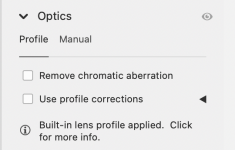
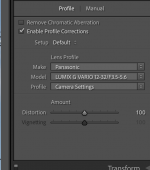
I have just downloaded a Panasonic G100 raw file from the internet, and after opening it in Adobe ACR I got the following:

Screenshot 2022-07-08 at 13.32.19.png
 
Just as an aside, and one you are probably aware of, but the earliest version of Lightroom Classic which works with the G100 is version 9.4

Not saying this is your opinion Alan, but it beats me how some people want the latest and greatest cameras and then moan because they are too tight to update their antiquated software.
 
I've just tried another couple of raws from DPR and they're perfect. But of course they were taken with a different camera and different lenses.
 
Last edited:
Just as an aside, and one you are probably aware of, but the earliest version of Lightroom Classic which works with the G100 is version 9.4

Not saying this is your opinion Alan, but it beats me how some people want the latest and greatest cameras and then moan because they are too tight to update their antiquated software.

If it's my software then fair enough but I keep coming back to the point that downloaded raws but processed with my old creaking software are perfect. If my software was the one and only issue here they should show some issues you'd expect in uncorrected raws but they don't, they're perfect.
 
This will be my last comment too :)

"OK. One more and last time from me. This is MFT not Fuji or Canon or Nikon or Sony or anyone else. That's the first thing to take in.

To date with MFT lens correction details have always been included in the raw data in camera and your software processes it and the whole process is invisible to you and can not be removed by you. That's what I've meant by in camera and baked in. I can't see and have never seen any way to remove it and return to the uncorrected raw file.

Anyone unfamiliar with MFT needs to understand how it normally works."


That seems different to how you started of, and is indeed I thought it worked.

I don't think I nor anyone else have thought it anything else but M43

However, the title of the thread is "A problem with in camera corrections" that is very different to the camera adding the data to the file in order for the software to make the corrections, and at the beginning it did seem that you thought the corrections were made in camera.
If that is not what you meant, it is the way myself and others saw it.

I don't know what you mean by the uncorrected raw file, because there is no corrected raw file, raw is raw.
You can view the raw file without corrections simply by clicking off lens correction in the PC software.

If you want to email me a raw file from your camera, I will see what Affinity does with it. (It is a very good and easy programme, and not expensive)
And of course you could try Silkypix as suggested.

Negative results are as important as positive results in issues like this, so nothing is wasted in trying.
I couldn't even take a guess as to why the downloaded files work but not yours, but trying other software would certainly help.
 
This will be my last comment too :)

"OK. One more and last time from me. This is MFT not Fuji or Canon or Nikon or Sony or anyone else. That's the first thing to take in.

To date with MFT lens correction details have always been included in the raw data in camera and your software processes it and the whole process is invisible to you and can not be removed by you. That's what I've meant by in camera and baked in. I can't see and have never seen any way to remove it and return to the uncorrected raw file.

Anyone unfamiliar with MFT needs to understand how it normally works."


That seems different to how you started of, and is indeed I thought it worked.

I don't think I nor anyone else have thought it anything else but M43

However, the title of the thread is "A problem with in camera corrections" that is very different to the camera adding the data to the file in order for the software to make the corrections, and at the beginning it did seem that you thought the corrections were made in camera.
If that is not what you meant, it is the way myself and others saw it.

I don't know what you mean by the uncorrected raw file, because there is no corrected raw file, raw is raw.
You can view the raw file without corrections simply by clicking off lens correction in the PC software.

If you want to email me a raw file from your camera, I will see what Affinity does with it. (It is a very good and easy programme, and not expensive)
And of course you could try Silkypix as suggested.

Negative results are as important as positive results in issues like this, so nothing is wasted in trying.
I couldn't even take a guess as to why the downloaded files work but not yours, but trying other software would certainly help.

Thanks for the offer but at the moment I don't want to put any more effort into this at all and if Silkipix is the answer I'd rather walk away from Panasonic as I think awful is too mild a word for it

I'm unsure what the issue is but the fact that downloaded raw files are fine is interesting as if my software is the problem I'd expect the downloaded files to show some issues and they simply do not.
 
Thanks for the offer but at the moment I don't want to put any more effort into this at all and if Silkipix is the answer I'd rather walk away from Panasonic as I think awful is too mild a word for it

I'm unsure what the issue is but the fact that downloaded raw files are fine is interesting as if my software is the problem I'd expect the downloaded files to show some issues and they simply do not.
I quite agree with you on Silkypix, terrible, but really only to see if it works, ie it would confirm whether it was you camera or software, I would never use it for anything else :)

And I agree with the downloaded pictures, and would expect the same results with yours, but if it was me I would want that last question answered.

At the same time I can understand your frustration and wanting to send it back.
 
You say you've downloaded G100 raw files from DPReview and they are displayed by CS5's raw converter with lens corrections applied.
Please point me to the location you downloaded the raws from so that I can try to help. I'm a M4/3 user BTW and, when opening my Oly files in LR Classic (latest), the lens profiles are applied - and cannot be removed.
In Affinity, they are applied, but CAN be removed.

I still have Lightroom v6.14 installed on my PC. Opening raws from my Oly displays them uncorrected, and Oly/Panasonic lenses are NOT listed in the drop down menu under the lens correction tab.
 
Last edited:
You say you've downloaded G100 raw files from DPReview and they are displayed by CS5's raw converter with lens corrections applied.
Please point me to the location you downloaded the raws from so that I can try to help. I'm a M4/3 user BTW and, when opening my Oly files in LR Classic (latest), the lens profiles are applied - and cannot be removed.
In Affinity, they are applied, but CAN be removed.

I still have Lightroom v6.14 installed on my PC. Opening raws from my Oly displays them uncorrected, and Oly/Panasonic lenses are NOT listed in the drop down menu under the lens correction tab.
I use Affinity and Darktable, and Darktable also allows you to just turn off and on the lens corrections.
And if the data is missing, Affinity does not stop (I have never seen that, but from a previous post), it just tells you the data is missing, and allows you to do it manually
 
You say you've downloaded G100 raw files from DPReview and they are displayed by CS5's raw converter with lens corrections applied.
Please point me to the location you downloaded the raws from so that I can try to help. I'm a M4/3 user BTW and, when opening my Oly files in LR Classic, the lens profiles are applied - and cannot be removed.
In Affinity, they are applied, but CAN be removed.

There's a G100 review at dpr with a sample gallery. They've used several lenses but I only downloaded wider angle ones as with longer focal lengths any distortion might not be so obvious. I downloaded raws for the 12-32mm and 20mm.


Thanks for trying to help but please only continue for your own interest as this camera is going back as if it's faulty, it's faulty, and if it's working as to be expected I can't really cope with the changes I'd need to make and the additional time I'd need to spend on this as if it is working it would seem to be lens dependant and possibly lens and software dependant and I don't want the hassle of treating my various cameras and lenses differently and selecting lenses and/ or software to use only with this camera. With my other Panasonic cameras I can use any lens without issue and I don't want the G100 or anything else to have to be treated as a special case.

Thanks all for trying to help and it is appreciated. I'm sorry if I've appeared uncooperative or snappy, it's just that I'm under a lot of pressure without the extra time and effort all this trying to sort out a new to me camera is taking.

:D
 
Last edited:
Sometimes it’s interesting to try to fathom problems out, and sometimes one has better/real world problems which take priority. I understand. (y)
 
They are jpegs. They will have been corrected already - probably in camera.

Some of them are JPEG only, but the overwhelming majority of the sample pictures presented there are both JEPG and RAW versions are available to download

 
Last edited:
They are jpegs. They will have been corrected already - probably in camera.
Some of them are JPEG only, but the overwhelming majority of the sample pictures presented there are both JEPG and RAW versions are available to download


Yup. There may be some jpeg only ones there but every one I looked at was available to download as either a jpeg or a raw so raw is what I downloaded.

As above, I don't know how significant it is that my camera produced jpegs with distortion clearly visible until I updated the firmware.

Oh and extra info. To date DNG has only converted files that it's been updated with. I suppose it could be possible that DNG can convert the files and not apply the lens corrections but that brings me/us to the question of why the DPR files are perfect when processed by me. It could of course be that those lenses are recognised whilst for whatever reason mine are not but that would make the camera just too much hassle for me and would be like going back to the days of shutter shock and trying to work out what lenses I could use and which I couldn't. Too much hassle :D
 
Last edited:
FWIW I just downloaded the photo above

With my current version of LR Classic (v11.4.1) lens corrections are applied by default and, geometrically at least, the RAW appears identical to the JPEG version on DPR.

If you wanted to send me one of your problem files, Alan, I could see if corrections are applied on my setup.
 

Attachments

  • Screenshot 2022-07-08 at 15.20.45.png
    Screenshot 2022-07-08 at 15.20.45.png
    136.4 KB · Views: 3
every one I looked at was available to download as either a jpeg or a raw so raw is what I downloaded.
Apologies! I stand corrected.

Downloaded raw,
Opened in latest Photoshop ACR - corrections applied.
Opened in LR 11.4 (latest) - corrections applied BUT with Pana raw it seems I can opt to remove corrections whereas, with my Oly files I can't.
Will not open in Lightroom 6.14 - unrecognised.

I stand by my conclusion that your problem is outdated software, and that there is nothing wrong with your camera.
 
Last edited:
Apologies! I stand corrected.

Downloaded raw,
Opened in latest Photoshop ACR - corrections applied.
Opened in LR 11.4 (latest) - corrections applied BUT with Pana raw it seems I can opt to remove corrections whereas, with my Oly files I can't.
Will not open in Lightroom 6.14 - unrecognised.

I stand by my conclusion that your problem is outdated software, and that there is nothing wrong with your camera.

And you might be right but that doesn't explain why the DPR files are corrected when I process them using my software whilst the ones taken with my camera and processed with the same software are not corrected. If it is something as subtle as what lens you use I'm just not interested in the camera.

It confirms what you have subsequently posted.

I didn't understand what the pictures represented. That's all.
 
Back
Top