

A minute of your time please (help)

chrisc

Suspended / Banned
Messages
298
Edit My Images
Yes
Ok I have noticed that a lot of my pics turn out very dark on other peoples computers eg at work and in friends houses etc the only thing I can think of that is causing this is the settings of the monitors.


So as you look at these pics which is the best looking colour wise?? For me the first one looks good and the second one is to bright.
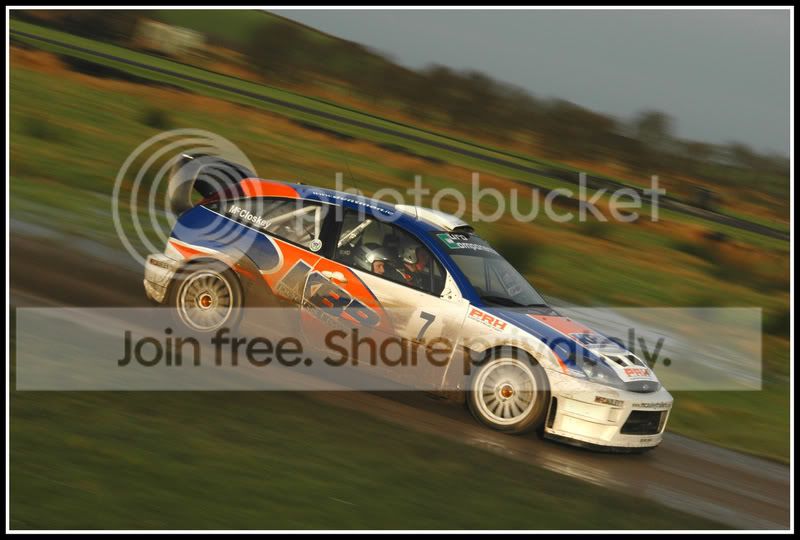
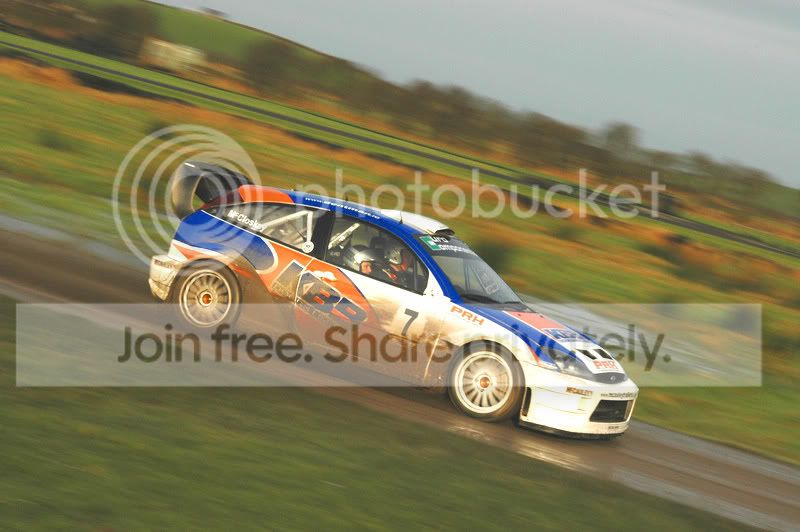
ny1rms.jpg


ny12bb.jpg
 
You'd get away with the first one. But the second one is a tad light.
 
#2 is over exposed.
#1, look at that curved crease above the front wheel arch, the flare, how much brighter could you make it without losing that crease detail ?
obviously its completely gone in pic 2, but even on a generally dark moniter, that crease will still be gone...
I think #1 is correctly exposed for the whites on the car, but could take a spot of brightening overall..
Maybe you take a lot of pics of bright things in dull places..:)
 
First shot is spot on for me, the second one is totally burnt out.

Remember a lot of people dont calibrate their monitor.
 
so it must be the monitor then, the second one was edited at my parents house where it looks ok but at my house it is far to bright
 
The first one looks pretty good to me (on a recently calibrated monitor) but the second one is far too bright.

Bob
 
Only seeing one picture in your post ... is my internet playing up again?

Never mind ... a reload sorted it.

I'd say first is too dark, second is too light, on a non-calibrated Dell 2407.
 
2nd looks overexposed. Popped your first into CS3 and did an auto levels - nothing changed so I reckon it's OK (Certainly looks OK to me!)
 
Cal Monitor

1st OK 2nd Light
 
first one looks good, second too bright
(non calibrated Sony monitor)
 
#1 looks fine for me - #2 is just bright and washed out.

My monitor was calibrated by a Huey and that made naff all difference to the brightness/contrast, it just made everything green!
 
Back
Top