Dear All
You may have seen a lot of emails recently about passwords being hacked on various websites such as facebook, twitter, linkedin, hotmail etc etc - the list goes on and on and on and on and on and on ( get the idea?)
So in the spirit of giving I thought i would try to encourage you to be more secure with your passwords with a little article that i found. I've edited it somewhat to make it easier to understand for the non IT savvy. The credit for the article is not mine. (original is by an author called John Pozadzides who has written some great articles)
Included in this email is a table which shows how quick your passwords can be cracked given their lengh- i know many of you wont bother reading all of the article but this is the important bit please take 5 mins to protect yourself........
In summary for those who are not going to read on here are some recommendations to protect yourself......
1. Do not use the same password for every account, and change them regularly (yes i know you have lots to remember so think of a theme to stick to )
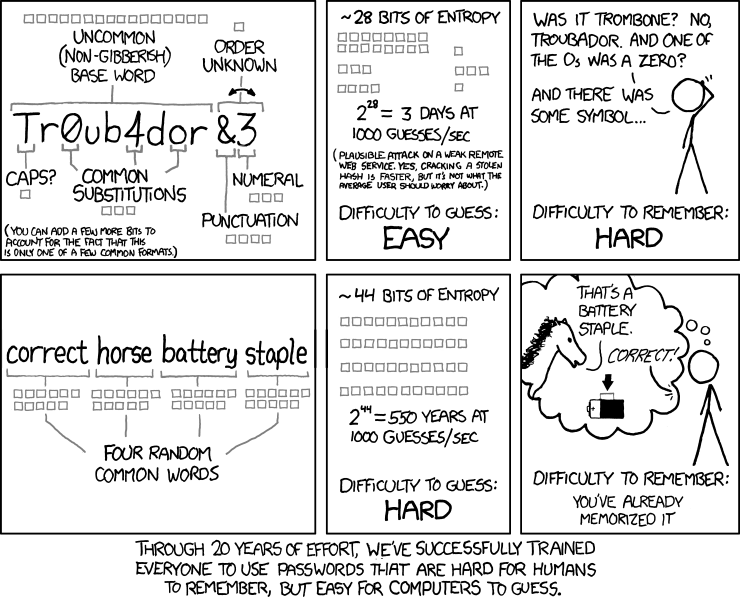
2. Use a passphrase rather than a word -e.g if your password is "Chocolate", why not make it "I l0v3 Ch0c0l@t3"
3. NEVER GIVE YOUR COMPUTER TO SOMEONE YOU DO NOT TRUST - your passwords can be easily retrieved from cookies.
4. NEVER give anyone your user account password. Not even your IT department - they really do not need it even if they say they do - the IT staff are just being lazy and unprofessional. (they can give you a temp new password and then you change it again when you get your pc back and if they say they can't they're lying)
So the article begins.......
If you invited me to try and crack your password, how many guesses would it take before I got it?
Let’s see… here is my top 10 list which will catch between 10 and 20 % of people. I can obtain most of this information much easier than you think, then I might just be able to get into your e-mail, computer, or online banking. After all, if I get into one I’ll probably get into all of them.
Your partner, child, or pet’s name, possibly followed by a 0 or 1 (because they’re always making you use a number, aren’t they?)
your mobile phone number.
123 or 1234 or 123456.
“password”
Your city, or university, football team name.
Date of birth – yours, your partner’s or your child’s.
“god”
“letmein”
“money”
“love”
Statistically speaking that should probably cover between 10- 20% of you. But don’t worry. If I didn’t get it yet it will probably only take a few more minutes before I do…
Hackers, and I’m not talking about the ethical kind, have developed a whole range of tools to get at your personal data. And the main impediment standing between your information remaining safe, or leaking out, is the password you choose. (Ironically, the best protection people have is usually the one they take least seriously.)
One of the simplest ways to gain access to your information is through the use of a Brute Force Attack. This is accomplished when a hacker uses a specially written piece of software to attempt to log into a site using your credentials. Insecure.org has a list of the Top 10 FREE Password Crackers if you wish to dabble and prove just how easy this is. PLEASE NOTE THAT UNLESS YOU HAVE PERMISSION TO DO THIS YOU ARE BREAING THE LAW!!!!
So, how would one use this process to actually breach your personal security? Simple. Follow my logic:
You probably use the same password for lots of stuff right - web based email, forums, social networking?
Some sites you access such as your Bank or work VPN probably have pretty decent security, so I’m not going to attack them - no point in doing that because there are much easier targets with looser security.
However, other sites like e-mail greeting cards sites, forums, shopping sites you frequent might not be as well prepared. So those are the ones I’d work on.
So, all we have to do now is unleash Brutus, wwwhack, or THC Hydra on their server with instructions to try say 10,000 (or 100,000 – whatever makes you happy) different usernames and passwords as fast as possible.
Once we’ve got several login+password pairings we can then go back and test them on targeted sites.
But wait… How do I know which bank you use and what your login ID is for the sites you frequent? All those cookies are simply stored, unencrypted and nicely named, in your Web browser’s cache - dead easy.
And how fast could this be done? Well, that depends on three main things, the length and complexity of your password, the speed of the hacker’s computer, and the speed of the hacker’s Internet connection.
Pay particular attention to the difference between using only lowercase characters and using all possible characters (uppercase, lowercase, and special characters – like @#$%^&*). Adding just one capital letter and one asterisk would change the processing time for an 8 character password from 2.4 days to 2.1 centuries.
Assuming the hacker has a reasonably fast internet connection and PC here is an estimate of the amount of time it would take to generate every possible combination of passwords for a given number of characters. After generating the list it’s just a matter of time before the computer runs through all the possibilities – or gets shut down trying.
Password Length All Characters Only Lowercase
3 characters
4 characters
5 characters
6 characters
7 characters
8 characters
9 characters
10 characters
11 characters
12 characters
13 characters
14 characters 0.86 seconds
1.36 minutes
2.15 hours
8.51 days
2.21 years
2.10 centuries
20 millennia
1,899 millennia
180,365 millennia
17,184,705 millennia
1,627,797,068 millennia
154,640,721,434 millennia 0.02 seconds
.046 seconds
11.9 seconds
5.15 minutes
2.23 hours
2.42 days
2.07 months
4.48 years
1.16 centuries
3.03 millennia
78.7 millennia
2,046 millennia
Remember, these are just for an average computer, and these assume you aren’t using any word in the dictionary. If Google put their computers to work on it they’d finish about 1,000 times faster.
Now, I could go on for hours and hours more about all sorts of ways to compromise your security and generally make your life miserable – but 95% of those methods begin with compromising your weak password. So, why not just protect yourself from the start and sleep better at night?
Believe me, I understand the need to choose passwords that are memorable. But if you’re going to do that how about using something that no one is ever going to guess AND doesn’t contain any common word or phrase in it.
Here are some password tips:
Randomly substitute numbers for letters that look similar. The letter ‘o’ becomes the number ’0′, or even better an ‘@’ or ‘*’. (i.e. – m0d3ltf0rd… like modelTford)
Randomly throw in capital letters (i.e. – Mod3lTF0rd)
Think of something you were attached to when you were younger, but DON’T CHOOSE A PERSON’S NAME! Every name plus every word in the dictionary will fail under a simple brute force attack.
Maybe a place you loved, or a specific car, an attraction from a vacation, or a favorite restaurant?
You really need to have different username / password combinations for everything. Remember, the technique is to break into anything you access just to figure out your standard password, then compromise everything else. This doesn’t work if you don’t use the same password everywhere.
Since it can be difficult to remember a ton of passwords, I recommend using Roboform for Windows users. It will store all of your passwords in an encrypted format and allow you to use just one master password to access all of them. It will also automatically fill in forms on Web pages, and you can even get versions that allow you to take your password list with you on your PDA, phone or a USB key. If you’d like to download it without having to navigate their web site here is the direct download link.
Mac users can use 1Password. It is essentially the same thing as Roboform, except for Mac, and they even have an iPhone application so you can take them with you too.
Once you’ve thought of a password, try Microsoft’s password strength tester to find out how secure it is.
By request I also created a short RoboForm Tutorial. Hope it helps…
Another thing to keep in mind is that some of the passwords you think matter least actually matter most. For example, some people think that the password to their e-mail box isn’t important because “I don’t get anything sensitive there.” Well, that e-mail box is probably connected to your online banking account. If I can compromise it then I can log into the Bank’s Web site and tell it I’ve forgotten my password to have it e-mailed to me. Now, what were you saying about it not being important?
Often times people also reason that all of their passwords and logins are stored on their computer at home, which is save behind a router or firewall device. Of course, they’ve never bothered to change the default password on that device, so someone could drive up and park near the house, use a laptop to breach the wireless network and then try passwords from this list until they gain control of your network – after which time they will own you!
Now I realize that every day we encounter people who over-exaggerate points in order to move us to action, but trust me this is not one of those times. There are 50 other ways you can be compromised and punished for using weak passwords that I haven’t even mentioned.
I also realize that most people just don’t care about all this until it’s too late and they’ve learned a very hard lesson. But why don’t you do me, and yourself, a favor and take a little action to strengthen your passwords and let me know that all the time I spent on this article wasn’t completely in vain.
Please, be safe. It’s a jungle out there.
You may have seen a lot of emails recently about passwords being hacked on various websites such as facebook, twitter, linkedin, hotmail etc etc - the list goes on and on and on and on and on and on ( get the idea?)
So in the spirit of giving I thought i would try to encourage you to be more secure with your passwords with a little article that i found. I've edited it somewhat to make it easier to understand for the non IT savvy. The credit for the article is not mine. (original is by an author called John Pozadzides who has written some great articles)
Included in this email is a table which shows how quick your passwords can be cracked given their lengh- i know many of you wont bother reading all of the article but this is the important bit please take 5 mins to protect yourself........
In summary for those who are not going to read on here are some recommendations to protect yourself......
1. Do not use the same password for every account, and change them regularly (yes i know you have lots to remember so think of a theme to stick to )
2. Use a passphrase rather than a word -e.g if your password is "Chocolate", why not make it "I l0v3 Ch0c0l@t3"
3. NEVER GIVE YOUR COMPUTER TO SOMEONE YOU DO NOT TRUST - your passwords can be easily retrieved from cookies.
4. NEVER give anyone your user account password. Not even your IT department - they really do not need it even if they say they do - the IT staff are just being lazy and unprofessional. (they can give you a temp new password and then you change it again when you get your pc back and if they say they can't they're lying)
So the article begins.......
If you invited me to try and crack your password, how many guesses would it take before I got it?
Let’s see… here is my top 10 list which will catch between 10 and 20 % of people. I can obtain most of this information much easier than you think, then I might just be able to get into your e-mail, computer, or online banking. After all, if I get into one I’ll probably get into all of them.
Your partner, child, or pet’s name, possibly followed by a 0 or 1 (because they’re always making you use a number, aren’t they?)
your mobile phone number.
123 or 1234 or 123456.
“password”
Your city, or university, football team name.
Date of birth – yours, your partner’s or your child’s.
“god”
“letmein”
“money”
“love”
Statistically speaking that should probably cover between 10- 20% of you. But don’t worry. If I didn’t get it yet it will probably only take a few more minutes before I do…
Hackers, and I’m not talking about the ethical kind, have developed a whole range of tools to get at your personal data. And the main impediment standing between your information remaining safe, or leaking out, is the password you choose. (Ironically, the best protection people have is usually the one they take least seriously.)
One of the simplest ways to gain access to your information is through the use of a Brute Force Attack. This is accomplished when a hacker uses a specially written piece of software to attempt to log into a site using your credentials. Insecure.org has a list of the Top 10 FREE Password Crackers if you wish to dabble and prove just how easy this is. PLEASE NOTE THAT UNLESS YOU HAVE PERMISSION TO DO THIS YOU ARE BREAING THE LAW!!!!
So, how would one use this process to actually breach your personal security? Simple. Follow my logic:
You probably use the same password for lots of stuff right - web based email, forums, social networking?
Some sites you access such as your Bank or work VPN probably have pretty decent security, so I’m not going to attack them - no point in doing that because there are much easier targets with looser security.
However, other sites like e-mail greeting cards sites, forums, shopping sites you frequent might not be as well prepared. So those are the ones I’d work on.
So, all we have to do now is unleash Brutus, wwwhack, or THC Hydra on their server with instructions to try say 10,000 (or 100,000 – whatever makes you happy) different usernames and passwords as fast as possible.
Once we’ve got several login+password pairings we can then go back and test them on targeted sites.
But wait… How do I know which bank you use and what your login ID is for the sites you frequent? All those cookies are simply stored, unencrypted and nicely named, in your Web browser’s cache - dead easy.
And how fast could this be done? Well, that depends on three main things, the length and complexity of your password, the speed of the hacker’s computer, and the speed of the hacker’s Internet connection.
Pay particular attention to the difference between using only lowercase characters and using all possible characters (uppercase, lowercase, and special characters – like @#$%^&*). Adding just one capital letter and one asterisk would change the processing time for an 8 character password from 2.4 days to 2.1 centuries.
Assuming the hacker has a reasonably fast internet connection and PC here is an estimate of the amount of time it would take to generate every possible combination of passwords for a given number of characters. After generating the list it’s just a matter of time before the computer runs through all the possibilities – or gets shut down trying.
Password Length All Characters Only Lowercase
3 characters
4 characters
5 characters
6 characters
7 characters
8 characters
9 characters
10 characters
11 characters
12 characters
13 characters
14 characters 0.86 seconds
1.36 minutes
2.15 hours
8.51 days
2.21 years
2.10 centuries
20 millennia
1,899 millennia
180,365 millennia
17,184,705 millennia
1,627,797,068 millennia
154,640,721,434 millennia 0.02 seconds
.046 seconds
11.9 seconds
5.15 minutes
2.23 hours
2.42 days
2.07 months
4.48 years
1.16 centuries
3.03 millennia
78.7 millennia
2,046 millennia
Remember, these are just for an average computer, and these assume you aren’t using any word in the dictionary. If Google put their computers to work on it they’d finish about 1,000 times faster.
Now, I could go on for hours and hours more about all sorts of ways to compromise your security and generally make your life miserable – but 95% of those methods begin with compromising your weak password. So, why not just protect yourself from the start and sleep better at night?
Believe me, I understand the need to choose passwords that are memorable. But if you’re going to do that how about using something that no one is ever going to guess AND doesn’t contain any common word or phrase in it.
Here are some password tips:
Randomly substitute numbers for letters that look similar. The letter ‘o’ becomes the number ’0′, or even better an ‘@’ or ‘*’. (i.e. – m0d3ltf0rd… like modelTford)
Randomly throw in capital letters (i.e. – Mod3lTF0rd)
Think of something you were attached to when you were younger, but DON’T CHOOSE A PERSON’S NAME! Every name plus every word in the dictionary will fail under a simple brute force attack.
Maybe a place you loved, or a specific car, an attraction from a vacation, or a favorite restaurant?
You really need to have different username / password combinations for everything. Remember, the technique is to break into anything you access just to figure out your standard password, then compromise everything else. This doesn’t work if you don’t use the same password everywhere.
Since it can be difficult to remember a ton of passwords, I recommend using Roboform for Windows users. It will store all of your passwords in an encrypted format and allow you to use just one master password to access all of them. It will also automatically fill in forms on Web pages, and you can even get versions that allow you to take your password list with you on your PDA, phone or a USB key. If you’d like to download it without having to navigate their web site here is the direct download link.
Mac users can use 1Password. It is essentially the same thing as Roboform, except for Mac, and they even have an iPhone application so you can take them with you too.
Once you’ve thought of a password, try Microsoft’s password strength tester to find out how secure it is.
By request I also created a short RoboForm Tutorial. Hope it helps…
Another thing to keep in mind is that some of the passwords you think matter least actually matter most. For example, some people think that the password to their e-mail box isn’t important because “I don’t get anything sensitive there.” Well, that e-mail box is probably connected to your online banking account. If I can compromise it then I can log into the Bank’s Web site and tell it I’ve forgotten my password to have it e-mailed to me. Now, what were you saying about it not being important?
Often times people also reason that all of their passwords and logins are stored on their computer at home, which is save behind a router or firewall device. Of course, they’ve never bothered to change the default password on that device, so someone could drive up and park near the house, use a laptop to breach the wireless network and then try passwords from this list until they gain control of your network – after which time they will own you!
Now I realize that every day we encounter people who over-exaggerate points in order to move us to action, but trust me this is not one of those times. There are 50 other ways you can be compromised and punished for using weak passwords that I haven’t even mentioned.
I also realize that most people just don’t care about all this until it’s too late and they’ve learned a very hard lesson. But why don’t you do me, and yourself, a favor and take a little action to strengthen your passwords and let me know that all the time I spent on this article wasn’t completely in vain.
Please, be safe. It’s a jungle out there.