A focus question

realspeed

Suspended / Banned
Messages
8,827
Name
Bazza
Edit My Images
No
focus test.jpg

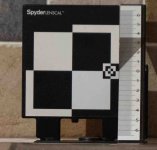
take with Panasonic G9ii (spot focus) and 12-60mm@60mm panasonic elmarit lens. Target spirit level checked - camera and target on same level as well. The above photo shows a difference between the top and bottom 6 marks . To me looks like front focus issue. When I had nikon D810 camera this could be adjusted in camera . Apart from editing is there any in camera adjustments I can try. Same result using a panasonic 35-100 lens @60mm so a minor camera issue
 
Last edited:
Don't bite my head off. I'm just putting it out there. Without knowing the size of your target, if the camera is at the same level it will still target the lower half of the frame, surely? I say that because I'm wondering if it's a depth of field issue.
 
A quick thought...

AFAIK you need to focus on the small 'target' adjacent to the 'zero' mark. Your picture gives me the impression that you focused on the centre of the larger target area.

As for spot focus, why? Small area AF yes... To cover the above mentioned smaller target.

Sorry if I have just been teaching you how to suck eggs ;)
 
BB Thank you for your comment, just to say I had focused on the small square . cropping in the shot does give the impression you mentioned. spot focus enabled a more accurate pinpoint for that small square.
However even so that would not account for the back /front focus difference

Neville I think you may have found something I had not thought of. Aperture was f4.5 . maybe I should retest using something like f11. f 4.5 might have been a too narrow a margine to allow the full DOF. will try that tomorrw when the boss is somewhere else. so thank you for the hint
 
FWIW
Back in my Canon days I would check, it needed back or front focusing, but not using such as the device you have.

I used a chart scale and IIRC the, received wisdom/advice, was when checking for such an issue you need to use the lens wide open.

Afteral if there is an AF micro adjustment issue you don't want hide it by using a large DoF .

Again IIRC I had one lens that was slightly front focusing and made the very slight adjustment in the body to correct for that.
 
From the manual.....I have made bold what I was saying above ;)

"Turn on your camera and set the exposure mode to Manual or Aperture Priority. Select
the lowest native ISO, turn off the lens stabilizing function (if the lens has it) and set the
lens to its widest aperture.
If you are calibrating a zoom lens, set it to its longest focal
length. Some cameras will allow you to adjust a lens at multiple points in the focal
range. If your camera has this functionality, adjust at each of the suggested focal lengths
for the lens you are using"
 
thank you for the advise on what to try. The Panasonic G9 and G9ii do not have any means of recalibrating within the camera body that I know of.

these one can adjust within the camera body but not back/front focus. Basic adjustments that can be reprogramed if desired
View: https://youtu.be/cPveNGhoUgw
 
Last edited:
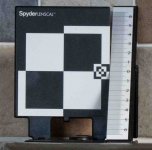
same shot but at f22. Nevilles reply got me thinking about f stops . Below cropped but unedited, so looks as that isgthe anser
test ff.jpg
 
Last edited:
It’s not quite perpendicular, you can see from the top edge that the camera isn’t perfectly square on.

Hope that’s useful
 
If that's at lowest native ISO it's awful.

You need the clearest image to even begin to be able to see if the focus is out.
 
I’ve always done a MA on my lenses with them wide open ,stopping down is simply increasing the DOF and throwing out your results ..
There should in theory be no need to MA any compatible mirrorless lenses , if it’s front focussing as it seems to be I would think it’s a faulty lens ..
the other couple of points of note would be how did you trigger the shutter it honestly needs a remote cable release etc . And did you check that the focus point ( red/ green square) was bang on the target area
 
Back
Top