Jammy Dodger
Suspended / Banned
- Messages
- 692
- Name
- Fraser
- Edit My Images
- Yes

4.8 FilmLab
A twitter contact reminded me about FilmLab, a stand-alone app for colour and black and white negative inversion, versions available for smart phones but also Mac and Windows. See https://www.filmlabapp.com. Recently upgraded to version 2.5.
Has anyone tried this? I can't see any sign of a free trial option.
The Mac/Windows versions are priced atUS$6US$8 per month,$50$60 per year, or $200 for a lifetime license, presumably plus VAT.
All prices quoted for FilmLab were found inMarch 2022April 2023.
I was initially VERY sceptical about this, but that was based on the capabilities of my 2016 iPhone SE. With modern (2023) high-end smart phones, this would be a much more viable option.

Interesting YT video on using FilmoMat SmartConvert atView: https://www.youtube.com/watch?v=d4fc1GJXQXc
Interesting snippet, not directly relevant, it still apparently took him 50 minutes to scan his roll of film (uncut!) with his camera scanning setup. That seemed quite slow to me.
TLDR: you can setup a watch folder for SmartConvert, and as images (including RAW, I wonder how many formats?) drop in there they are picked up and converted. There is an auto-crop capability, but manual cropping as well. You can individually adjust cyan, magenta and yellow channels, rotate etc.
Desktop versions appear to be €125 on their store.


Apples withdrawel of support for firewire is frustrating, to avoid this i picked up a old but cheap MacBook Pro, which is now my designated scanning machine. Its 2010 so I can also run NikonScan software for my Coolscan 9000. Its not an ideal setup but it works without having to spend too much money to keep my scanning setup operational.I have inherited a large number of slides (well into the 1,000s) from my father and I’ve recently started scanning them.
My standard way of doing this for the last ten years or so for my own photos has been to use a Sony A7x body with a Canon FD slide copier / bellows and an FD 50mm f/3.5 Macro lens and a CRI 98+ LED light panel by Smallrig, which works brilliantly for 35mm slides.
However, dad’s also include a fair number of 127 Super Slides and 6x6 transparencies, many of them (mostly my grandfather's photos) mounted in glass, so I’m having to look at alternatives, preferably one system that covers multiple formats. Unfortunately, the clock is ticking for the end of the of macOs support for Firewire for my V700 and I have got rather used to the improved convenience and quality of using a mirrorless camera as a scanner anyhow.
Does anyone have hints/tips/recommendations after experience with less common formats like this?

I run my V700 as a USB devise on a 2015 Mac book with Vuescan , given the general slow workflow on the V700 I can't see the lack of Firewire as been a problem.Unfortunately, the clock is ticking for the end of the of macOs support for Firewire for my V700 and I have got rather used to the improved convenience and quality of using a mirrorless camera as a scanner anyhow.
I run my V700 as a USB devise on a 2015 Mac book with Vuescan , given the general slow workflow on the V700 I can't see the lack of Firewire as been a problem.

I've just converted an old Meopta enlarger into a copy stand much more cheaply than buying a similar copy stand outright. The only trick was engineering the camera connection, which involved a bit of metalwork.Essential Film Holder + à copy stand looks like my best bet at the moment, but I am wondering if I have missed anything else.
Yes, I’ve been investigating homemade rigs, particularly ones that are easily demountable for storage; everything will have to be used on the dining room table.I've just converted an old Meopta enlarger into a copy stand much more cheaply than buying a similar copy stand outright. The only trick was engineering the camera connection, which involved a bit of metalwork.
It seems to me there are a lot of home made rigs about. The pro versions from Valoi etc are incredibly expensive. Valoi does have the Easy135 and Easy120 IIRC which do away with the faff of copy stands and tripods etc. Might be worth a look?Yes, I’ve been investigating homemade rigs, particularly ones that are easily demountable for storage; everything will have to be used on the dining room table.
I already have a suitable clamp that will do nicely for mounting the camera, so that’s a start.
Nick,Apples withdrawel of support for firewire is frustrating, to avoid this i picked up a old but cheap MacBook Pro, which is now my designated scanning machine. Its 2010 so I can also run NikonScan software for my Coolscan 9000. Its not an ideal setup but it works without having to spend too much money to keep my scanning setup operational.
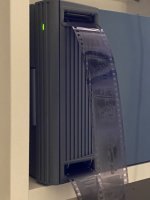
Looks goodWhoops I forgot to add text! Here’s my Primefilm 7600pro munching through a roll. It takes 1.5hrs for a 24exp roll at full resolution with a pre scan and autofocus for each frame. Really not bad especially as it does it all itself. No alignment issues at all, it just works.
Typical result:
View attachment 467400

 )
)
 www.facebook.com
Looks good
It currently takes me circa 2 mins for a 36 exposure roll! (Smug Git
Filmomat SmartConvert Users | This thing is incredible | Facebook
This thing is incredible! I have had my Autocarrier 135 for a week now and it is incredibly impressive! Let me go through my history of film scanning so you can see what I'm judging it against: I...