
and the site receives a small commission
You are using an out of date browser. It may not display this or other websites correctly.
You should upgrade or use an alternative browser.
You should upgrade or use an alternative browser.
8 Bit Depth to 16 Bit Depth
- Thread starter nikonuser
- Start date

arad85
Suspended / Banned
- Messages
- 9,438
- Name
- Andy
- Edit My Images
- Yes
??
If you take JPEGs you will only get 8 bit depth. RAW will take higher bit depths and you then (typically) develop these into 8 bit JPEGs for later display. It's the develop process that allows you to control the transfer from higher bit depths to lower, rather than letting the camera decide for you.
If you take JPEGs you will only get 8 bit depth. RAW will take higher bit depths and you then (typically) develop these into 8 bit JPEGs for later display. It's the develop process that allows you to control the transfer from higher bit depths to lower, rather than letting the camera decide for you.
Andy - sorry, I'm still a little confused. Its a friend of mine who has asked me this question and I dont know the full answer to it.
He says with his Nikon D90 he was getting 16 bit out of the camera but now with the
D7000 he is only getting 8 bit.
I have mentioned about the 12 and 14 bit depth in the Shooting Menu under the NEF (RAW)Recording tab.
So if he chose 14 bit lossless in camera would he still need to be changed in ACR to 16 bit??
Appreciate any help
Thanks
Dave
He says with his Nikon D90 he was getting 16 bit out of the camera but now with the
D7000 he is only getting 8 bit.
I have mentioned about the 12 and 14 bit depth in the Shooting Menu under the NEF (RAW)Recording tab.
So if he chose 14 bit lossless in camera would he still need to be changed in ACR to 16 bit??
Appreciate any help
Thanks
Dave
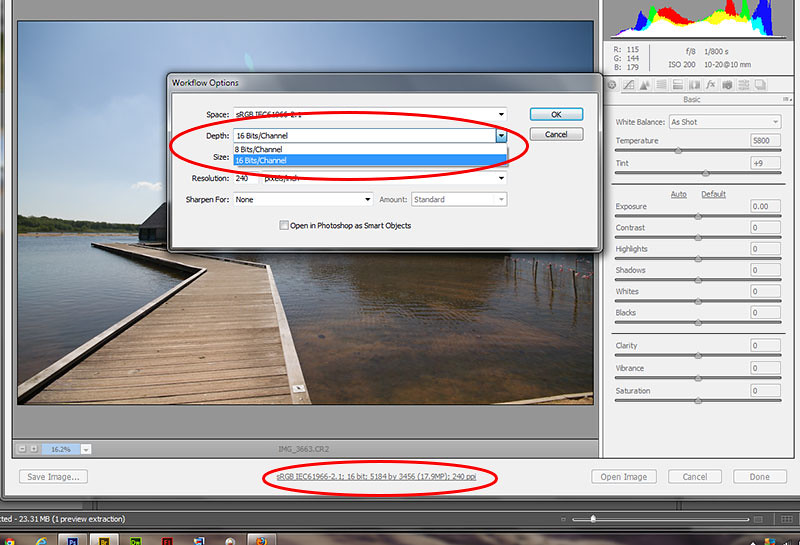
 ACR will convert to 8bit on import if you don't select 16 bit.
swanseamale47
Suspended / Banned
- Messages
- 10,876
- Name
- wayne clarke
- Edit My Images
- Yes
The camera can usually output either 8 or 16 bit (normally 12 or 14 bit actually) if you put a 8 bit image into camera raw and output it as 16 bit what your doing is putting 8 bits in a 16 bit wrapper.

Chappers
Suspended / Banned
- Messages
- 5,386
- Name
- John
- Edit My Images
- No
Dave
RAW is normally either 12 or 14 bit. it's the RAW conversion software that does the conversion to 16 bit. not the camera. So what is happening is the camera is outputting the RAW file ( in whatever bit depth it works in ) and that file is then processed by the software ( in this case ACR) to give a Standard output in either 8 bit or 16 bit. So the RAW conversion software needs to be set to 16 bit.
Hope this helps
John C
RAW is normally either 12 or 14 bit. it's the RAW conversion software that does the conversion to 16 bit. not the camera. So what is happening is the camera is outputting the RAW file ( in whatever bit depth it works in ) and that file is then processed by the software ( in this case ACR) to give a Standard output in either 8 bit or 16 bit. So the RAW conversion software needs to be set to 16 bit.
Hope this helps
John C

- Messages
- 29,876
- Name
- Dave
- Edit My Images
- Yes
Thanks John for the explanation.... but how do you set the RAW conversion software to 16 bit please
Thanks for your help
Dave
Hi Dave
In ACR at the bottom you can see some text (circled) Click that then when the window opens click the dropdown and change it to 16 bit HTHs also it will remain that way as a default setting so no need to keep changing it everytime
Dave
Last edited: