7 Quick & Dirty Lightroom Tricks

Handy indeed, favourited. Thanks
 
Excellent - really liked trick 7.

Think I have an awful lot more to learn about Lightroom [emoji3]
 
As for tip 7 - I simply hit 'Opt-Cmd-o' (on Mac, I guess it'll be something similar on windows) to show a grid; or 'View>Loupe Overlay>Grid' to select via menus.

This grid can easily be customised to control the grid size and opacity.

Interestingly, once this is set up, whenever I mouse over a slider in the manual transform controls of 'Lens Corrections' the grid automatically overlays the image to aid tweaking, and conveniently disappears when the pointer moves off a slider. No extra key presses or selections are necessary, and the helpful grid just shows up when needed.
 
Great video, many thanks. Now I need to take some geese pictures! :whistle:
 
Great video covering some tricks I didnt know
 
As for tip 7 - I simply hit 'Opt-Cmd-o' (on Mac, I guess it'll be something similar on windows) to show a grid; or 'View>Loupe Overlay>Grid' to select via menus.

This grid can easily be customised to control the grid size and opacity.

Interestingly, once this is set up, whenever I mouse over a slider in the manual transform controls of 'Lens Corrections' the grid automatically overlays the image to aid tweaking, and conveniently disappears when the pointer moves off a slider. No extra key presses or selections are necessary, and the helpful grid just shows up when needed.
Thanks for that. The customizable grid is cool... but I can't get "auto-show" to work on my setup.
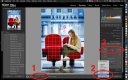
 
I can't get "auto-show" to work on my setup.
This is something I setup years ago and I've forgotten all the steps...I'll have a rummage around...aha, I think I have it...

You need to set 'Show Grid: Auto' (see 1), this setting may be hidden (I certainly hid it in the dim and distant past) and can be accessed by the 'Select toolbar content' menu doohickey on the toolbar (see 2).

Hopefully when all that is set, you'll see the grid when you mouse over a slider (see 3).

I hope that gets you sorted.

TPLRGrid.jpg
 
Well I watched that, not expecting to learn anything new, and I learnt loads so thanks for that! Everyday is a school day :)
 
I decided to make a video of some of my Lightroom editing tricks.
I don't want to sound like a grimmo, and I appreciate the fact that you've made this video to share your knowledge. It's commendable community spirit.

But it's over 7 minutes long. That's a lot of time you're asking people to spend, with no idea as to whether they will find it beneficial. Maybe these tips would be incredibly useful to me. Maybe they wouldn't. Maybe I know them all already. There's no way of finding out without watching it.

Any chance of a table of contents?
 
Any chance of a table of contents?
Cloning a specific source area into specific destination
Cloning/healing over a previously cloned area
Moving very small clone/heal spots (source and destination)
Using "visualize spots" w/ noise reduction
History/undo brush
Auto-masking for hard to mask areas/masking small areas of entire image simultaneously
Crop/Grid overlay for lens correction (although Tony's method is better)
 
Great, ta. Looks like I need to find 7 minutes to watch this!
 
Thanks for that Steven, some useful tips in your video.
 
Excelent and will come in handy, many thanks.
 
Hadn't attempted cloning up to now but it looks to be a useful trick to have in the arsenal
 
Back
Top
