
sk66
Suspended / Banned
- Messages
- 9,557
- Name
- Steven
- Edit My Images
- Yes
I decided to make a video of some of my Lightroom editing tricks.
View: https://youtu.be/TXU5e0Ppeqs



Thanks for that. The customizable grid is cool... but I can't get "auto-show" to work on my setup.As for tip 7 - I simply hit 'Opt-Cmd-o' (on Mac, I guess it'll be something similar on windows) to show a grid; or 'View>Loupe Overlay>Grid' to select via menus.
This grid can easily be customised to control the grid size and opacity.
Interestingly, once this is set up, whenever I mouse over a slider in the manual transform controls of 'Lens Corrections' the grid automatically overlays the image to aid tweaking, and conveniently disappears when the pointer moves off a slider. No extra key presses or selections are necessary, and the helpful grid just shows up when needed.
This is something I setup years ago and I've forgotten all the steps...I'll have a rummage around...aha, I think I have it...I can't get "auto-show" to work on my setup.
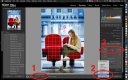
That's the part I was missing... thanks!You need to set 'Show Grid: Auto' (see 1), this setting may be hidden

I don't want to sound like a grimmo, and I appreciate the fact that you've made this video to share your knowledge. It's commendable community spirit.I decided to make a video of some of my Lightroom editing tricks.
Cloning a specific source area into specific destinationAny chance of a table of contents?


