3D software preferences ?

ccn1

Suspended / Banned
Messages
34
Name
Chris
Edit My Images
Yes
Hi All,

I am creating 3D images for products like the one below using PS 3D Objects but its quite slow going.

Does anyone know a more automated way such as importing a selection of images into a template (Gallery wrap, Greeting Card or Post Card etc) and the software creates the output like below, or similar??

http://www.flickr.com/photos/cnicholls/8099405641/in/photostream

Thanks in advance.

Chris
 
Not quite sure what you are asking but MS Powerpoint can do whats in the example.

If you just want to use pictures as textures on a predetermined 3D shape then any 3D software could do it. Use the same object and change the texture image you should be able to knock out 1 a minute if you dont render too large or have complex backgrounds.

Cinema 4D, MAYA, 3DS MAX etc

Hope that helps.
 
Thanks for the info,

Yes the later is what i am trying to achieve. Import an image into a template as a texture on an object such as a a 3D box like you say.

Ill have a look into it.
 
Adobe illustrator
 
Not quite sure what you are asking but MS Powerpoint can do whats in the example.

If you just want to use pictures as textures on a predetermined 3D shape then any 3D software could do it. Use the same object and change the texture image you should be able to knock out 1 a minute if you dont render too large or have complex backgrounds.

Cinema 4D, MAYA, 3DS MAX etc

Hope that helps.

Yeah but those are pretty pricey packages to be investing in just to slap a photo into an incandescent shader and apply it to a basic primitive. It would also require a bit of 3D know-how.

The best (and cheapest) way to quickly accomplish the kind of effect shown in the OP's link would be to cheat it in Photoshop. Honestly I think Photoshop's 3D tools are a waste of time but if you could set up a reusable template with the "object" on a canvas, then all you'd have to do is bring in your photo, do an Edit>Perspective adjustment and that's it. Okay so it's not exactly automated but it's the quickest fix you'll get without investing money and time in a 3D DCC app.
 
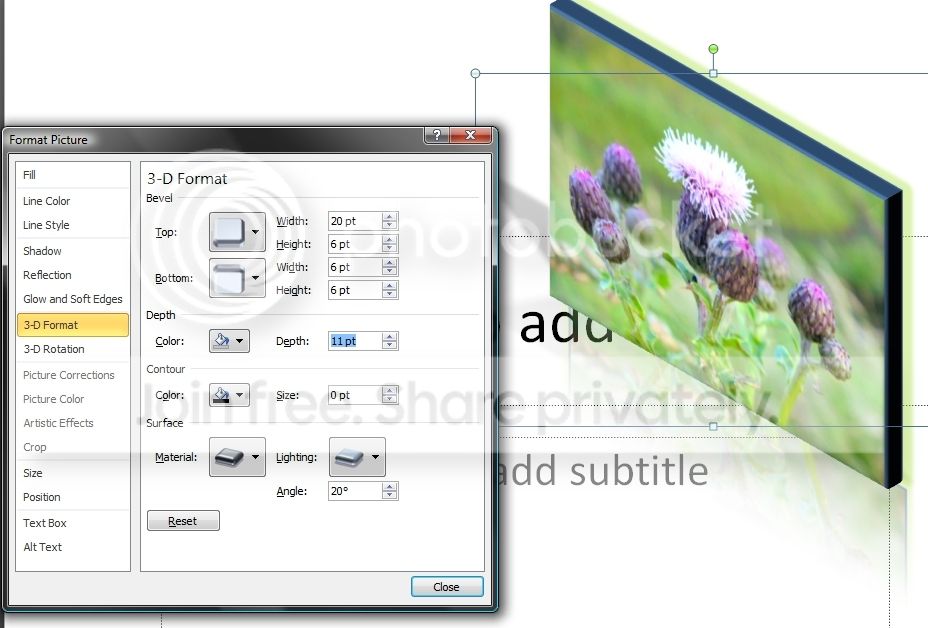
Most computers have MS Office and the example can be created with the Power Point built in tools:
ppoint1.jpg


Picture2.png


CHEERS
 
Last edited:
Back
Top