360 degree product photography

Tdes

Suspended / Banned
Messages
440
Name
Tony
Edit My Images
Yes
I have a client sending me some prototypes over from China, he wants some 360 degree photos done.

Quick look into it and a bit of research, I need a turntable and need to take a shot every 15 degrees, then the website will have a plugin to pick these up and display them properly.

There are 30ish products, so it adds up to 720 finished shots!

Would any of you with experience buy an automatic kit, that rotates and pauses (possible triggering the camera as well), or just go manual turntable and turn/click (saving a load of investment for something I may not use again?).

Any thoughts or things I should know that I have naively overlooked?? They need to be on a white background, so imagine there will be a bit of photoshopping the turntable edge out!!

Cheers, T
 
Depends on the size and weight of the product but I would Google cake icing stands. You can get cheap ones from about a tenner and then mark it up somehow to display every 15 degrees so you have a datum to line up with. Then edit out the marks/edges in post.
 
I've done this a lot, for a photographic equipment supplier, where lighting quality was everything.
This was my setup:
A "Lazy susan" available via ebay in various sizes (needs to be at least 50% larger than the largest product but twice the size is easier).
A sheet of chipboard, larger than the lazy susan.
A sheet of white formica-type material, which you fix to the lazy suzan and cut to shape

Then, just use a machine screw and nut to fix the lazy susan to the board, use a protractor or similar to make 36 marks on the board just outside of the (now covered) lazy Susan, so that each mark is at 10 degree intervals, and you're good to go.

All that you then need to do is to arrange the camera position and lighting to produce the best possible results for the first shot, then leave everything where it is for the other shots.
Edit: I see that you mentioned 15 degree intervals (24 shots) but 10 degree (36 shots) gives much better results
 
Last edited:
I am very surprised that they are not doing the shots in China.
 
I built a turntable for taking 360 degree images of some rocks for photogrammetry - don't ask. Getting the light right was the time consuming and critical bit, I only had LED video lights but flash would be have been much easier. Actually taking the photos was really quick - I managed ~ 300 per hour tethered through lightroom allowing a quick qc. I have also done a few VR projects and as Gary mentioned small increments 10 degrees or a little less give better results - the quickest way is to use a head with an automated 'click' at a present amount of rotation and get an assistant to turn the object.
 
I've done this a lot, for a photographic equipment supplier, where lighting quality was everything.
This was my setup:
A "Lazy susan" available via ebay in various sizes (needs to be at least 50% larger than the largest product but twice the size is easier).
A sheet of chipboard, larger than the lazy susan.
A sheet of white formica-type material, which you fix to the lazy suzan and cut to shape

Then, just use a machine screw and nut to fix the lazy susan to the board, use a protractor or similar to make 36 marks on the board just outside of the (now covered) lazy Susan, so that each mark is at 10 degree intervals, and you're good to go.

All that you then need to do is to arrange the camera position and lighting to produce the best possible results for the first shot, then leave everything where it is for the other shots.
Edit: I see that you mentioned 15 degree intervals (24 shots) but 10 degree (36 shots) gives much better results
Thank you.
 
I am very surprised that they are not doing the shots in China.
I have 5 clients who import from the far east, and none of them would consider getting shots done there.

My last employed job was designing and importing products from china/thailand/romania/egypt and all photography was done here.

I don't know why, it would make sense to get them done there, but i am not going to complain!!

T
 
I have 5 clients who import from the far east, and none of them would consider getting shots done there.

My last employed job was designing and importing products from china/thailand/romania/egypt and all photography was done here.

I don't know why, it would make sense to get them done there, but i am not going to complain!!

T
5

Absolutely
A job is a job and is always welcome.

However when one thinks that a majority of photographic kit is now designed and made in china, and that they are the larges market in the world for such kit. Including 360 kit. The probability is that. Excellent photographs already exist for their own publicity.

India and China also do much of the Photoshop retouching for commercial photographers and agencies around the world. They could be living nextdoor to you for all the difference it makes in this digital world. And it is not just a question of cost, speed and quality also come into the equation. Much of it is done over night, as they take advantage of the time difference.

I am glad that I never had to compete against them during my working life.
 
I've done this a lot, for a photographic equipment supplier, where lighting quality was everything.
This was my setup:
A "Lazy susan" available via ebay in various sizes (needs to be at least 50% larger than the largest product but twice the size is easier).
A sheet of chipboard, larger than the lazy susan.
A sheet of white formica-type material, which you fix to the lazy suzan and cut to shape

Then, just use a machine screw and nut to fix the lazy susan to the board, use a protractor or similar to make 36 marks on the board just outside of the (now covered) lazy Susan, so that each mark is at 10 degree intervals, and you're good to go.

All that you then need to do is to arrange the camera position and lighting to produce the best possible results for the first shot, then leave everything where it is for the other shots.
Edit: I see that you mentioned 15 degree intervals (24 shots) but 10 degree (36 shots) gives much better results
Thank you.
I forgot to mention, I've explained this technique fully in one of my books.. If you PM me with your email address I'll send you the extract.
 
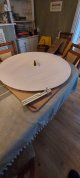
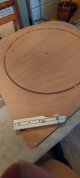
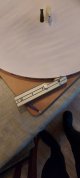
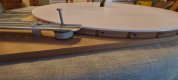
I eventually decided to design my own turntable. 1m diameter and 36 notches on the edge out of the rotating top. Base with a corner, top and base both have a groove 4mm deep and 10mm across, filled with 9.5mm bearings. It runs smoother than I thought for MDF.

A wheel with a bearing that gently clicks into the notched to give a more positive location to the angles. As suggested I went with the 36 pics per rotation.

Topped with a sheet of acrylic, shiny on one side and a mat vinyl on the other so I can reverse it to suit what I need.

Had a first go today, need to work a bit more on the position and depth of field now. Run out of time this week but will play more next week.

Cheers for all the advise.

T

20210324_172821.jpg20210324_172919.jpg20210324_172816.jpg20210324_172837.jpg
 
Last edited:
Looks good, well done that man.
Not sure the lighting is a done deal yet
.
 
Looks good, well done that man.
Not sure the lighting is a done deal yet
.
Agree, need more time and artificial lighting is not my forte!! I won't look at this again until next week, need fresh eyes to be objective.

I have 30 of these wooden toys to photograph, some are fine but I trialled this one because it has white in it as well, added level of difficulty. The polar bear will be fun!

Obviously, tips, pointers and advice is always welcome. I had flash left and right pointing down at 45°, and a flash between the turntable and the backdrop down low and pointing up. The backdrop is slightly angled to bounce some of that to the back of the turntable.

These shots were cropped and animated gif made, no other post processing was done.

EOS R was 200mm, f8, iso100, 1/125.
 
Good effort. Some pointers though . . .
1. Use 1 light, not two. Put it at one side, pointing downwards to a slight degree but far less than at present. At present it's so high that it's causing the entire front/chest area to be unlit. Put a simple white card reflector on the other side. The closer it is, the greater the effect will be so there will be trial and error involved.
2. Get the camera lower, again trial and error will be needed but at the moment it's definitely too high.
3. Put less light on the background, it's overlit to the point where it's destroying edge detail on the badger
 
Good effort. Some pointers though . . .
1. Use 1 light, not two. Put it at one side, pointing downwards to a slight degree but far less than at present. At present it's so high that it's causing the entire front/chest area to be unlit. Put a simple white card reflector on the other side. The closer it is, the greater the effect will be so there will be trial and error involved.
2. Get the camera lower, again trial and error will be needed but at the moment it's definitely too high.
3. Put less light on the background, it's overlit to the point where it's destroying edge detail on the badger

That all makes sense, I like to think I probably would have got there in the end but you have saved me hours (probably days)!!:)

Will try that out next week.

Thank you, T
 
A few things I have learnt...

The customer changed their mind and can't do scrolling pics (so the user has control) but needs animated gifs. So I doubled up and shot 72 pics per rotation to get it smoother. This caused the following issues:

1 - speed lights eat through batteries like you wouldn't believe
2 - speed lights heat up and then don't fire every time

So, I am clicking, turning and checking each pic! As the batteries die down or heat builds up undoubtedly one of the speed lights did not fire. Lot of recharging, resting with the battery doors open. Sometimes the eneloops were so hot I could not handle them and my cheaper speed lights smelled like burning electronics!

30 products x 72 shots =2160 shots (plus probably as many failed flash pics taken). Each checked on the camera after it was taken.

www.desimone.co.uk/Bear-full.gif

It still feels a bit jumpy to me.

To say I was frazzled last night and looking for plug in strobes as the client is happy with the first sample and has another 150 products in development. I can't go through battery charging and checking each click again!!

T
 
Wow! That's a lot of effort for the result. :eek:

Get some studio lights and you'll do it in no time at all in comparison. (y)
 
Yes, flashguns are completely unsuitable for this. The Lencarta Smartflash would be a good choice, although of course there are other choices too.
 
If you're going to get a kit, I suggest two small softboxes to light the products, and just standard reflectors for the background. And the low level lighting stands are probably ideal for this purpose - see the "which lighting Stand" tutorial, tutorials section.
 
If you're going to get a kit, I suggest two small softboxes to light the products, and just standard reflectors for the background. And the low level lighting stands are probably ideal for this purpose - see the "which lighting Stand" tutorial, tutorials section.
I am definitely on the lookout for a pair of small strobes. I won't use them too often so don't want to spend a fortune.
 
A few things I have learnt...

The customer changed their mind and can't do scrolling pics (so the user has control) but needs animated gifs. So I doubled up and shot 72 pics per rotation to get it smoother. This caused the following issues:

1 - speed lights eat through batteries like you wouldn't believe
2 - speed lights heat up and then don't fire every time

So, I am clicking, turning and checking each pic! As the batteries die down or heat builds up undoubtedly one of the speed lights did not fire. Lot of recharging, resting with the battery doors open. Sometimes the eneloops were so hot I could not handle them and my cheaper speed lights smelled like burning electronics!

30 products x 72 shots =2160 shots (plus probably as many failed flash pics taken). Each checked on the camera after it was taken.

www.desimone.co.uk/Bear-full.gif

It still feels a bit jumpy to me.

To say I was frazzled last night and looking for plug in strobes as the client is happy with the first sample and has another 150 products in development. I can't go through battery charging and checking each click again!!

T
I've now looked at your animated gif - I was away on our farm last week, only had my mobile and couldn't view it on that - and I agree, it does look pretty jumpy, I have no idea why, with 72 shots . . .

But I think you've now got the lighting right, all you need now is to start again but with studio flash - it will then become very easy.
 
I've now looked at your animated gif - I was away on our farm last week, only had my mobile and couldn't view it on that - and I agree, it does look pretty jumpy, I have no idea why, with 72 shots . . .

But I think you've now got the lighting right, all you need now is to start again but with studio flash - it will then become very easy.
Appreciate the feedback, I have a long road ahead of me learning artificial lighting!

I have just bought two Lencarta Smartflash II's with some modifiers (from the classifieds here) so hopefully will help next time.

T
 
  • Like
Reactions: Sky
Tony, I've a set of Lerncarta studio lights and softboxes for sale here:


that I would have thought would have worked well for this. If they're of interest there's a deal to be done and can get those shipped to you quickly. Just a thought.
Appreciate the heads up but I have bought a pair of studio strobes. I usually only shoot events and the speed lights have the biggest gap in my knowledge, so feel I need to use it more in a controlled environment to get a better understanding.

Thankfully we live in an age where I don't have to get film developed and prints done days after practicing to see where I went wrong!!

Cheers for the heads up though!

T
 
Back
Top