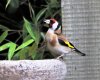
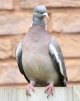
Beginner 2 from my first 20 shots

  • Thread starter Thread starter Ian Wright
  • Start date Start date
I

Ian Wright

Guest
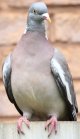
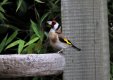
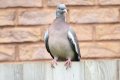
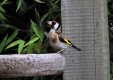
Hi All, I have just taken early retirement and decided to try photography as a (completely new to me) hobby. I purchased a Canon 7D Mk II and a Sigma 150-600 C Lens to try and catch some wildlife. These are 2 from my first 20 shots taken late evening (7:30pm). The pigeon was in late sunlight and the Goldfinch was in a shaded part of the garden with very poor light. I know they are nowhere near good enough but to save me some time could you folks point me in the right direction as to what to adjust and which way to make improvements please? Details are: F/6.3 - 1/500th Sec - ISO1600 at 600mm

Thank you and please be gentle ;)

2.JPG BI4A3944.JPG
 
Hi Ian, if it helps you then the next time you upload a photo, your best bet is to click on Full image. You have got a great camera and lens now and you will get better. Of the shots I think you have done well, even though the pigeon is a tight crop, I like it so well done. Members who have the same camera and lens will help with what settings.
 
Thanks Dave. I had to crop the images to get them to upload as the website said they were too large? Thanks again, Ian.
 
Ian, I think it would help if you thought about cropping and sizing separately.

Cropping is the process of deciding how much of the original image you want to present. You might crop to remove wasted space, to remove distracting elements, to reposition the main subject(s) in the frame, to create symmetry, to fit a specified shape (eg an existing picture frame), or for other reasons.

Sizing is the process of deciding how many pixels you want to have in your image in order to suit the output. For example, for web display you might want to resize it so that the long edge is 960 pixels (Facebook standard) or 1024 pixels (many forums). My camera club sets a maximum of 1600 pixels for images to be projected. For a 12" print at 300 pixels per inch you need 3600 pixels, and so on. Sometimes there might also be a requirement to reduce the size of the file by compressing the data, which reduces quality.

I find that I often end up with multiple copies of an image: original full-size, print resolution, HDTV resolution for on-screen display, 960px for FB and forums, etc. That's OK.

Note that cropping is essentially an artistic decision and sizing is essentially a technical decision, and cropping logically comes first. That's why I suggest thinking of them separately. I know that some software allows you to do both in one step (eg crop to 8 inches square at 300 pixels per inch) but to my mind that's really not helpful.

The reason I mention this is that with your pigeon picture you initially solved a technical problem (how to make the image small enough to display) via an artistic process (cropping). And that created a totally different picture. Your two pigeon images are very different, even though they both come from the same raw data.

With that in mind I suggest you go back to the pigeon and think about how much of the original image you wish to present. How much of the bird's surroundings do you wish to show? Where do you want the bird in the frame? And so on. Then once you've decided that, you need to resize for display. (Personally I think the first one may be cropped too tightly and the second one has far too much wasted space, but these are subjective views and there is no right answer.)

Hope this helps.

PS Remember, always save the original. When you're trying out different crops, always do it to copies so that you can always go back and do something different. When resizing, always do it to copies so that you always have the full resolution available if necessary.

 
Hi Stewart, thank you for the advice and thank you for taking the time to go into detail, that has helped me to understand a little more.
 
To expand slightly on Stewart's explanation - well, more to tell you how I go about cropping and resizing...

Using PhotoShop Elements (often referred to as PSE), I select the crop tool (simply hitting the C key) and set the size to whatever I want the final pixel size to be (often 600x900 px) then drag the crop box to do the actual cropping. This does the cropping and resizing in one quick step, although I often don't actually do any cropping, I just select the entire frame with the Crop tool and use it as a quick and dirty resizer! I then use the Save As tool to do the save and use the Quality slider to make sure the file size and quality (which show when the Preview box is ticked) are acceptable (to the site and me respectively!)

IMO, not a lot wrong with either of those shots, although I would have tried a portrait format shot of the pigeon to frame it slightly looser and cropped the Goldfinch a bit tighter to remove some of the wasted space (as suggested by Stewart.)
 
Very nice. Is this going to be your main thing or will you branch out into other subjects? I love taking pictures of flowers or anything else interesting that I come across when out.
 
Very nice. Is this going to be your main thing or will you branch out into other subjects? I love taking pictures of flowers or anything else interesting that I come across when out.
Thank you Alan. I will be doing any kind of wildlife, flowers, fungi etc. I also want to try Macro and Aircraft.
I think being able to study the details in the natural world is amazing. We see these things every day but never really take in the detail and I think this hobby is perfect for doing that.
 
That sounds a bit similar to me, most of my pictures are scenery, my GF and family and close up shots of various things.

One thing I'd recommend is keeping in mind the end product you want, if you want to print how large will you print or if you mostly view on screen, and what size and quality of end product you will accept. I like to start at the end requirement and work backwards to decide the kit and settings.

I rarely print these days (maybe one print a week on average) and mostly view on screen and I've found that even heavy crops in the region of 50 to 100% are easily good enough for on screen viewing and reasonably size prints. This helps me when I'm out and about shooting even smaller or far away subjects as a relatively close focusing or short focal length lens will act as a good all round solution and get me a good enough result after cropping and this means I don't need to carry an additional macro or longer lens and spend time swapping lenses.

Anyway, that's just something to think about, carrying and using specialised lenses that'll enable you to fill the frame as you wish without cropping is another option :D
 
Thanks Alan. I am really enjoying the hobby so far and wish I had started years ago. It's going to be fun learning and hopefully it will keep the old grey matter working.
 
Thanks Alan. I am really enjoying the hobby so far and wish I had started years ago. It's going to be fun learning and hopefully it will keep the old grey matter working.

I think photography is maybe like golf... it's simple really but a struggle to get it quite right :D
 
Much like that, Ian, although shooting the pigeon would give the ingredients for a nice pie in the portrait format would have left a little more space above his/her head and relaxed the crop a bit.
 
Hi Ian, glad you're enjoying your new hobby.

Just seen this thread and ... nice lens, nice results, the subject stands out well from the BG in both.

Re editing ... I'd say both need a CW rotation

And re the pigeon shot ...

I'd crop the original like this, a result I like and one that follows the rules, at least two composition rules I can think of: the rule of thirds, the rule saying you need space for the subject's eyes to look in to.

6Y60cINibcP_5JZ1cs-gkXnDiewuNMKWBrhPFpDcXzHeUUnV3pdY4ycYlhSSjDUDiywhyICnSdi0gINGUKHDYJ8N7RFgPmW61GTsK0feT_MtfVHWd44ENVYNQFJrt7zb9E6GbvMPs3bS3qsROVXVItoXHrCz_h-crch8chLA8jeQPvUv8c099Qd_HTrvhyGvkuInArzzwN9pIG70t71ivDUs1ScPHgfwXdk4YovUZKorN_cBUk9DPB_ynyApTB5Pt7gYWXOTer_vHoNODzE_gOZq3R3HQtDyFAs4EvfnNhVTdK3XlPwFTi0c9XUySQwFgF8gExesK2hL1ovgyOQH4eheDaOb2nCqZTC7RjK7Vat5plhpLEXxL6aIwcWJ_f8YVV26dRhf9frFkr02W3PYsq8jNBMNTtCr-Z79EvYwprFXkzvM4g8zUp6f4Pf1DxI7GO4gUnTfqaTUvmSf-ukiR4Bv4TBIjV_GLUW1k_NPdJ7_whhQIqDAAxe6982206HJ7T6XCDbuCN9KTBj5LvfnJE7LFTniLbliPELhTS1d3tHCUAL-4X5ZYmW6RznZDXAUUsrQaqZle0XArs9c1XRNHk-jJsA9_oVxcIqOEE69LdyqlSeyvzc3Jj1ioARPkp2eE7ip1TVEmDsQesBPJHMNE-USiLzxN0eA42RmGwE6mA=w748-h602-no
 
Last edited:
Hi Ian, glad you're enjoying your new hobby.
Re editing ... I'd say both need a CW rotation

Thank you d00d, very much appreciated and good advice. Showing my ignorance, what is a CW Rotation?:confused:
 
CW = clockwise, 1 or 2 degree is all that's needed, the difference between level and wonky .... the very first thing I look at when viewing pics on my pc.
 
CW = clockwise, 1 or 2 degree is all that's needed, the difference between level and wonky .... the very first thing I look at when viewing pics on my pc.
Thanks for the tip d00d, taken on board.
 
My first thought is that they look like pictures taken in your back garden..what is not in your photo can be as important as what is in it..


Robin
by Shaun Wilkinson, on Flickr

e.g.This stick the bird is on could be taped with a load of gaffer tape to an old broom handle stuck in the ground and there could be a plastic bird feeder just out of frame...but as they are not in the picture in the eyes of the viewer they were never there

I would try to make a convenient natural looking perch for your feathered visitors with a nice background behind, near some food...

The other thing to bear in mind is a hit rate of 2/20 would be exceptionally good, 1/100 - 1/1000 is probably more the norm...if I get 3-4 good shots in an afternoon I would think i have done well!

Great first shots and if thats how you start I am sure you will be getting some cracking images soon...this was shot on the 150-600 sigma too.

A tripod or some kind of support is also very useful!
 
Last edited:
Hi Shaun, Thanks for the feedback. yes they are in my garden, camera on a tripod and gimbal.

I will take the stick and stage advice on board.

These were just to get used to the camera etc. before progressing further. I am new to it all so any tips are always welcome.

Retired and still learning every day
cheers.;)
 
Hello Ian,

I am lucky in that i have bigish garden.
So i can set up a scene if i wanted to.
The Drift has the right idea with stick to encourage burbs to an area of his choosing.
I had a large tree cut down and i kept two sections of the truck. Initially for movable seats / stools for BBQs for guests.

However i have used them for bird feeding stations. I set them in an area i wanted to photograph and from a comfy chair ( an bottle of IPA ) i could just photo the birds.
Simple shoot. Give it a try and with that sigma 150-600 you can fill the view finder easily.
 
However i have used them for bird feeding stations. I set them in an area i wanted to photograph and from a comfy chair ( an bottle of IPA ) i could just photo the birds.
Simple shoot. Give it a try and with that sigma 150-600 you can fill the view finder easily.
Thanks Tyson, I assume the IPA is compulsory :beer:
 
Back
Top