

14" MacBook Pro (M1 Pro)

Hanley

Suspended / Banned
Messages
1,667
Name
Paul
Edit My Images
No
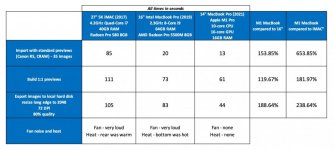
After a couple of weeks of to and fro, watching plenty of YouTube reviews, I bought a 14-inch MacBook Pro (M1 Pro chip) yesterday and have been running some tests against both my 2017 iMac and my 16-inch 2019 MacBook Pro.

I don't want this thread to turn into a PC vs Mac debate, I'm well aware if I spend the same amount I can get a huge PC rig :) I just prefer the Mac experience.

I thought if anyone was on the fence about buying one then my experience may help, as I still have all 3 at the moment it meant I could do this comparison.

You can see the full results on the image - summary is it's fast, it's silent and it doesn't get hot
1f923.png


It is important to note the difference in specs, my 16-inch 2019 MacBook Pro was a high spec beast and the 14-inch is one of the baseline models.
I didn't put it in the picture but as it has an internal SD card slot, the 14-inch copies the RAW files from the SD card to the internal hard disk 25% faster.

A couple of my observations having used it for just over a day - it's thicker, more like older MacBooks, apparently this helps with battery and heat dissipation, I also think it feels better to handle. For example, you can lift the handle with one hand and the base stays where it is and the lid opens.

During the stress of downloading and installing loads of apps at the same time the laptop remained cold to the touch, I have only had it for a day but with my testing so far I haven't managed to even make it warm
My daily driver for Lightroom is my iMac so as you can see I'm getting a huge gain on imports, my plan is to use the 14-inch with an external monitor on my desk.

I'm using it to type this, I've got some images exporting from Lightroom, I'm listening to the best Dire Straits album (Alchemy Live) on Music while I do it, just downloaded and installed Office, this thing literally never gets hot, there is no noise from the fan at all (not even sure if it's coming on) but it's so responsive, literally everything you click, the response is immediate.

My plan is to sell my iMac and my 16 inch and just keep this, I'll connect it to a monitor on my desk. I'll be sad to see the iMac go as I love using it but I want to use just 1 device, which can be hooked up to a screen in my office or can be unplugged if I'm taking it out with me.

I think I made the right choice with the 14" M1 Pro.
256288608_4913294065350531_695728896714175738_n.jpg
 
Been thinking of doing the same thing but my MBP isn't selling....
Also M1 don't support hardware calibration with my monitor, it is supported on the intel Macs.
 
I concur. Had mine a few weeks, it is a seriously good bit of kit. I don't think I have ever heard the fans kicking in.
 
Been thinking of doing the same thing but my MBP isn't selling....
Also M1 don't support hardware calibration with my monitor, it is supported on the intel Macs.
Unfortunately the M1 has pretty much killed the intel MacBooks resale. I sold my 16inch a few months back, same as yours but with the 8gb graphics and 32gb ram for £2000 on eBay. I paid £3500 less than a year previous. I then bought a m1 13inch which out performed it in every way for £1400.
Very tempted to get a 14inch. The extra real estate would be handy and the performance looks mind blowing.
 
It’s so good to see the M1 pro be that much better than the i7. I have the same iMac and it intel just ruins it.
mate you running Lightroom classic?
 
I hadn’t noticed the faster M1 chips were out on the MacBook Pro’s. I have an 2012 iMac that could do with updating so I’ve been waiting to see what apple releases as an upgrade to the M1 chip. Also have a very basic model MacBook Pro 2013 that could do with upgrading but I don’t really need both

As things have changed massively with working from home in the last 18 months and the likely of staying at home in the future too I have a big decision to make regarding replacing my iMac. initially I was thinking another iMac but now having a monitor for home working I was tempted by the Mac mini. The only issue is that it’s quite a cut down version of the iMac without bits like web cam which has been quite useful recently. A while back I was thinking of the MacBook Pro as I find my one good for general stuff. If I could combine the two in a new MacBook Pro that would be great. My only issue would be trying to work out how I can use a MacBook Pro and works laptop on my current screen without needing various cables connected to the MacBook Pro (I have 3 external thunderbolt drives for photo storage that I need to keep and connect).

the performance of the M1 pro looks good. The upgrade price to 32GB RAM at £32 is quite a price. Add the £200 upgrade to the 1TB SSD that makes the options increase the base price quite a lot. I’d be looking at £2500 on a 14 inch model.


Unfortunately the M1 has pretty much killed the intel MacBooks resale. I sold my 16inch a few months back, same as yours but with the 8gb graphics and 32gb ram for £2000 on eBay. I paid £3500 less than a year previous. I then bought a m1 13inch which out performed it in every way for £1400.
Very tempted to get a 14inch. The extra real estate would be handy and the performance looks mind blowing.
I would have been looking at the latest intels as upgrades but the change to M1 chips meant it didn’t make sense to do that and buying new M1 macs was now the sensible option. my macs are pretty old but still working so will likely be handed down to parents as a general web browsing/email/video chats computer. There is no value in them so no point selling. Feel for anyone who just bought one of the expensive models then to see the new chips appear.
 
It’s so good to see the M1 pro be that much better than the i7. I have the same iMac and it intel just ruins it.
mate you running Lightroom classic?
Yeah Lightroom Classic, I can't tell how quickly it opens, it's ridiculously fast. I'd record it but it's too quick :ROFLMAO:
The whole setup just seems right now, it's like they've finally got out of this Johnny Ive era of slimmer is better.
 
I hadn’t noticed the faster M1 chips were out on the MacBook Pro’s. I have an 2012 iMac that could do with updating so I’ve been waiting to see what apple releases as an upgrade to the M1 chip. Also have a very basic model MacBook Pro 2013 that could do with upgrading but I don’t really need both

As things have changed massively with working from home in the last 18 months and the likely of staying at home in the future too I have a big decision to make regarding replacing my iMac. initially I was thinking another iMac but now having a monitor for home working I was tempted by the Mac mini. The only issue is that it’s quite a cut down version of the iMac without bits like web cam which has been quite useful recently. A while back I was thinking of the MacBook Pro as I find my one good for general stuff. If I could combine the two in a new MacBook Pro that would be great. My only issue would be trying to work out how I can use a MacBook Pro and works laptop on my current screen without needing various cables connected to the MacBook Pro (I have 3 external thunderbolt drives for photo storage that I need to keep and connect).

the performance of the M1 pro looks good. The upgrade price to 32GB RAM at £32 is quite a price. Add the £200 upgrade to the 1TB SSD that makes the options increase the base price quite a lot. I’d be looking at £2500 on a 14 inch model.


I would have been looking at the latest intels as upgrades but the change to M1 chips meant it didn’t make sense to do that and buying new M1 macs was now the sensible option. my macs are pretty old but still working so will likely be handed down to parents as a general web browsing/email/video chats computer. There is no value in them so no point selling. Feel for anyone who just bought one of the expensive models then to see the new chips appear.
Do you think you'd definitely need 32GB?
My 16 inch I paid for 64GB, whilst researching the M1 I was convinced that 16GB would be all I need, memory seems more efficient and swapping to a page file on the hard disk isn't noticeable at all due to the speed of the SSD.
I've been purposely trying to stress the RAM but haven't managed it yet, so I'm comfortable that 16GB is all I need. I use Lightroom, Affinity Photo and Topaz DeNoise.
 
Do you think you'd definitely need 32GB?
My 16 inch I paid for 64GB, whilst researching the M1 I was convinced that 16GB would be all I need, memory seems more efficient and swapping to a page file on the hard disk isn't noticeable at all due to the speed of the SSD.
I've been purposely trying to stress the RAM but haven't managed it yet, so I'm comfortable that 16GB is all I need. I use Lightroom, Affinity Photo and Topaz DeNoise.
16GB would likely be good for now but I’ve learnt the hard way with apple to buy what I need for the future rather than now as I’d be hoping for a lifespan somewhere between 6-8 years. I’ve had my iMac since 2013 (8GB version bought used off here at 6 months) and haven’t been able to upgrade RAM or SSD as they are both behind a glued screen. It was good enough for lightroom at the beginning but started to slow down in the last few years. I’ve said to myself I’d upgrade the RAM at purchase if I ever purchased new as id not want to make the same mistake.

I gather the RAM is part of the M1 chip so can’t be user upgraded. It’s just annoying paying so much for the RAM upgrade, but at least this time it’s not exactly the same RAM modules you can pick up somewhere else’s for less.
 
Unfortunately the M1 has pretty much killed the intel MacBooks resale. I sold my 16inch a few months back, same as yours but with the 8gb graphics and 32gb ram for £2000 on eBay. I paid £3500 less than a year previous. I then bought a m1 13inch which out performed it in every way for £1400.
Very tempted to get a 14inch. The extra real estate would be handy and the performance looks mind blowing.
I have got a decent enough trade-in offer.
It's the lack of support for hardware calibration that's stopping me from going all in to M1.
 
I have got a decent enough trade-in offer.
It's the lack of support for hardware calibration that's stopping me from going all in to M1.
Apple offered me £900 trade in on my 16 inch to get the 13 inch. Surprisingly I declined.
 
Apple offered me £900 trade in on my 16 inch to get the 13 inch. Surprisingly I declined.
Yeah apple trade in offers are crap.
But there are shops that'll buy macbooks with more reasonable offers.
I have a £1200 offer for the one I have advertised for £1500 on this forum
 
Yeah apple trade in offers are crap.
But there are shops that'll buy macbooks with more reasonable offers.
I have a £1200 offer for the one I have advertised for £1500 on this forum
Its a difficult one with the calibration but from a money back point of view I’d take the trade in offer whilst you can. The intel macs are only going to go one way on second hand prices especially with the M1 basic model out performing them at a lower point too. Difficult decision when you still need a computer and have to make a cost back versus performance decision.
 
Its a difficult one with the calibration but from a money back point of view I’d take the trade in offer whilst you can. The intel macs are only going to go one way on second hand prices especially with the M1 basic model out performing them at a lower point too. Difficult decision when you still need a computer and have to make a cost back versus performance decision.
The other issues is with my canon selphy printer. It works on windows because the OS supports both 32bits and 64bits software unlike OSX :mad:
So bootcamp is quite helpful too.
I could upgrade the selphy printer but calibration is still a bummer.....
 
Thanks. This is very useful.
Helps my decision making.
 
I hadn’t noticed the faster M1 chips were out on the MacBook Pro’s. I have an 2012 iMac that could do with updating so I’ve been waiting to see what apple releases as an upgrade to the M1 chip. Also have a very basic model MacBook Pro 2013 that could do with upgrading but I don’t really need both

As things have changed massively with working from home in the last 18 months and the likely of staying at home in the future too I have a big decision to make regarding replacing my iMac. initially I was thinking another iMac but now having a monitor for home working I was tempted by the Mac mini. The only issue is that it’s quite a cut down version of the iMac without bits like web cam which has been quite useful recently. A while back I was thinking of the MacBook Pro as I find my one good for general stuff. If I could combine the two in a new MacBook Pro that would be great. My only issue would be trying to work out how I can use a MacBook Pro and works laptop on my current screen without needing various cables connected to the MacBook Pro (I have 3 external thunderbolt drives for photo storage that I need to keep and connect).

the performance of the M1 pro looks good. The upgrade price to 32GB RAM at £32 is quite a price. Add the £200 upgrade to the 1TB SSD that makes the options increase the base price quite a lot. I’d be looking at £2500 on a 14 inch model.


I would have been looking at the latest intels as upgrades but the change to M1 chips meant it didn’t make sense to do that and buying new M1 macs was now the sensible option. my macs are pretty old but still working so will likely be handed down to parents as a general web browsing/email/video chats computer. There is no value in them so no point selling. Feel for anyone who just bought one of the expensive models then to see the new chips appear.
This is pretty much what I have done - iMac and MacBook have been replaced by 14" MacBook Pro, which connects to the same monitor that I use for WFH. I decided to stick with 16GB RAM, as the SSD is so fast that swapping is less of an issue than with an old HDD. I have no problems running Docker and Lightroom Classic at the same time.
 
This is pretty much what I have done - iMac and MacBook have been replaced by 14" MacBook Pro, which connects to the same monitor that I use for WFH. I decided to stick with 16GB RAM, as the SSD is so fast that swapping is less of an issue than with an old HDD. I have no problems running Docker and Lightroom Classic at the same time.
Agree, I've tried my best over the last few days to try and stress the RAM but, as you say, swapping is so efficient you don't even notice it.
Happy I didn't stump up the extra cash for 32Gb as I don't think I need it.
 
Yeah apple trade in offers are crap.
But there are shops that'll buy macbooks with more reasonable offers.
I have a £1200 offer for the one I have advertised for £1500 on this forum
If you are just looking to move your MBP on, take the trade in as it doesn’t seem to be moving on.

I've got an iMac that I hope to replace with the new M1 version that’s out (hopefully) next year and I’m sure I’ll share the same issues.
 
If you are just looking to move your MBP on, take the trade in as it doesn’t seem to be moving on.

I've got an iMac that I hope to replace with the new M1 version that’s out (hopefully) next year and I’m sure I’ll share the same issues.
Rumours are starting that it may be out in the first half of 2022 :)
 
If you are just looking to move your MBP on, take the trade in as it doesn’t seem to be moving on.

I've got an iMac that I hope to replace with the new M1 version that’s out (hopefully) next year and I’m sure I’ll share the same issues.
Well I have only advertised it on here and things don't move quickly on here.
I haven't tried to seriously sell it yet because I'm not sure if I should go with M1 yet.
 
Well I have only advertised it on here and things don't move quickly on here.
I haven't tried to seriously sell it yet because I'm not sure if I should go with M1 yet.
If you look at it the other way intel Mac will just go down in price. Why do you still need it? Windows? It doesn't and won't support 11 the proper way. Best buy a nice Asus then. Legacy Mac apps? Probably even osx updates will stop in like 2 years time. You may need 2 devices and that's a bit different then.
eBay has specials for listing and it will be gone quickly
 
If you look at it the other way intel Mac will just go down in price. Why do you still need it? Windows? It doesn't and won't support 11 the proper way. Best buy a nice Asus then. Legacy Mac apps? Probably even osx updates will stop in like 2 years time. You may need 2 devices and that's a bit different then.
eBay has specials for listing and it will be gone quickly
Windows 11 works perfectly on it. Only need windows to make my canon sephy printer work but I have workarounds and could upgrade it. I also use some stacking apps that works only on windows but I have got them working via. crossover or VM. So I don't really need windows. its a nice to have.

I need an intel machine for hardware calibrating the monitor. M1 macs don't support hardware calibration (with any manufacturer/brand as far as I am aware) because the GPU on the M1 are still new and not supported.
 
Last edited:
Agree, I've tried my best over the last few days to try and stress the RAM but, as you say, swapping is so efficient you don't even notice it.
Happy I didn't stump up the extra cash for 32Gb as I don't think I need it.

I have a 10 core 14 inch MBP due to arrive in a couple of weeks - it's principally to replace my 2012 Mac Pro with 32 GB of RAM that was finally obsoleted by LR Classic 11 needing Catalina, despite being pimped-up with SSD drives and a graphics card that have kept it able to run official releases of macOS up to 10.14 remarkably well.

For most of my day-to-day photography, I could probably get by with 16 GB, but I do occasional large panoramas which demand more real memory. I've a 16 inch 2019 i9 MPB from work that has only 16 GB of RAM and even with plenty of free (and pretty fast) disk space, it really suffers with stitching them when the Mac Pro flies through the same tasks, despite being broadly a much a slower machine. The current Mac Pro was already a step down from the 48 GB I had in my previous Mac Pro and I had an eye on unified memory having to support a 4K display, so I felt I had to go with 32GB.

Everyone's use case is different, though.

It's certainly going to weird not having a desktop as my principal Mac at home after 30 years, but I had already been thinking of getting a personal laptop to take away on holidays, etc. and the performance of this new generation of Apple laptops seems to be hugely impressive.

Currently scoping external storage options to replace the internal RAID.
 
Last edited:
The ram in m1 is a completely different beast to the intel machines. I had a 16inch MacBook pro with 32gb Ram and my 13 inch m1 with 16gb ram crushes it, including stitching 28 image panoramas.
But if you can afford it, then get 32gb, it won’t hurt! It’ll still use the swap drive though even if it’s nowhere near to using the full 32gb.
 
The ram in m1 is a completely different beast to the intel machines. I had a 16inch MacBook pro with 32gb Ram and my 13 inch m1 with 16gb ram crushes it, including stitching 28 image panoramas.
But if you can afford it, then get 32gb, it won’t hurt! It’ll still use the swap drive though even if it’s nowhere near to using the full 32gb.
My 16 inch has 64GB and my 14 inch M1 Pro with 16GB kills it :)
 
Anyone know a good docking hub to use with the MacBook Pro 14 inch? I would need a HDMI connector for the monitor and thunderbolt 3 that allows daisy chaining of g-tech external power drives. At the moment my works laptop connects to the monitor via usb-c so I could potentially use a MacBook connected via a hdmi port.
 
Anyone know a good docking hub to use with the MacBook Pro 14 inch? I would need a HDMI connector for the monitor and thunderbolt 3 that allows daisy chaining of g-tech external power drives. At the moment my works laptop connects to the monitor via usb-c so I could potentially use a MacBook connected via a hdmi port.
From the limited reading I've done the CalDigit TS3 seems to be one of the better ones, they're not cheap though
 
My 16 inch has 64GB and my 14 inch M1 Pro with 16GB kills it :)
Jesus really? That's pretty amazing tbh!! I thought my 32gb i9 MacBook was pretty decent.. seems its worth nothing now! Talk about bad timing!
 
My 16 inch has 64GB and my 14 inch M1 Pro with 16GB kills it :)

If that's the case then it's more likely to be down to the SSD than the processor.

The lack of latency and high transfer speed of the faster SSD setups offsets the traditional benefits of caching in RAM.
 
From the limited reading I've done the CalDigit TS3 seems to be one of the better ones, they're not cheap though
I’m actually buying this for the 16inch for a works machine. I’ve spent all day trying to research the best. It’s also worth noting apple lists it on their website which is a promising sign.
 
Windows 11 works perfectly on it. Only need windows to make my canon sephy printer work but I have workarounds and could upgrade it. I also use some stacking apps that works only on windows but I have got them working via. crossover or VM. So I don't really need windows. its a nice to have.

I need an intel machine for hardware calibrating the monitor. M1 macs don't support hardware calibration (with any manufacturer/brand as far as I am aware) because the GPU on the M1 are still new and not supported.

i can run hardware calibration on my BenQ. The BenQ software has been running on M1 Mac for a few months now.
 
Very useful thread. Just ordered 16inch M1 pro. 1TB drive. 16G RAM 10core with 16 gpu
Costco £2299. Can’t wait.
 
Very useful thread. Just ordered 16inch M1 pro. 1TB drive. 16G RAM 10core with 16 gpu
Costco £2299. Can’t wait.
Didn’t know Costco did apple products at discounted prices. The 16 inch looked nice when I had a quick look at John Lewis whilst there at the weekend. Nice £300 discount over apple prices.
 
If that's the case then it's more likely to be down to the SSD than the processor.

The lack of latency and high transfer speed of the faster SSD setups offsets the traditional benefits of caching in RAM.
I think you're right.

Interestingly, now I've used it for 12 days and got everything installed, and started to edit some bird of prey shots I did at the weekend, I see Clean My Mac occasionally reports that my physical RAM and swap file is full and asks me if I want to free up some RAM, if I just ignore it and carry on then the Mac just seems to carry on as normal and I don't see any difference in performance, it's only because Clean My Mac told me that I know about it.

I've done some intensive photo editing over the last few days, processing RAW files in Lightroom, sending over to Topaz DeNoise then to Affinity Photo for some object removal, and I haven't noticed any problem with performance. I can play music in the background and I have email running.

So all in all so far so good. I have an extended return period so I'm trying to make sure I'm definitely going to be happy with 16GB but so far I don't see the need to spend the extra on 32GB. :)
 
Last edited:
Ah nice good to know benq are supporting it now. My viewsonic still doesn't.

Ah Viewsonic. I bought a new £900 Viewsonic last November for my new M1. I knew they wouldn't support the M1 initially but after an email exchange with Viewsonic I was assured they were working on it. I was promised April, June, July, August and then in September I contacted Amazon and requested a return as the monitor was not as advertised and not fit for purpose.

Amazon were great, gave me a full refund and I bought the BenQ.
 
Back
Top