The Amazing Sony A1/A7/A9/APS-C & Anything else welcome Mega Thread!

"Apple discontinued the 17-inch MacBook Pro in 2012 primarily due to low sales (approx. 2% of total,) and a strategic shift toward thinner, lighter, and more portable devices. Other key factors included the technological shift towards high-resolution Retina displays which were difficult to produce in larger sizes, and the high cost of the 17-inch model."

Thinner and lighter doesn't matter to me as it'll probably never leave the house and screen size is much more important and will probably be more important to me than quality as that extra quality wont always be visible but the size will be. Shame that Apple decided to drop even just 2% of their sales at least partly due to manufacturing difficulties. All in all I like the idea of moving away from Windows and its many issues but the thought of buying from a company with a history of doing what they want with the main box tech and connectivity and leaving customers to live with it or find workarounds doesn't appeal either. I don't want a headache every time I want to plug something in or connect with the world.

I'll have a look at Apples in Currys (no Apple centres here) but I'm 99% certain I'll go for a Windows laptop again and accept that it'll need replacing in 4 years or so if it lasts that long.
I’ve never really understood the issue when people complain about Apple saying that they’re too restrictive and you can’t do what you want with them. I’ve never had that issue, I’ve never come across software or an app that I want but can’t get on Mac, I’ve been able customise it any way I see fit. If you don’t like the software it comes with you can get others etc etc.
 
I’ve never really understood the issue when people complain about Apple saying that they’re too restrictive and you can’t do what you want with them. I’ve never had that issue, I’ve never come across software or an app that I want but can’t get on Mac, I’ve been able customise it any way I see fit. If you don’t like the software it comes with you can get others etc etc.

Without seeing one I know I'll need a new printer cable or an adapter and will probably also need the same for my external drives and anything else I want to plug in. OK, these may be little gripes but I have no interest at all in computers these days and I want one to work like my fridge and just do its job. What I don't want is to fight with it every time I want to do something. Windows machines are a right royal PITA and need way too much fiddling with but there are issues with Apple too so I'll have to decide which I want to get annoyed and frustrated with, a large screen Windows pc which will be a PITA or a smaller screen Apple with a possibly new learning curve and possible connection issues.
 
Without seeing one I know I'll need a new printer cable or an adapter and will probably also need the same for my external drives and anything else I want to plug in. OK, these may be little gripes but I have no interest at all in computers these days and I want one to work like my fridge and just do its job. What I don't want is to fight with it every time I want to do something. Windows machines are a right royal PITA and need way too much fiddling with but there are issues with Apple too so I'll have to decide which I want to get annoyed and frustrated with, a large screen Windows pc which will be a PITA or a smaller screen Apple with a possibly new learning curve and possible connection issues.
Everything’s pretty much plug and play nowadays. Macs are usb-c but that’s the way everything’s going so you’ll find the same with windows laptops. I use all my printers wirelessly.
 
I’ve never really understood the issue when people complain about Apple saying that they’re too restrictive and you can’t do what you want with them. I’ve never had that issue, I’ve never come across software or an app that I want but can’t get on Mac, I’ve been able customise it any way I see fit. If you don’t like the software it comes with you can get others etc etc.
Best thing about Macs is that they just work

We have a couple of Windows PCs as well and they are a lot more hassle at times but they are better for playing games,
 
I’ve never really understood the issue when people complain about Apple saying that they’re too restrictive and you can’t do what you want with them. I’ve never had that issue, I’ve never come across software or an app that I want but can’t get on Mac, I’ve been able customise it any way I see fit. If you don’t like the software it comes with you can get others etc etc.

When I still used a Macbook - a long time ago now - it was fussy about what printer you could use, what USB sticks and other devices it would 'see'. It would create a sidecar file for every file on your computer (that became awkward when transferring files to a memory stick and to non-apple devices). I think more recent versions of OSX seem much more reliable and more windows-like, 10.5/6 were pretty shoddy really and 10.6 Snow Leopard was their 'Vista', and just like Windows used to be, they needed to be reinstalled every 18 months to keep performance up.. The upgrade to Lion made a big difference, and Apple devices have been much better behaved since then.

I switched from the Macbook to a Dell XPS in 2014 and it was such a relief to have a machine that would do what you wanted in the way you wanted it to. No more issues about which external monitors were approved, no problems printing, email that didn't do strange things sometimes and a laptop that didn't get too hot to sit on your lap when playing DVDs (or refuse to give the disc back if it couldn't recognise it). Also I bought next-day on-site business warranty for 3 years for £50 less than Applecare that required me to take the Macbook to a store, where they would suck their teeth and tell you there's nothing wrong with your computer and it will cost £70 if they send it away and can't find a fault.

The M series chips give Apple a big advantage in performance and for that reason I'd consider one. But otherwise, my experience with Apple computers was not good (haven't even mentioned multiple versions they sold with known faults in graphics chips and the butterfly keyboards). To be absolutely honest, the only computers I ever found that 'just worked' were running Linux, because they aimed for broadest compatibility for their user base.
 
Last edited:
When I still used a Macbook - a long time ago now - it was fussy about what printer you could use, what USB sticks and other devices it would 'see'. It would create a sidecar file for every file on your computer (that became awkward when transferring files to a memory stick and to non-apple devices). I think more recent versions of OSX seem much more reliable and more windows-like, 10.5/6 were pretty shoddy really and 10.6 Snow Leopard was their 'Vista', and just like Windows used to be, they needed to be reinstalled every 18 months to keep performance up.. The upgrade to Lion made a big difference, and Apple devices have been much better behaved since then.

I switched from the Macbook to a Dell XPS in 2014 and it was such a relief to have a machine that would do what you wanted in the way you wanted it to. No more issues about which external monitors were approved, no problems printing, email that didn't do strange things sometimes and a laptop that didn't get too hot to sit on your lap when playing DVDs (or refuse to give the disc back if it couldn't recognise it). Also I bought next-day on-site business warranty for 3 years for £50 less than Applecare that required me to take the Macbook to a store, where they would suck their teeth and tell you there's nothing wrong with your computer and it will cost £70 if they send it away and can't find a fault.

The M series chips give Apple a big advantage in performance and for that reason I'd consider one. But otherwise, my experience with Apple computers was not good (haven't even mentioned multiple versions they sold with known faults in graphics chips and the butterfly keyboards). To be absolutely honest, the only computers I ever found that 'just worked' were running Linux, because they aimed for broadest compatibility for their user base.
Sounds like a seat to keyboard interface error.

Apple are renowned for comparability with printers in particular. Can still use 30 year old printers with them that stopped being supported by windows more than 10 years ago. My uncle for example has some weird printer that is only compatible up to Windows XP but works fine on Tahoe. That has always been the case.

Have never seen a Mac be fussy with any USB memory stick or hard drive etc once it has been formatted correctly either. Where as Windows 10 and Windows 11 regularly had issues with both for me.

Pretty much disagree with everything you have said as hasn’t been my experience. They definitely lost their way a bit when they started using Intel processors as the advantages of having a Mac for creative work just wasn’t there any more. Rectified now with the M processors.
 
Last edited:
Sounds like a seat to keyboard interface error.

Apple are renowned for comparability with printers in particular. Can still use 30 year old printers with them that stopped being supported by windows more than 10 years ago. My uncle for example has some weird printer that is only compatible up to Windows XP but works fine on Tahoe. That has always been the case.

Have never seen a Mac be fussy with any USB memory stick or hard drive etc once it has been formatted correctly either. Where as Windows 10 and Windows 11 regularly had issues with both for me.

Pretty much disagree with everything you have said as hasn’t been my experience. They definitely lost their way a bit when they started using Intel processors as the advantages of having a Mac for creative work just wasn’t there any more. Rectified now with the M processors.

Never the less, my experience is all real, no matter how stupid you think I am. The MacBook was my business computer and I needed it to print labels on a colour laser printer. The list of compatible printers was restricted and I bought a Samsung unit that worked with 10.5, but could not be made to work with 10.6. It forced me to revert to 10.5 in the end, simply because I needed to print, and other things were broken in 10.6 too.

USB devices like hubs - how many ways can you plug them in? Memory sticks ditto - will it open or not? I had a Toshiba external drive for time machine use and that was fine if plugged into one port but not another. All these worked first time every time plugged into windows and Linux computers not based on apple hardware. Jammed superdrives were a common occurrence, and were often ditched in favour of a second hard drive where possible because they were flakey.

All the problems I had were already being talked about on the Apple forum, and nothing was unusual or special. If you never saw a problem then that's lucky for you.
 
Last edited:
When I still used a Macbook - a long time ago now - it was fussy about what printer you could use, what USB sticks and other devices it would 'see'. It would create a sidecar file for every file on your computer (that became awkward when transferring files to a memory stick and to non-apple devices). I think more recent versions of OSX seem much more reliable and more windows-like, 10.5/6 were pretty shoddy really and 10.6 Snow Leopard was their 'Vista', and just like Windows used to be, they needed to be reinstalled every 18 months to keep performance up.. The upgrade to Lion made a big difference, and Apple devices have been much better behaved since then.

I switched from the Macbook to a Dell XPS in 2014 and it was such a relief to have a machine that would do what you wanted in the way you wanted it to. No more issues about which external monitors were approved, no problems printing, email that didn't do strange things sometimes and a laptop that didn't get too hot to sit on your lap when playing DVDs (or refuse to give the disc back if it couldn't recognise it). Also I bought next-day on-site business warranty for 3 years for £50 less than Applecare that required me to take the Macbook to a store, where they would suck their teeth and tell you there's nothing wrong with your computer and it will cost £70 if they send it away and can't find a fault.

The M series chips give Apple a big advantage in performance and for that reason I'd consider one. But otherwise, my experience with Apple computers was not good (haven't even mentioned multiple versions they sold with known faults in graphics chips and the butterfly keyboards). To be absolutely honest, the only computers I ever found that 'just worked' were running Linux, because they aimed for broadest compatibility for their user base.
Yeah apple are no longer like that. My first Mac was Mountain Lion so never experienced the problems you have, everything just works for me. I appreciate we all have our own preferences, and some prefer windows for very good reasons, however some of the stuff spouted about Mac by die hard windows users (not anyone on here I hasten to add) are completely unfounded (y).
 
I've barely used my A1 in the last couple of years but updated the firmware and went out for some long exposure photography today.

Maybe I dreamt it or just can't remember but I thought there was a way of doing exposures over 30 seconds, like 2 minutes and setting that time without having to manually time it in Bulb.

I couldn't find the setting but had the creator app on my phone so used that, but that also doesn't appear to have any sort of timer.

Can you do this on the A1 or am I just thinking of another system?
 
I've barely used my A1 in the last couple of years but updated the firmware and went out for some long exposure photography today.

Maybe I dreamt it or just can't remember but I thought there was a way of doing exposures over 30 seconds, like 2 minutes and setting that time without having to manually time it in Bulb.

I couldn't find the setting but had the creator app on my phone so used that, but that also doesn't appear to have any sort of timer.

Can you do this on the A1 or am I just thinking of another system?
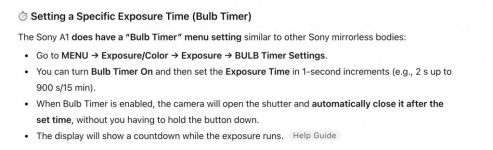
I can't find anything in the manual, but chatGPT says this, I've not got my A1 on hand to see if chatGPT is right or not.

Screenshot 2026-01-31 at 20.44.05.jpg
 
I can't find anything in the manual, but chatGPT says this, I've not got my A1 on hand to see if chatGPT is right or not.

View attachment 473885

Thanks, that's what I was thinking of, but think it's just the A1ii that has it, or at least I couldn't find the option on the A1.

I'll take another look now. edit: just checked and it's not there, must have been the A1ii I used it on :(
 
Last edited:
Best thing about Macs is that they just work

We have a couple of Windows PCs as well and they are a lot more hassle at times but they are better for playing games,

If they only did 17" and even bigger.

Mrs WW is a bit of an Apple fan as she thinks they're better quality.
 
Here's a question...

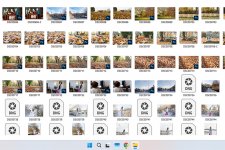
I like my raw files to appear as a generic ikon rather than as a preview picture, that's just how I like it. Long time back something in Windows changed and raws started appearing as previews so I went in regedit and under HKEY Current User and Machine software classes I deleted all the raw extensions I had and that works fine for a few weeks until windows does an update and switches it all back. Rince and repeat.

With Apple is there a similar way of controlling how photo files appear?
 
Last edited:
Mrs W is correct.

I spent years dissing Apple but have had to suck up the shame of converting to my Apple fanboy mate and admitting he was right all along.

Everything has niggles but I might give one a go just to say I've had one.
 
Last edited:
While they get criticism , they also do so many things right.
The screens on the MacBook Pro are fantastic for watching Tv/ movies on, paired with AirPods and Spatial Audio is fantastic.

Then having everything be able to sync/ share family wise is great.
The simplicity of the operating systems and lack of input from us is also a main selling point. Update when you choose too most of the time, instead of forced or constant needed updates, means the kids can do it without worry.
Once you’re in the eco system it would be hard to leave.
We currently have 5 laptops,3 iPads ,4 phones and two watches, plus the countless past products.
My MacBook Pros probably last me about 5 years, but are taken on holiday, used daily to watch movies in my kitchen while cooking and then photography and daily computing. Problem 4-5h most days it’s being used and is rarely ever properly turned off.
 
The big sticking point is the screen size though. I'm surprised many people seem happy to drop down in size but for me it's a problem. Just as with having a big screen TV and not wanting to drop down in size I really don't want to go back to a laptop screen size I haven't had for decades.
 
My past two were both 15” and my newest is a 14” as they went down in size as you’ve found out., I was abit concerned but have found it’s made no difference, I don’t thinking would even want to go up to a 16” now
 
The big sticking point is the screen size though. I'm surprised many people seem happy to drop down in size but for me it's a problem. Just as with having a big screen TV and not wanting to drop down in size I really don't want to go back to a laptop screen size I haven't had for decades.

Alan

Most people are happy to drop in screen size for better quality output, you have staed that you're not happy about this, so you have two choices

a) don't buy a device with a smaller screen
b) buy an Apple in the knowldge that the screen is smaller than 'your' ideal and thats a compromise that you have made (with your eyes wide open)

This discussion is almost getting as circular as front/rear dials and flippy/tilting screens...........................
 
Here's a question...

I like my raw files to appear as a generic ikon rather than as a preview picture, that's just how I like it. Long time back something in Windows changed and raws started appearing as previews so I went in regedit and under HKEY Current User and Machine software classes I deleted all the raw extensions I had and that works fine for a few weeks until windows does an update and switches it all back. Rince and repeat.

With Apple is there a similar way of controlling how photo files appear?
There are a few ways you can display files in folders.

You can choose:

- as icons, will display a small preview image, as windows does.
- as list, will display filename with no preview image.
- as columns, will display file structure with no preview image.
- as gallery, will turn every folder into a slideshow.

Edit - Forgot to say there is a button at the top of each folder that allows to change to suit.


This might help. https://www.dummies.com/article/tec...-your-mac-folders-as-icons-or-columns-197264/
 
Last edited:
Alan

Most people are happy to drop in screen size for better quality output, you have staed that you're not happy about this, so you have two choices

a) don't buy a device with a smaller screen
b) buy an Apple in the knowldge that the screen is smaller than 'your' ideal and thats a compromise that you have made (with your eyes wide open)

This discussion is almost getting as circular as front/rear dials and flippy/tilting screens...........................

I know. I am surprised by people making that choice as I imagine that as with TV screens the extra quality wont be visible all of the time at all viewing distances. I am tempted and will have a look but that smaller screen size is a problem regardless of how good it is.

There are a few ways you can display files in folders.

You can choose:

- as icons, will display a small preview image, as windows does.
- as list, will display filename with no preview image.
- as columns, will display file structure with no preview image.
- as gallery, will turn every folder into a slideshow.

Ah. So displaying files like this isn't possible then?

Untitled-1.jpg
 
I know. I am surprised by people making that choice as I imagine that as with TV screens the extra quality wont be visible all of the time at all viewing distances. I am tempted and will have a look but that smaller screen size is a problem regardless of how good it is.


Ah. So displaying files like this isn't possible then?

View attachment 473962

It will be personal preference I guess.

I like the way Apple do it as i can choose file name option when I want to find a particular file fast or icon for previews and slideshow if I want to get a good idea of what the image looks at when full size. All by just selecting one of the buttons at the top of the folder. Column view is also handy as it will display all the folder info and if I select a file without clicking on it will also show a preview. I find it works very well and much prefer it to how windows handles folders that include images.
 
It will be personal preference I guess.

I like the way Apple do it as i can choose file name option when I want to find a particular file fast or icon for previews and slideshow if I want to get a good idea of what the image looks at when full size. All by just selecting one of the buttons at the top of the folder. Column view is also handy as it will display all the folder info and if I select a file without clicking on it will also show a preview. I find it works very well and much prefer it to how windows handles folders that include images.

So just to be clear, I can't display files as generic icons with an Apple, they have to be as an image preview or list/column?

The reason I do it like above is because in many folders I have both raws and jpegs and if they're all image previews next to each other it's easy to click on a raw instead of a jpeg and call up PS instead of Faststone, or vice versa.
 
Last edited:
So just to be clear, I can't display files as generic icons with an Apple, they have to be as an image preview or list/column?

The reason I do it like above is because in many folders I have both raws and jpegs and if they're all image previews next to each other it's easy to click on a raw instead of a jpeg and call up PS instead of Faststone, or vice versa.

I think you need to go touch and see for yourself, nothing else will help.
 
So just to be clear, I can't display files as generic icons with an Apple, they have to be as an image preview or list/column?

The reason I do it like above is because in many folders I have both raws and jpegs and if they're all image previews next to each other it's easy to click on a raw instead of a jpeg and call up PS instead of Faststone, or vice versa.
I get what you mean and can see why you would prefer that.

Honestly I don't know if it can differentiate between jpegs and raws in some way, maybe one of the other guys on here can help. Maybe @snerkler can help with that I never shoot jpeg and when I export jpeg its going to its own folder.

Best thing would maybe be to bang some images on to a usb pen and take it with you when you go to look at a mac and see what you think yourself.
 
I'm not sure the staff in Currys will be able to answer question like that but I'll ask.
Unlikely I would thought, even if they did answer, can never be guaranteed they are telling you the right thing. Hate those guys. :D

As mentioned above best thing would maybe be to bang some images on to a usb pen and take it with you when you go to look at a mac and see what you think yourself.
 
I get what you mean and can see why you would prefer that.

Honestly I don't know if it can differentiate between jpegs and raws in some way, maybe one of the other guys on here can help. Maybe @snerkler can help with that I never shoot jpeg and when I export jpeg its going to its own folder.

Best thing would maybe be to bang some images on to a usb pen and take it with you when you go to look at a mac and see what you think yourself.

For the reason above. I have multiple different types of raw file in folders which also contain jpeg and Tiff files. If all are displayed as previews it's possible to click on the wrong one and then have to wait until the action is completed before having another go. It's just the way I like to store, display and select files.
 
I know. I am surprised by people making that choice as I imagine that as with TV screens the extra quality wont be visible all of the time at all viewing distances. I am tempted and will have a look but that smaller screen size is a problem regardless of how good it is.

I personally find all laptop screens small for editing. So i have an external monitor anyway.
I have laptop for portability and not for the best screen as none of them can compete with a nice large monitor. Hence smaller screen is an acceptable compromise versus size.

Once up on a time I had a 17 inch laptop and nothing else. I even carried it around but over time it was not very practical and I could afford a second nicer screen.

This is the same reason I don't bother with fast zooms. I have slow zooms because I use zooms for versatility and very fast primes because I use primes for large aperture. I don't try to mix the two and have a compromise is both departments.

YMMV
 
Unlikely I would thought, even if they did answer, can never be guaranteed they are telling you the right thing. Hate those guys. :D

As mentioned above best thing would maybe be to bang some images on to a usb pen and take it with you when you go to look at a mac and see what you think yourself.

I will take a usb pen with me but it wont plug into an Apple. Hopefully they'll have an adapter.

It's just another annoyance. What I like is to be able to buy things which suit me and what I want to do and that's not always possible. Instead I have to buy what the maker wants me to buy and use it as they want me to.

Anyway. Looking back at the last few pages I think I've clogged the thread up too much with this but hopefully others have found it a bit interesting. I'll have a think and a walk to the shops to see an Apple.

Thank to you and all who've provided help and info.
 
Last edited:
I personally find all laptop screens small for editing. So i have an external monitor anyway.
I have laptop for portability and not for the best screen as none of them can compete with a nice large monitor. Hence smaller screen is an acceptable compromise versus size.

Once up on a time I had a 17 inch laptop and nothing else. I even carried it around but over time it was not very practical and I could afford a second nicer screen.

This is the same reason I don't bother with fast zooms. I have slow zooms because I use zooms for versatility and very fast primes because I use primes for large aperture. I don't try to mix the two and have a compromise is both departments.

YMMV

I do know that I'm a bit, unusual, but I like to think about what I want and try and anticipate the issues I'll have buying anything less. Whatever I get I always nit pick and nothing is ever 100% and as Mrs WW keeps saying "No one else cares" but as I keep saying, being a ocd obsessed pita geek paid for my life :D
 
So just to be clear, I can't display files as generic icons with an Apple, they have to be as an image preview or list/column?

The reason I do it like above is because in many folders I have both raws and jpegs and if they're all image previews next to each other it's easy to click on a raw instead of a jpeg and call up PS instead of Faststone, or vice versa.
Am I understanding this correctly, you want JPEGs to appear as a preview and raw to be a generic thumbnail so you can differentiate them? To the best of my knowledge I don’t think this can be done, the only thing I can think of is that you can sort by file types but then all the JPEGs will be together and all the raws will be together and you won’t be able to see the corresponding JPEGs and raws side by side.
 
Am I understanding this correctly, you want JPEGs to appear as a preview and raw to be a generic thumbnail so you can differentiate them? To the best of my knowledge I don’t think this can be done, the only thing I can think of is that you can sort by file types but then all the JPEGs will be together and all the raws will be together and you won’t be able to see the corresponding JPEGs and raws side by side.

Yes, that's what I do. If I can tell the difference I can view or edit whatever file I want without picking the wrong one. With files sorted by name the jpeg/other and raws files are displayed next to each other so they're easy to find and I can see what's what and choose accordingly. Easy Peasy, even if I have to do the regedit deleting every few weeks as Windows keeps resetting it when updates are done which seems to be all the time.

So with an Apple there's no way to edit what's displayed as with Windows and regedit and deleting the ones I don't want?
 
Yes, that's what I do. If I can tell the difference I can view or edit whatever file I want without picking the wrong one. With files sorted by name the jpeg/other and raws files are displayed next to each other so they're easy to find and I can see what's what and choose accordingly. Easy Peasy, even if I have to do the regedit deleting every few weeks as Windows keeps resetting it when updates are done which seems to be all the time.

So with an Apple there's no way to edit what's displayed as with Windows and regedit and deleting the ones I don't want?
I don’t think you can have one file type show as a preview and another a generic thumbnail no.
 
I will take a usb pen with me but it wont plug into an Apple. Hopefully they'll have an adapter.

It's just another annoyance. What I like is to be able to buy things which suit me and what I want to do and that's not always possible. Instead I have to buy what the maker wants me to buy and use it as they want me to.

Anyway. Looking back at the last few pages I think I've clogged the thread up too much with this but hopefully others have found it a bit interesting. I'll have a think and a walk to the shops to see an Apple.

Thank to you and all who've provided help and info.
Most new computers Mac or Windows are usb c.

Any usb pens I have bought recently have been usb c or have been usb c and the old usb connection on the other side.

Does the fix you currently use also work on windows 11? Should maybe check that as well in case it would be an issue for either way.
 
Last edited:
Most new computers Mac or Windows are usb c.

Any usb pens I have bought recently have been usb c or have been usb c and the old usb connection on the other side.

Does the fix you currently use also work on windows 11? Should maybe check that as well in case it would be an issue for either way.

Computer says I have "Windows 11 Home".

As far as I can remember raws were displayed as generic icons until a few years ago or so and then they started appearing as previews.

Just on the constant updates triggering this, the last update was on 14th Jan and the one before that was 12th Dec, then 26th Nov and so on. They're never ending and not always visible to me and often I only know it's happened when I open a folder and see it full of previews and then I go into regedit and delete the files with the raw extensions I have again. Actually sometimes I suspect that an update is happening because my pc runs slow and sure enough the next time I turn it on it's fast again and my raw previews are back.

In the screen shot above there are generic icons and previews with a small PS in the corner. I've no idea why some appear like this but these will turn into generic icons once opened and saved again.

On the plug in devices, I'll need a printer cable or adapter and for external drives also, and my memory sticks will also need something.
 
Last edited:
Computer says I have "Windows 11 Home".

As far as I can remember raws were displayed as generic icons until a few years ago or so and then they started appearing as previews.

Just on the constant updates triggering this, the last update was on 14th Jan and the one before that was 12th Dec, then 26th Nov and so on. They're never ending and not always visible to me and often I only know it's happened when I open a folder and see it full of previews and then I go into regedit and delete the files with the raw extensions I have again. Actually sometimes I suspect that an update is happening because my pc runs slow and sure enough the next time I turn it on it's fast again and my raw previews are back.

In the screen shot above there are generic icons and previews with a small PS in the corner. I've no idea why some appear like this but these will turn into generic icons once opened and saved again.
ChatGPT says you can get an app for Mac to do what you want. I was going to try it for you but it's not free so I haven't I'm afraid.

Screenshot 2026-02-01 at 15.27.17.jpg
 
ChatGPT says you can get an app for Mac to do what you want. I was going to try it for you but it's not free so I haven't I'm afraid.

View attachment 473974

Thanks. I'll read up on that.

It may be a niche thing but it's just how I've always done it as I like my files for each picture all stored in the same folder. Makes them easy to find for me.

Going into regedit every few weeks is a pit of a pain but TBH it doesn't take too long and the main pain is having to reboot the pc to enable the tweak to take effect.
 
I know. I am surprised by people making that choice as I imagine that as with TV screens the extra quality wont be visible all of the time at all viewing distances. I am tempted and will have a look but that smaller screen size is a problem regardless of how good it is.


Ah. So displaying files like this isn't possible then?

View attachment 473962
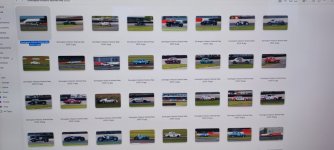
On a Mac you can display the icons as small or as big as you want and yes im a mac convert. Also no extra anti virus software to mess things up or slow down you windows pcdelete me.jpgdelete me 1.jpg
 
Back
Top