YouTube…

Nikon_Nick

Shirley
Suspended / Banned
Messages
6,637
Name
Nick
Edit My Images
Yes
I’m starting to get into video a little bit, and have a decent enough set up for some vloggy type content that I would add b-roll to etc. My only problem, is that I feel really silly talking to camera. Anyone got any tips on how to ‘get over it’? :giggle:
 
Just do it, there is no other way. Ignore the idiots on YouTube who criticise and make stupid comments too.
 
I would struggle doing it with other people around but don't mind speaking to camera at all though not usually while in front of it.
Some on youtube do it so effortlessly watch them for tips, essentially imagine you are only talking to one or two people actually with you.
You are really because most content is consumed by one person on a laptop or whatever.
 
If it's anything like performing on stage: I used to focus on one person in the audience and perform to them (although it would be different people in the course of a performance or speech). In the case of film/video, imagine someone behind the camera who you are talking to. Maybe even put a picture of a person there. You want to appear natural, not stilted, so you want to do it like (in the case of a vlog) you are chatting with friends or work colleagues. Editing will take care of stumbles if you are good about breaking it up into short enough elements of content.
(I'm not a vlogger or video shooter so take the above with scepticism, but that would be my approach)
 
Vlogging is actually a lot harder than tutorials or reviews. With those, you can script them, or at least have talking points. Vlogging has to be off the cuff and natural, which very quickly becomes apparent if you aren’t.

The advice about talking to one person is spot on. Imagine it’s a friend you are talking to.
Ive done a couple of vloggy type things over the years, and I’m completely not natural in front of a camera, but one became reasonably successful.
My tutorial channel also did pretty well, but I found doing that a lot easier than the vlog one.
 
Last edited:
I’m starting to get into video a little bit, and have a decent enough set up for some vloggy type content that I would add b-roll to etc. My only problem, is that I feel really silly talking to camera. Anyone got any tips on how to ‘get over it’? :giggle:

I don't film myself but record corporate interviews and that kind of thing and find that must people need 10 -15 mins to warm up and relax about the fact that they are being filmed. People who are more natural or who have been filmed before are often quicker. I think you just need to practice your content and warm up a bit before you deliver the actual content.
 
Thanks all for the tips. I’m going to do a dry run to see how I get in at the weekend.
 
I don't vlog or do anything with YT (other than watch it), but I have lots of experience with TV and video production and I've prepared and given many hundreds of lectures to large audiences.

I found the best way (for me) was to write a few basic notes that I could look at without making it obvious to the camera or audience and then practice by 'talking' it through to myself several times over (often lots more) before the event. If you don't talk to yourself, then now is a good time to start as it really helps. You can practice whilst driving or walking along with headphones as other people will assume you're talking on the phone.

Talk in your own voice, don't try to 'posh it up' as this will trip you up if you say something wrong. For the same reason, don't use words you're not used to using - if you must, then practice saying them until you're comfortable with them.

Anyway, as the others have said 'Just do it'. It will get easier with time and you have to start somewhere. :)

Good luck.
 
Be yourself and just do it. If you feel a bit of a wally talking to the camera, head over to my channel and look at some of the lame attempts I've done, that'll cheer you up!

On a serious note, I keep saying I'm going to make more videos and I really should as there's a great community over on YT that I'm missing out on but like you said, you feel a right wally talking to yourself and trying to remain natural to I feel for you and your predicament but all I can say is keep going and try to think you're talking to an audience rather than yourself.

 
Thanks all for the tips. I’m going to do a dry run to see how I get in at the weekend.
Let’s have a look then :)

we won’t be harsh, constructive criticism is always welcome :cool:
 
Let’s have a look then :)

we won’t be harsh, constructive criticism is always welcome :cool:
It went so well that I haven’t yet had any desire to look at the clips I recorded :eek: I may do at some point …
 
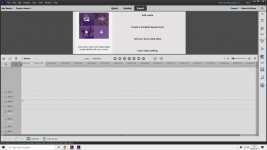
of course trhere is nothing stopping you doing a voiceover at home afterwards. Depending which editing suite you are using but if I may suggest you look at Adobe Premier Elements 2020 or 2021. On there you can use one track for video- the soundtrack that goes with the video and the voice track for the voiceover.

Screenshot (1).png
 
Last edited:
of course trhere is nothing stopping you doing a voiceover at home aftewards. Depending which editing suite you are using but if I may suggest you look at Adobe Premier Elements 2020 or 2021. On there you can use one track for video- the soundtrack that goes with the video and the voice track for the voiceover.

View attachment 329310
I have a little Rode Video Micro shotgun mic and was actually considering this approach. Seems like it could be an alternative for me until I get over myself :D
 
Be yourself and just do it. If you feel a bit of a wally talking to the camera, head over to my channel and look at some of the lame attempts I've done, that'll cheer you up!

On a serious note, I keep saying I'm going to make more videos and I really should as there's a great community over on YT that I'm missing out on but like you said, you feel a right wally talking to yourself and trying to remain natural to I feel for you and your predicament but all I can say is keep going and try to think you're talking to an audience rather than yourself.

Thanks Gareth, I’ll check out your channel.
 
I have a little Rode Video Micro shotgun mic and was actually considering this approach. Seems like it could be an alternative for me until I get over myself :D
I don't do the chat on my videos I sound terrible and the farts that would intrude would put anyone off.:LOL:
are you using a camcorder or a camera out of interest? if later on you are looking for a great camcorder I recently bought a Sony FDR-AX53 Hanycam, the built in image stabliser is amazing forr walking and shooting at gthe same time. Had a Panasonic for 10 years but it started to have a few problems so did a P/X. If i can help in any way let me know
 
Last edited:
I don't do the chat on my videos I sound terrible and the farts that would intrude would put anyone off.:LOL:
are you using a camcorder or a camera out of interest? if later on you are looking for a great camcorder I recently bought a Sony FDR-AX53 Hanycam, the built in image stabliser is amazing forr walking and shooting at gthe same time. Had a Panasonic for 10 years but it started to have a few problems so did a P/X. If i can help in any way let me know
I’m mainly using my GoPro Hero 8 Black at the moment. I have the media Mod so can use either the mic on that or the Rode. I’ll be editing out any farts :)
 
of course trhere is nothing stopping you doing a voiceover at home afterwards. Depending which editing suite you are using but if I may suggest you look at Adobe Premier Elements 2020 or 2021. On there you can use one track for video- the soundtrack that goes with the video and the voice track for the voiceover.

Any video editor will have multiple audio tracks and multiple video tracks for that matter, it’s not exclusive to premiere.
 
Any video editor will have multiple audio tracks and multiple video tracks for that matter, it’s not exclusive to premiere.
Yeah, I’ve been using LumaFusion recently, and it’s perfect for my needs.
 
Yeah, I’ve been using LumaFusion recently, and it’s perfect for my needs.
It is what one is uses to for editing.

I am still finding my way around the one I use but find no difficulty In cutting out adding text changing to look old time-fading in/out and replacing sound track.
below is an example the content is not important

View: https://www.youtube.com/watch?v=vrBJLvIN-I4&ab_channel=Bazza1041


looks easy enough but in actual fact getting the footage and editing does take a bit of time
 
It is what one is uses to for editing.

I am still finding my way around the one I use but find no difficulty In cutting out adding text changing to look old time-fading in/out and replacing sound track.
below is an example the content is not important

View: https://www.youtube.com/watch?v=vrBJLvIN-I4&ab_channel=Bazza1041


looks easy enough but in actual fact getting the footage and editing does take a bit of time
Looks good. I used to find it a bit clunky previously when editing on an iPad, but have been enjoying using it a lot more since getting the M1 MacBook Pro. It’s a great bit of software in my opinion.
 
Back
Top