

Wiping a Macbook Hard Drive

Marc

TPer Emeritus
Suspended / Banned
Messages
34,670
Edit My Images
Yes
I have an 11 year old Macbook Air that's fit for the bin. Battery & mousepad are knackered and the screen continually refreshes and there's a thin red line running down the middle of the screen.

I want to delete the hard drive before it goes in the bin so I've gone into Disk Utility but, when I select Macintosh HD, the erase button isn't active. If I select APPLE SSD SM128 at the top, the erase button is active but I get "erase process has failed".
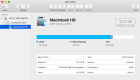
Screen Shot 2020-04-24 at 10.53.52.png
 
I usually use an axe on old hard drives.
 
If its going in the bin take the HDD out , it really does not matter how ( large hammer) and drill a few holes in it, bend the connection pins ,even if you erase it it is probably still recoverable with the right software/ knowledge.
Just render it unuseable by whatever means possible
 
I usually use an axe on old hard drives.
If its going in the bin take the HDD out , it really does not matter how ( large hammer) and drill a few holes in it, bend the connection pins ,even if you erase it it is probably still recoverable with the right software/ knowledge.
Just render it unuseable by whatever means possible

Yes, that was plan B, if I can work out how to remove the hard drive. Was just wondering if there was a less violent method.
 
if you have another Mac, try connecting it in Target Mode. It depends what ports you have on the MBA, basically you hold down the T key whilst starting up, and should get a FireWire symbol moving (jumping) around the screen. You connect the MBA to another Mac, usually by Firewire, and the disk should mount on the other Mac. if so, you can then erase it.

if that is not possible, investigate Recovery mode, there may be a recovery partition on the drive, or you may be able to do and Internet Recovery. It depends on the age of the machine, what OSX versionit is running, and the Firmware version.
 
if you have another Mac, try connecting it in Target Mode. It depends what ports you have on the MBA, basically you hold down the T key whilst starting up, and should get a FireWire symbol moving (jumping) around the screen. You connect the MBA to another Mac, usually by Firewire, and the disk should mount on the other Mac. if so, you can then erase it.

if that is not possible, investigate Recovery mode, there may be a recovery partition on the drive, or you may be able to do and Internet Recovery. It depends on the age of the machine, what OSX versionit is running, and the Firmware version.

You had me right up until "if you have...." :lol:
 
:D

so it’s recovery mode, unless you have someone you know with a Mac who is willing to leave it on your doorstep for a few days!
 
:D

so it’s recovery mode, unless you have someone you know with a Mac who is willing to leave it on your doorstep for a few days!

I have an iMac but I've mentioned it to the missus (it's her macbook) and she's now decided she wants to use, shall we say, a more "creative" method. ;)


It's a shame though as I was hoping to use it just as a word processor so I could write whilst sat in the garden.
 
I had to "dispose" of a few of my FiL's HDDs so I wiped the data off them with an angle grinder. Worked well - couldn't read any of the files after that!!!
 
The only effective way of hiding data on a hard drive (without physically destroying it), is to overwrite it. There are erase programmes that will overwrite the whole drive surface with X's. At least 5+ passes to be effective. It will take several hours.
Hammer is far more effective.
 
If you can make a linux USB boot drive, you can open a terminal window in that and enter the command:
Code:
sudo dd if=/dev/urandom of=/dev/sda bs=16M
which will overwrite the entire drive with random garbage.
 
If it's heading binwards then take it to bits and take the HDD out. Drop the HDD into a bucket of cheap cola and leave for a week. Or if you can't take out the HDD drop the whole thing into the bucket of cola. I'd think that would erase it. :)

I still have the HDD out of a computer I binned. I decided it was easier to keep that and bin the rest.
 
Last edited:
I have an iMac but I've mentioned it to the missus (it's her macbook) and she's now decided she wants to use, shall we say, a more "creative" method. ;)


It's a shame though as I was hoping to use it just as a word processor so I could write whilst sat in the garden.

Stop her!

Try the first bullet point here:

https://support.apple.com/en-us/HT201255
 
Nope, she's made up her mind and will be taking it into work when she goes back.

I can't tell you what she does for a living but I'm hoping she videos what she does with it! :D
Woah, you can't leave us like that! :D
 
What’s on this drive that you don’t want seen hmmm I can see a film being made of this topic
 
Woah, you can't leave us like that! :D

I can and I have. ;)

What’s on this drive that you don’t want seen hmmm I can see a film being made of this topic

b****r all to be honest but she's used it for 11 years to make all sorts of online purchases and applications, who knows what data remains even after it's been wiped!
 
Back
Top