Win10 colour management / wake from sleep nightmare

LongLensPhotography

Th..th..that's all folks!
Suspended / Banned
Messages
18,695
Name
LongLensPhotography
Edit My Images
No
I am pretty sure the thing is as broken like a smashed bottle.

I have decided to recalibrate my wide gamut screen using 'native' OSD profile and allow x-rite to ask for RGB adjustments. Minor tweaks were made and I got a profile that is slightly wider than adobeRGB. That's a win big when you print a lot.

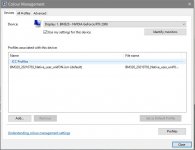
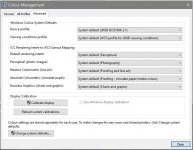
Now a day later, the PC resumed from sleep and everything has red tint. Open screen preferences and it instantly bounces back to new profile. I tripple checked and made sure all colour management properties in gazillion diffirent places are all set to new profile. Nothing helps. Windows is trashy POS that just doesn't work out of the box. Ok, the workaround is simple. Just open display prefs every time, and do always it to be sure.

Perhaps the only reason I didn't pickup on this before was that my custom profiles and whatever default adobe one were really similar, but I had suspicions. It clearly didn't behave when I tried to use with 2 different screens.

So a word of warning. You may not be looking at screen with your latest profile right now unless you force the settings by opening display prefs. That's a big shocker.

P.S. Can't wait to go back to a mac.
 
You mentioned that you put the pc into sleep mode.....have you tried Shutting down and (simply) restarting? If so does that resolve the issue?

You might or not as the case may be, be aware the W10 shutdown is a sort of hybrid. It puts the current state into memory for quicker boot times. I am not too sure what, by comparison, 'sleep' mode does but something odd is going on with your PC :thinking:
 
You mentioned that you put the pc into sleep mode.....have you tried Shutting down and (simply) restarting? If so does that resolve the issue?

Pretty much the same; as long as monitor goes black and resumes it is like a lottery which profile will be loaded. This time it was OK. At least it is quick and easy to fix. I don't like leaving it on permanently. I could be away for 5min or 2hrs and don't fancy some image burn in as well as extra electricity bill.
 
View: https://youtu.be/mqphV-VDE8s


All I had to do to cause this was in fact power monitor off and back on.

It is really visible because RGB channels got tweaked. Pretty much everything you see should be some shade of grey. I guess in most normal cases you can barely notice the difference.
 
Sorry if I missed it but what connection port are you using and as such have you been able to try the others....... e.g. if HDMI have tried the Display Port or even the DVI (I read that BM320 has all three).

I think I recall reading once (not about this monitor) that where choice is possible, in order of better to best > DVI > HDMI > DP. Plus that HDMI is not a port of choice where colour critical work is intended?
 
Last edited:
All I had to do to cause this was in fact power monitor off and back on.
That makes me think it's not windows. it's the monitor.
Windows is telling it what adjustments to implement, and it's forgetting when it drops to an inactive power state; loading the colour management panel sends a reminder.
Bit of a cludge, but could you go through the monitor's OSD menus and note down what the settings are, then power cycle it and check the menus again to see what (if anything) changed.
If there is a difference, change an save the desired values on the monitor.
 
That makes me think it's not windows. it's the monitor.
Windows is telling it what adjustments to implement, and it's forgetting when it drops to an inactive power state; loading the colour management panel sends a reminder.
Bit of a cludge, but could you go through the monitor's OSD menus and note down what the settings are, then power cycle it and check the menus again to see what (if anything) changed.
If there is a difference, change an save the desired values on the monitor.
How would you explain that everything immediately goes back to normal as soon as I open display preferences?
 
How would you explain that everything immediately goes back to normal as soon as I open display preferences?
I would surmise that the display prefs are re-sending their current settings on opening to ensure what the prefs say, and what the display is outputting are synchronized prior to any changes being made.
 
How would you explain that everything immediately goes back to normal as soon as I open display preferences?

I would surmise that the display prefs are re-sending their current settings on opening to ensure what the prefs say, and what the display is outputting are synchronized prior to any changes being made.
I wonder, is it remotely possible that the DP cable is at faulty ???
 
Last edited:
I wonder, is it remotely possible that the DP cable is at faulty ???
No idea, but this would be the only fault in that case. I'm yet to see the same happen on linux.
 
@LongLensPhotography

Another thought occurred to me :thinking:

What version of the nVidia drivers are you using and 'which type'? The reason I ask is that I have a vague memory that unless you are specifically using a gaming rig then it is best(?) to install the "Studio" type of driver and not the "Gaming" ones. NB AFAIK even with Studio you can still paly games.......................it is just that Gaming drivers are enhanced for Games, whereas Studio is targeted are creative applications.

As I say, just a thought in case there is some benefit in your situation :)
 
@LongLensPhotography

Another thought occurred to me :thinking:

What version of the nVidia drivers are you using and 'which type'? The reason I ask is that I have a vague memory that unless you are specifically using a gaming rig then it is best(?) to install the "Studio" type of driver and not the "Gaming" ones. NB AFAIK even with Studio you can still paly games.......................it is just that Gaming drivers are enhanced for Games, whereas Studio is targeted are creative applications.

As I say, just a thought in case there is some benefit in your situation :)

I have Studio driver 471.11
 
Last edited:
Back
Top