WiFi adaptors for a Windows 10 PC ?

Box Brownie

Suspended / Banned
Messages
17,645
Edit My Images
No
Hi all

I am looking at a situation where the router will not be in the same room as the PC and ethernet wired, so will need to make the PC "WiFi".

The motherboard is an older one, I have added a USB 3 PCI adapter.....but without checking i cannot recall which PCI sockets are still free.

Therefore I am looking for ideas & would appreciate some pointers/suggestions for PCI and USB adapters.

Note ~ the wired port is Gigabyte speed.
 
Something like the TP-Link Archer T9UH will plug into one of your USB3 sockets. It has a cable so the gubbins aren't hanging off the back of the PC and can be positioned for best reception. Unless you have a very modern router that supports 802.ax you only need something that supports 802.ac.

I'm not sure why the wired port is relevant; knowing what Wi-Fi the router supports would be more useful.
 
Something like the TP-Link Archer T9UH will plug into one of your USB3 sockets. It has a cable so the gubbins aren't hanging off the back of the PC and can be positioned for best reception. Unless you have a very modern router that supports 802.ax you only need something that supports 802.ac.

I'm not sure why the wired port is relevant; knowing what Wi-Fi the router supports would be more useful.

Thanks for the linky, it does look interesting :)

Why not home plugs?

Thanks both re: Home Plugs
Do you know if they work in a mixed wiring house i.e. where upstairs & downstairs are on different ring main circuits and what about if some places in the house are radial spur wired (i.e. not on the ring main)?
 
With your PCI to USB card you have presumably some spare USB sockets.
A quick google for USB to WiFi adapter brings up a lot at various prices from the usual suspects, Currys , Argos , amazon or have a look at CCL

 
When we went from copper cable broadband to fibre we could not have(without some serious redecoration) the fibre router upstairs next to the PCs, so the previously wired internet connection had to become wireless. We use a couple of the wireless adapters Johnathin mentioned above.

The signal comes through a floor and a couple of walls with no problem and delivers around 148Meg download and 28Meg upload.

Dave
 
With your PCI to USB card you have presumably some spare USB sockets.
A quick google for USB to WiFi adapter brings up a lot at various prices from the usual suspects, Currys , Argos , amazon or have a look at CCL

Yes, a couple of spare USB3 sockets.

Hmmm! yes, lots of different makes & models to consider....though a model as mentioned above by @Snapsh0t with its own cable and cradle does give more positional versatility ;)
When we went from copper cable broadband to fibre we could not have(without some serious redecoration) the fibre router upstairs next to the PCs, so the previously wired internet connection had to become wireless. We use a couple of the wireless adapters Johnathin mentioned above.

The signal comes through a floor and a couple of walls with no problem and delivers around 148Meg download and 28Meg upload.

Dave
Thanks for the insight about the specific model :)


PS my Router is a BT Business Smart Hub 6 and is Wireless-Wi-Fi 802.11ac
 
I've tried home plugs and found the actual transfer speed to be disappointing, whatever the headline connection speed. They might well be okay if you're only using them for connection to the internet but I was trying to move photo files around. They did work across two ring mains however.
 
My sons PC uses an TP Link Archer T2U nano USB dongle.
Approx 20 feet from the router and through two internal walls he gets the Virgin BB stated speeds over the 5Ghz network.

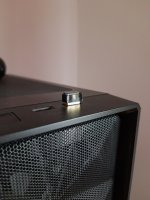
This is the dongle in question occupying one of the two front USB 3 ports on his case. Ig literally lives up to its nano name

20220509_081927-01.jpeg
 
Last edited by a moderator:
Bought a TP-Link AC1300 USB dongle around 6 months ago, great signal reception and a decent price (link below).

TP-Link AC1300

Alternatively as you’re with BT you could go with WiFi Complete (BT WiFi discs) and plug your PC into the disc, using the disc as an extender AND bridge
 
Bought a TP-Link AC1300 USB dongle around 6 months ago, great signal reception and a decent price (link below).

TP-Link AC1300

Alternatively as you’re with BT you could go with WiFi Complete (BT WiFi discs) and plug your PC into the disc, using the disc as an extender AND bridge
Thanks for insight and link.

PS when I said I use a BT Business Hub I should have explained. I am with PlusNet and this router came highly recommended by others on the PN community forum as a good choose for overcoming the shortfalls of the BT Homehub 5A based PN router.

PPS unless something changes I won't be swapping ISP.
 
I have a TP-Link Archer T9UH for my desktop PC and it is pretty well flawless - always good reception and great download speed (y)
 
@Snapsh0t and @Bristolian

As mentioned above I have now gotten the T9UH and other than a minor delay indentifying its MAC Address (I know it is only a minor security precaution ~ but I do MAC filter all WiFi devices).

I have speed tested it against the Ethernet connection and there is a minor difference i.e.
Ethernet
DL 34.50 Mbps
UL 5.61 Mbps
Ping 6ms

TP Link T9UH
DL 34.45 Mbps
UL 5.56 Mbps
Ping 7 ms

NB above using the 5GHz channel

I have noted that it runs quite hot, which did surprise me a tad. I wonder how hot do you find your ones run???

I have now switched it to the 2.4GHz channel I though it might be my imagination it seems to be running a little cooler by comparison :thinking:

At the moment the TP Link is in very close proximity to the router but that will not always the case i.e. the reason for buying it was in regard to re-arranging where the router is located in future.

TIA for the usage insights re: running temps :)

PS edit ~ I am convinced that it does run cooler using the 2.4GHz compared to the 5GHz band.

PPS downloading a video I am not seeing any significant difference in the DL time of the video using Ethernet or WiFi of either band.
 
Last edited:
As your internet speed is barely 10% of the PC-to-router link speed, even on 2.5GHz, it would be very disappointing if there was any significant difference in download speed.
 
HI BB,

Yes, my device runs hot to the touch too. It has always done that and I guess I've just accepted it. I would expect it to run cooler on 2.4MHz. Have you opened the antenna up? I found that makes a very big difference to the speeds.

We are fortunate to have a 1Gb download speed connection and with the T9UH I seldom see download speeds of less than 500Mb/s on the PC (other devices like my iPhone and iPad are quicker using their inbuilt WiFi). Typical download speed is more like 600Mb/s on 5MHz. I should say that our router isn't located in the best place but that is constrained by where other WiFi and Ethernet connected devices are located. The T9UH could probably be located better too but I don't have any need for faster speeds so it can stay where it is.

As things happen, we've recently decided to lay a laminate floor in the room where my PC is located so I'm going to take the opportunity to lay an Ethernet cable :)
 
Back
Top