Whitewall print too dark??

Marc1548

Suspended / Banned
Messages
126
Edit My Images
Yes
Hi, hope im in the right forum here. Please help as iv no idea what iv done wrong.
I m a novice when it comes to LRC editing & preparing my images for print. I recently submitted an edited B&W image to Whitewall for print exported from LRC as a Tiff file from my Mac when I received the print it was way, way too dark. I estimate 2-3 stops under what I could see on my Macs screen. The brightness was turned down to about 1/3 when I edited the original & obviously my screen is not calibrated. The ICC profile whitewall recommend is Grey Gamma 2.2... What does this mean ?? as its not not downloadable from there web site & not in the default LRC list under soft proofing & could there be that much difference in exposure anyway?
grateful for any advice thank you. edit I should point out that I didn't touch the profile setting which were at Adobe RGB.
Marc
 
Last edited:
Do you have your monitor calibrated?

Many years ago I had a photobook made and the images were too dark when I got it back. A question to the manufacturer came back with the question was the monitor calibrated? They said, people tend to have bright monitors, and so darken images to make the images 'look right'.

When it comes to bright and dark levels, and colours, unless you are using a calibrated monitor, how do you know what you are altering is 'correct'?

I calibrate my monitor every so often, but definitely before editing a set for either uploading to an image site, or intend to print.

Although most peoples monitors are not calibrated, editing on a calibrated monitor will lead to images looking good on most screens, but will at least be consistent.

Having a calibrated monitor for printing is essential for me. Whomever you print with will have calibrated gear, and whilst some adjustment can be done, they don't expect to do too much and expect for you to have edited them correctly.

Printing and calibration can be as big or as little a rabbit hole as you want it to be, especially if one intends to print themselves.

If you plan to print on a regular basis, get a calibration device to minimise future hassle with whoever you print with.
 
I cannot speak about the Mac 'ecosystem'......

Having said that, for such marked difference between screen and print, I would think your screen is way too bright!

You say the screen is not calibrated but adjusting the screen brightness is always(?) a step in monitor calibration. This is to set the screen brightness to a set/specific level e.g 100cd/m2

Lastly, have you printed before this occasion or was this your first print?
 
Yes I have used Whitewall before with no issues but never B&W only colour. I haven't set my monitor to any specific brightness value but it is only set to about 1/3 of full brightness. Not sure if this is relevant but on there configurator the exposure looked fine they show a preview of what your print might look like against a wall in a virtual living room. looked fine there lowering the monitor brightness there lowers the whole scene if that makes sense.
 
Yes I have used Whitewall before with no issues but never B&W only colour. I haven't set my monitor to any specific brightness value but it is only set to about 1/3 of full brightness. Not sure if this is relevant but on there configurator the exposure looked fine they show a preview of what your print might look like against a wall in a virtual living room. looked fine there lowering the monitor brightness there lowers the whole scene if that makes sense.
I perceive that the configurator is only showing 'how it would look on the wall' i.e. not what it will look like when printed.

Can I suggest that you show us the image so 'we' can see it?
 
Yes I have used Whitewall before with no issues but never B&W only colour. I haven't set my monitor to any specific brightness value but it is only set to about 1/3 of full brightness. Not sure if this is relevant but on there configurator the exposure looked fine they show a preview of what your print might look like against a wall in a virtual living room. looked fine there lowering the monitor brightness there lowers the whole scene if that makes sense.
As a very rough guide, white on your monitor should look about as bright as a piece of white paper in the same lighting. But, this will not work if the room is particularly dark.

Grey Gamma 2.2 is included with Photoshop but it doesn't show up in LR. It really shouldn't matter; LR functions in gamma 2.2 already. You could try soft proofing in Adobe RGB instead to see if it makes a difference, but it should be very minor if anything.

I find editing in the dark is very problematic in terms of image brightness. Also note that soft proofing is only approximate; a backlit screen cannot replicate paper. If you used a flat paper the issue can be compounded.
 
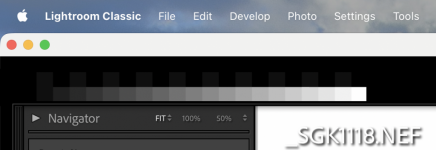
I use this png as my identity plate in LR (it must be in png format)

TestStrip2.png

1767710141275.png

On a well calibrated monitor you should be able to distinguish the two alternating blacks in the top row... I can, but just barely. On my computer, I cannot distinguish the two blackest squares in the bottom row; ideally I would be able to. If it appears different than it normally does I either need to recalibrate, or I need to adjust my monitor brightness.
 
Back
Top