

You are using an out of date browser. It may not display this or other websites correctly.
You should upgrade or use an alternative browser.
You should upgrade or use an alternative browser.
White balance
- Thread starter Markvs
- Start date


Mark
As Phil said, this is not a white balance problem, white balance contols colour temperature making it warmer or colder (bluer or yellower if you like) in appearance.
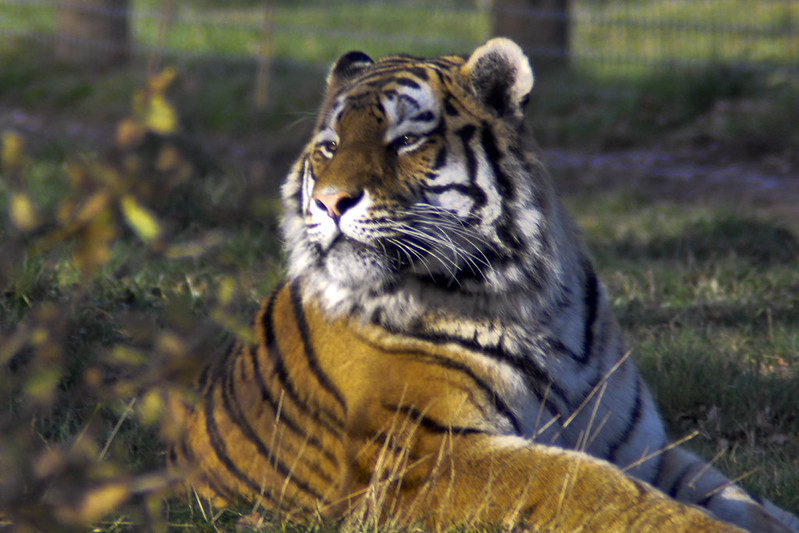
The issue you have is that the whites are clipped on the nose. That means that there is no detail remaining in the image at this area, only pure white. So you cannot do much anything to recover this.
However it is possible if you processed this mage to where it is now that you lost the detail while adjusting levels to suit other areas.
Take a look in your original file, is it still clipped? Do you have software where you can look at the histogram.
Also, did you shoot in Jpeg or RAW? If in RAW then you still have a chance that it may be recoverable. If in Jpeg then unlikely.
As Phil said, this is not a white balance problem, white balance contols colour temperature making it warmer or colder (bluer or yellower if you like) in appearance.
The issue you have is that the whites are clipped on the nose. That means that there is no detail remaining in the image at this area, only pure white. So you cannot do much anything to recover this.
However it is possible if you processed this mage to where it is now that you lost the detail while adjusting levels to suit other areas.
Take a look in your original file, is it still clipped? Do you have software where you can look at the histogram.
Also, did you shoot in Jpeg or RAW? If in RAW then you still have a chance that it may be recoverable. If in Jpeg then unlikely.
To be honest I dont think there is ever any point in shooting only Jpeg unless your a photojournalist or sports tog and have to upload instantly.
Sometimes shooting RAW+ which gives a copy of each can be a good idea, though I rarely do this.
Seeing as you have LR then you will find RAW gives you a huge advantage and no doubt you have read that.
However you still need to check your histogram after shooting to see if it is too far to the left or right and re shoot if necessary.
Anyway, enjoy RAW and good luck
Sometimes shooting RAW+ which gives a copy of each can be a good idea, though I rarely do this.
Seeing as you have LR then you will find RAW gives you a huge advantage and no doubt you have read that.
However you still need to check your histogram after shooting to see if it is too far to the left or right and re shoot if necessary.
Anyway, enjoy RAW and good luck

ernesto
Suspended / Banned
- Messages
- 2,839
- Name
- Chris
- Edit My Images
- Yes
This is a good example of where raw is better. You will get better results when manipulating the problem areas as there is more data held in the raw image. Quite often blown is blown and nothing can be done but you have a better chance with raw. That may be the case in your example as it does look like it may have gone too far.
You should have got the tiger to move out the shade really
You should have got the tiger to move out the shade really

HoppyUK
Suspended / Banned
- Messages
- 23,200
- Name
- Richard
- Edit My Images
- No
As said, this is a perfect example of where Raw scores. I'm fairly sure that the white nose is only just blown, or rather the in-camera JPEG process has clipped the brightest highlights, that would have retained detail on the Raw file.
If you have post processing program like LightRoom, it takes two seconds to pull down the Whites slider, and maybe nudge up the Shadows slider to pull a little more brightness in the darker tones. Then give it a bit more punch with the Clarity slider.
The basic stuff in LightRoom is really easy, but to get the most out of this software you really need a book, eg Scott Kelby.
To prevent blown highlights like this, enable the Highlight Alert in the menus, and over-exposed areas of the image will flash black/white (known as blinkies) so you know when to make an adjustment. Extremely useful feature
If you have post processing program like LightRoom, it takes two seconds to pull down the Whites slider, and maybe nudge up the Shadows slider to pull a little more brightness in the darker tones. Then give it a bit more punch with the Clarity slider.
The basic stuff in LightRoom is really easy, but to get the most out of this software you really need a book, eg Scott Kelby.
To prevent blown highlights like this, enable the Highlight Alert in the menus, and over-exposed areas of the image will flash black/white (known as blinkies) so you know when to make an adjustment. Extremely useful feature

Phil V
Suspended / Banned
- Messages
- 26,303
- Name
- Phil
- Edit My Images
- No
It's been mentioned by a couple, but I think gets lost in the talk about processing.
This is a prime example of where photographers should be using their eyes to assess the image in the viewfinder. I understand the will to get the shot, but the dappled light is going to give you an image that'll need PP work to make 'right'.
When it's 'right' will the image justify the work? Would the OP have been better waiting for the tiger to move? If the tiger moves forward into the light, there's less chance of the fence in the background. If it moves back into the shade, a slightly different angle might give a better finished image.
But it's just easier to pretend it can be 'fixed in post', rather than asking photographers to consider the photography, we're giving advice to improve what can only be described as a snap, when we could be giving advice to elevate it to a photograph. </rant>
This is a prime example of where photographers should be using their eyes to assess the image in the viewfinder. I understand the will to get the shot, but the dappled light is going to give you an image that'll need PP work to make 'right'.
When it's 'right' will the image justify the work? Would the OP have been better waiting for the tiger to move? If the tiger moves forward into the light, there's less chance of the fence in the background. If it moves back into the shade, a slightly different angle might give a better finished image.
But it's just easier to pretend it can be 'fixed in post', rather than asking photographers to consider the photography, we're giving advice to improve what can only be described as a snap, when we could be giving advice to elevate it to a photograph. </rant>
PhilV - agreed that we should be looking to get it right in camera before considering PP, I did in fact hint at that.
The Tiger may well have moved into a better position, but equally it may have moved into a worse position or the sun may have gone altogether.
The Tiger may well have moved into a better position, but equally it may have moved into a worse position or the sun may have gone altogether.

phil8139
Suspended / Banned
- Messages
- 2,028
- Name
- Go on, have a guess
- Edit My Images
- Yes
It's been mentioned by a couple, but I think gets lost in the talk about processing.
This is a prime example of where photographers should be using their eyes to assess the image in the viewfinder. I understand the will to get the shot, but the dappled light is going to give you an image that'll need PP work to make 'right'.
When it's 'right' will the image justify the work? Would the OP have been better waiting for the tiger to move? If the tiger moves forward into the light, there's less chance of the fence in the background. If it moves back into the shade, a slightly different angle might give a better finished image.
But it's just easier to pretend it can be 'fixed in post', rather than asking photographers to consider the photography, we're giving advice to improve what can only be described as a snap, when we could be giving advice to elevate it to a photograph. </rant>

HoppyUK
Suspended / Banned
- Messages
- 23,200
- Name
- Richard
- Edit My Images
- No
PhilV - agreed that we should be looking to get it right in camera before considering PP, I did in fact hint at that.
The Tiger may well have moved into a better position, but equally it may have moved into a worse position or the sun may have gone altogether.
Tiger doesn't look like going anywhere...

But dappled sun is one of the lovliest lights. Catch it while you can.
Phil V
Suspended / Banned
- Messages
- 26,303
- Name
- Phil
- Edit My Images
- No
Tiger doesn't look like going anywhere...
But dappled sun is one of the lovliest lights. Catch it while you can.
It is, but I don't think it's doing the tiger any favours, likewise it's rarely nice on people. All it's done here is create a dynamic range that's become an issue for the photographer, but the light on the background does look nice though

modchild
Suspended / Banned
- Messages
- 3,914
- Name
- Stuart or just Stoo!
- Edit My Images
- Yes
Mark, was this taken at Yorks Wildlife Park, would seem logical seeing where you come from. I was there earlier in the year and got a few similar shots, some good and some ok, but I waited 35 minutes in one place outside the fence while the tiger laid down and hardly moved (it rolled over and stuck his head up once) so regardless of whether the fence is in the shot, sometimes you just can't control the shot. I also got lion shots with the fence in them, but it couldn't be helped, the only place to get the shot had the fence in it. Would you have rather got that shot and maybe a few other similar shots or thought 'forget it, he's not going to pose so I wont take any shots. I'll come back another day and try again'. Keep an eye on your histogram to keep it from clipping and get the best you can.
Last edited:

Richard King
Suspended / Banned
- Messages
- 3,661
- Name
- Richard King
- Edit My Images
- No
starting off with a shallow DOF and a wide open lens is the start of the issues... I feel the DOF is too shallow, and you are letting a "smidge" too much light in the camera... However its your first go, and on that basis, you have done well
the issue here is "what are you metering from?" Yes raw will help oyu claw back some hilights, but.. fundamentally, it is slightly over exposed. you may benefit form working through and really understanding the metering options on the camera
the issue here is "what are you metering from?" Yes raw will help oyu claw back some hilights, but.. fundamentally, it is slightly over exposed. you may benefit form working through and really understanding the metering options on the camera