Which White Balance For Maximum Versatility

Erty

Suspended / Banned
Messages
746
Name
Andrew
Edit My Images
Yes
Imagine I'm trying to take a picture in a high contrast landscape and I'm trying to get the most data and avoid blowing certain highlights. I look at the blown highlights and histogram to get the most data. I can fix the colours and light levels in processing.

The camera manufacturer says to use neutral picture controls, as this is the least messed about with and best reflects the raw data. The white balance also impacts the histogram and can apply huge colour shifts.

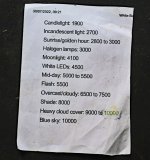
So which white balance gives the most realistic representation of what the camera sensor sees? I am guessing the sunlight setting as it is in the middle of the range.
 
I think I might be tempted to dial down the contrast in a custom picture control and see if that helps if it's a contrast issue. Many cameras will also let you scroll through WB in live view to see what looks best.
Which histogram are you looking at? The camera one is often off the jpeg image thats embedded in the raw rather than the raw image itself.
Another option for high contrast is tone mapping or HDR (lots of different ways) it doesnt have to look awful like some overdone ones. Done properly you'd be hard put to notice.
While my fun pics are generally on auto WB for serious stuff I use a custom WB, or a fixed 5600k depending on lighting.
 
Last edited:
Is it the case that shooting RAW: avoid blowing highlights and adjust WB in post?
That is it. It should be easier to avoid blowing highlights if the white balance isn't shifting the colours about.
 
That is it. It should be easier to avoid blowing highlights if the white balance isn't shifting the colours about.
Maybe go old school and meter off a grey-card?

High contrast stuff has always been tricky, hence dodging and burning back in the film days. IIRC we (Dad and I) used to shoot half a stop under for slides and a stop over for (B&W) negatives? L o n g time ago.
 
I don’t very often shoot landscape but when I do I try to take a few shots of each scene (raw) with a range of exposures as you say the camera screen doesn’t always show exactly what the exposure is
 
a coffee-break read

(unable to show the link but search for Ken Rockwell histograms.)
 
Imagine I'm trying to take a picture in a high contrast landscape and I'm trying to get the most data and avoid blowing certain highlights. I look at the blown highlights and histogram to get the most data. I can fix the colours and light levels in processing.

The camera manufacturer says to use neutral picture controls, as this is the least messed about with and best reflects the raw data. The white balance also impacts the histogram and can apply huge colour shifts.

So which white balance gives the most realistic representation of what the camera sensor sees? I am guessing the sunlight setting as it is in the middle of the range.
I’d also go with the sunlight setting for a balanced baseline gives you a good starting point without heavy shifts.
 
You cannot rely on the histogram to maximize recorded dynamic range in a raw file; it simply lies, and that's where the "highlight recoverability" of a raw file comes from. It will also show a highlight as clipping if any color channel approaches 255 (usually by 250). And the camera doesn't see/record color in a raw file... it's just pixel exposure values.

The best white balance for the most accurate histogram is a Uni-WB... it sets all color multipliers to 1 (or nearly) for the most accurate histogram. The result is a heavily green image that must be corrected in post (due to the majority of pixels being green filtered). I messed with it for a while years back and found it to be too much of a hassle. Even then the histogram isn't going to be entirely accurate, you need to use raw digger (or similar) to see how much range remains when your camera's histogram/blinky is showing clipping (typically .5-1 stop).

Also, with an ISO invariant camera there is no real benefit to trying to maximize the exposure if it is done by increasing the ISO (and minimal benefit if it is a non-invariant camera). Since I use auto ISO so much with a primarily invariant camera, the whole thing becomes pointless.
 
Last edited:
I always shoot RAW & cloudy WB so it’s consistent and adjust in post as required.
That's my general approach too. As for histograms, it can be helpful to remember that "the histogram displayed on the camera’s LCD screen is based on processed JPEG settings, not the raw file itself. This means that relying solely on the camera’s histogram may not always result in the most accurate exposure" (PhotograhyReal.com, Master Histograms for Perfect Exposures).
 
Back
Top