Where to start with 'polishing' this image

TomWoozle

Suspended / Banned
Messages
217
Name
Tom
Edit My Images
Yes
I've had my first camera a couple of months now and am starting to get the hang of the basics and thought it is time I get more to grips with post processing (I have a vague grip on the basics only at the moment).

I've ordered Scott Kelby's 7-point Photoshop book which is on it's way. Right now thought I am wondering how best to approach some photos, which I know is an experience thing but I'm impatient!

The photo below is a photo I took today with my new flash; my first time using it and so I was less than brilliant with the settings! I screwed this photo up but liked it anyway so was interested in how to make the best of it.

I adjusted the exposure in LR2 and then imported it into PS CS4 to try to fix the blown highlights on the face a bit, but got nowhere and think they are a lost cause.

So (finally) getting to my questions:

- Looking at this picture, what would you do to process it for the best? (I know it depends on what you want from it, but imagine it is up to you!)

- Are the blown highlights on the face a lost cause (I know the arm is)?

Any tips and hints would be much appreciated. C+C on the photo is also welcome. Thanks! :)
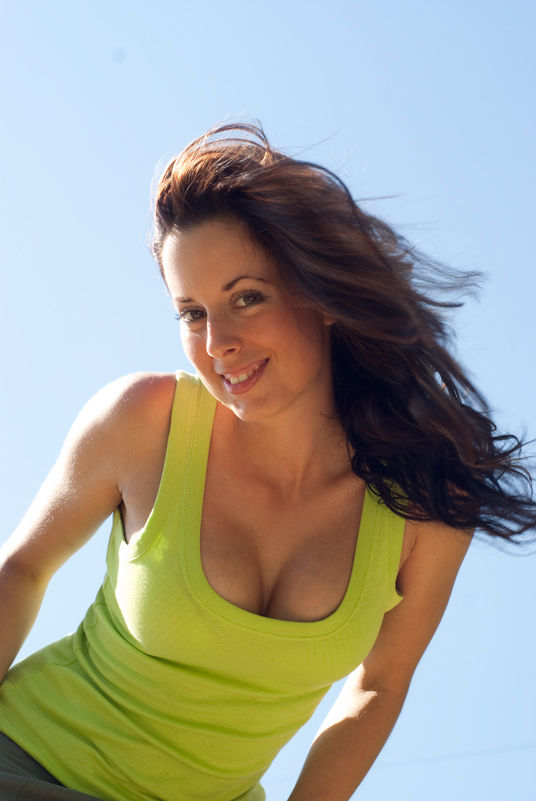
emma_wind_small.jpg

(Larger JPG version) (Untouched Sony RAW)
 
Here's my effort - first the unprocessed raw and then with some tweaks performed in Lightroom.

20090530_104451_LR.jpg


(You have a dust bunny)
 
Slightly different approach:


::edit, looks a bit washed out compared to what it was like in PS :(
 
::edit, looks a bit washed out compared to what it was like in PS :(

Which OS and browser are you using. I've given up using IE because I'm fed up with the way it detroys colour managed images - even those in sRGB. I've switched to Firefox and turned colour management on. Your image looks fine to me :)
 
What a shame - such a lovely shot. You're not going to recover those highlights by conventional means and that's what spoils it for me. It's definitely fixable and if it were mine I'd want to keep it. This work is better done on a much larger version of the image, but this is a rough job with some obvious levels tweaks and the highlights reduced by using some very low opacity cloning to try to reduce the backlight but keep it looking natural.

3591306129_6aa5f3a009_o.jpg


And with more natural skin tones, which would be my preference.

3592141897_30c9f7d809_o.jpg
 
You have a very nice model. I am going to try to modify it a bit if I may.
Areas I find distracting are the dust spot top left, the wire coming out of her back, on the bottom right, the hairs on her cheek (but not the ones on the forehead for some reason).

I also find the harsh light on her bossom distracting, so will try and remove this, at the same time as the arms. I think that it could stay on the face, will have to see in the end.

If any of these modifications are not acceptable to either you or the model, I will remove them immediately.
 
Here is my attempt.
On the cheek I have used healing brush, as with the bossom.

On the areas which are over-exposed, I have copied the area, pasted as a new layer, and then re-selected as exclusion layer. I then copy merged the resultant item, and pasted back as a new layer, this time multiply. Then deselected the exclusion layer from visible.
Then using the eraser tool, I removed the areas that were not over-exposed (a bit badly seems I missed a bit).
Then change the opacity of the layer down until it looks more natural. This way, you are multiplying the very light detail, with a very low reverse of the detail. And the details are kept. It can be repeated several times to get less blown results.

Some people may not like it, but I think that the yellow light bouncing off the arm-hairs adds the extra sense of detail.
emma_wind_copy1.jpg
 
My effort

emma_wind.jpg


I used the raw, pulled back the exposure -1.2, contrast masked a duplicate layer, then selected the blue sky and erased the changes on the duplicate layer.
 
I think the original photo doesnt have much that can be tweaked. Its a good natural photo with some blown highlights but it doesnt detract from the overall image that much, in my eyes.

BTW, the Kelby book is very good, and helps you think about whether you really should adjust an image, or leave it alone.

Does that book cover Elements or just the full blown Photoshop? Sounds interesting!
 
Very nice shot and lovely model, here is my attempt only 5 Min's,hope you like.

emma_wind12.jpg


Does need refining.
 
Which OS and browser are you using. I've given up using IE because I'm fed up with the way it detroys colour managed images - even those in sRGB. I've switched to Firefox and turned colour management on. Your image looks fine to me :)

Vista 32bit and Chrome. My images always look different when i open them in windows picture gallery and especially if i use them as a desktop wallpaper.
That pic is just a little less vibrant and a bit cooler than i wanted it to be, ah well.
 
Vista 32bit and Chrome. My images always look different when i open them in windows picture gallery and especially if i use them as a desktop wallpaper.
That pic is just a little less vibrant and a bit cooler than i wanted it to be, ah well.

Google's Picasa (Photo editing software no less!) is not colour managed. I imagine Chrome isn't either.
 
All I can say is that some of you are using very different monitor/colour settings... some of those images had interesting colour and saturation choices.
 
All I can say is that some of you are using very different monitor/colour settings... some of those images had interesting colour and saturation choices.

Whos do you think looks right on your monitor then?
 
My effort

emma_wind.jpg


I used the raw, pulled back the exposure -1.2, contrast masked a duplicate layer, then selected the blue sky and erased the changes on the duplicate layer.

This version looks spot on to me, on my monitor.
 
Is it just me or is the OP's image still the best? Some of these have some pretty weird colours going on for sure!! Apart from the dust spot and the cable I can't find much wrong with a pretty pleasing image? All the same, I couldn't resist having a go!!

emma_wind.jpg
 
One can but try... to make it a bit different, rather than natural... :D

30sc09s.jpg
 
Back
Top