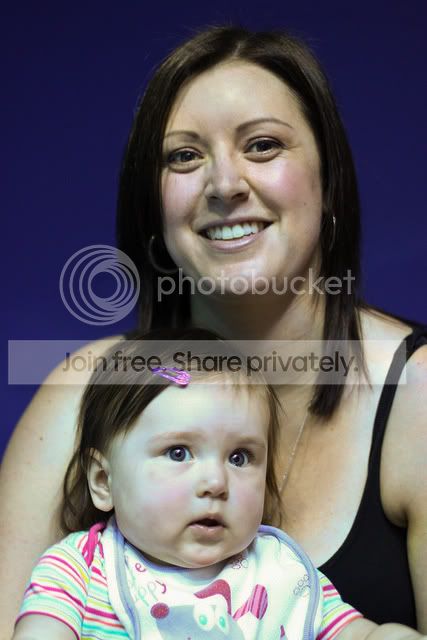
What would you do too this?

chiffs

Suspended / Banned
Messages
437
Name
Sean
Edit My Images
Yes
This shot was taken in jpeg so cant give you the raw too play with (was part of the sooc comp). The colour is due to being next to a massive aquarium tank.

The rest of the shockingness (is that a word) was due to rushing and not being the best with a camera yet.

Ive had a little go at editing it with cs5 but the only way i could get it too look half decent with was changing to black and white (need to learn more about PS) although i think ive gone to dark with it.

So lets see what the pros can do?

Unedited

Edit challenge by Chiffs, on Flickr

My effort

my effort by Chiffs, on Flickr
 
JW.jpg


JW_2.jpg


First one, just a desaturate, levels adjustment, dupe layer, diffuse glow via filter-distort.

Second one, levels adjustment for the dark blue background, paint out the face, select that mask, fill with yellow on a new layer, overlay mode, lower opacity to suit, reselect mask and on new layer fill with red, overlay mode, lower opacity to suit.

Then you could twiddle to refine the hair and any other bits that are reflecting the original blue, but these get to a starting point.
 
Last edited:
Quick edit :

lady2.jpg


What I remeber I did... using Gimp
- Color balance
---- tweaked more red more yellow and hint of green
- curves - pulled down a bit
- levels - to brighten a little
- duplicated layer - changed to multiply 30% opacity
- merged visible
- duplicated new visible
- on top most added a mask (see through)
- changed curves (upwards)
- blanked mask and poked holes in for eyes
- gaussian blurred mask to soften brightness on eyes.

Let me know if you want it removed
 
Joan thanks for putting everything you have done, thats a big improvement over what i got when first trying with PS.

The list of what you have done kind of confuses me at the moment but i am going to try using those layers and filters that you have listed and see what i end up with.
 
You may want to check your WB setting.

Here I opened the image `as camera RAW` and boosted the temp to +29.
Other adjustments in RAW dialogue:

Exp -.9
Recovery 36
Clarity +18
Vibrance +22
Saturation +18.

Then opened into Photoshop and gave the bright spot on her forehead a quick brush with a clone stamp @ 20% opacity. Spending more time on a bigger file would improve things further (she looks a bit green!), but I reckon the white balance is your main culprit.


0489cfc4.jpg
 
Heres a fairly quick go. I used the clone tool the patch tool, colour balance and surface blur.

5794751236_23d8ffdd3d_z.jpg
 
Thanks everyone so far. You are all far better than me at editing. Don't think it was a White balance problem, more so everything was blue due to the large glass viewing window of a massive fish tank ( will check wb but all other shots have come out fine).
 
Changed daylight to tungsten and a bit of burn

5790301054_2aababb300_o2.jpg
 
Back
Top