

What would cause this?

LauraJ23

Suspended / Banned
Messages
14,759
Name
Laura
Edit My Images
No
On the camera the file is fine, windows explorer shows the image fine, but when opened in elements 10 at the camera raw stage, the bottom right is all white and then when opened in elements, the lines appear.

Could it a corrupt file, or my hard drive, which has been showing signs of failing for a while. Also earlier the laptop wouldn't open pictures saying there wasn't enough memory, but bags of space on the main drive.
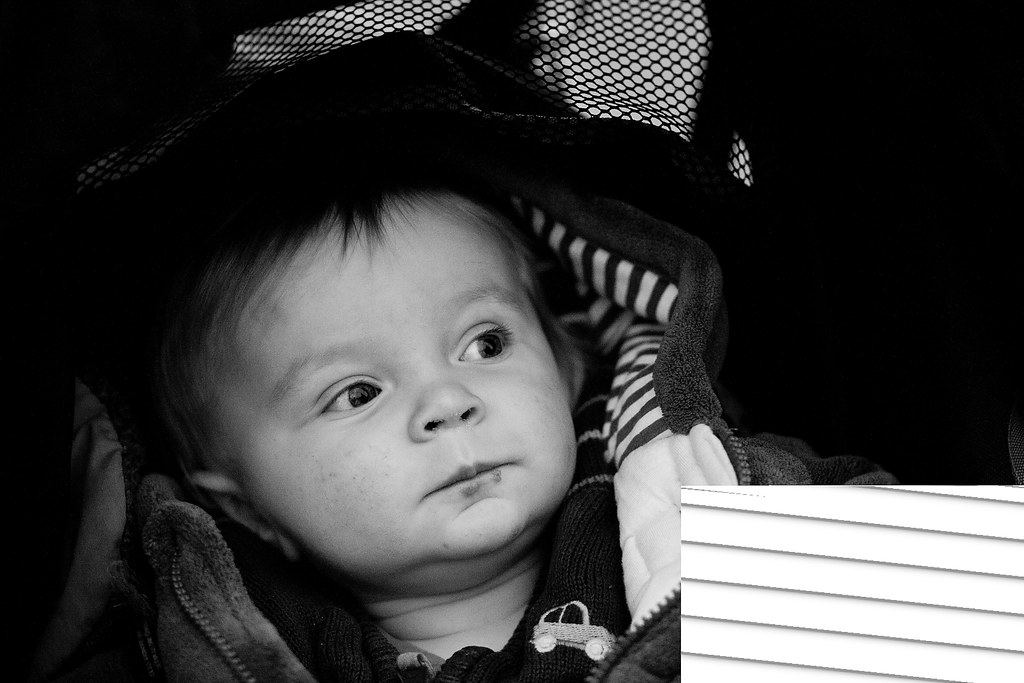

problem file
by scilly puffin, on Flickr
 
Memory is not the same as hard drive space. You can have 10TB of free hard drive space and still run out of memory. How much MEMORY do you have? Right click on the My Computer icon and select properties to find out.

Sounds like it's a running out of memory issue, or perhaps a problem with the HDD.

If you suspect the drive is failing, have you backed up your files???


You coudl try stopping any unnecessary services from running.. How much crap runs at startup? Look in your system try (next to the time and date on your task bar). If that is full of running applications.. kill them. Have as little as possible running at start up.

Go and do some research on using "msconfig.exe" to reduce the amount of crap running at start up.
 
Last edited:
Thanks for the reply David.
I have 8gb of ram and the only open programme was chrome. Backing up is proving quite awkward with this, I am having do do small numbers at a time, otherwise the laptop crashes and does nothing until the power button is pressed to shut it down. Will have a look in msconfig.
 
I some times get that with raw files and Elements,something happens at the copying stage when I copy from one drive to another for storage purposes, the original raw file from my camera is usually OK, don't know why, it only happens occasionally,that's my experience anyway.
 
Thanks Rob, I opened the raw file in lightroom, it appeared to be fine, but when I went to the develop tab it brought the file up as it was processed in camera raw and had the same part missing.
 
Could be something as simple as replacing the onboard CR2032 battery...

The complete and exact message would be nice to see, if you have?
 
I think its file corruption as a result of compression, occasionally I get it on the very last files squeezed onto the card in the camera. Doesn't make a difference if its a brand new card or an old one thats been formatted so now I make a point of changing cards when the indicator says 20 frames left.
 
Managed to copy this text

Description
Stopped working
Faulting Application Path: C:\Program Files (x86)\Hotkey\PowerBiosServer.exe

Problem signature
Problem Event Name: CLR20r3
Problem Signature 01: powerbiosserver.exe
Problem Signature 02: 1.0.0.0
Problem Signature 03: 4d5377d1
Problem Signature 04: System
Problem Signature 05: 2.0.0.0
Problem Signature 06: 506c18e6
Problem Signature 07: 38c0
Problem Signature 08: 25
Problem Signature 09: System.ComponentModel.Win32
OS Version: 6.1.7601.2.1.0.768.3
Locale ID: 2057
 
I have had an issue when uploading Raw files from the camera to my laptop, 3 to 4GBytes Ram, two core when the file has been flagged as corrupt by the Canon software, this does not seem to happen when uploading to the desktop machine 12Gb Ram 4 core. My only expaination is either memory usage / shortage / pageing and the the laptop may have issues streaming the USB files.
 
Back
Top