Beginner What the heck are those?

ross.anderson.58

Suspended / Banned
Messages
616
Name
Ross
Edit My Images
Yes
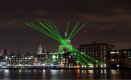
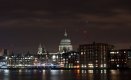
What the heck are those? And how did they happen?

Just above St Pauls there is like a set of coloured flares? didn't notice them when i took the picture, just when opened in Photoshop.
Are they to do with the lens? or just like reflections?

Shot on a D90 with a Nikkor 35-135mm F3.5-4.5

Im still learning all this photography stuff so the picture isn't great i know. Go easy on me.

Thanks for the help.
What are these.jpg
 
Last edited:
Internal specular reflections but they are weird, were you using a filter? That can often be the cause.
 
Looks like flare to me but I can't see an obvious source for it in the shot. Were you using a filter on the lens and/or is there a smeared fingerprint running across it or the front element?
 
Looks like flare to me but I can't see an obvious source for it in the shot. Were you using a filter on the lens and/or is there a smeared fingerprint running across it or the front element?
If you trace them back they all seem to be coimng from the dome, but that's not really bright enough to cause that effect. Also there is a mark to the right of the dome. I'd tend to agree with you that there is something on the front of the lens.
 
They're ghost images of the lights at the bottom of the frame. It's a common digital effect, especially with night scenes if you have a protection filter on the lens.

When there are very bright lights like that, the light bounces off the shiny surfaces of the sensor and is reflected back again off the back of the rear element of the lens, or more likely off the rear surface of a filter. They appear as a reversed image on the diagonally opposite side of the image, and show up against a dark background.

If you have a filter on there, take it off and only use it when there's real danger of something nasty hitting the lens, like sea spray etc. Filters can and do impair image quality - the problem is usually flare and ghosting rather than a reduction in sharpness, though that can happen too. If it's a UV filter, they serve no useful purpose with digital as the sensor already has UV and infrared filters over the sensor. Use a lens hood for protection, that will also enhance image quality in many situations and will never do any harm.

Edit: From replies I now see you haven't used a filter, in which case the reflections are coming off an internal lens element, usually the rear-most one. That kinda fits, as ghosts off the curved rear element are often slightly irregular. If it was a filter issue, the flat surface would reflect them as more clearly defined and probably a lot brighter.
 
Last edited:
They're ghost images of the lights at the bottom of the frame. It's a common digital effect, especially with night scenes if you have a protection filter on the lens.

When there are very bright lights like that, the light bounces off the shiny surfaces of the sensor and is reflected back again off the back of the rear element of the lens, or more likely off the rear surface of a filter. They appear as a reversed image on the diagonally opposite side of the image, and show up against a dark background.

If you have a filter on there, take it off and only use it when there's real danger of something nasty hitting the lens, like sea spray etc. Filters can and do impair image quality - the problem is usually flare and ghosting rather than a reduction in sharpness, though that can happen too. If it's a UV filter, they serve no useful purpose with digital as the sensor already has UV and infrared filters over the sensor. Use a lens hood for protection, that will also enhance image quality in many situations and will never do any harm.

Edit: From replies I now see you haven't used a filter, in which case the reflections are coming off an internal lens element, usually the rear-most one. That kinda fits, as ghosts off the curved rear element are often slightly irregular. If it was a filter issue, the flat surface would reflect them as more clearly defined and probably a lot brighter.
Oh yeah, look at how they relate to the lights at the bottom. Interesting... every day is a school day :)
 

Attachments

  • 2016-10-24_121616.jpg
    2016-10-24_121616.jpg
    326.4 KB · Views: 70
Thanks for the explaination, Hoppy and for the visual representation, Tim. I'd looked at the lights along the bottom but discounted them as the sources since the didn't match as a straight reflection! D'oh!!!
 
Put something like UV filter ghost reflections into google images and lots of examples come up.
 
If you zoom the image you can see the jibs of 2 cranes
I think you are looking at the wrong flares. There are 2 cranes there with red lights at the top, but the flares we are talking about are the faint, rainbow coloured ones circling above the dome.
 
Back
Top